PathMaster-REV-L-4.5-1.pdf - 第25页
Machine Operati on Manual Revision L / February 2020 Page 25 of 200 Legacy / DMC2 000 Tool Operations The control ler can be se lecte d in setup mo de. When the controll er is set as Legac y or a 2000 serie s controll er…
Machine Operation Manual
Revision L /
February 2020
Page 24 of 200
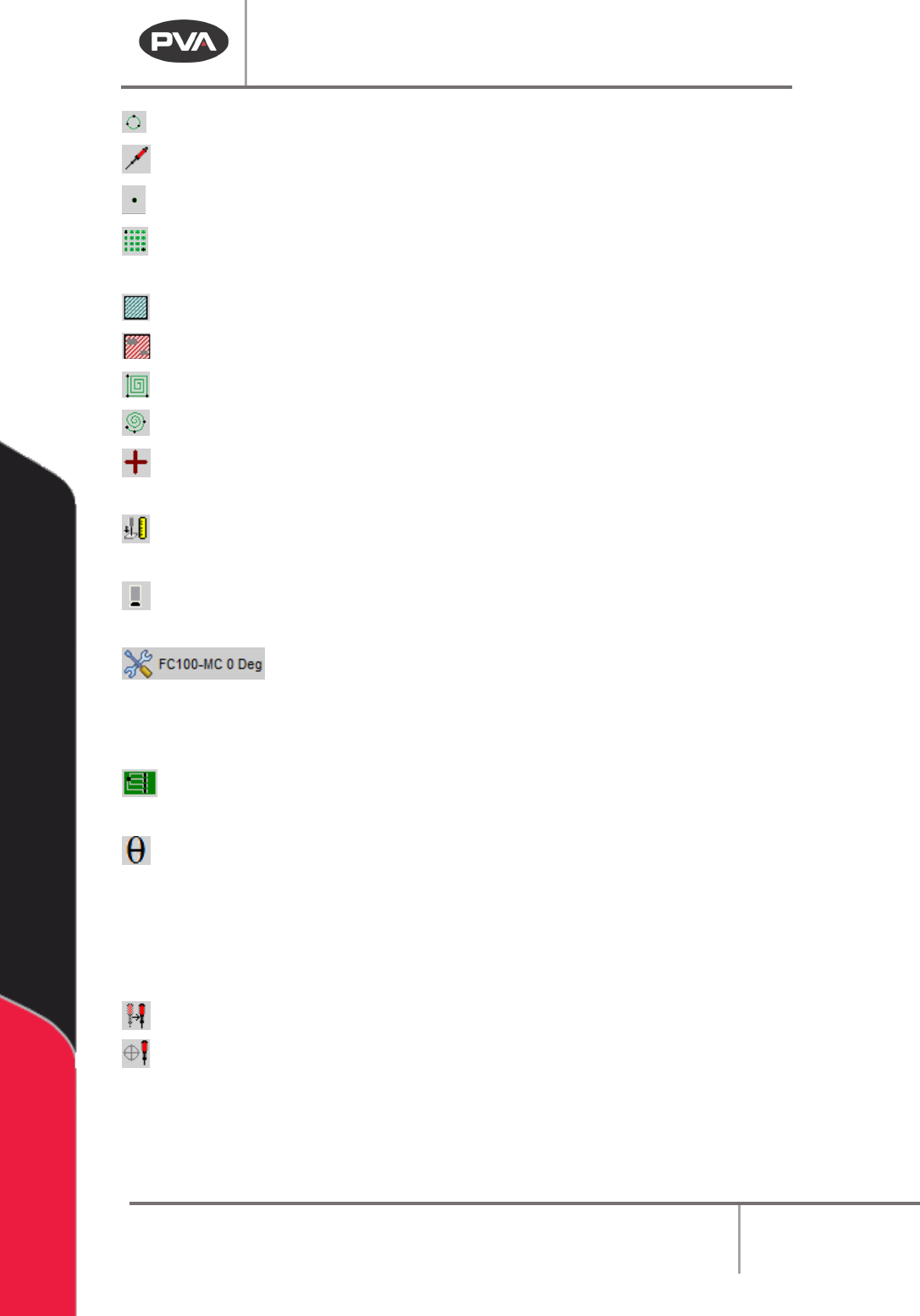
Circle – Teach a circular path segment and program tool operation.
Tool – Add a tool function (up/down, rotary, etc.).
Dot – Dispense at a defined point for a length of time and program tool operation.
Dot Array – Define a series of dots based on two adjacent points along with X and Y
pitch.
Area – Teach a path segment that covers a rectangular area.
FastMask – Teach a FastMask™ path segment (specify keep out areas).
Rectangular Spiral – Teach a rectangular spiral segment to cover an area.
Circular Spiral – Teach a circular spiral segment to cover an area.
Fiducial – Teach a fiducial A or B command in the path program. The Teach Tool
(Camera) box must be selected in
Setup->Machine Parameters
to see this function.
Surface Height – Teach a surface height command in the path program. The surface
height reading is used to calculate the Profile Z Height for Run tools used during Polylines.
Camera Height – Moves the Z axis to the set camera height from the Machine
Parameters. In the Utilities menu, select “View Camera Tools” to see this function.
Tool State Selector –Open the Tool State Selector menu to select an
option. This will move the selected tool to the correct programmed position. This is only
shown if the Teach Tool box is selected under the Tools section in the Machine Parameters
Window and PathMaster® is setup for a 4-axis machine.
FastPath – Open the FastPath™ window for offline programming. The Teach Tool
(Camera) box must be selected in
Setup->Machine Parameters
to see this function.
Theta- Move the selected tool to the calibrated W-axis position (theta). The Theta
button in all command forms and in the Main Grid now shows an indicator color
• Yellow means the Theta axis is not at the proper coordinate for the selected Teach
Tool
• Green means the Theta axis is at the proper coordinate +- the value in the
ThetaDeadband string of Pathmaster.ini
Tool Change- Correct the position of a tool and apply offsets.
Tool Calibration –Used to change tool offsets and set the profile calibration.
Machine Operation Manual
Revision L /
February 2020
Page 25 of 200
Legacy / DMC2000 Tool Operations
The controller can be selected in setup mode. When the controller is set as Legacy or a
2000 series controller, polyline and surface height commands are not available.
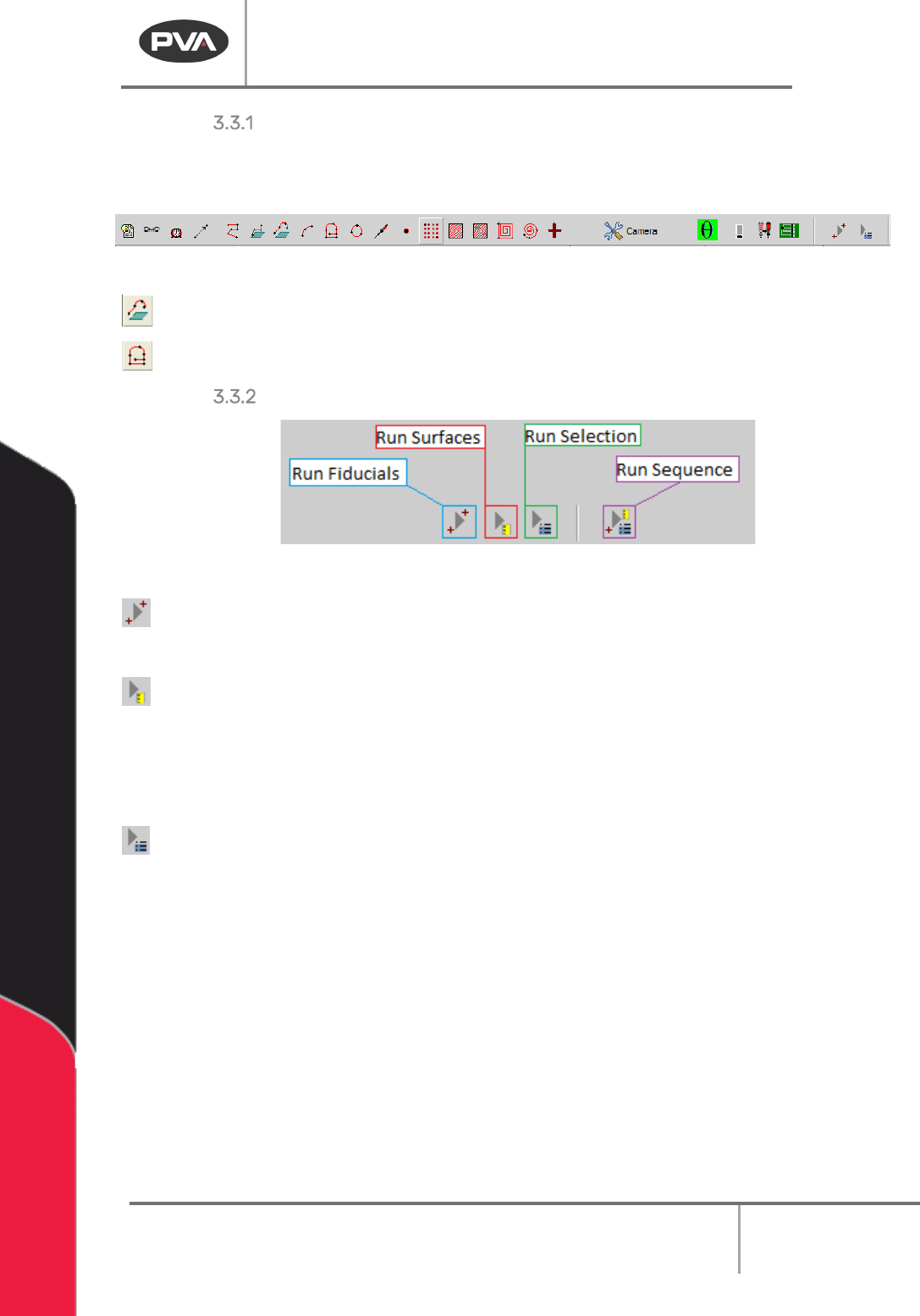
Figure 10: Legacy Mode, DMC2000 Toolbar
Polyline3D – Teach a path segment with 3D lines and arc commands.
PolyLine – Teach a path segment with of 2D, circle, and arc path segments.
Run Fiducials / Surfaces / Selection / Sequence
Figure 11: Run Commands
Run Fiducials – Plays back any fiducials at the top of the path program and enters
“corrected” teaching space. See Section 9.4 for more details.
Run Surfaces – Plays back any taught surface height commands and enumerates the
surfaces to be used in and polylines taught after these surfaces.
NOTE: Subroutines cannot access Surfaces outside of the subroutine, and any Surfaces in a
subroutine are localized to that subroutine and are inaccessible outside of it.
Run Selection – Plays back the selected line(s) of path program.
Machine Operation Manual
Revision L /
February 2020
Page 26 of 200
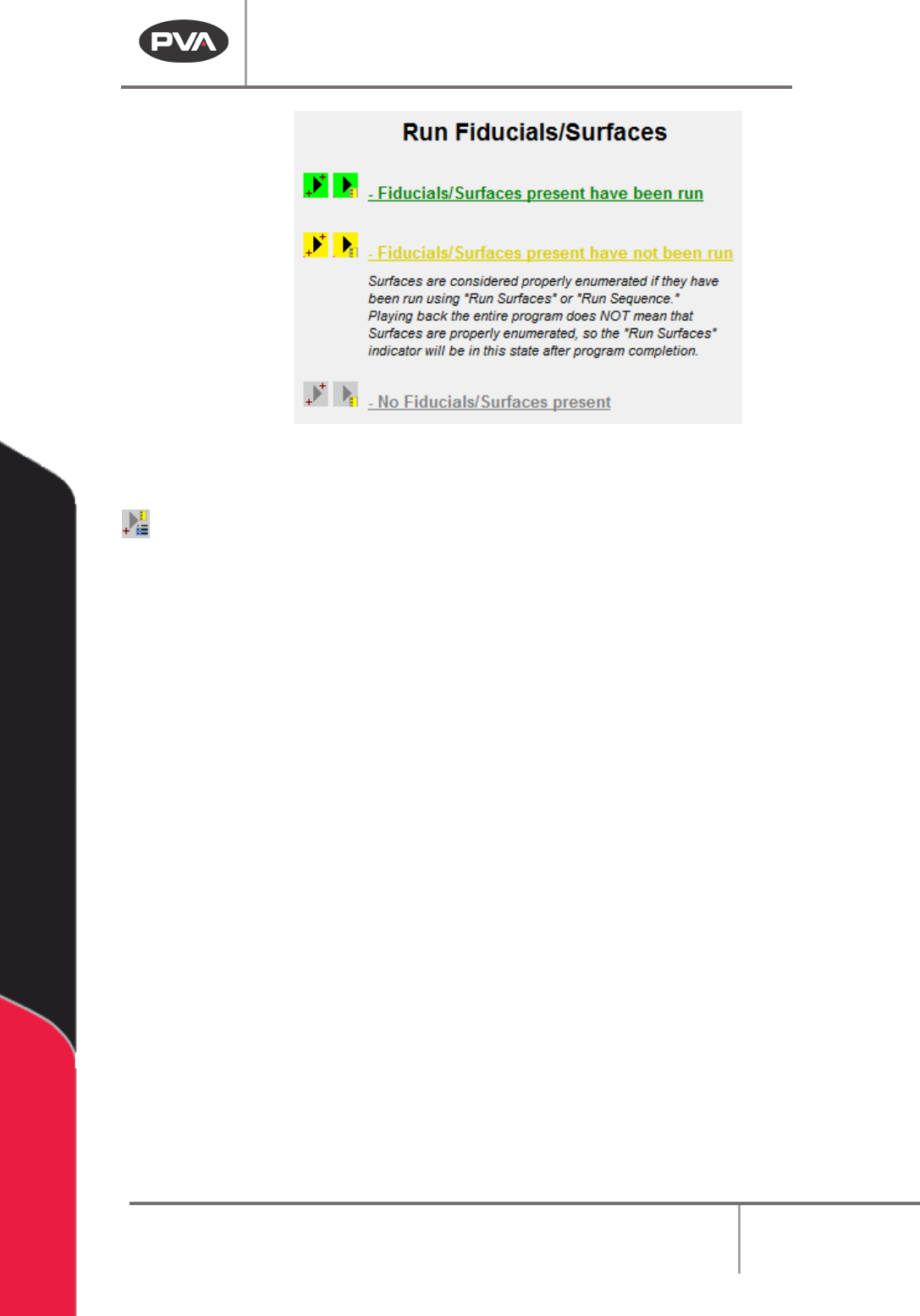
Figure 12: Run Fiducials / Surfaces Status Colors
Run Sequence – Plays the entire path program.
The highlighted color for Run Fiducials and Run Surfaces will change based on certain
conditions. The buttons for Fiducials and Surfaces will be yellow if the related command is
in the current path program but the command has not been run. This refers to teaching in
“Corrected Space” for Fiducials, and Surface Order Enumeration for Surfaces. The playback
button for Fiducials will be green when Fiducials have been run for the selected Path
Program. The playback button for Surfaces will be green when Surfaces have been run and
correctly enumerated.
NOTE: If a Fiducial is present in the path program and has not been run, the user cannot
run, teach, or edit surface commands.