PathMaster-REV-L-4.5-1.pdf - 第183页
Machine Operati on Manual Revision L / February 2020 Page 183 of 2 00 Set up Plug in s You must set t he refere nce posi tions befo re you c an create a b ond routi ne. The Setup Plugin s have the four m ain step s that …
Machine Operation Manual
Revision L /
February 2020
Page 182 of 200
Appendix E- Optical Bonding with PathMaster
Theory of Operation
Optical bonding with PVA’s PathMaster software should be done with the bonding path
template as shown in this document. This document only refers to bonding specific
settings. Please refer to the PathMaster manual for additional information on PathMaster.
PathMaster uses a series of plugins to set values for your specific procedure. Please set all
of the plugin values before you program additional template values.
Path Template
The easiest way to create a bonding sequence is to use the bonding template and change
the values as necessary for your product and process.
• You will need to import the path template from the
'\PathMaster\Samples' folder on
the workcell computer. For additional information on how to import a path, refer to
the PathMaster manual.
Plugins
There are two types of plugins, Setup plugins and Path plugins. Setup plugins are for
machine setup purposes and must be completed before a production path can be run. Path
plugins are program specific. In the case of bonding equipment, setup plugins are used to
measure the positions that are described in the name of the plugins. The wizard plugin
uses the values from the setup plugins to establish the bond base position and the bare
pick head reference measurement height. The descriptions of all setup plugins are in this
document, for information on the path plugins refer to the PathMaster manual.
Machine Operation Manual
Revision L /
February 2020
Page 183 of 200
Setup Plugins
You must set the reference positions before you can create a bond routine. The Setup
Plugins have the four main steps that you must complete to have a succesful routine. The
setup plugins must be done in numerical order (1-4).
Offset values should be taught to the bare datum and pick tool. The part values you set will
calculate the correct distance off of the datum and pick tool.
NOTE: The setup plugins are used to calculate the bonding reference position. Setup
plugins are accessed through the PM machine setup menu and have a global effect.
1. Select
Setup->Machine Parameters
from the Main menu to open the Machine
Parameters window.
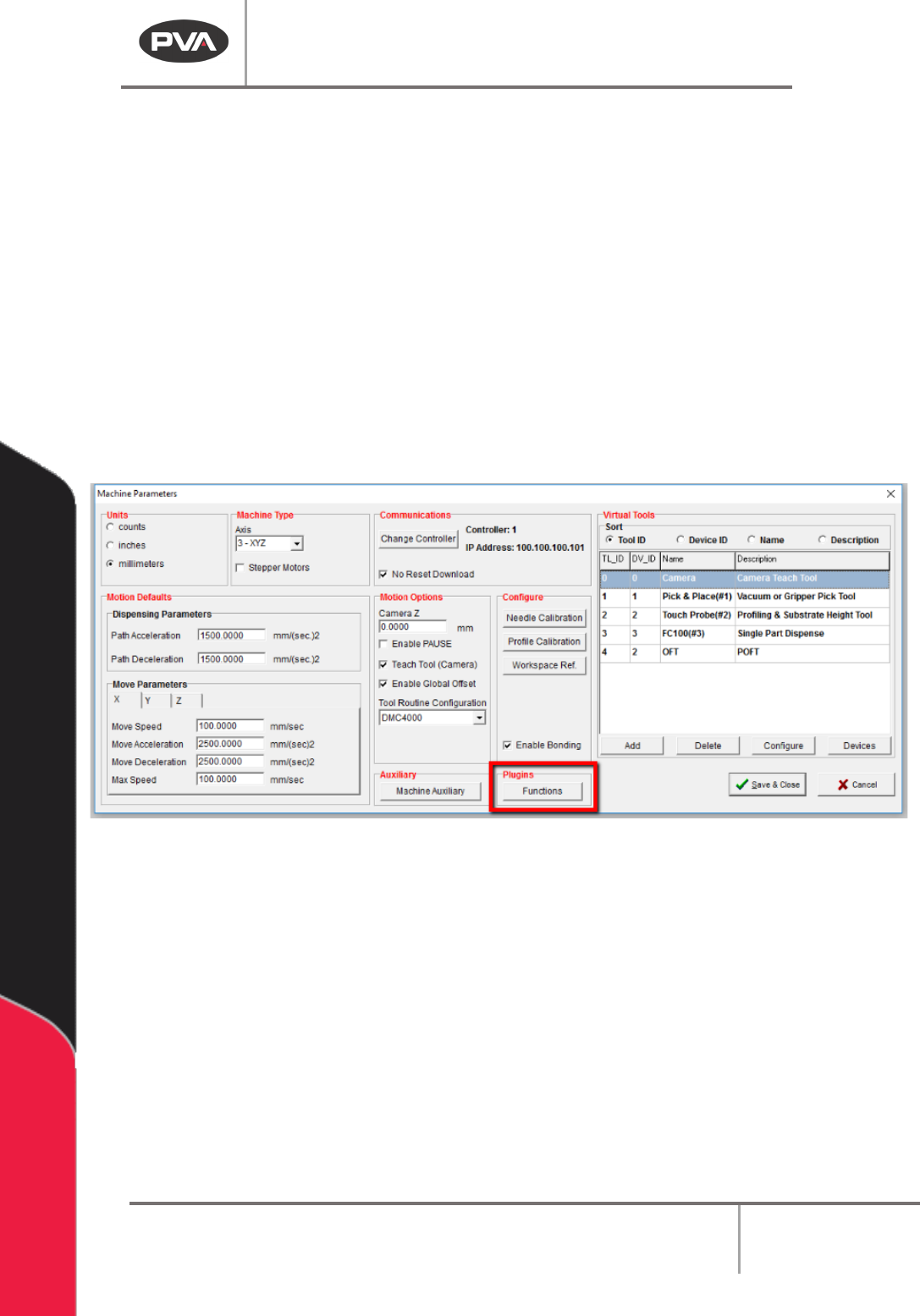
2. Select the “Functions” button form the Plugins section of the screen.
Figure 195: Plugins, Functions
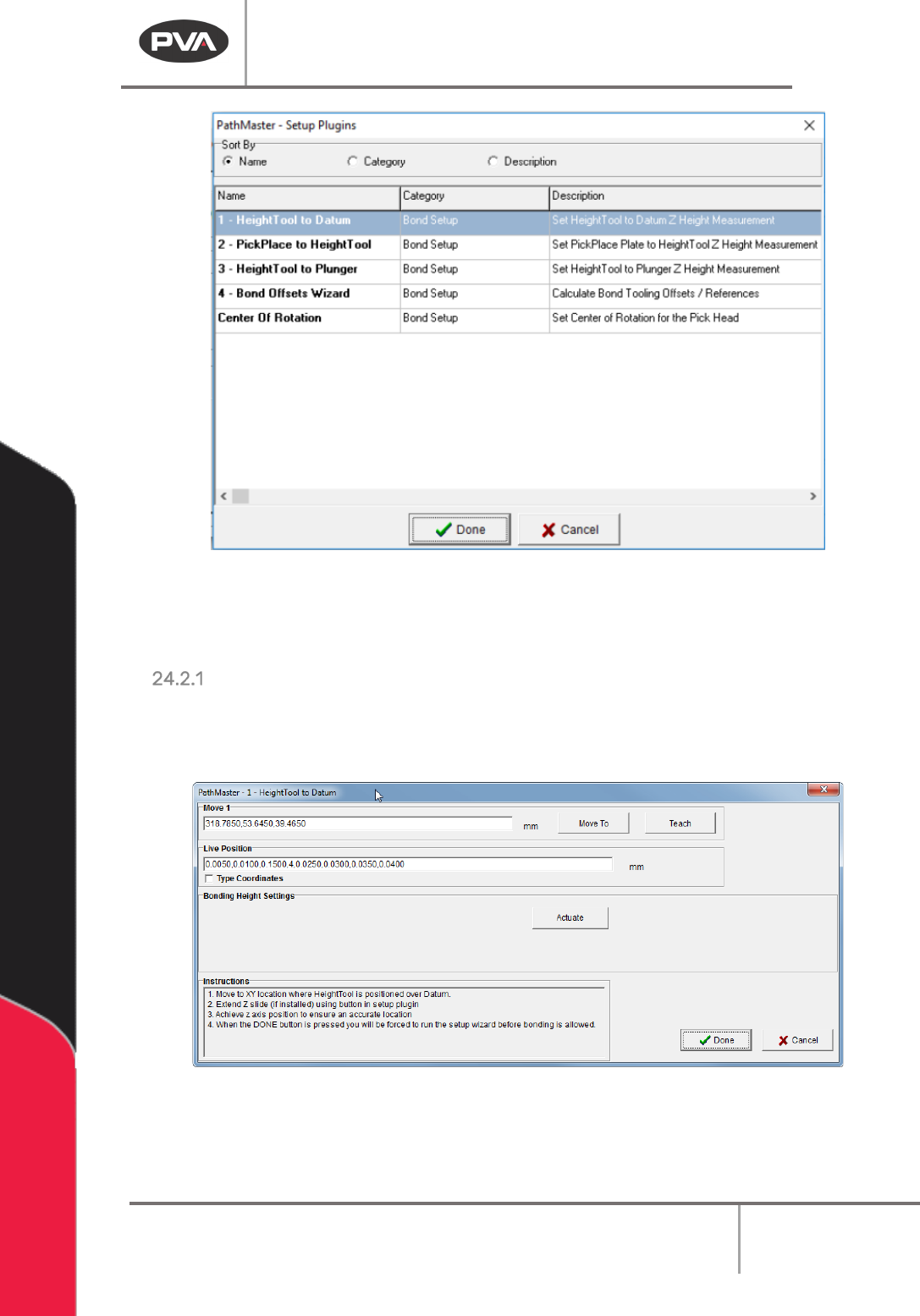
3. The Setup Plugins screen will open. Use the radial Sort By buttons to sort by
Category.
4. Do the four “Bond Setup” plugins in order.
Machine Operation Manual
Revision L /
February 2020
Page 184 of 200
Figure 196: Setup Plugins
NOTE: Plugins must be done in numerical order, as shown. If done out of order, the setup
window for the plugin will close and you will return to the previous screen.
HeightTool to Datum
1. In the Bond Setup category, select 1-HeightTool to Datum.
The HeightTool to Datum window will open.
Figure 197: HeightTool to Datum
2. Refer to the instructions in the window to set the correct position.