2OM-1075-002.pdf - 第148页
AHB01ESPP [Nozzle Exchange] Button When this button is pressed, the "Nozzle Exchange" edit win- dow opens. Set the rate of speed reduction in the data entry field for a series of operations performed when the n…

AHB01ESPP
*4 Over Tact-Time Reduction
Press one of the following buttons to determine whether or not the
upper limit of the speed should be specified for the working speed of
each device (rate of speed reduction based on the highest speed)
specified in the component library data.
[No Designate] Button
When this button is pressed, the reduction rate of the tact time is
not designated.
[Designate] Button
When this button is pressed, the reduction rate of the tact time is
designated. In this case, as the following buttons become avail-
able, set the rate of each speed reduction.
[X/Y Beam] Button
When this button is pressed, the "X/Y Beam" edit window opens.
Set the rate of speed reduction in the data entry field for the X/Y
beam (Beams A and B).
[Pick-Up Descent] Button
When this button is pressed, the "Pick-Up Descent" edit window
opens. Set the rate of speed reduction in the data entry field for
the descending movement of the nozzle (nozzle movement to
pick up a component from the feeder).
[Pick-Up Ascent] Button
When this button is pressed, the "Pick-Up Ascent" edit window
opens. Set the rate of speed reduction in the data entry field for
the ascending movement of the nozzle (nozzle movement after
the nozzle has picked up a component from the feeder).
[Place Descent] Button
When this button is pressed, the "Place Descent" edit window
opens. Set the rate of speed reduction in the data entry field for
the descending movement of the nozzle (nozzle movement to
place a component on the P.C.B.).
[Place Ascent] Button
When this button is pressed, the "Place Ascent" edit window
opens. Set the rate of speed reduction in the data entry field for
the ascending movement of the nozzle (nozzle movement after
the nozzle has placed a component on the P.C.B.).
0206-003 5-19
3.3 "Opn. Mode" Tab

AHB01ESPP
[Nozzle Exchange] Button
When this button is pressed, the "Nozzle Exchange" edit win-
dow opens. Set the rate of speed reduction in the data entry field
for a series of operations performed when the nozzle is changed.
[Nozzle Rotation] Button
When this button is pressed, the "Nozzle Rotation" edit window
opens. Set the rate of speed reduction in the data entry field for
the nozzle rotation.
[Nozzle Change] Button
When this button is pressed, the "Nozzle Change" edit window
opens. Set the rate of speed reduction in the data entry field for
the nozzle change operation.
(a) If a higher speed than that specified in this tab sheet is set
in the component library data, it is regulated to the speci-
fied upper limit.
(b) If a lower speed than that specified in this tab sheet is set
for some components in the component library data, it
becomes valid.
(c) When there is still some room in the placement tact time
according to the line balance, the machine can be oper-
ated at a slow tact time specified by this function.
[Tray Elevator] Button
Refer to the instruction manual of the multi-layer tray feed-
ers (option) for details.
[Tray Traverse] Button
Refer to the instruction manual of the multi-layer tray feed-
ers (option) for details.
*5 [Next] Button
When pressed, this button opens the second page.
*6 [Set] Button
After setting various operation modes, press the [Set] button. The
specified data is saved.
When the machine is set in the "RUN" or the "WAIT" mode, the
setting operation cannot be performed.
The setting operation is possible only when the machine is in
the "STOP" mode.
0206-003 5-20
3.3 "Opn. Mode" Tab
Note
Note
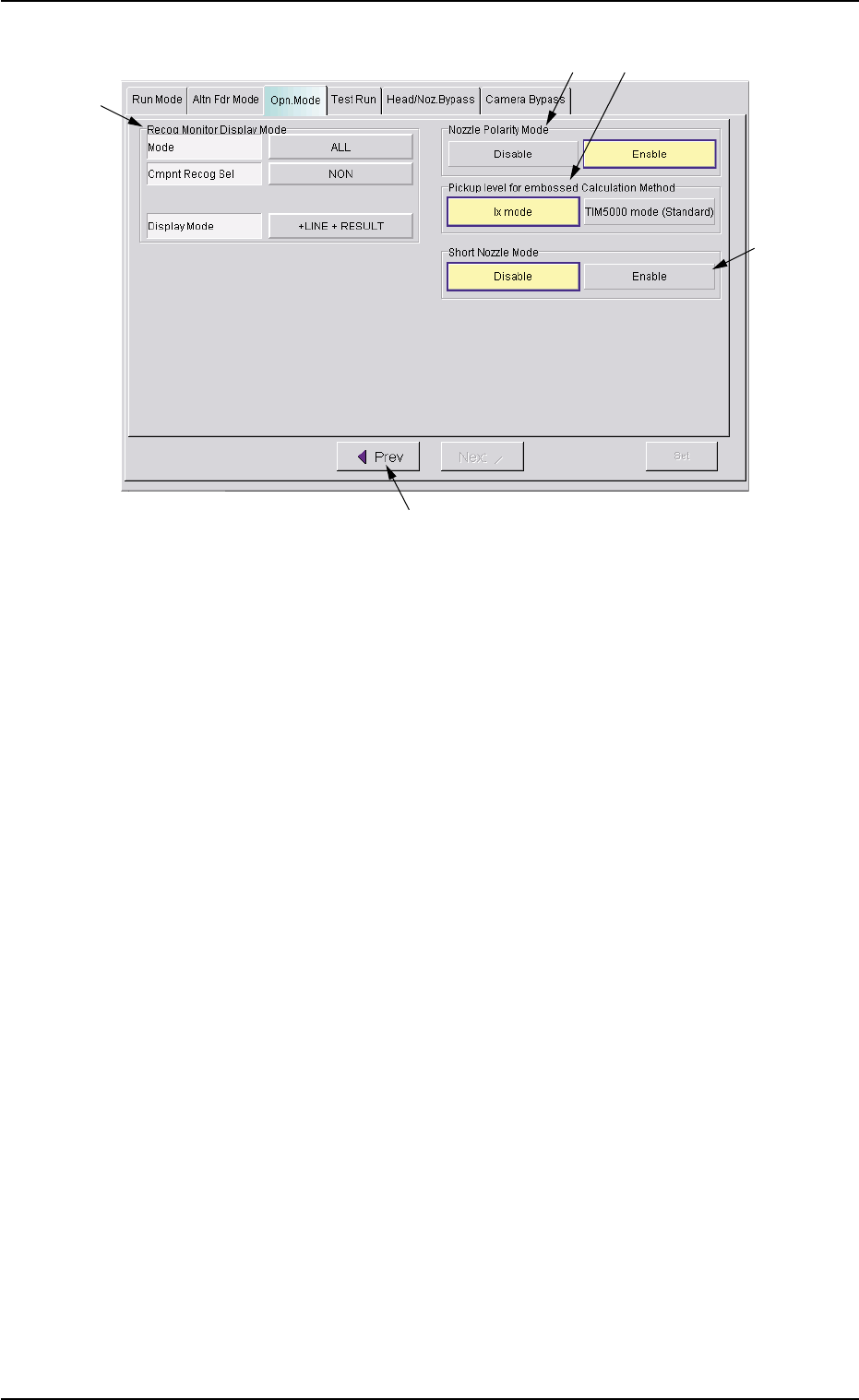
AHB01ESPP
Fig. 2E13 "Opn. Mode" Tab Sheet
*7 Recog Monitor Display Mode
It can be specified how to display the results of recognition such as
P.E.C. and component recognition functions.
Mode
Specify the recognition mode which the displayed result should
be based on.
Every time the right button is pressed, the label changes in scroll-
ing such as "ALL" Æ "DEVICE" Æ "P.C.B.".
"ALL" : When this is selected, the results of the com-
ponent and P.E.C. recognition operations are
regarded as object items to be displayed.
"DEVICE" : When this is selected, the results of the com-
ponent recognition operation are regarded as
object items to be displayed.
"P.C.B." : When this is selected, the results of the P.E.C.
recognition operation are regarded as object
items to be displayed.
Cmpnt Recog Sel
When the results of the component recognition operation are
regarded as object items to be displayed (when [ALL] or [DE-
VICE] is selected for "Mode"), it is required to specify the condi-
tion (requirements) for the component recognition.
Every time the right button is pressed, the label changes in scroll-
ing such as "NON" Æ "CAMERA" Æ "PARTS" Æ "FEEDER".
"NON" : There is no condition (requirements) for com-
ponent recognition.
0308-004 5-21
3.3 "Opn. Mode" Tab
*7
*8
*11
*10
*9