2OM-1075-002.pdf - 第386页
AHB01ESPP *2 [Send] Button When this button is pressed after each parameter related to the jig P .C.B. is specified, the parameter is sent to the machine side. Whenever each parameter is changed, be sure to press the [Se…
AHB01ESPP
5.3.2 "Jig P.C.B." Sheet
This sheet enables the operator to set the jig P.C.B.
(In normal cases, it is not required any setting.)
• Sheet Layout
When the [Jig P.C.B.] button is pressed in the "P.E.C. Recog Camera &
Beam Offset" tab sheet, the following sheet appears.
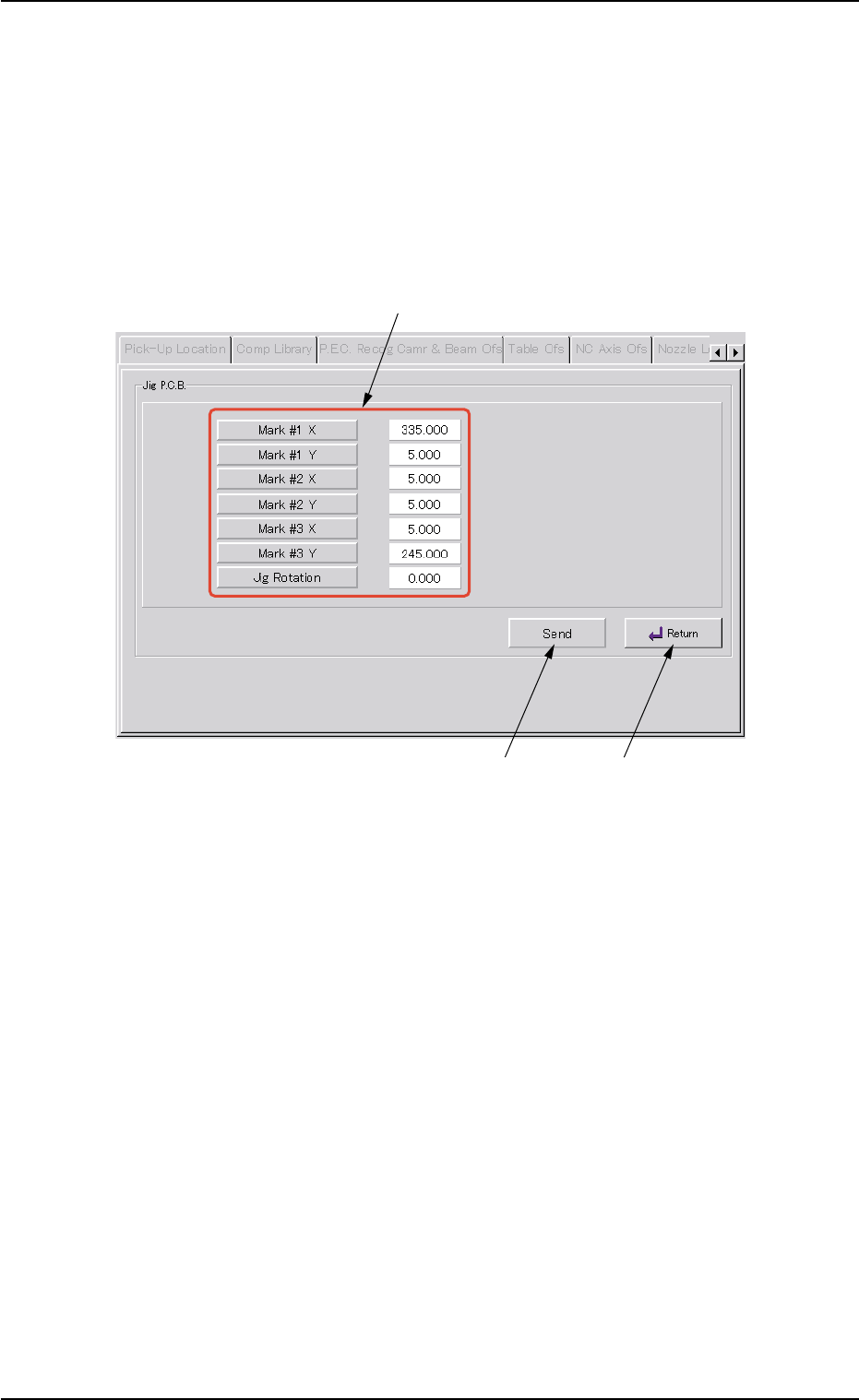
Fig. 2F108 "Jig P.C.B." Sheet
• Sheet Composition
*1 "Jig P.C.B." Group Box
Select the jig P.C.B. data items to be set.
The following buttons are provided in this group box.
[Mark #1 X], [Mark #1 Y], [Mark #2 X], [Mark #2 Y], [Mark #3 X],
and [Mark #3 Y] Buttons : When each button is pressed, the cor-
responding edit window opens.
Enter a value that represents the X or
the Y coordinate of Mark #1, #2, or #3
in the range of "0 to 999.999 mm".
[Jig Rotation] Button : When this button is pressed, the "Jig
Rotation" edit window opens.
Enter the angle of the jig P.C.B. in the
range of "-9.999 to 9.999°".
0206-003 6-151
5.3 "P.E.C. Recog Camr & Beam Ofs" Tab
*1
*2
*3

AHB01ESPP
*2 [Send] Button
When this button is pressed after each parameter related to the jig
P.C.B. is specified, the parameter is sent to the machine side.
Whenever each parameter is changed, be sure to press
the [Send] button.
*3 [Return] Button
When this button is pressed, the "Jig P.C.B." sheet closes and the
"P.E.C. Recog Camera & Beam Offset" tab sheet resumes.
0206-003 6-152
Note
5.3 "P.E.C. Recog Camr & Beam Ofs" Tab
AHB01ESPP
5.4 "Table Ofs" Tab
The corresponding tab enables the operator to determine the table off-
set data by recognizing the checker marks printed on the jig P.C.B.’s
with the P.E.C. recognition camera.
This teaching operation must be performed only by our service
personnel.
• Sheet Layout
When the "Table Ofs" tab is pressed in the "TEACHING" window
(submenu), the following tab sheet appears inside the window.
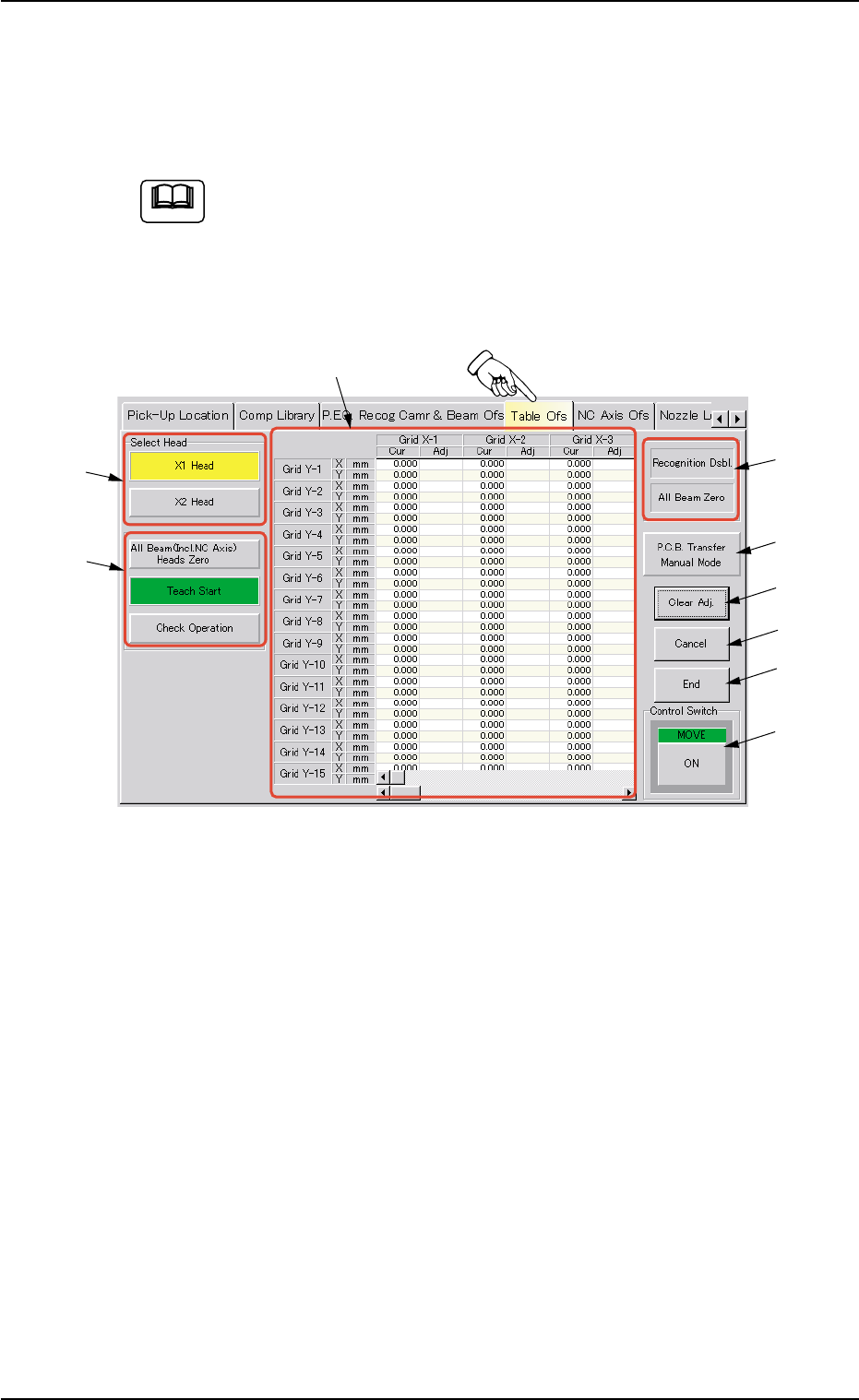
Fig. 2F109 "Table Ofs" Tab Sheet
• Sheet Composition
*1 "Select Head" Group Box
The provided buttons make it possible to select the P.E.C. recogni-
tion camera to be used for teaching operations.
The following buttons are provided in this group box.
[X1 Head] and [X2 Head] Buttons
*2 "Selection of Teaching Operation" Group Box
The following buttons are provided.
[All Beam (Incl. NC Axis) Heads Zero] Button
When this button is pressed, all X/Y beams are zeroed.
[Teach Start] Button
When this button is pressed, a teaching operation is performed,
using the selected head.
[Check Operation] Button
When pressed, this button recognizes the checker mark again,
using the results of the teaching operation.
(It is not necessary to use this function in normal cases.)
5.4 "Table Ofs" Tab
0206-003 6-153
Note
*1
*4
*6
*2
*5
*7
*8
*9
*3