2OM-1075-002.pdf - 第449页
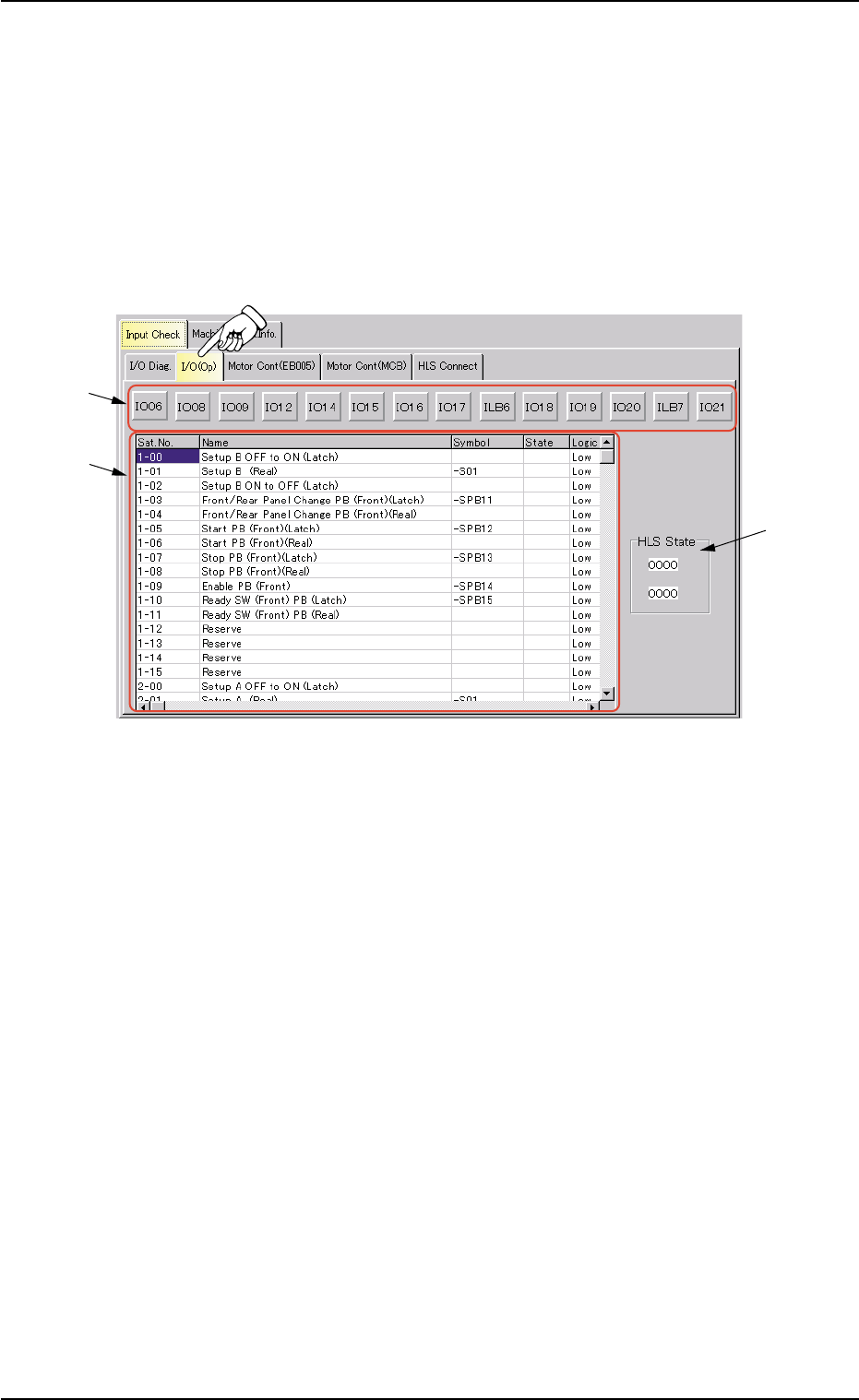
AHB01ESPP *2 Status Indication The status of each section is indicated in this pane. Sat. No. : Displayed are the satellite Nos. Name : Displayed are the satellite names. Symbol : Displayed are the satellite symbols. Sta…
AHB01ESPP
7.1.2 "I/O (Op)" Tab
The corresponding tab sheet enables the operator to check the input/
output status of each sensor (option).
• Sheet Layout
When the "I/O (Op)" tab is pressed in the "Input Check" tab sheet, the
following tab sheet appears.
Fig. 2F135 "I/O (Op)" Tab Sheet
• Sheet Composition
*1 I/O Class Button
Press one of the following buttons to change the contents (status
indication) to be displayed in "*2".
[IO06] Button, [IO08] Button, [IO09] Button, [IO12] Button
[IO14] Button, [IO15] Button, [IO16] Button, [IO17] Button
[ILB6] Button, [IO18] Button, [IO19] Button, [IO20] Button
[ILB7] Button, [IO21] Button
0206-003 6-210
7.1 "Input Check" Tab
*1
*2
*3

AHB01ESPP
*2 Status Indication
The status of each section is indicated in this pane.
Sat. No. : Displayed are the satellite Nos.
Name : Displayed are the satellite names.
Symbol : Displayed are the satellite symbols.
State : Displayed are the satellite states.
Logic : Displayed are the satellite logical values.
*3 "HLS State" Group Box
HLS state is indicated in this group box.
0206-003 6-211
7.1 "Input Check" Tab
AHB01ESPP
7.1.3 "Motor Cont (EB005)" Tab
The corresponding tab sheet enables the operator to view the input/
output statuses of the motor control (EB005).
• Sheet Layout
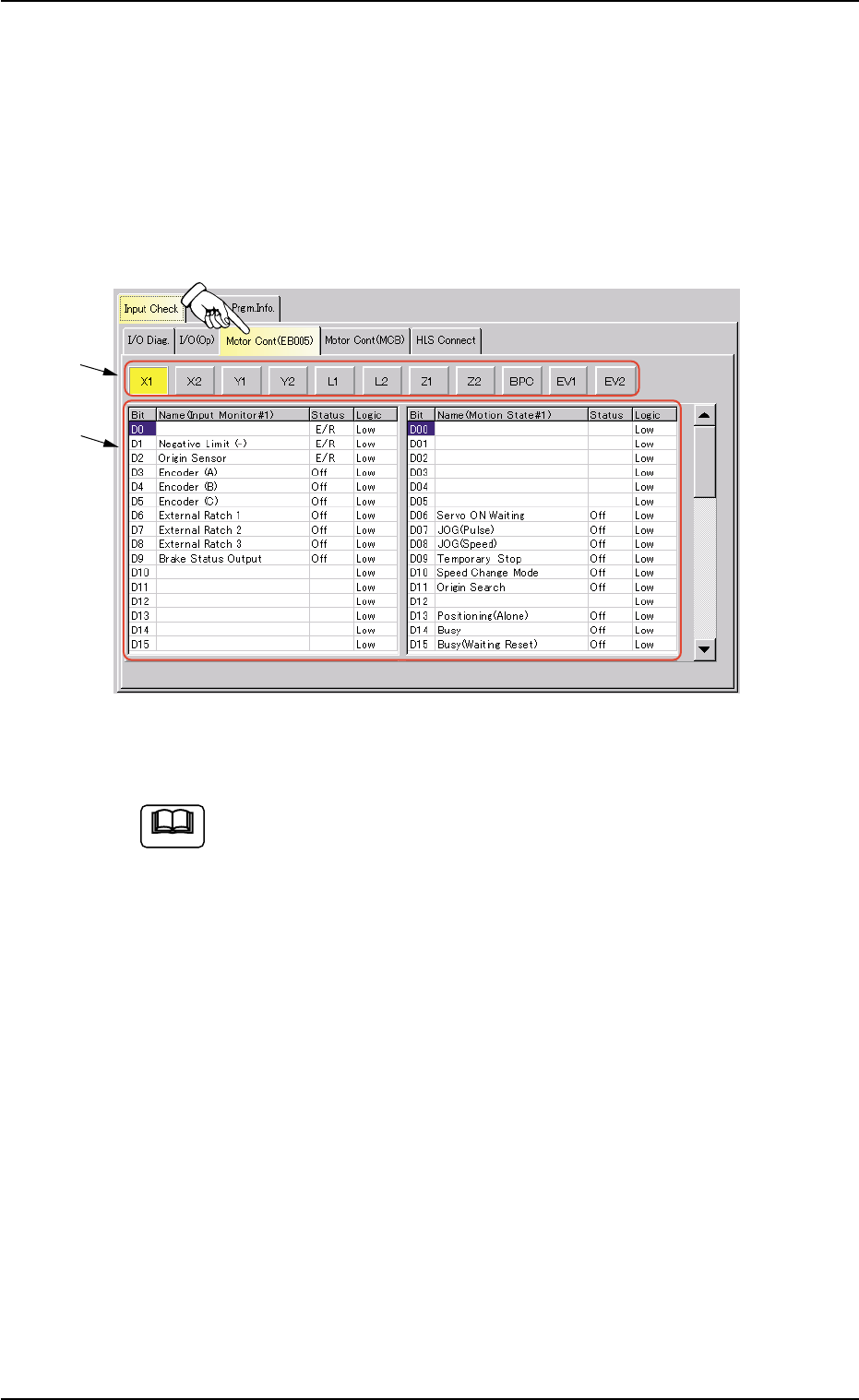
When the "Motor Cont (EB005)" tab is pressed in the "Input Check" tab
sheet, the following tab sheet appears.
Fig. 2F136 "Motor Cont (EB005)" Tab Sheet
(Provided with Multi-Layer Tray Feeder 2)
The tab sheet may look different, depending on which options
are selected.
• Sheet Composition
*1 Motor Axis Buttons
Press one of the following buttons to change the contents (status
indication) to be displayed in "*2".
[X1] Button, [X2] Button, [Y1] Button, [Y2] Button
[L1] Button, [L2] Button, [Z1] Button, [Z2] Button
[BPC] Button, [EV1] Button (Option), [EV2] Button (Op-
tion)
*2 Status Indication
The following information will be displayed for "Input Monitor #1",
"Operating Status", "Error Status 1", "Error Status 2", and "Error
Status 3".
Bit : Displayed are the bit Nos.
Status : Displayed are the bit statuses.
Logic : Displayed are the logical values of the bits.
0206-003 6-212
7.1 "Input Check" Tab
*1
*2
Note