2OM-1075-002.pdf - 第383页
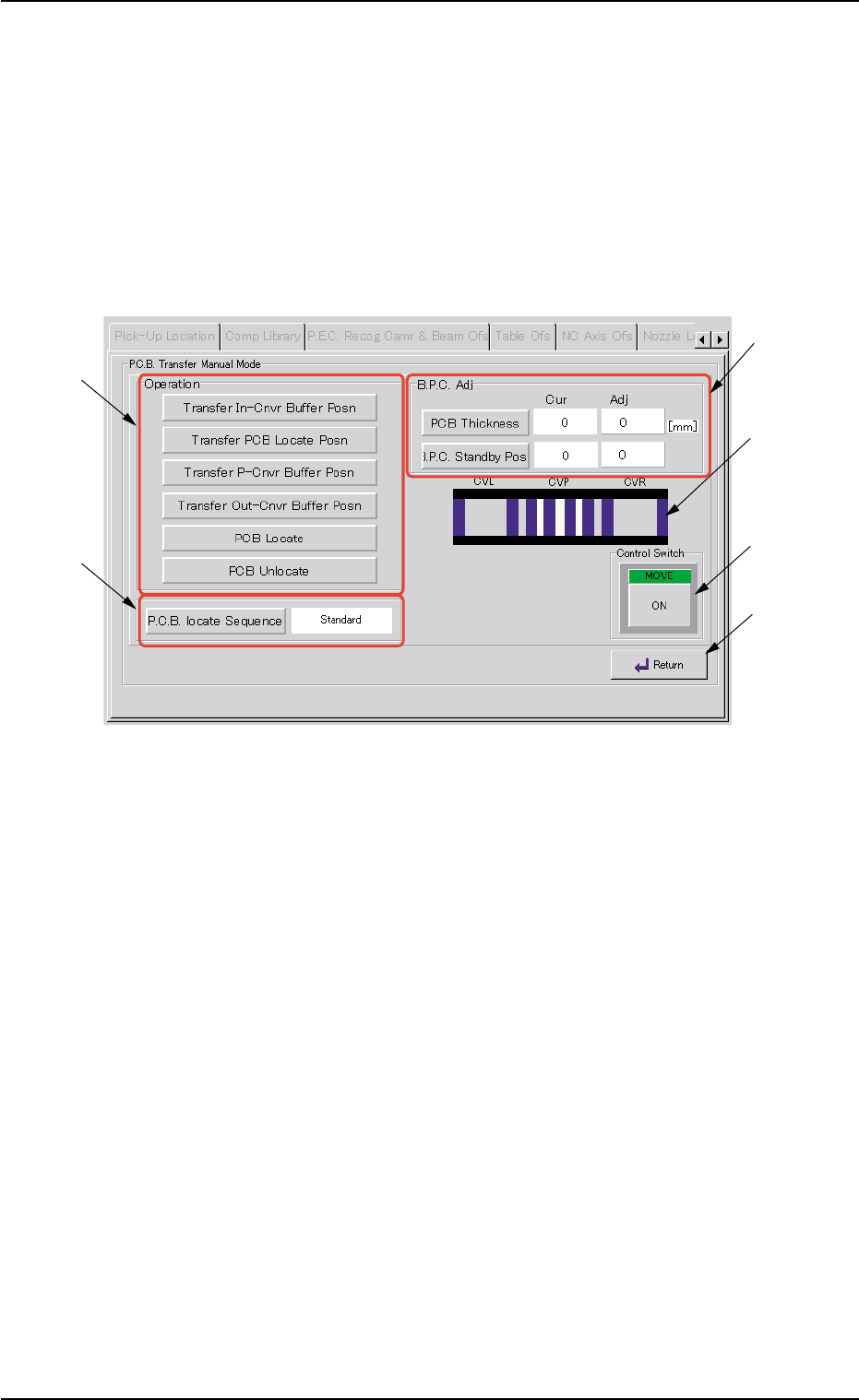
AHB01ESPP 5.3.1 "P .C.B. T ransfer Manual Mode" Sheet This enables the operator to transfer and position the P .C.B. • Sheet Layout When the [P .C.B. T ransfer Manual Mode] button is pressed in the "P .E.C…

AHB01ESPP
*5 Y2 Offset Difference
Shown are the values to be added to the Y-axis origin offset (Y2) for
tilting correction of the beam X axis.
After the teaching operation, the values must be used in the follow-
ing formula.
(X1+X2)/2
Enter the result in the "Y2 [mm]" text box in the "Y-Axis" tab sheet
that belongs to the "Offset Data" tab sheet in the "Machine System
Data - [Internal Editor]" window.
*6 [P.C.B. Transfer Manual Mode] Button
When this button is pressed, the "P.C.B. Transfer Manual Mode"
sheet appears.
Refer to "5.3.1 "P.C.B. Transfer Manual Mode" Sheet" for details.
*7 [Jig P.C.B.] Button
When this button is pressed, the "Jig P.C.B." sheet appears.
Refer to "5.3.2 "Jig P.C.B." Sheet" for details.
*8 [Clear Adj.] Button
When pressed, this button clears the results of the teaching opera-
tion.
*9 [Cancel] Button
When pressed, this button ends the teaching operation without re-
flecting the teaching results on the offset data.
*10 [End] Button
When this button is pressed, a "Confirmation" dialog box opens.
Fig. 2F106
When the [YES] button is pressed, the results of the teaching op-
eration is reflected on the offset data, and exits from this session.
*11 "Control Switch" Group Box
Select the items (buttons) to be taught and press the [ON] button
entitled "MOVE". After that, press the [ENABLE] button on the op-
eration panel in 2 seconds. A teaching operation is performed on
the selected item.
0206-003 6-148
5.3 "P.E.C. Recog Camr & Beam Ofs" Tab
AHB01ESPP
5.3.1 "P.C.B. Transfer Manual Mode" Sheet
This enables the operator to transfer and position the P.C.B.
• Sheet Layout
When the [P.C.B. Transfer Manual Mode] button is pressed in the "P.E.C.
Recog Camera & Beam Offset" tab sheet, the "P.C.B. transfer Manual
Mode" sheet appears.
Fig. 2F107 "P.C.B. Transfer Manual Mode" Sheet
• Sheet Composition
*1 "Operation" Group Box
The following buttons are provided in this group box.
[Transfer In-Cnvr Buffer Posn] Button
When this button is pressed, the P.C.B. is transferred to the
input conveyor buffering position.
[Transfer PCB Locate Posn] Button
When this button is pressed, the P.C.B. is transferred to the
positioning location and positioned there.
[Transfer P-Cnvr Buffer Posn] Button
When this button is pressed, the P.C.B. is transferred to the
positioning conveyor buffering position.
0308-004 6-149
5.3 "P.E.C. Recog Camr & Beam Ofs" Tab
*1
*3
*5
*4
*6
*2

AHB01ESPP
[Transfer Out-Cnvr Buffer Posn] Button
When this button is pressed, the P.C.B. is transferred to the
output conveyor buffering position.
[PCB Locate] Button
When this button is pressed, the backup base is moved to the
P.C.B. locate position.
[PCB Unlocate] Button
When this button is pressed, the backup base is zeroed.
*2 [P.C.B. locate Sequence] Button
Select one of the following options as a P.C.B. positioning sequence.
Standard: Y Clamp deactivated, Z Clamp activated, and BPC Axis
activated
Z clamp & Y Pusher: Y Clamp activated once, Z Clamp activated,
and BPC Axis activated
*3 "B.P.C. Adj" Group Box
The following buttons are provided in this group box.
[PCB Thickness] Button
When this button is pressed, the "PCB Thickness" edit win-
dow opens, enabling the operator to enter a parameter as P.C.B.
thickness.
[B.P.C. Standby Pos] Button
When this button is pressed, the backup base standby posi-
tion is specified.
*4 Conveyor Status
The P.C.B. positions are expressed in white.
The blue areas represent sensors.
*5 "Control Switch" Group Box
Select the items (buttons) to be taught and press the [ON] button
entitled "MOVE". After that, press the [ENABLE] button on the op-
eration panel in 2 seconds. A teaching operation is performed on
the selected item.
*6 [Return] Button
When this button is pressed, the "P.C.B. Transfer Manual Mode"
sheet closes and the "P.E.C. Recog Camera & Beam Offset" tab
sheet resumes.
0308-004 6-150
5.3 "P.E.C. Recog Camr & Beam Ofs" Tab