2OM-1075-002.pdf - 第94页
4. Confirmation of Component Placement 4 . 1 Setting of Operation Mode Before starting the automatic operation, press the [OPN. MODE] button on the submenu bar . The "OPN. MODE" window opens. Confirm and specif…
(2) Component Recognition Test
A recognition test can be performed to check whether or not the
created component can be recognized normally.
Operation Procedure
(1) Select the component to be tested from the standard component
library and register it, using the test ID registration function.
• Specify the view size suitable for the compo-
nent.
If the suitable view size is not selected for the
component, the component may interfere with
the head section.
(2) Perform component recognition tests on the components picked
up from various feeders.
(3) When the component library data of the tested component is
changed, register it in the standard library, using the [Entry Comp
ID] button.
(4) Save the data in the network terminal (option).
Refer to "3.3 "Cmpnt Recog Test" Tab" in "Section 6" for a com-
ponent recognition test.
0308-004 3-16
AHB01ESPP
3.8 Re-Verification of Component Library
CAUTION
Note
4. Confirmation of Component Placement
4.1 Setting of Operation Mode
Before starting the automatic operation, press the [OPN. MODE] button
on the submenu bar. The "OPN. MODE" window opens. Confirm and
specify the following items related to the operation mode for the produc-
tion model.
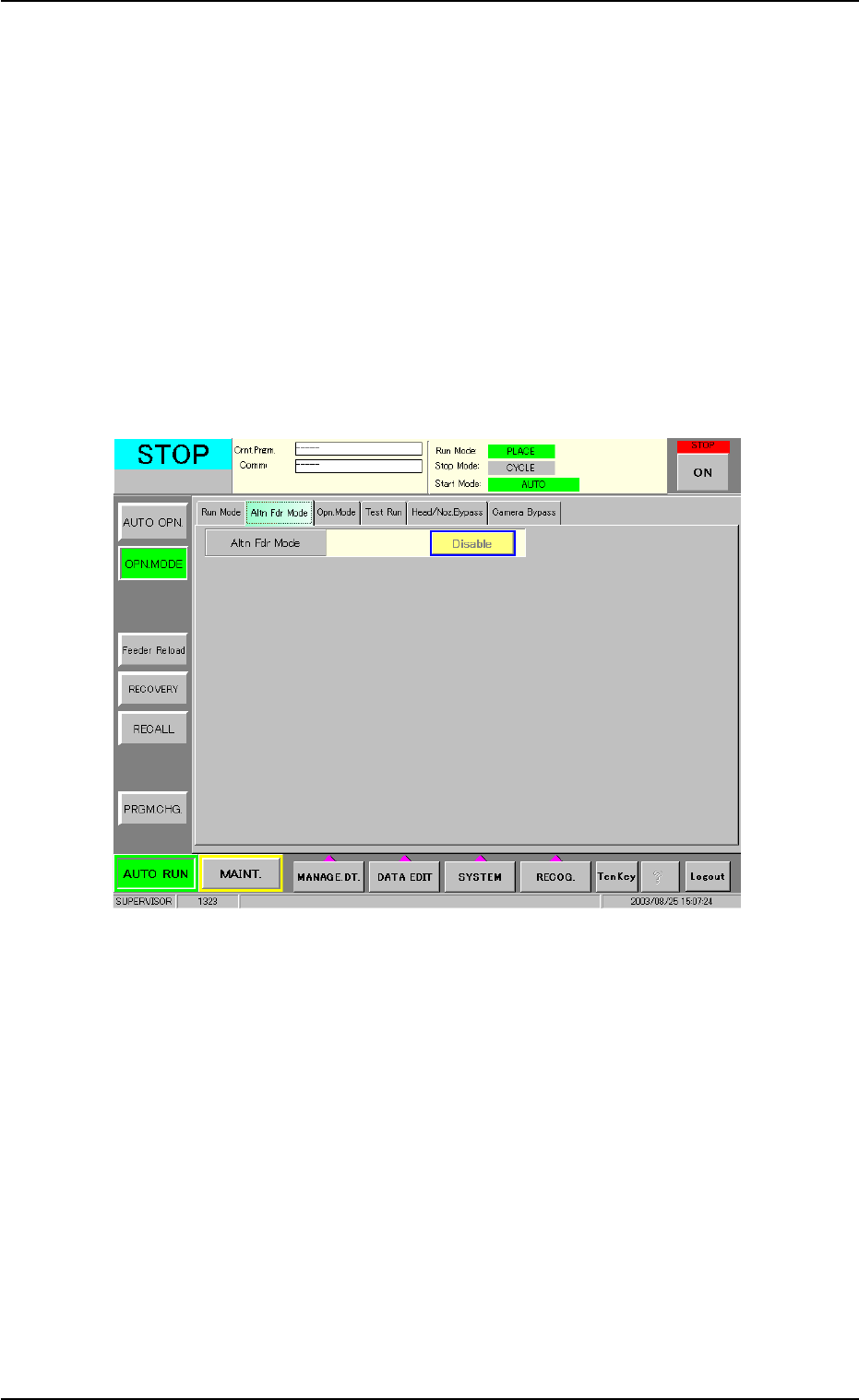
(1) Confirmation and Setting of Alternate Designation
Check the settings of the alternate function in the "Altn Fdr Mode"
tab sheet of the "OPN. MODE" submenu window.
Fig. 2C11 "Altn Fdr Mode" Tab Sheet
4. Confirmation of Component Placement
0308-004 3-17 AHB01ESPP
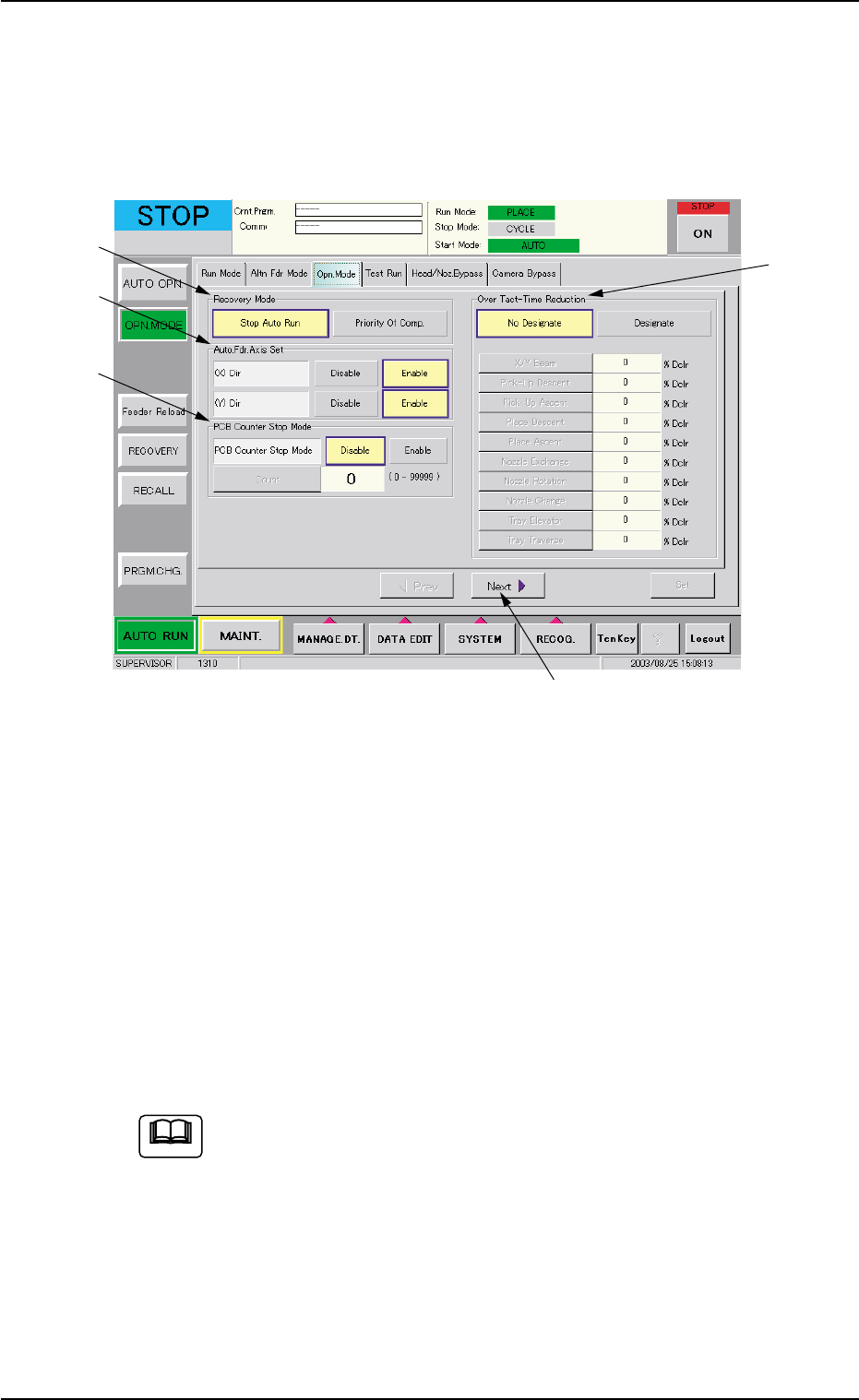
(2) Confirmation and Setting of Operation Mode Setting
Press the [OPN. MODE] button on the submenu bar and open the
"Opn. Mode" tab sheet. Confirm the setting of each function and
specify parameters if necessary.
When the [Next] button (*5) is pressed, the second page appears.
Fig. 2C12 "Opn. Mode" Tab Sheet (First Page)
Confirmation and Setting of Recovery Mode
Confirm or specify a parameter for "Recovery Mode" (*1).
Confirmation and Setting of Automatic Fdr. Axis Set
Confirm or specify a parameter for "Auto. Fdr. Axis Set" (*2).
Confirmation and Setting of PCB Counter Stop Mode
Confirm or specify a parameter for "PCB Counter Stop Mode" (*3).
Confirmation and Setting of Over Tact-Time Reduction
Confirm or specify a parameter for "Over Tact-Time Reduction" (*4).
Refer to "3.3 "Opn. Mode" Tab" in "Section 5" for details.
4. Confirmation of Component Placement
*5
*1
*2
*3
*4
0308-004 3-18 AHB01ESPP
Note