2OM-1075-002.pdf - 第302页
AHB01ESPP *8 Nozzle Stocker Open/Closed Status Indicated is the status that represents if the nozzle stockers are open or closed. *9 Nozzle Selection (Nozzle Stocker) Buttons Select a nozzle stored in the nozzle stocker …
AHB01ESPP
*4 [Switch Stocker] Button
When this button is pressed, the specified nozzle stocker is opened
or closed.
When pressed, this button turns yellow, indicating that one of the
nozzle stocker selection buttons (*7) can be set active.
*5 Imaginary Expression of Nozzle Stockers
The nozzle stockers are expressed.
*6 Nozzle Selection (Head) Buttons
Select a nozzle on Head #1 or Head #2.
When one of the buttons is pressed, the background color turns
yellow.
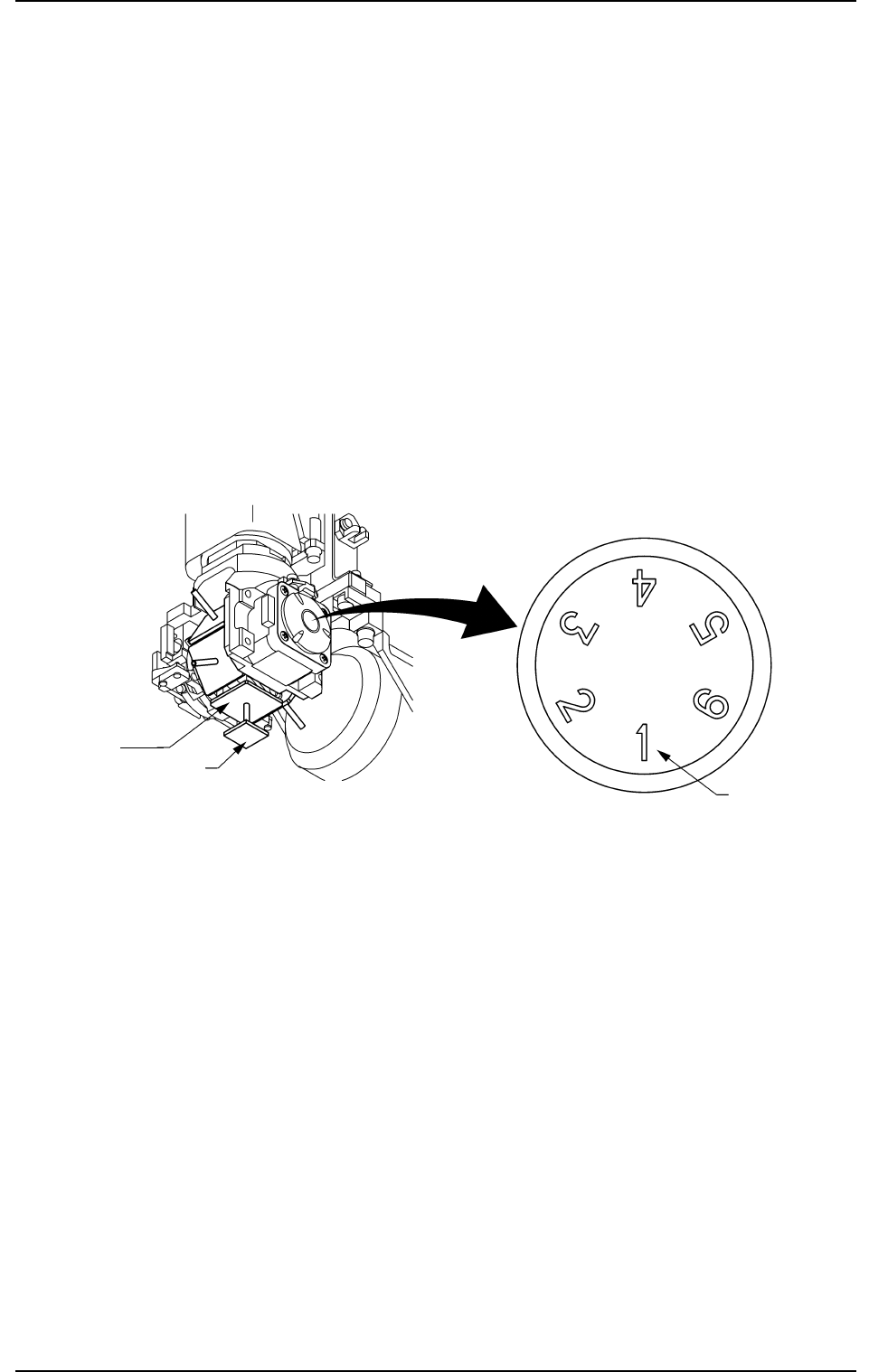
The nozzle Nos. accented in blue represent that they are located at
the nozzle change position (Nozzle #1) of the related heads.
Fig. 2F51
*7 Nozzle Stocker Selection Buttons
Select one of the following buttons to specify which nozzle stocker
should be opened or closed.
NST-B1: Nozzle Stocker B1
NST-B2: Nozzle Stocker B2
When one of the buttons is pressed, the background color turns
yellow.
The nozzle Nos. accented in red represent that they are attached to
the related head.
0308-004 6-69
4.3 "Nozzle Change" Tab
Vacuum
Nozzle at
Nozzle Change
Position
Component
Nozzle
Change
Position
Nozzle No.

AHB01ESPP
*8 Nozzle Stocker Open/Closed Status
Indicated is the status that represents if the nozzle stockers are
open or closed.
*9 Nozzle Selection (Nozzle Stocker) Buttons
Select a nozzle stored in the nozzle stocker.
When one of the buttons is pressed, the background color turns
yellow.
*10 "Control Sw" Group Box
When the [ENABLE] button on the operation panel is pressed in 2
seconds after one of the buttons in the "Operation" group box is
selected, the objective action is selected, and the [ON] button (en-
titled "MOVE") is pressed, the selected action takes place.
0308-003 6-70
4.3 "Nozzle Change" Tab
AHB01ESPP
0308-004 6-71
4.3 "Nozzle Change" Tab
• Do not change any nozzle when a component is
picked up by the head.
Otherwise, the vacuum will be turned off, releas-
ing the component from the head.
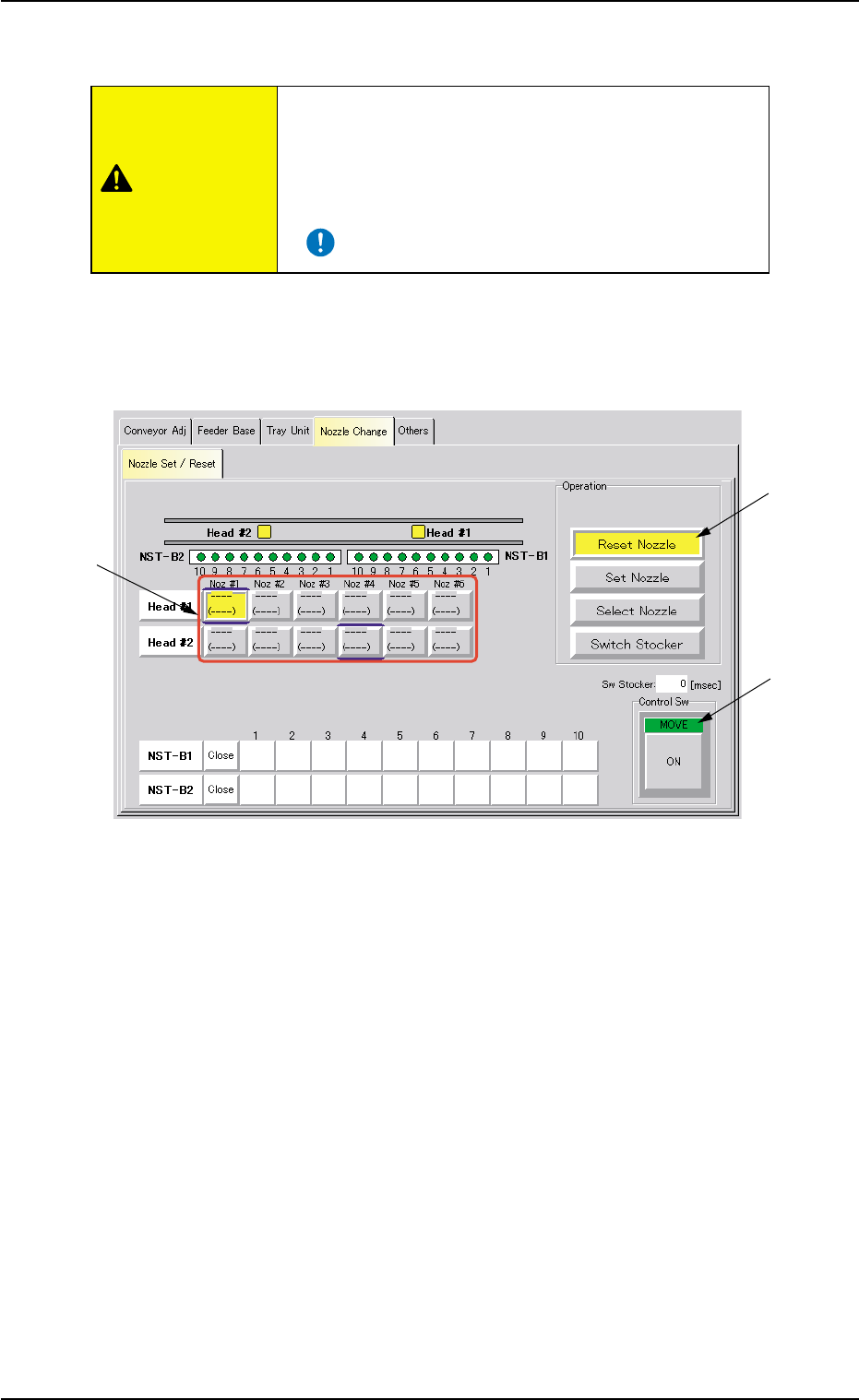
*10
*1
*6
CAUTION
• Procedure for Nozzle Storage Operation
(1) Press the [Reset Nozzle] button (*1).
The background color of the button turns yellow, indicating that the
nozzle selection (head) buttons (*6) are set active.
Fig. 2F52 "Nozzle Change" Tab Sheet ([Reset Nozzle] Button Selected)
(2) Select the nozzle to be stored in the nozzle stocker by pressing one
of the nozzle selection (head) buttons (*6).
The background color of the selected button turns yellow.
(3) When the [ENABLE] button on the operation panel is pressed in 2
seconds after the [ON] button (*10 entitled "MOVE"), the selected
nozzle is stored in the nozzle stocker.