2OM-1075-002.pdf - 第340页
AHB01ESPP 5.1.4 "Feeder No. Set" Sheet This sheet makes it possible to set the objective feeder No. for teaching. • • • • • Sheet Layout When the [Fdr . No.] button is pressed in the "T ape, V ib. Stick T …
AHB01ESPP
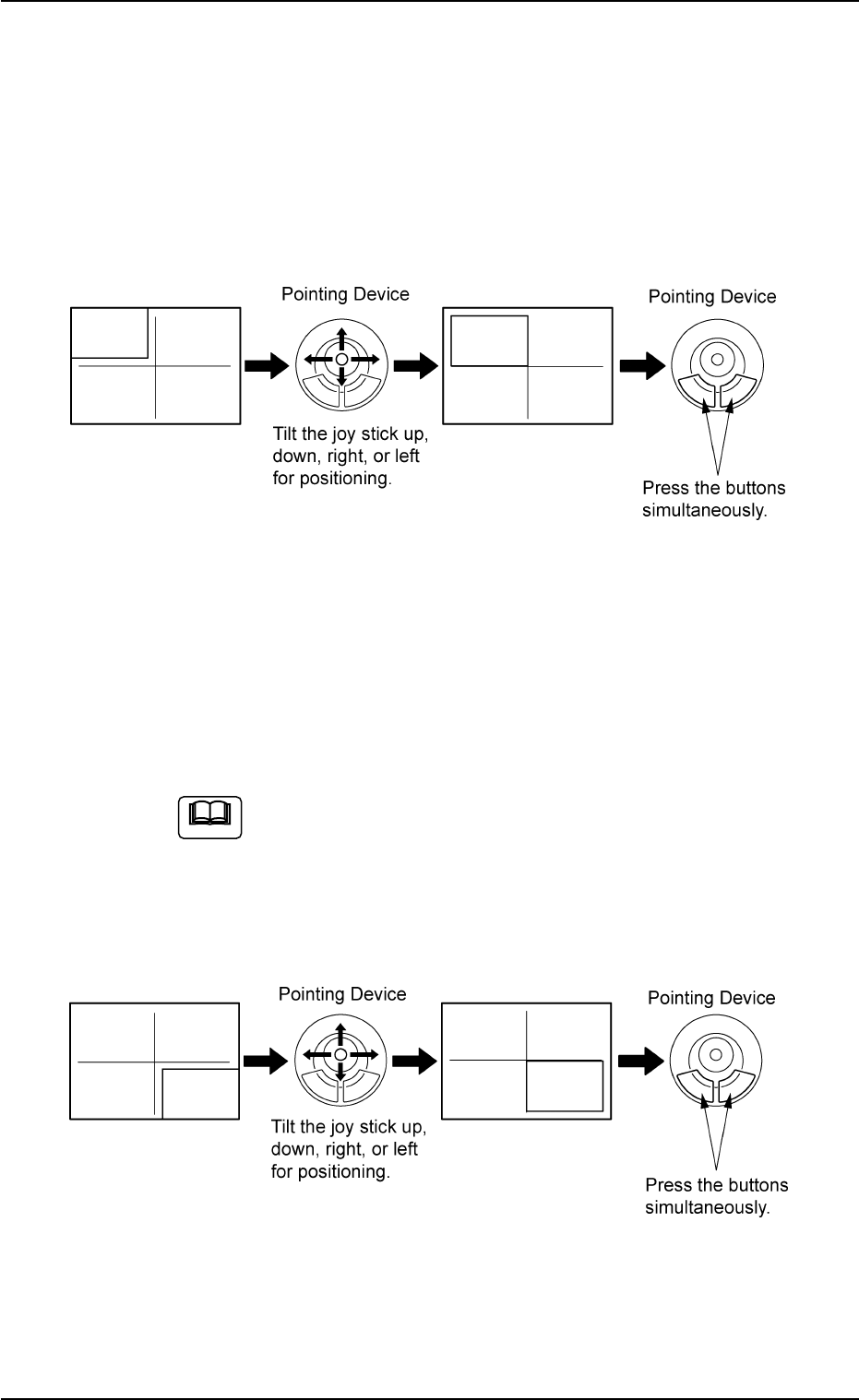
(1) When the [ENABLE] button on the operation panel is pressed in two
seconds after the [1Point] button and the [ON] button (entitled
"MOVE"), the P.E.C. recognition camera moves to the specified
feeder No. position.
A crosshair (first point) appears on the recognized image.
(2) Make an alignment with the pointing device and press the right and
left buttons simultaneously.
Fig. 2F78
(3) When the [ENABLE] button on the operation panel is pressed in 2
seconds after the [2Point] button and the [ON] button (entitled
"MOVE"), the P.E.C. recognition camera moves to the specified
feeder No. position.
A crosshair (second point) appears on the recognized image.
When the [ON] button (entitled "MOVE") is hidden behind
the recognized image, touch the image softly to make it
disappear and press the [ON] button.
(4) Make an alignment with the pointing device and press the right and
left buttons simultaneously.
Fig. 2F79
5.1 "Pick-Up Location" Tab
Note
0206-003 6-107
AHB01ESPP
5.1.4 "Feeder No. Set" Sheet
This sheet makes it possible to set the objective feeder No. for teaching.
••
••
• Sheet Layout
When the [Fdr. No.] button is pressed in the "Tape, Vib. Stick Teach
Pick-Up Pos. [Comp. Center Pos.]" or the "Tape, Vib. Stick Teach Ecc.
Pick-Up Pos. [Pickup Loc. Adj.]" sheet, the following sheet appears.
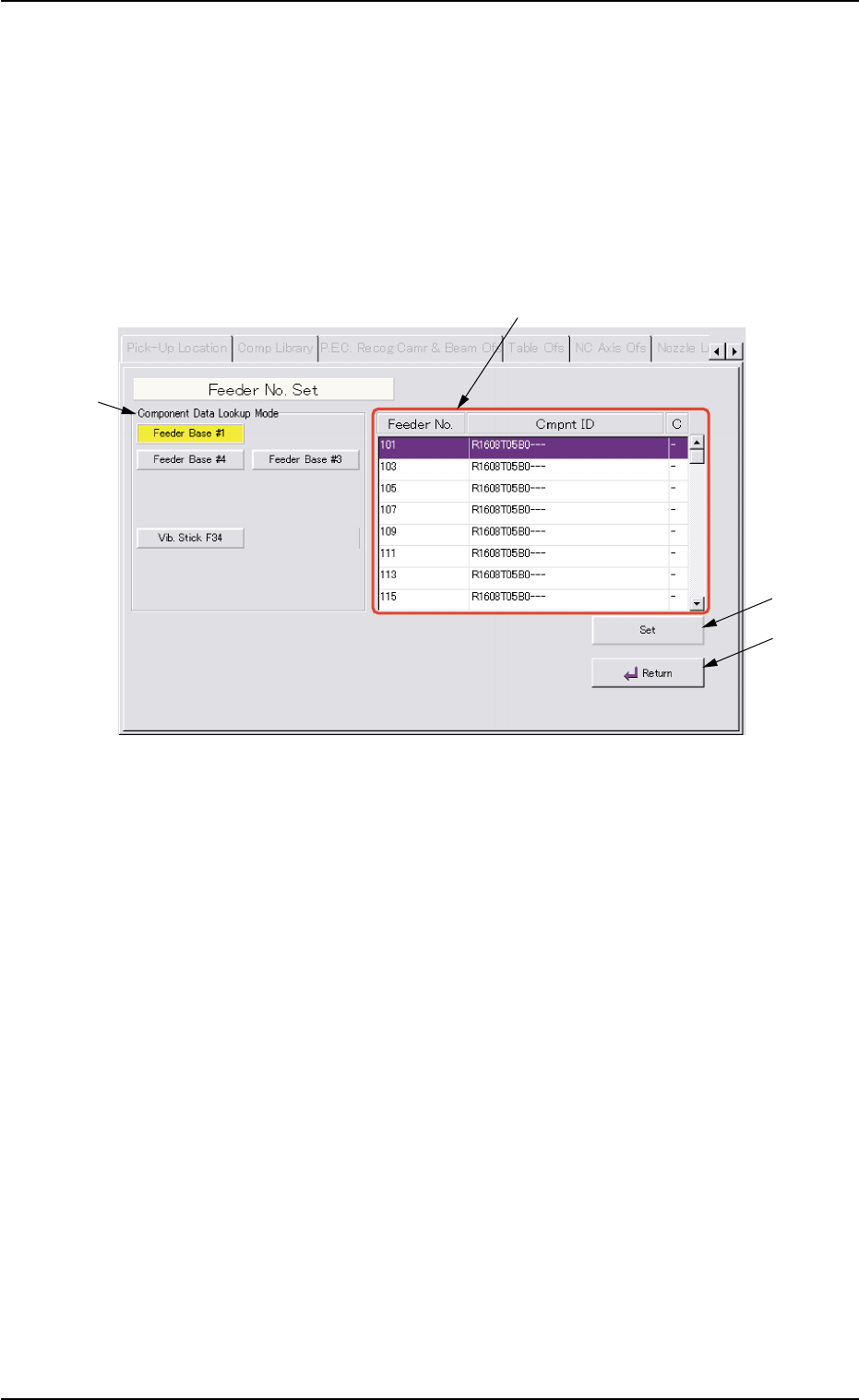
Fig. 2F80 "Feeder No. Set" Sheet
••
••
• Sheet Composition
*1 "Component Data Lookup Mode" Group Box
The provided buttons make it possible to specify the feeder base on
which the feeder to be taught is installed.
When the [Feeder Base #1], the [Feeder Base #3], or the [Feeder
Base #4] button is pressed, the feeders on the selected feeder base
are listed in "Feeder List" (*2).
*2 Feeder List
When one of the buttons in the "Component Data Lookup Mode"
group box (*1) is pressed, the feeders on the corresponding feeder
base are listed.
5.1 "Pick-Up Location" Tab
0308-004 6-108
*1
*3
*2
*4

AHB01ESPP
*3 [Set] Button
The feeder selected in "Feeder List" (*2) is set as the objective feeder
No. for teaching.
*4 [Return] Button
When this button is pressed, the "Feeder No. Set" sheet closes and
the "Tape, Vib. Stick Teach Pick-Up Pos. [Comp. Center Pos.]" or
the "Tape, Vib. Stick Teach Ecc. Pick-Up Pos. [Pickup Loc. Adj.]"
sheet appears.
••
••
• Operation Procedure
Follow the steps below to specify the feeder No. to be taught.
(1) Specify the feeder base.
The feeder Nos. on the specified feeder base are listed in "Feeder
List" (*2).
(2) Specify the feeder No.
In the case of the vibratory stick feeder, it is required to specify a
unit.
(3) Press the [Set] button (*3).
The objective feeder No. for teaching is determined.
(4) Press the [Return] button.
The "Feeder No. Set" sheet closes and the "Pick-Up Location" tab
sheet appears.
5.1 "Pick-Up Location" Tab
0206-003 6-109