2OM-1075-002.pdf - 第414页
AHB01ESPP 5.13 "Nozzle Stocker Ofs" T a b The corresponding tab sheet enables the operator to perform a teach- ing operation on the nozzle stocker offset data. By automatically recognizing the fiducial mark on …

AHB01ESPP
(a) When each device is not zeroed and the teaching op-
erations are performed, note that the offset values may
not be taught correctly.
(b) Before performing a teaching operation, be sure to zero
all beams.
*6 Offset Values
Displayed are the current values and the adjusted ones after teach-
ing.
*7 [Manual Nozzle Change] Button
When this button is pressed, the "Nozzle Change" sheet appears.
Refer to "4.3 "Nozzle Change" Tab" for details.
*8 [Clear Adj.] Button
When pressed, this button clears the results of the teaching opera-
tion.
*9 [Cancel] Button
When pressed, this button ends the teaching operation without re-
flecting the teaching results on the offset data.
*10 [End] Button
When pressed, this button reflects the results of the teaching op-
eration on the offset data and exits from this session.
*11 "Control Switch" Group Box
Select the items (buttons) to be taught and press the [ON] button
entitled "MOVE". After that, press the [ENABLE] button on the op-
eration panel in 2 seconds. A teaching operation is performed on
the selected item.
Note
0308-003 6-179
5.12 "Cmpnt Recog Mvbl Camr Ofs" Tab
AHB01ESPP
5.13 "Nozzle Stocker Ofs" Tab
The corresponding tab sheet enables the operator to perform a teach-
ing operation on the nozzle stocker offset data.
By automatically recognizing the fiducial mark on the nozzle stocker,
the nozzle stocker offset data can be taught.
(a) This teaching operation must be performed only by our
service personnel.
(b) If the offset data is not taught accurately, the nozzle change
operation cannot be performed correctly.
• Sheet Layout
When the "Nozzle Stocker Ofs" tab is pressed in the "TEACHING" win-
dow (submenu), the following tab sheet appears inside the window.
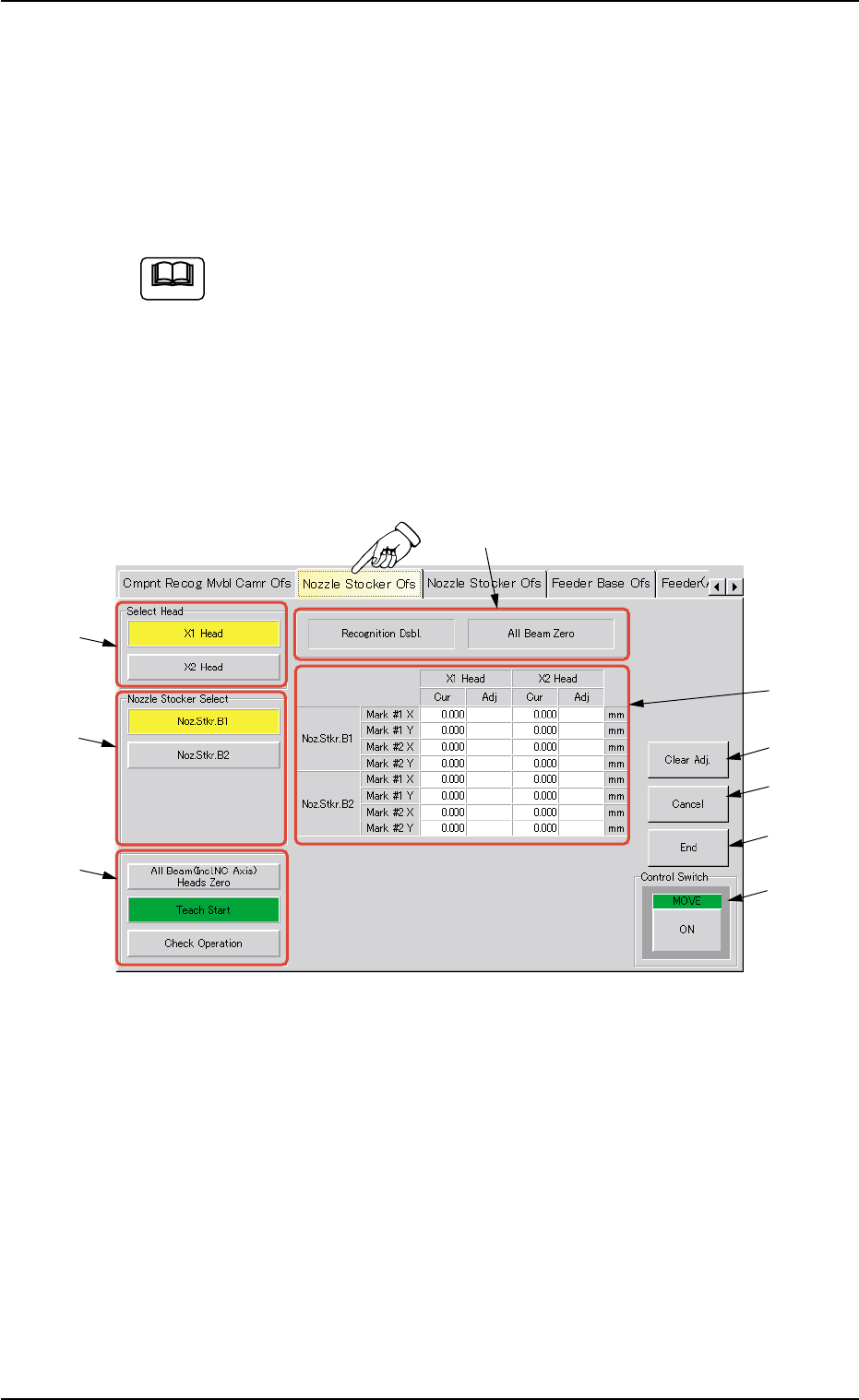
Fig. 2F120 "Nozzle Stocker Ofs" Tab Sheet
• Sheet Composition
*1 "Select Head" Group Box
Select the head to be used for teaching operations.
The following buttons are provided in this group box.
[X1 Head] and [X2 Head] Buttons
Note
0206-002 6-180
5.13 "Nozzle Stocker Ofs" Tab
*1
*2
*3
*5
*8
*7
*6
*4
*9

AHB01ESPP
*2 "Nozzle Stocker Select" Group Box
Select the nozzle stocker to be used for teaching operations.
The following buttons are provided in this group box.
[Noz. Stkr. B1] and [Noz. Stkr. B2] Buttons
*3 "Selection of Teaching Operation" Group Box
The following buttons are provided in this group box.
[All Beam (Incl NC Axis) Heads Zero] Button
When this button is pressed, all X/Y beams are zeroed.
[Teach Start] Button
When this button is pressed, the machine performs a teaching
operation on the selected nozzle stocker.
[Check Operation] Button
When the check operation is performed after the nozzle stocker
position offsets and the nozzle stocker offsets are taught, the
pins of the nozzle stocker are recognized.
When the values (Deviations X and Y indicated on the recog-
nized image) are small, it means that the teaching operation
on the nozzle stocker offsets was completed normally.
*4 Set Status
When the "P.E.C. Dsbl." or the "Comp. Recognition Dsbl." check
box in the "Test Run" window is turned on (checked), the background
color of "Recognition Dsbl." turns light red. (No background color in
normal cases).
No recognition processing is made even if a teaching op-
eration is performed when the each check box is turned on
(checked) in the "Test Run" window. Therefore, various
teaching operations will get incorrect results.
When "All Beam (Incl. NC Axis) Heads Zero" is completed, the back-
ground color of "All Beam Zero" turns green. (Otherwise, the back-
ground has no color.)
(a) When each device is not zeroed and the teaching op-
erations are performed, note that the offset values may
not be taught correctly.
(b) Before performing a teaching operation, be sure to zero
all beams.
*5 Offset Values
Displayed are the current values and the adjusted ones after teach-
ing.
Note
Note
0206-002 6-181
5.13 "Nozzle Stocker Ofs" Tab