2OM-1075-002.pdf - 第314页
AHB01ESPP 5.1 "Pick-Up Location" T ab The corresponding tab sheet enables the operator to correct the com- ponent pick-up location. The correction is made through the manual alignment operation. Only a well-tra…
AHB01ESPP
• Basic Teaching Procedure
The teaching operations must be performed on the following items in
the described order.
(1) P.E.C. Recog Camr & Beam Ofs
(2) Table Ofs
(3) NC-Axis Ofs
(4) Cmpnt Fxd Camr Mag
(5) Cmpnt Recog Fxd Camr Ofs
(4) Head Height Offset (Manual Operation)
Obtain the height offset data of each head (all six nozzles) through
manual operation and register them in the "Up/down L (mm)" text
boxes of the "Device Offset 2" tab sheet. (Operation Sequence:
[SYSTEM] Button on Main Menu Æ "SYS DATA" Menu Æ "Machine
System Data" Window Æ "Offset Data" Tab Æ "Device Offset" Tab
Æ "Device Offset 2" Tab)
Refer to "2.1.1 "Device Offset" Tab" in "Section 5" of "Vol. 3: Pro-
gramming and Machine Data" for details.
(5) Teaching Plate Offset
(6) Magnification of Component Recognition Camera (Fixed)
(7) Offset of Component Recognition Camera (Fixed)
(8) Head Center Offset
(9) Nozzle Stocker Offset
(10) Head Rotation Offset
(11) Magnification of Component Recognition Camera (Movable)
(12) Offset of Component Recognition Camera (Movable)
The above-described offset items are related to the accuracy of com-
ponent placement.
Perform the following teaching operations after the above-described off-
set items.
(13) Feeder Base Offset
(14) Feeder (A) Offset
(15) Nozzle Center Offset
(16) Traverse Offset (Option)
• When the "P.E.C. Dsbl." and "Comp. Recognition
Dsbl." check boxes are turned on (checked), the
related teaching operations cannot be performed
correctly.
Be sure to turn off the check boxes in the "Test Run"
tab sheet.
• Be sure to press the [End] button after each teach-
ing operation. Otherwise, the results will not be re-
flected.
To exit from each teaching operation without saving
the results, press the [Cancel] button.
To make the results ineffective, press the [Clear Adj.]
button.
0308-004 6-81
5. "TEACHING" Window (Submenu)
CAUTION
AHB01ESPP
5.1 "Pick-Up Location" Tab
The corresponding tab sheet enables the operator to correct the com-
ponent pick-up location.
The correction is made through the manual alignment operation.
Only a well-trained personnel shall perform teaching
operations.
The component library data and the pattern pro-
gram may be modified additionally for the teaching.
If the teaching operation is not performed correctly,
the pick-up rate may deteriorate.
This function can be used in the following cases.
• Program Change
• Feeder Replacement
• Deteriorated Pick-Up Rate
(a) The objective feeders for teaching are those whose pick-
up position is registered in the placement feeder location
data of the current pattern program.
(b) The pick-up rate may be improved after the teaching of the
pick-up position is performed when the pick-up rate is low.
(c) When a component has a groove, a protrusion, etc., and
cannot be picked up at the center with any hindrance, it is
possible to perform the teaching operation on the desig-
nation of eccentric pick-up (the parameters to be specified
in the "X [mm]" and "Y [mm]" text boxes of the label "Pickup
pos correction" in the component library data). (*2 in Fig.
2F57)
(d) Menu selections become possible only when the machine
is in the "STOP" mode.
5.1 "Pick-Up Location" Tab
Note
0308-004 6-82
CAUTION
AHB01ESPP
• Sheet Layout
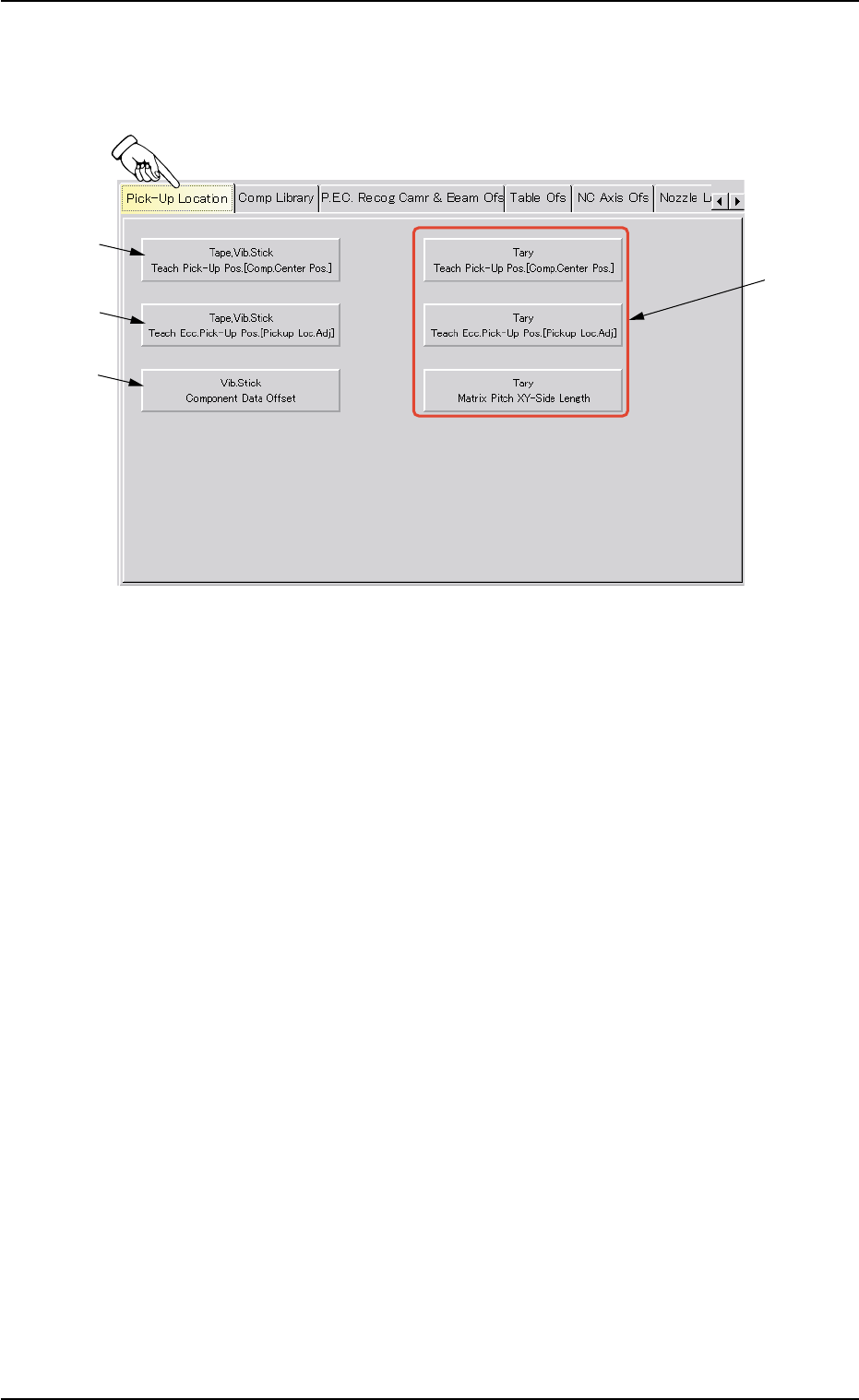
When the "Pick-Up Location" tab is pressed in the "TEACHING" win-
dow (submenu), the following tab sheet appears inside the window.
Fig. 2F57 "Pick-Up Location" Tab Sheet
••
••
• Sheet Composition
*1 [Tape, Vib. Stick Teach Pick-Up Pos. [Comp. Center Pos.]] But-
ton
When pressed, this button makes it possible to perform a teaching
operation to align the component center with the nozzle center.
When this button is pressed, the "Tape, Vib. Stick Teach Pick-Up
Pos. [Comp. Center Pos.]" sheet appears.
Refer to "5.1.1 "Tape, Vib. Stick Teach Pick-Up Pos. [Comp. Center
Pos.]" Sheet" for details.
*2 [Tape, Vib. Stick Teach Ecc. Pick-Up Pos. [Pickup Loc. Adj.]]
Button
When pressed, this button makes it possible to perform a teaching
operation on the eccentric pick-up correction position against hin-
drance to component picks at the center.
When this button is pressed, the "Tape, Vib. Stick Teach Ecc. Pick-
Up Pos. [Pickup Loc. Adj.]" sheet appears.
Refer to "5.1.2 "Tape, Vib. Stick Teach Ecc. Pick-Up Pos. [Pickup
Loc. Adj.]" Sheet" for details.
5.1 "Pick-Up Location" Tab
0206-003 6-83
*1
*2
*3
*4