2OM-1075-002.pdf - 第199页
AHB01ESPP [Elevator #2 Axis] Button When a button is pressed, the selected button turns yellow , indi- cating that the unit (axis) for which the alarm information should be issued is selected. Pressing the button again c…
AHB01ESPP
6.5 "Servo Alarm" Tab
• Sheet Layout
When the "Servo Alarm" tab is pressed in the "RECALL" window
(submenu), the following tab sheet appears inside the window.
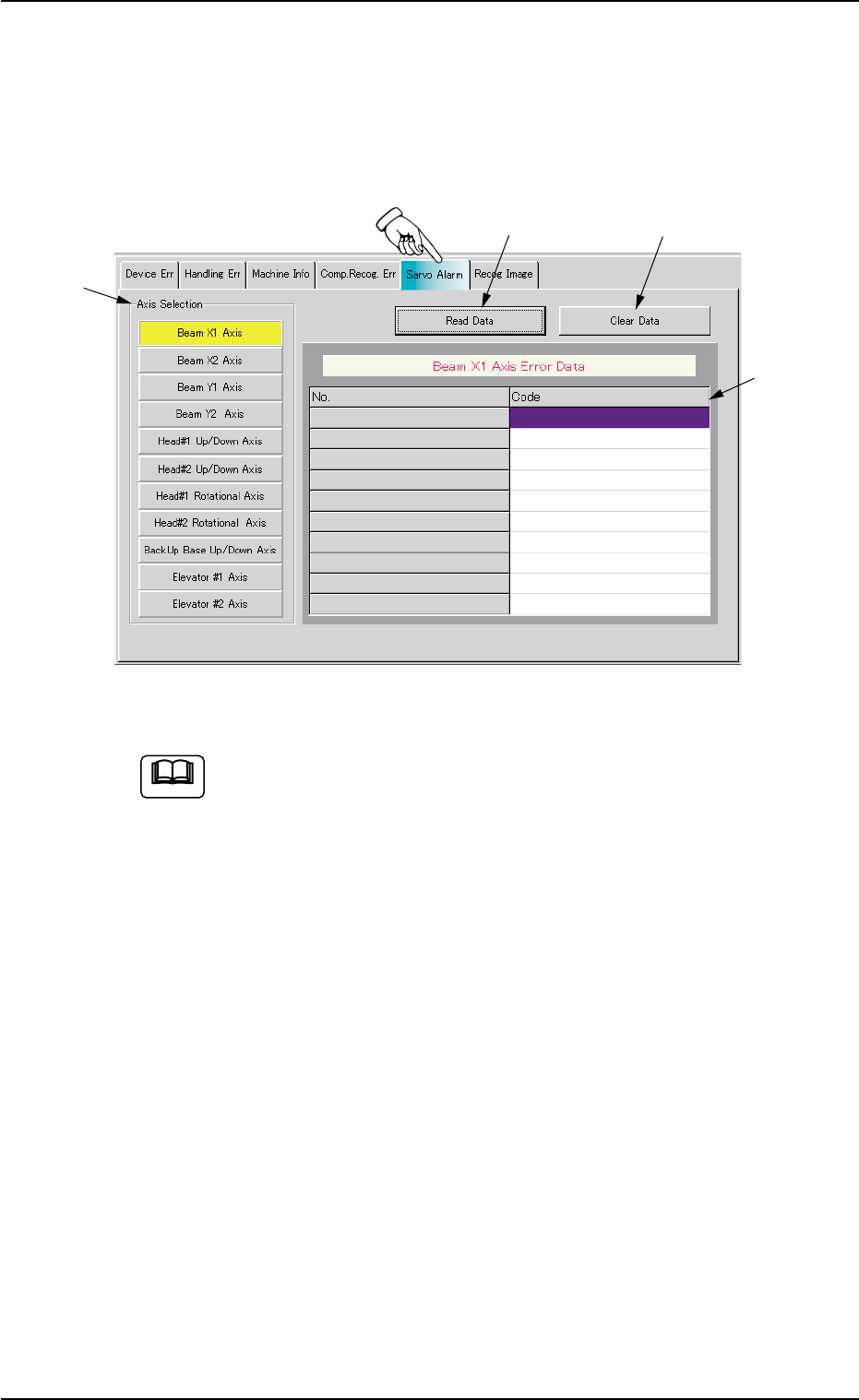
Fig. 2E33 "Servo Alarm" Tab Sheet (Provided with Multi-Layer Tray Feeder 2)
The tab sheet may look different, depending on which options
are selected.
• Sheet Composition
*1 "Axis Selection" Group Box
The following buttons are provided in this group box.
[Beam X1 Axis] Button
[Beam X2 Axis] Button
[Beam Y1 Axis] Button
[Beam Y2 Axis] Button
[Head#1 Up/Down Axis] Button
[Head#2 Up/Down Axis] Button
[Head#1 Rotational Axis] Button
[Head#2 Rotational Axis] Button
[BackUp Base Up/Down Axis] Button
[Elevator #1 Axis] Button
0308-004 5-36
6.5 "Servo Alarm" Tab
Note
*1
*2
*3
*4

AHB01ESPP
[Elevator #2 Axis] Button
When a button is pressed, the selected button turns yellow, indi-
cating that the unit (axis) for which the alarm information should
be issued is selected.
Pressing the button again changes the background color to the
original one, indicating that the selection is canceled.
*2 [Read Data] Button
When this button is pressed, the last 10 pieces of alarm data is
displayed with respect to the selected axis.
The data before the last 10 pieces is deleted.
*3 [Clear Data] Button
When this button is pressed, the alarm data of the selected axis is
cleared.
*4 Alarm Data Display Field
Displayed is the alarm information of the selected unit (axis).
0308-003 5-37
6.5 "Servo Alarm" Tab
AHB01ESPP
6.6 "Recog. Image" Tab
The corresponding tab sheet enables the operator to save the recog-
nized images of component recognition errors on a floppy disk (inserted
into the drive on the service panel).
Error images can be saved on a floppy disk and sent to us for
error analysis.
• Sheet Layout
When the "Recog. Image" tab is pressed in the "RECALL" window
(submenu), the following tab sheet appears inside the window.
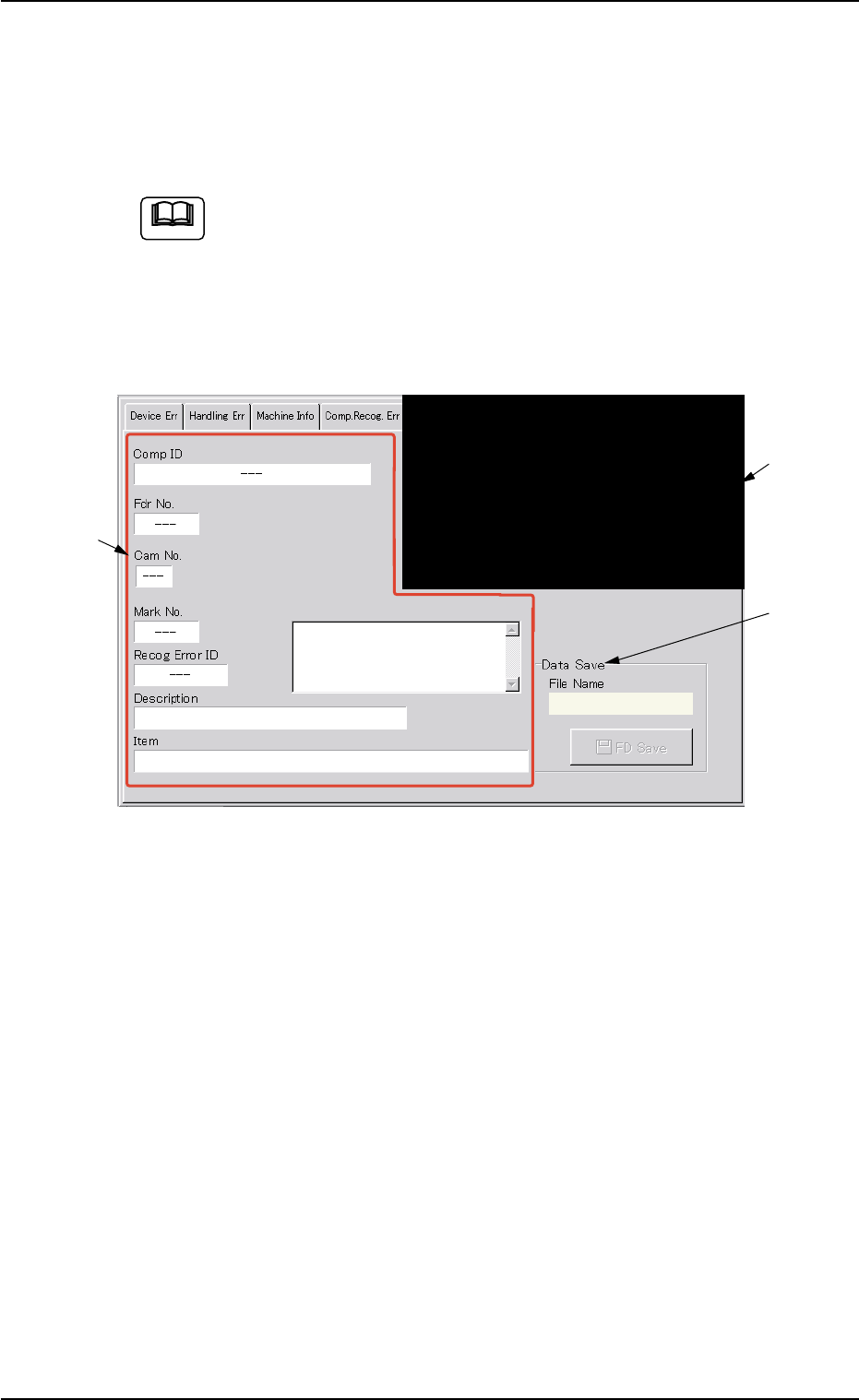
Fig. 2E34 "Recog. Image" Tab Sheet
• Sheet Composition
*1 Recognition Error Image
Displayed is the image of a component recognition error.
When this area is pressed, the image disappears.
0308-004 5-38
6.6 "Recog. Image" Tab
Note
*1
*3
*2