2OM-1075-002.pdf - 第293页
AHB01ESPP [L-Conveyor (-) HI-Speed] Button When the [ENABLE] button on the operation panel is pressed in 2 seconds after this button is selected and the [ON] button (entitled "MOVE") is pressed, the L conveyor …
AHB01ESPP
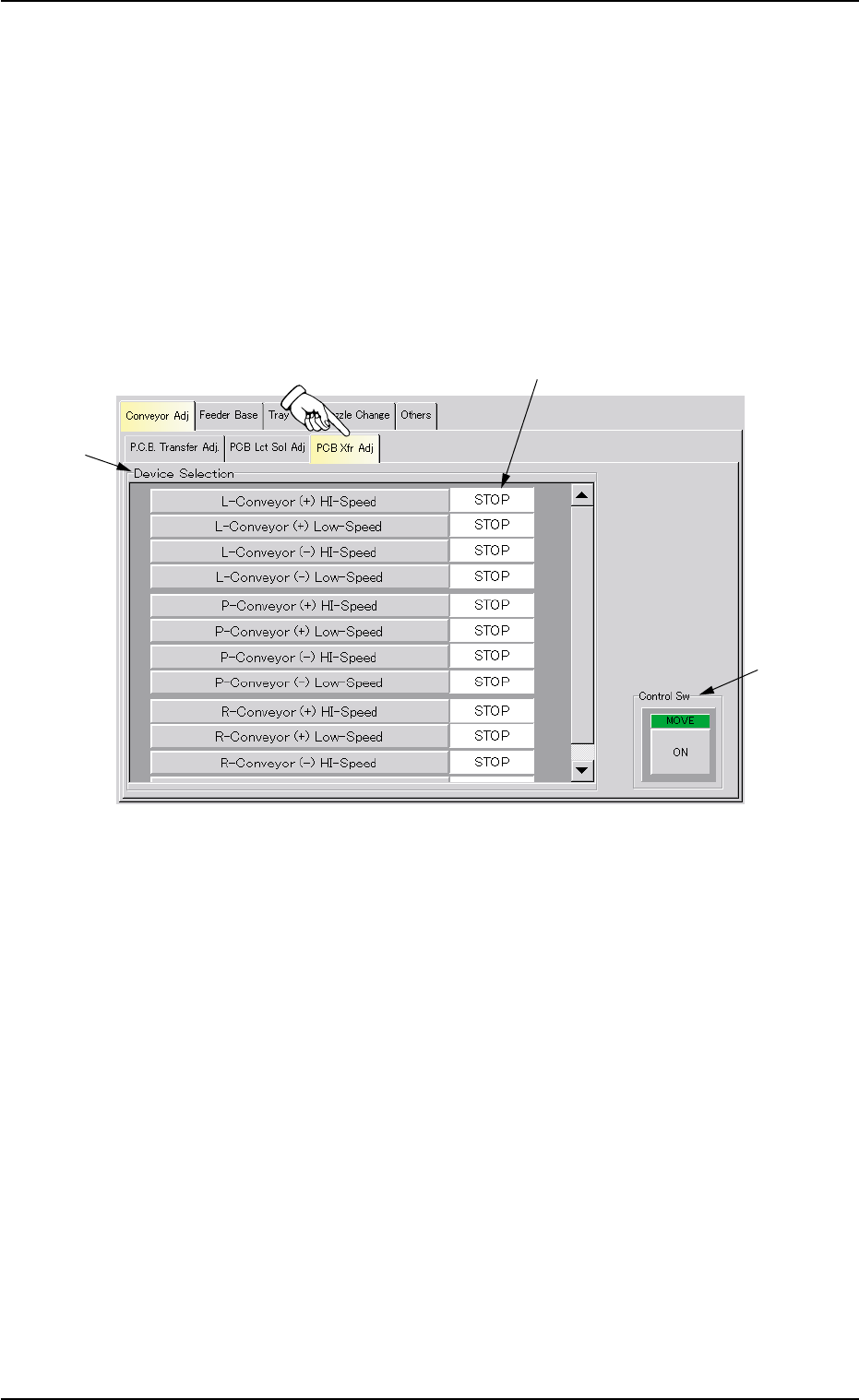
4.1.3 "PCB Xfr Adj" Tab
The corresponding tab sheet enables the operator to activate the con-
veyor motors.
The operator can perform the cycle operations related to the P (P.C.B.
positioning section), L, and R conveyors.
• Sheet Layout
When the "PCB Xfr Adj" tab is pressed in the "Conveyor Adj" tab sheet,
the following tab sheet appears.
Fig. 2F45 "PCB Xfr Adj" Tab Sheet
• Sheet Composition
*1 "Device Selection" Group Box
The following buttons are provided for cycle operations in this group
box.
[L-Conveyor (+) HI-Speed] Button
When the [ENABLE] button on the operation panel is pressed
in 2 seconds after this button is selected and the [ON] button
(entitled "MOVE") is pressed, the L conveyor moves forward at
high speed.
[L-Conveyor (+) Low-Speed] Button
When the [ENABLE] button on the operation panel is pressed
in 2 seconds after this button is selected and the [ON] button
(entitled "MOVE") is pressed, the L conveyor moves forward at
low speed.
0308-004 6-60
4.1 "Conveyor Adj" Tab
*1
*2
*3

AHB01ESPP
[L-Conveyor (-) HI-Speed] Button
When the [ENABLE] button on the operation panel is pressed
in 2 seconds after this button is selected and the [ON] button
(entitled "MOVE") is pressed, the L conveyor moves backward
at high speed.
[L-Conveyor (-) Low-Speed] Button
When the [ENABLE] button on the operation panel is pressed
in 2 seconds after this button is selected and the [ON] button
(entitled "MOVE") is pressed, the L conveyor moves backward
at low speed.
[P-Conveyor (+) HI-Speed] Button
When the [ENABLE] button on the operation panel is pressed
in 2 seconds after this button is selected and the [ON] button
(entitled "MOVE") is pressed, the P conveyor moves forward
at high speed.
[P-Conveyor (+) Low-Speed] Button
When the [ENABLE] button on the operation panel is pressed
in 2 seconds after this button is selected and the [ON] button
(entitled "MOVE") is pressed, the P conveyor moves forward
at low speed.
[P-Conveyor (-) HI-Speed] Button
When the [ENABLE] button on the operation panel is pressed
in 2 seconds after this button is selected and the [ON] button
(entitled "MOVE") is pressed, the P conveyor moves backward
at high speed.
[P-Conveyor (-) Low-Speed] Button
When the [ENABLE] button on the operation panel is pressed
in 2 seconds after this button is selected and the [ON] button
(entitled "MOVE") is pressed, the P conveyor moves backward
at low speed.
[R-Conveyor (+) HI-Speed] Button
When the [ENABLE] button on the operation panel is pressed
in 2 seconds after this button is selected and the [ON] button
(entitled "MOVE") is pressed, the R conveyor moves forward
at high speed.
[R-Conveyor (+) Low-Speed] Button
When the [ENABLE] button on the operation panel is pressed
in 2 seconds after this button is selected and the [ON] button
(entitled "MOVE") is pressed, the R conveyor moves forward
at low speed.
0107-001 6-61
4.1 "Conveyor Adj" Tab

AHB01ESPP
[R-Conveyor (-) HI-Speed] Button
When the [ENABLE] button on the operation panel is pressed
in 2 seconds after this button is selected and the [ON] button
(entitled "MOVE") is pressed, the R conveyor moves backward
at high speed.
[R-Conveyor (-) Low-Speed] Button
When the [ENABLE] button on the operation panel is pressed
in 2 seconds after this button is selected and the [ON] button
(entitled "MOVE") is pressed, the R conveyor moves backward
at low speed.
*2 Mode
Displayed is the operating mode of each device.
*3 "Control Sw" Group Box
When the [ENABLE] button on the operation panel is pressed in 2
seconds after one of the buttons in "*1" is selected and the [ON]
button (entitled "MOVE") is pressed, the action corresponding to the
selected button takes place.
• Operation Procedure
(1) Select one of the buttons in "*1" as the device to be inspected.
(2) Press the [ON] button (entitled "MOVE"). In 2 seconds, press the
[ENABLE] button on the operation panel.
The motor starts rotating.
To stop the rotation, press the [STOP] button on the operation panel.
01 12-002 6-6 2
4.1 "Conveyor Adj" Tab