2OM-1075-002.pdf - 第204页
AHB01ESPP 7. 1 "Program Change" T ab The corresponding tab sheet enables the operator to select a pattern program as a current one (model) for automatic operation. • • • • • Sheet Layout When the "Program …
AHB01ESPP
0308-004 5-41
7. "PRGM. CHG." Window (Submenu)
••
••
• Window Layout
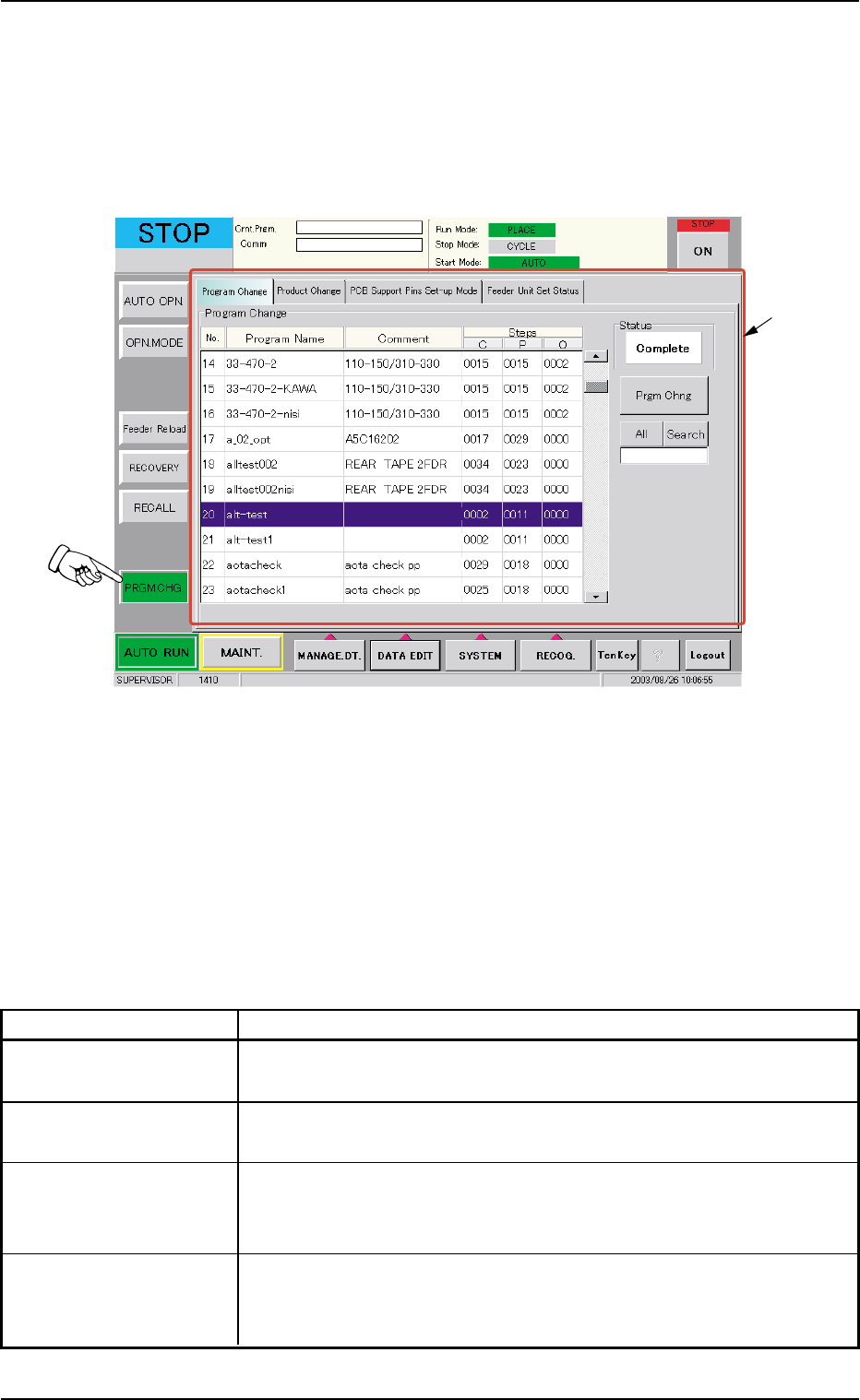
When the [PRGM. CHG.] button on the submenu bar of the "AUTO RUN"
window is pressed, the following window (submenu) opens.
Fig. 2E35 "PRGM. CHG." Window (Submenu)
••
••
• Window Composition
*1 Tabs
The "PRGM. CHG." window (submenu) is provided with the follow-
ing 4 tabs. When a tab is pressed, the corresponding tab sheet ap-
pears inside the window.
Table 2E8
Tabs Description
Program Change The corresponding tab sheet enables the operator to select a pat-
tern program as a current one (model) for automatic operation.
Product Change The corresponding tab sheet enables the operator to perform over-
all setup operations or manual setup operations on each device.
PCB Support Pins The corresponding tab sheet enables the operator to set the envi-
Set-up Mode ronmental condition required to determine the position of the P.C.B.
support pins.
Feeder Unit Set Status The corresponding tab sheet enables the operator to confirm the
required feeders and check if the correct feeders are actually
installed on the feeder bases.
7. "PRGM. CHG." Window (Submenu)
*1
AHB01ESPP
7.1 "Program Change" Tab
The corresponding tab sheet enables the operator to select a pattern
program as a current one (model) for automatic operation.
••
••
• Sheet Layout
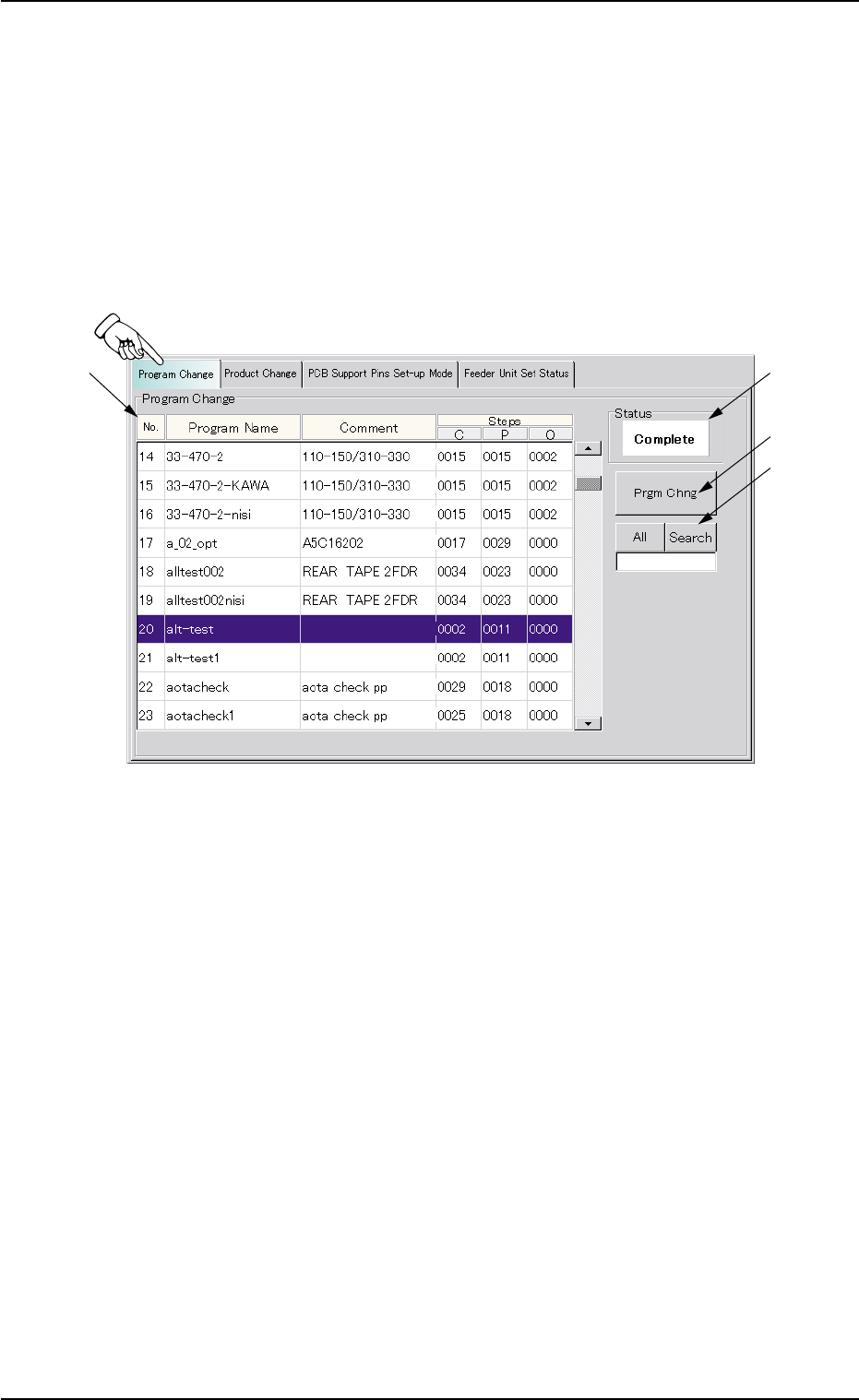
When the "Program Change" tab is pressed in the "PRGM. CHG." win-
dow (submenu), the following tab sheet appears inside the window.
Fig. 2E36 "Program Change" Tab Sheet
••
••
• Sheet Composition
*1 List of Model Names
Listed are the registered model names (pattern program names).
*2 Status
Displayed is the result of implemented program change operation.
*3 [Prgm Chng] Button
When this button is pressed, the current model (pattern program) is
changed to another one.
7.1 "Program Change" Tab
0308-004 5-42

AHB01ESPP
*4 [All] and [Search] Buttons
When pressed, this button makes it possible to search a program
name.
When some characters are entered in the text box under the [Search]
button and the [Search] button is pressed, only the program names
which start with the entered characters are displayed in the "List of
Model Names".
When the [All] button is pressed, all program names appear.
"*" (asterisk) and "?" (question mark) can be used as wild
cards.
abc* : The search function retrieves the program names
which start with "abc"
a?c : The search function retrieves the program names
which start with "a" and contain "c" as the third char-
acter.
••
••
• Procedure for Program Change Operation
(1) Select the program name desired to be the current one in the list
(*1). The background color turns blue.
(2) When the [Prgm Chng] button (*3) is pressed, "OK" appears in the
"Status" text box (*2) and the selected program is set as a current
one.
When the selected pattern program has an error, "NG" appears in
the "Status" text box (*2) and the program change operation is not
implemented. In such a case, correct the pattern program and re-
implement the program change operation.
7.1 "Program Change" Tab
0308-002 5-43
Note