2OM-1075-002.pdf - 第81页
(a) Refer to "3. "Nozzle Data" Window" in "Section 5" of "V ol. 3: Programming and Machine Data" for details. (b) It is recommended for better efficiency that the nozzles for Head …
2.4 Preparation for Nozzles
It must be confirmed that the nozzle IDs in the current pattern program
are registered in the placement head/nozzle data. After the confirma-
tion, it is required to set all nozzles to be used in the nozzle stocker.
Be sure to attach the nozzles correctly in place.
When a nozzle is attached incorrectly (not to the place
specified in the nozzle data), it may cause undesir-
able interference.
Operation Procedure
(1) Check the nozzle IDs in the "Nozzle" column of the placement feeder
location data in the current pattern program.
(2) Check the placement head/nozzle data. When the nozzle IDs are
not registered, search them in the list of nozzle types and register
them.
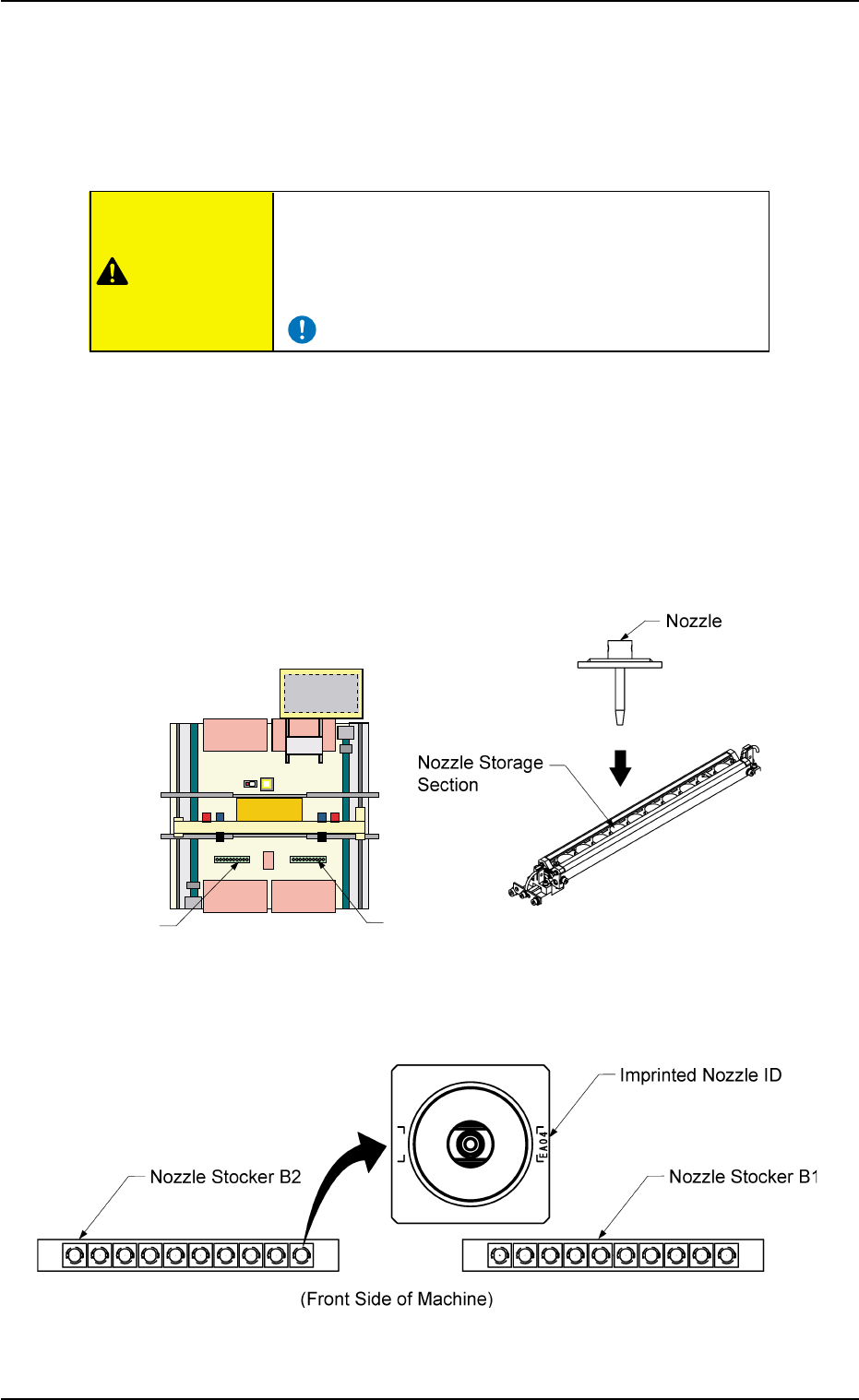
(3) Set all nozzles to be used in the nozzle stockers.
Direct the inprinted nozzle ID mark as shown in the figure and insert
the nozzle into the groove.
Fig. 2C2-1 Nozzle Stocker Position Fig. 2C2-2 Rough View of Nozzle Stocker
Fig. 2C2-3 Direction of Nozzle Arrangement
0308-004 3-3
AHB01ESPP
2.4 Preparation for Nozzles
Nozzle Stocker B1
Nozzle Stocker B2
Rear Side of Machine
Front Side of Machine
CAUTION
(a) Refer to "3. "Nozzle Data" Window" in "Section 5" of "Vol.
3: Programming and Machine Data" for details.
(b) It is recommended for better efficiency that the nozzles for
Head #1 be stored in Nozzle Stocker B1 and the nozzles
for Head #2 in Nozzle Stocker B2.
Do not put any foreign substance on the nozzle
stocker section.
Otherwise, the machine will break down.
• Keep the diffusion plates of the vacuum nozzles
clear of oil, nicks, etc.
Otherwise, an error may occur during component
recognition.
• Do not bring a magnet close to any vacuum
nozzle.
Otherwise, an error may occur during component
picks and placement.
0308-004 3-4 AHB01ESPP
2.4 Preparation for Nozzles
CAUTION
CAUTION
Note
3. Program Change Operation
3.1 Selection of Current Pattern Program
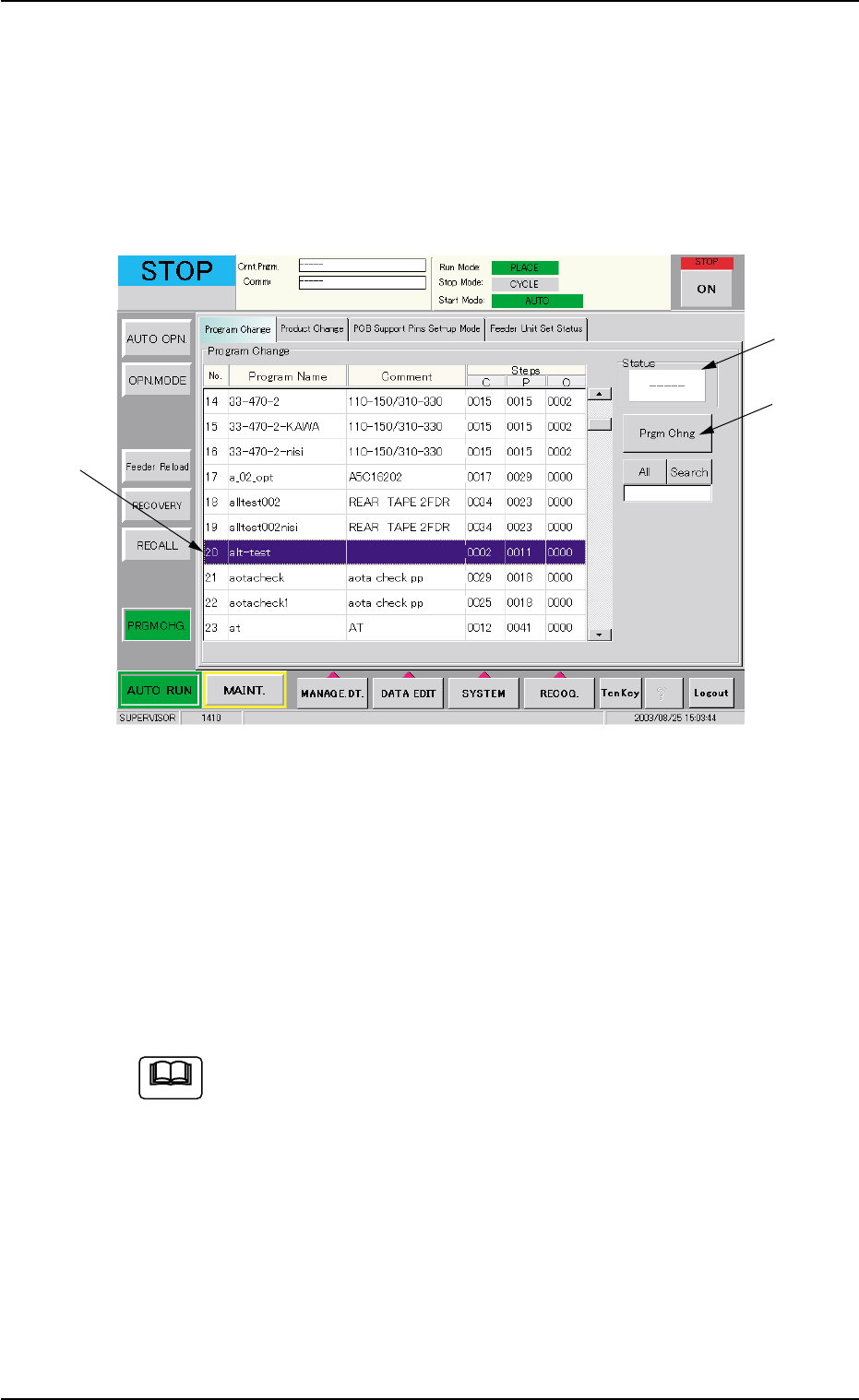
A pattern program must be selected as a current one in the "Program
Change" tab sheet of the "PRGM. CHG." window (submenu).
Fig. 2C3 "Program Change" Tab Sheet
Operation Procedure
(1) Select the program name to be set as a current one from the "Pro-
gram Change" list (*1). The line turns blue, indicating that the pat-
tern program is selected.
(2) Press the [Prgm Chng] button (*2). "OK" appears in the "Status"
box (*3), indicating that the selected program was downloaded nor-
mally.
When the selected pattern program has an error and "NG" ap-
pears in the "Status" box, the program change is not imple-
mented. In such a case, correct the pattern program and re-
implement the program change operation.
3. Program Change Operation
0308-004 3-5 AHB01ESPP
*2
*3
*1
Note