2OM-1075-002.pdf - 第306页
AHB01ESPP • Do not select any nozzle when a component is picked up by the head. Otherwise, the vacuum will be turned off, releas- ing the component from the head. 4.3 "Nozzle Change" T ab *10 *3 *6 0308-003 6-7…

AHB01ESPP
(2) Select the nozzle to be attached to the head by pressing one of the
nozzle selection (nozzle stocker) buttons (*9).
The background color of the selected button turns yellow.
(3) Select the position (Nozzle No.) where the nozzle must be attached
by pressing one of the nozzle selection (head) buttons (*6).
The background color of the selected button turns yellow.
(4) When the [ENABLE] button on the operation panel is pressed in 2
seconds after the [ON] button (entitled “MOVE”) (*10), the action to
attach the specified nozzle takes place.
No nozzle can be attached to the nozzle No. where a nozzle is
already attached.
Note
0308-004 6-73
4.3 "Nozzle Change" Tab
AHB01ESPP
• Do not select any nozzle when a component is
picked up by the head.
Otherwise, the vacuum will be turned off, releas-
ing the component from the head.
4.3 "Nozzle Change" Tab
*10
*3
*6
0308-003 6-74
CAUTION
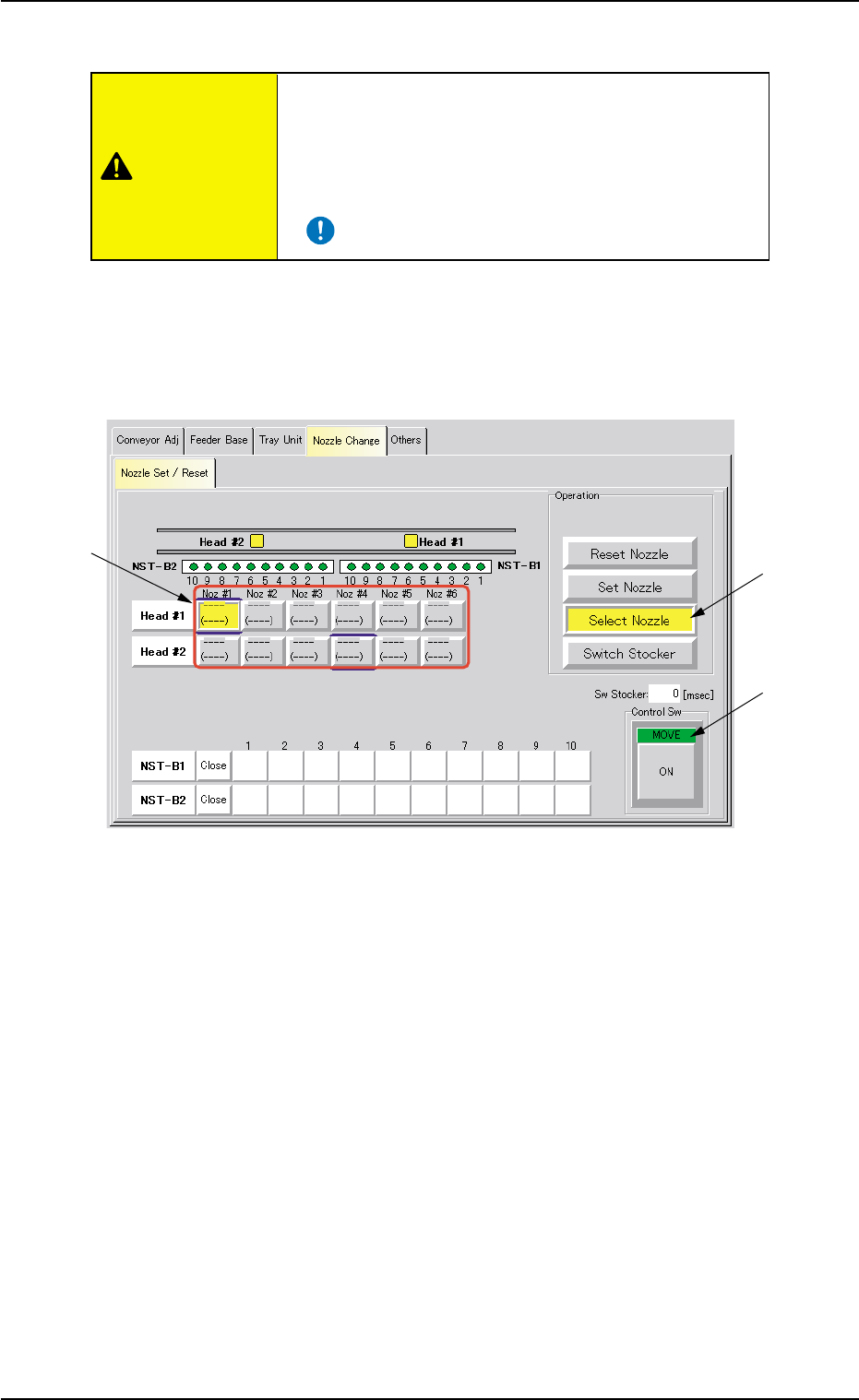
• Procedure for Nozzle Selection
(1) Press the [Select Nozzle] button (*3).
The background color of the button turns yellow, indicating that the
nozzle selection (head) buttons (*6) are set active.
Fig. 2F54 “Nozzle Change” Tab Sheet
([Select Nozzle] Button Selected)
(2) Select the nozzle to be moved to the nozzle #1 position (nozzle
change position).
The background color of the selected button turns yellow.
(3) Press the [ENABLE] button on the operation panel in 2 seconds
after the [ON] button (*10 entitled “MOVE”).
The selected nozzle moves to the nozzle #1 position.
AHB01ESPP
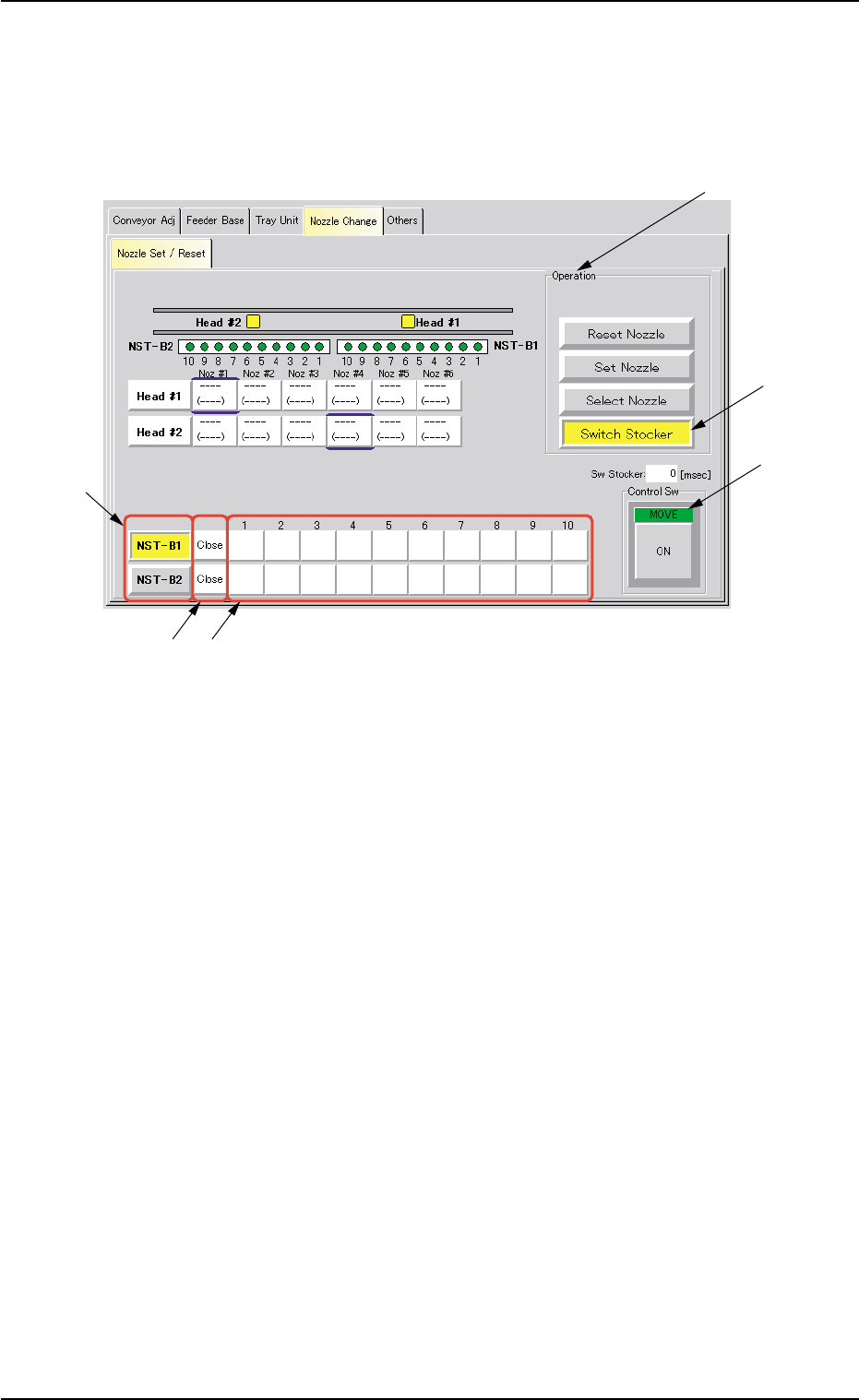
• Procedure for Nozzle Stocker Opening/Closing Operation
(1) Press the [Switch Stocker] button (*4).
When pressed, the background color of this button turns yellow,
indicating that the nozzle stocker selection button (*7) is set active.
Fig. 2F55 "Nozzle Change" Tab Sheet ([Switch Stocker] Button Selected)
(2) Press one of the nozzle stocker selection buttons (*7) ([NST-B1] or
[NST-B2] button) to select the nozzle stocker to be opened or closed.
The background color of the selected button turns yellow.
(3) When the [ENABLE] button on the operation panel is pressed in 2
seconds after the [ON] button (entitled "MOVE") (*10), the opening
or closing action of the specified nozzle stocker takes place.
(4) It is indicated if the nozzle stocker is opened or closed in the nozzle
stocker open/closed status field (*8).
"Open" or "Close" appears.
0308-004 6-75
4.3 "Nozzle Change" Tab
*1
*10
*7
*9*8
*4