2OM-1075-002.pdf - 第245页
AHB01ESPP 3 . 2 "P .E.C. Recog T est" T ab The corresponding tab sheet enables the operator to make a test on the P .E.C. recognition (fiducial) marks. • Sheet Layout When the "P .E.C. Recog T est" ta…

AHB01ESPP
*8 Fdr. No.
Displayed is the data of the step No. designated in "*7".
*9 "Control SW" Group Box
When the [ON] button (entitled "STOP") is pressed during the X/Y
beam test, the X/Y beam moves as far up as to the last step of the
pattern program, returns to its origin, and stops.
When the [ENABLE] button on the operation panel is pressed in 2
seconds after the [Auto] button or the [Step] button is selected and
the [ON] button (entitled "MOVE") is pressed, the X/Y beam moves
in succession or step by step according to the pattern program.
When the [ENABLE] button on the operation panel is pressed in 2
seconds after the [Zero XY Beam] button is selected and the [ON]
button (entitled "MOVE"), the X/Y beam starts returning to its origin
(zeroing).
••
••
• Procedure for X/Y Beam Test
(1) Set the current pattern program to be tested.
(2) To specify the starting step, designate it in the "Step No." group box
(*7).
(3) Set the period of time during which the X/Y beam stays still at the
placement point, using the button in the "Speed" group box (*4).
(4) Specify how to move the X/Y beam in the "Operation Mode" group
box (*5).
[Auto] Button : The XY beam moves in succession according
to the pattern program.
[Step] Button : The XY beam moves step by step according to
the pattern program.
(5) Start the X/Y beam test.
Selection of [Auto] Button
••
••
• When the [ENABLE] button on the operation panel is pressed in 2
seconds after the [ON] button (entitled "MOVE"), the X/Y beam
moves in succession according to the pattern program.
When the [ON] button (entitled "STOP") is pressed during the X/Y
beam test, the X/Y beam moves as far up as to the last step of the
pattern program, returns to its origin, and stops.
Selection of [Step] Button
••
••
• Every time the [ENABLE] button on the operation panel is pressed
in 2 seconds after the [ON] button (entitled "MOVE"), the X/Y beam
moves step by step.
3.1 "X/Y Beam Test" Tab
0206-001 6-12-3
AHB01ESPP
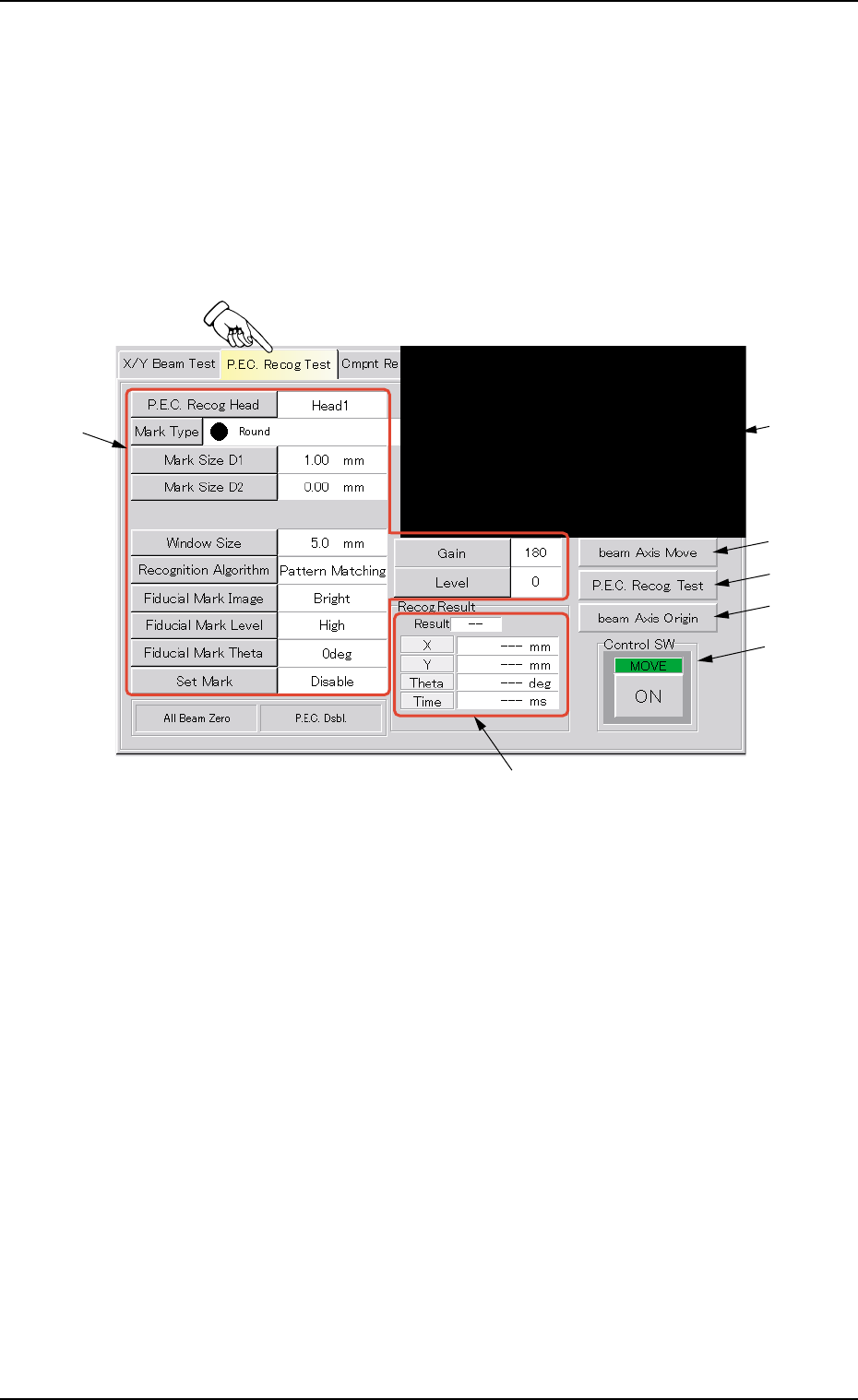
3.2 "P.E.C. Recog Test" Tab
The corresponding tab sheet enables the operator to make a test on the
P.E.C. recognition (fiducial) marks.
• Sheet Layout
When the "P.E.C. Recog Test" tab is pressed in the "DVC. TEST" win-
dow (submenu), the following tab sheet appears.
Fig. 2F8 "P.E.C. Recog Test" Tab Sheet
• Sheet Composition
*1 Recognized Image
The image of the recognized P.C.B. is displayed.
When this area is pressed, the image of the recognized component
disappears.
*2 Buttons for P.E.C. Recognition Test Data Settings
When one of the following buttons is pressed, the corresponding
window for parameter settings opens, enabling you to specify each
parameter for the P.C.B. recognition marks (fiducial marks).
[P.E.C. Recog Head] Button
[Mark Type] Button
[Mark Size D1] Button
[Mark Size D2] Button
[Window Size] Button
0206-003 6-13
3.2 "P.E.C. Recog Test" Tab
*2
*3
*1
*4
*5
*7
*6

AHB01ESPP
[Recognition Algorithm] Button
[Fiducial Mark Image] Button
[Fiducial Mark Level] Button
[Fiducial Mark Theta] Button
[Set Mark] Button
[Gain] Button
[Level] Button
Refer to "3.2.1 Various Data Settings for P.E.C. Recognition Marks"
for the detailed information on each parameter.
*3 [beam Axis Move] Button
When pressed, this button moves the X/Y beam.
*4 [P.E.C. Recog Test] Button
When pressed, this button sets a P.E.C. recognition test ready for
being made.
*5 [beam Axis Origin] Button
When pressed, this button zeroes the X/Y beam.
*6 "Recog Result" Group Box
Displayed are the coordinates that represent how far the fiducial
mark shifted from the correct position when a recognition test was
performed.
*7 "Control SW" Group Box
Press the [P.E.C. Recog Test] button and the [ON] button (entitled
"MOVE"). After that, press the [ENABLE] button in two seconds.
The P.E.C. recognition test is conducted.
Refer to "3.2.2 Procedure for P.E.C. Recognition Test" for the
detailed information on how to make a P.E.C. recognition test.
0206-003 6-14
Note
3.2 "P.E.C. Recog Test" Tab