2OM-1075-002.pdf - 第469页
1st Edition Issued Apr ., 2003 Copying Prohibited 2nd Edition Issued Aug., 2003 Compiled and Distributed by 0308-002 AHB01ESPP
AHB01ESPP
• How to delete the data from the floppy disk
Delete Procedure
(1) Insert the floppy disk (the disk where the data is saved) into the drive
of the service panel.
(2) Press the desired data type button to specify the type of the data to
be deleted.
(3) Press the [FD Search] button.
The names of the retrieved files are displayed in the "List of Files on
Floppy Disk" pane.
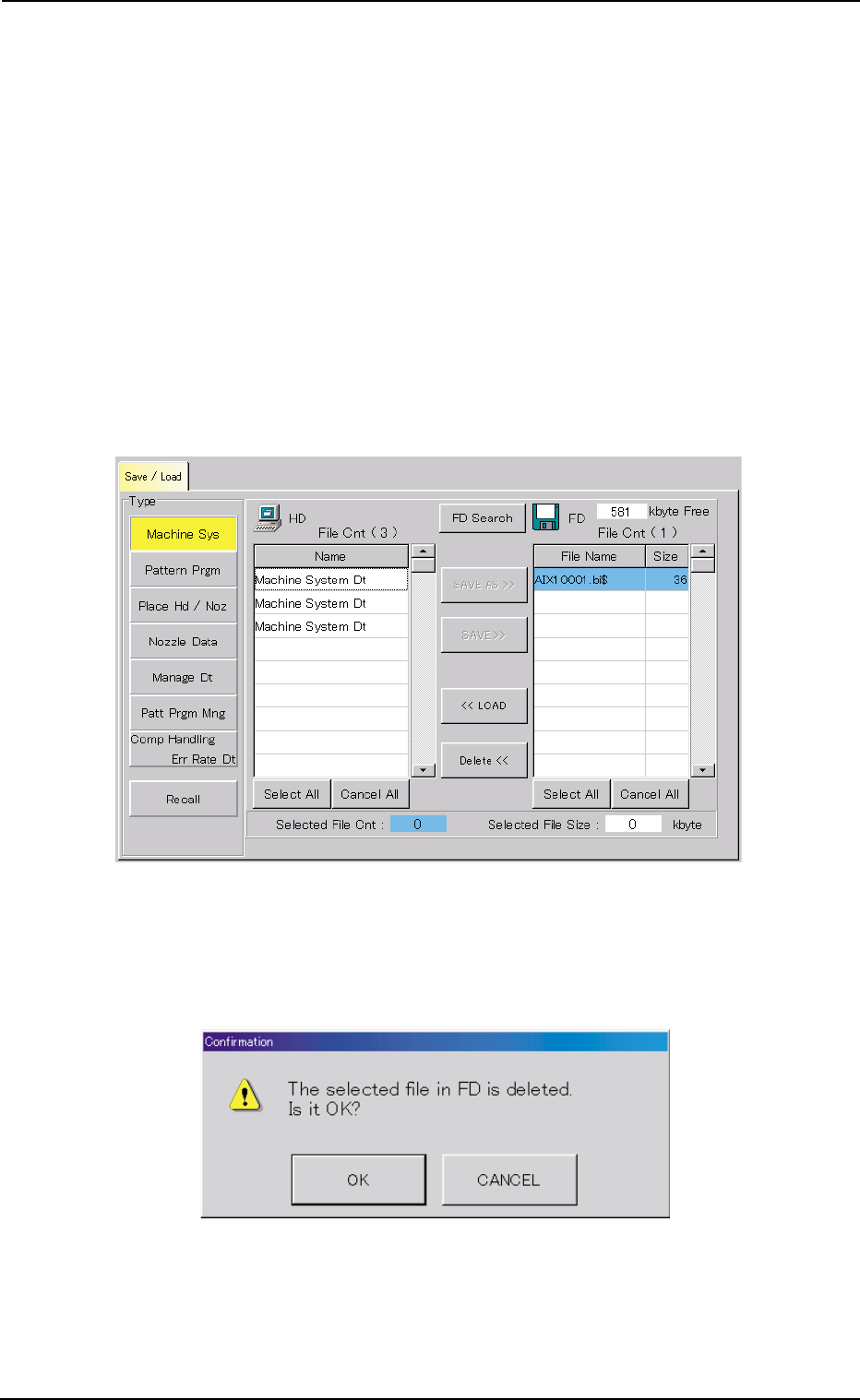
(4) Select the file(s) of the data to be deleted.
The line of the selected file name (data) turns sky blue.
Fig. 2F154 Selection of Data Deleted
(5) When the [Delete <<] button is pressed, the following "Confirma-
tion" dialog box opens.
Fig. 2F155 "Confirmation to Deleting" Dialog Box
(6) When the [OK] button is pressed, the deletion starts.
0206-002 6-229
8.1 "Save / Load" Tab

AHB01ESPP
0206-002 6-230
1st Edition Issued Apr., 2003 Copying Prohibited
2nd Edition Issued Aug., 2003
Compiled and Distributed by
0308-002
AHB01ESPP