2OM-1075-002.pdf - 第276页
AHB01ESPP 3.3.2 Hysteresis T est This function allows to verify the beam speed reduction and the θ -rota- tional speed reduction (specified in the component library data) for com- ponent picks. Some supplementary data ca…

AHB01ESPP
Procedure for Component Recognition Test on Components
Picked Automatically from Each Feeder
(1) Press the [Test ID] button (*4) in the "Component Recog. Test" tab
sheet (Fig. 2F22). The "Test ID Set" sheet appears.
Register the component ID to be tested as a test ID.
(2) Check the parameter in the text box (*6) and attach the specified
nozzle.
Attach the nozzle in the "Nozzle Set/Reset" sheet.
Refer to "4.4 "Nozzle Change" Tab" for details.
(3) Replenish the feeders for the production model with components.
Refer to the instruction manual of the tape and vibratory stick feed-
ers for details.
(4) Press the [Fdr. No.] button (*5). The "Fdr. No." sheet appears.
Set the same component ID (feeder No.) as the specified test ID.
(5) Press the button (*2). The sheet appears.
Select the head that is provided with the nozzles on the operation
side.
(6) Press the button (*3). The sheet appears.
Select the camera to capture an image.
(7) Press the button (*9). The sheet appears.
Select the [ON] button to use the function.
(8) Select the [Vacuum Pick-Up Off] button in the "Vac Valve" group box
(*10).
(The vacuum valve is turned "ON" automatically.)
When the vacuum valve is kept "ON" (component pickup
condition), the previous sheet cannot be resumed.
(9) Press the [Pick from Fdr (Auto)] button and then the [ON] button
(entitled "MOVE"). After that, press the [ENABLE] button on the op-
eration panel in 2 seconds.
The head moves to the position of the specified feeder No. and the
components are picked up.
(10) Press the [Move to Recog Sta & Recog (Full Auto)] button and
then the [ON] button (entitled "MOVE"). After that, press the [EN-
ABLE] button on the operation panel in 2 seconds.
A component recognition test is conducted.
(11) As for the following operations, refer to Steps (15) through (18)
described in "Procedure for Component Recognition Test on Manu-
ally Attached Component" for details.
Note
0206-003 6-43
3.3 "Cmpnt Recog Test" Tab
AHB01ESPP
3.3.2 Hysteresis Test
This function allows to verify the beam speed reduction and the θ-rota-
tional speed reduction (specified in the component library data) for com-
ponent picks. Some supplementary data can also be set in relation to
the beam and rotational speed reduction.
••
••
• Window Layout
When the [Hysteresis Test] button is pressed in the "Component Recog.
Test" tab sheet, the following window appears.
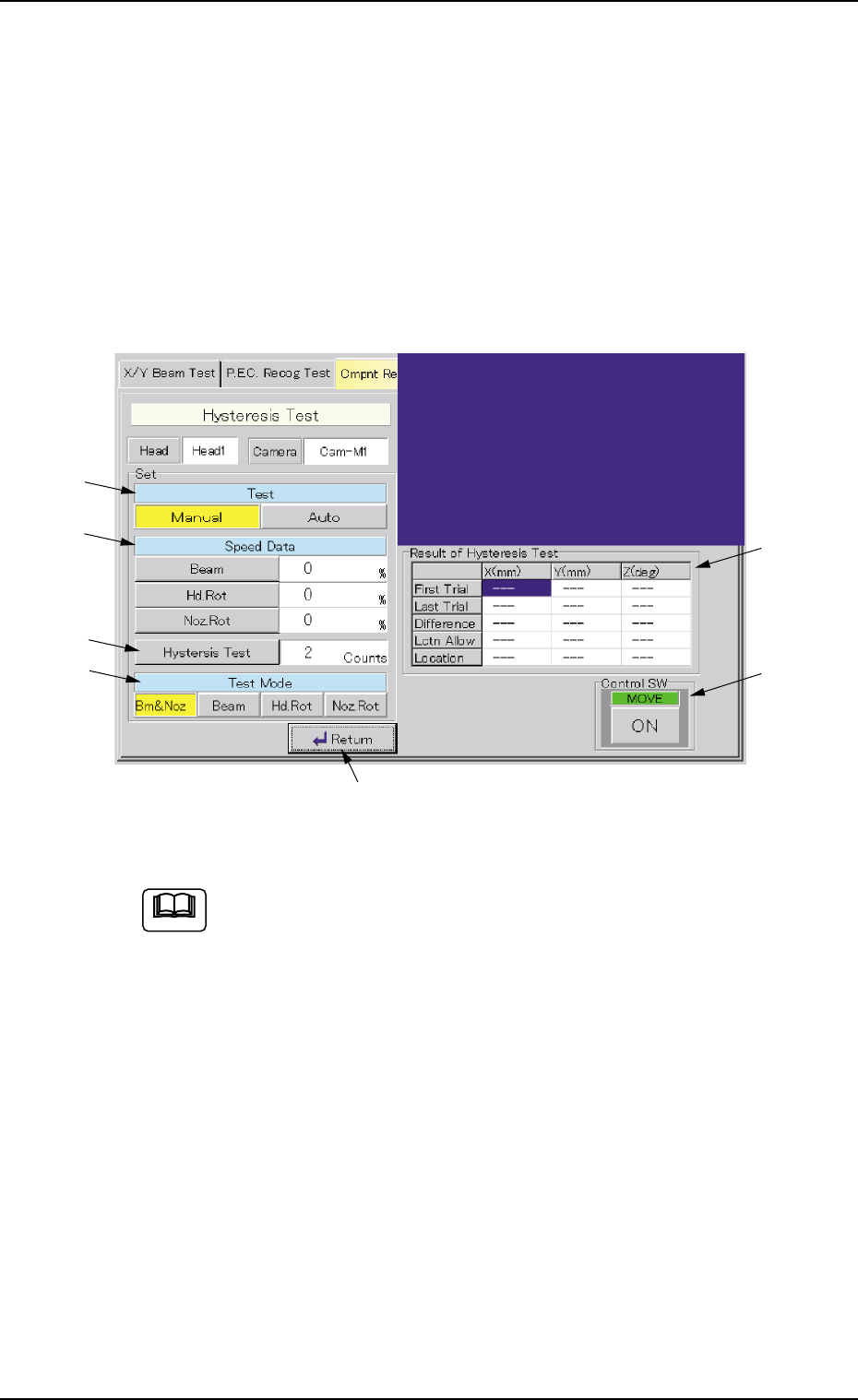
Fig. 2F36 "Hysteresis Test" Window
This window enables you to perform a hysteresis test only when
a component is located at the recognition station after imple-
mentation of the operations described in "(5-1)" and "(5-2)" of
"3.3.1 Component Recognition Test".
••
••
• Window Composition
*1 Test
[Manual] Button : When pressed, this button makes it possible to
set speed reduction parameters (%) in the "Speed
Data" text boxes, the number of hysteresis test
counts in the "Hysteresis Test" text box, and
specify a test mode.
[Auto] Button : When pressed, this button makes it possible to
increase the speed gradually and perform the test
operation repeatedly in a specific pattern.
3.3 "Cmpnt Recog Test" Tab
Note
0206-003 6-44
*1
*2
*3
*4
*7
*5
*6

AHB01ESPP
*2 Speed Data
When the [Manual] button is selected as a test mode, it is required
to set speed reduction rate (%) of the beam (X/Y) and the nozzle
rotation.
*3 Hysteresis Test
Set the number of hysteresis tests to be made when the [Manual]
button is selected as a test mode.
*4 Test Mode
Select the [Bm & Noz], the [Beam], the [Hd. Rot], or the [Noz Rot]
button.
*5 "Result of Hysteresis Test" Group Box
Displayed are the results of a hysteresis test.
*6 "Control SW" Group Box
When the [ENABLE] button on the operation panel is pressed in 2
seconds after the [ON] button (entitled "MOVE"), a hysteresis test is
conducted.
*7 [Return] Button
When this button is pressed, the "Cmpnt Recog Test" tab sheet
resumes.
••
••
• Procedure for Manual Test
(1) Press the [Manual] button under the title "Test" (*1).
(2) When the [Beam] or the [Noz Rot] button is pressed, the corre-
sponding edit window opens, enabling you to set the speed reduc-
tion rate for the test.
(3) When the [Hysteresis Test] button is pressed, the "Hysteresis Test"
edit window opens, enabling you to set the number of hysteresis
tests to be made.
(4) Select the desired test pattern.
Press the [Bm & Noz], the [Beam], the [Hd. Rot], or the [Noz. Rot]
button.
(5) When the [ENABLE] button on the operation panel is pressed in 2
seconds after the [ON] button (entitled "MOVE"), the hysteresis test
is conducted and the results of the test are displayed.
(6) When the [Return] button is pressed, the "Cmpnt Recog Test" tab
sheet resumes.
3.3 "Cmpnt Recog Test" Tab
0206-003 6-45