2OM-1075-002.pdf - 第71页
• The alternate destination should be terminated. (The feeder Nos. should not be looped.) • Neither "S" nor "X" should be set in the "C (Control Command)" text box of the destination feeder …
2.13 Feeder Alternate Function
When a feeder becomes short of components, this function selects a
prepared spare feeder. After all components are picked up from the spare
feeder, another spare feeder is selected. The prepared spare feeders
must contain the components of frequently used types.
When a component shortage error occurs and this function is activated,
the interval time for component replenishment can be prolonged and
the feeders short of components can be replenished with components
collectively.
To Implement the Alternate Feeder Mode
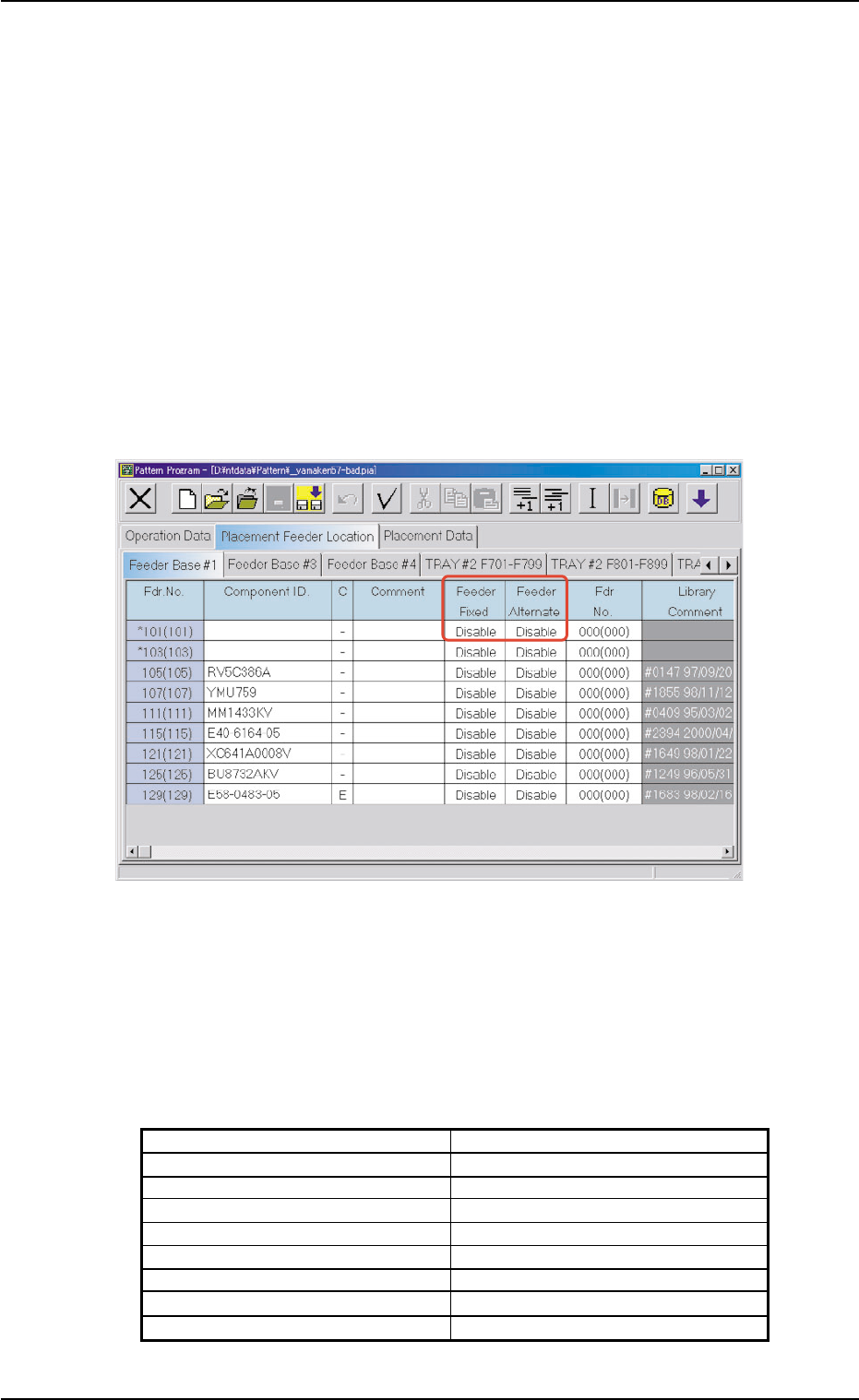
(1) Set "Enable" in the "Feeder Alternate" text box and specify the feeder
No. (destination feeder No.) in the "Fdr No." text box of the "Place-
ment Feeder Location" tab sheet in the "Pattern Program" edit win-
dow.
Fig. 2B23 "Placement Feeder Location" Tab Sheet in "Pattern Program" Edit Window
Requirements for "Fdr. No." Setting
• The component IDs must be identical between the feeder No. where
the alternate feeder mode is set (alternate source feeder No.) and
the alternate destination feeder No.
• The alternate destination feeder Nos. (Fdr No.) must be specified in
the following ranges.
Table 2B13
Feeder Base #1 101 to 132
Feeder Base #3 301 to 332
Feeder Base #4 401 to 432
FB #3 VIB Feeder #1 341 to 349
FB #3 VIB Feeder #2 351 to 359
FB #3 VIB Feeder #3 361 to 369
FB #4 VIB Feeder #1 441 to 449
FB #4 VIB Feeder #2 451 to 459
FB #4 VIB Feeder #3 461 to 469
2.13 Feeder Alternate Function
0308-002 2-21 AHB01ESPP
• The alternate destination should be terminated. (The feeder Nos.
should not be looped.)
• Neither "S" nor "X" should be set in the "C (Control Command)" text
box of the destination feeder carriage # in the "Placement Feeder
Location" tab sheet.
• When "S" or "X" is set in the "C (Control Command)" text box of the
source feeder carriage # (Placement Feeder Location Data), the com-
ponent placement actions for this feeder No. are all bypassed. (No
components are placed.)
All alternate feeder modes designated from this feeder become in-
valid.
• It is possible to designate the same alternate destination feeder from
different feeder Nos.
• The number of alternated feeder links is not limited.
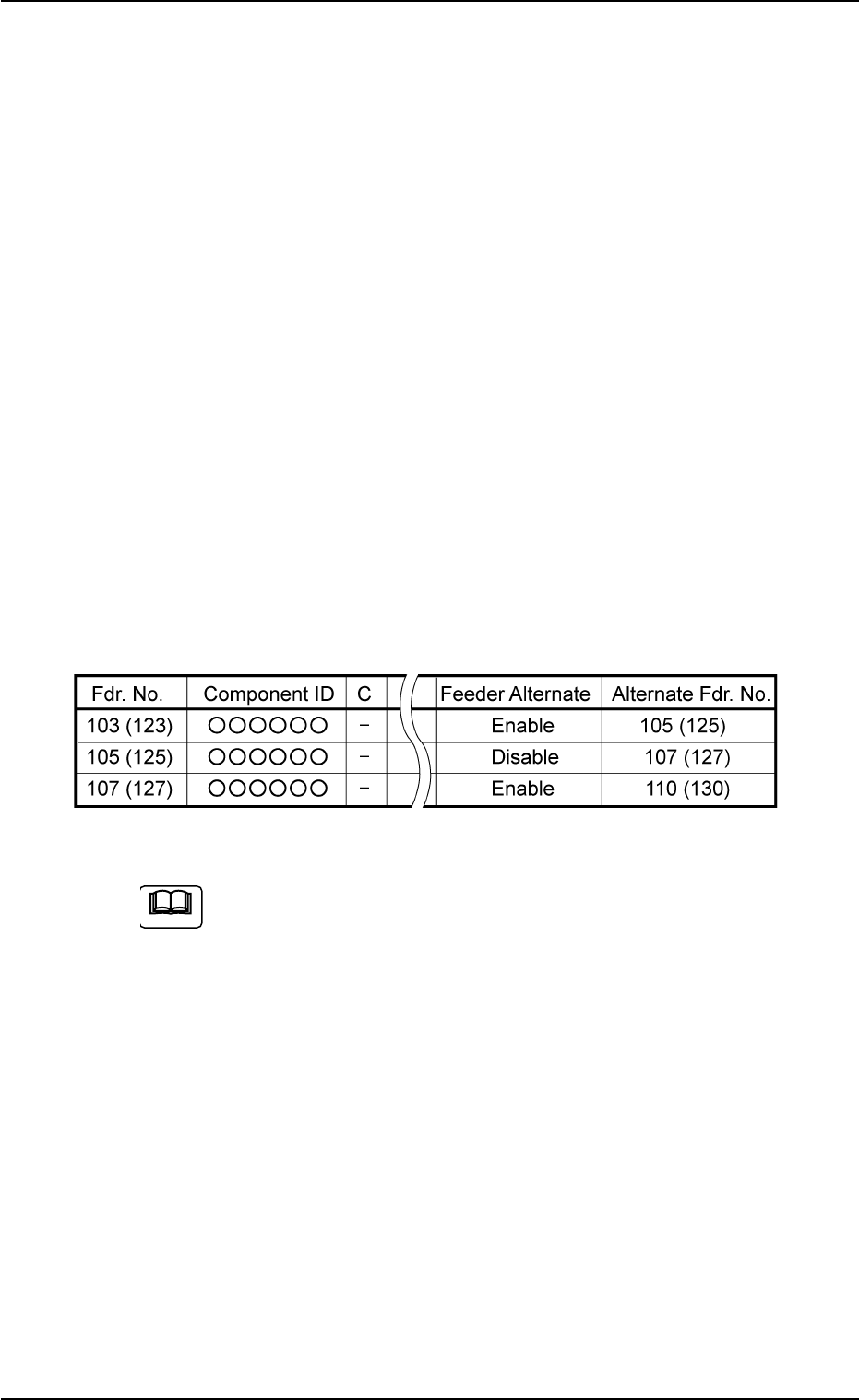
• When "Disable" is set in the "Feeder Alternate" text box for the desti-
nation feeder No., the alternate feeder mode stops working at this
feeder.
Example: In the following cases, the feeder alternate mode is termi-
nated in "Fdr. No. 103 (123)".
Fig. 2B24
When P.C.B.’s are produced using the feeders containing the
same types of components (same IDs) installed on two or more
feeders and each feeder No. is designated (dispersed feeder
designation), these feeders can be linked together by the alter-
nate feeder mode.
Load the feeders undesignated in the feeder data of the place-
ment data (P) with the same type of components (component
ID) and set them in the destination "Fdr. No." for the alternate
mode.
The machine starts automatic operation using the feeders on
the dispersed feeders. Every time a feeder becomes short of
components, the other available feeders are consolidated. Af-
ter the same types of components are used up, the machine
stops in the component shortage error condition.
2.13 Feeder Alternate Function
0206-001 2-22 AHB01ESPP
Note
2.13 Feeder Alternate Function
0308-002 2-23 AHB01ESPP
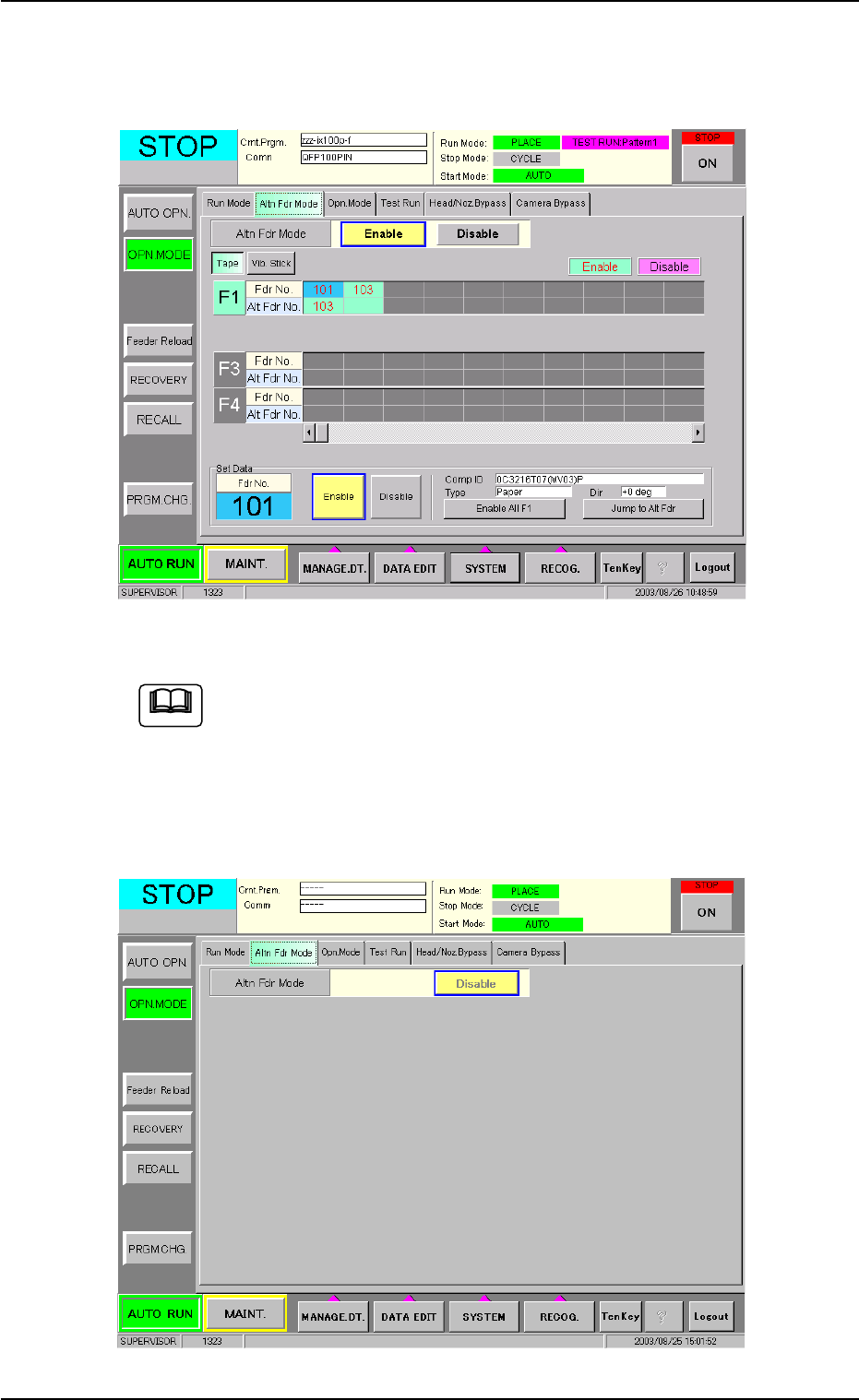
(2) Make the "Altn Fdr Mode" tab sheet appear in the "OPN. MODE"
window (submenu) that opens after the [OPN. MODE] button on the
submenu bar of the "AUTO RUN" window is pressed.
Fig. 2B25 "Altn Fdr Mode (Enable)" Tab Sheet
Fig. 2B25 shows the contents of the "Altn Fdr Mode" tab sheet
that appear when "Enable" is set in the "Feeder Alternate" text
box of the "Placement Feeder Location" tab sheet in the "Pat-
tern Program" edit window.
When "Disable" is set in the text box, the following tab sheet
appears.
Fig. 2B26 "Altn Fdr Mode (Disable)" Tab Sheet
Note