00195941-03-UM SiplaceCA-EN.pdf - 第360页
5 Tasks on the Mach ine User Manual SIPLACE CA 5.7 LCD and Status Display at the X-Feeder Mod ule Edition 08/2011 EN 360 5 Fig. 5.7 - 1 Buttons, LCD and status displays on the X feeder module The following t ables show t…

User Manual SIPLACE CA 5 Tasks on the Machine
Edition 08/2011 EN 5.6 Configuring the X Feeder
359
5.6 Configuring the X Feeder
Setting up the X feeder modules is described in the job guide.
5.7 LCD and Status Display at the X-Feeder Module
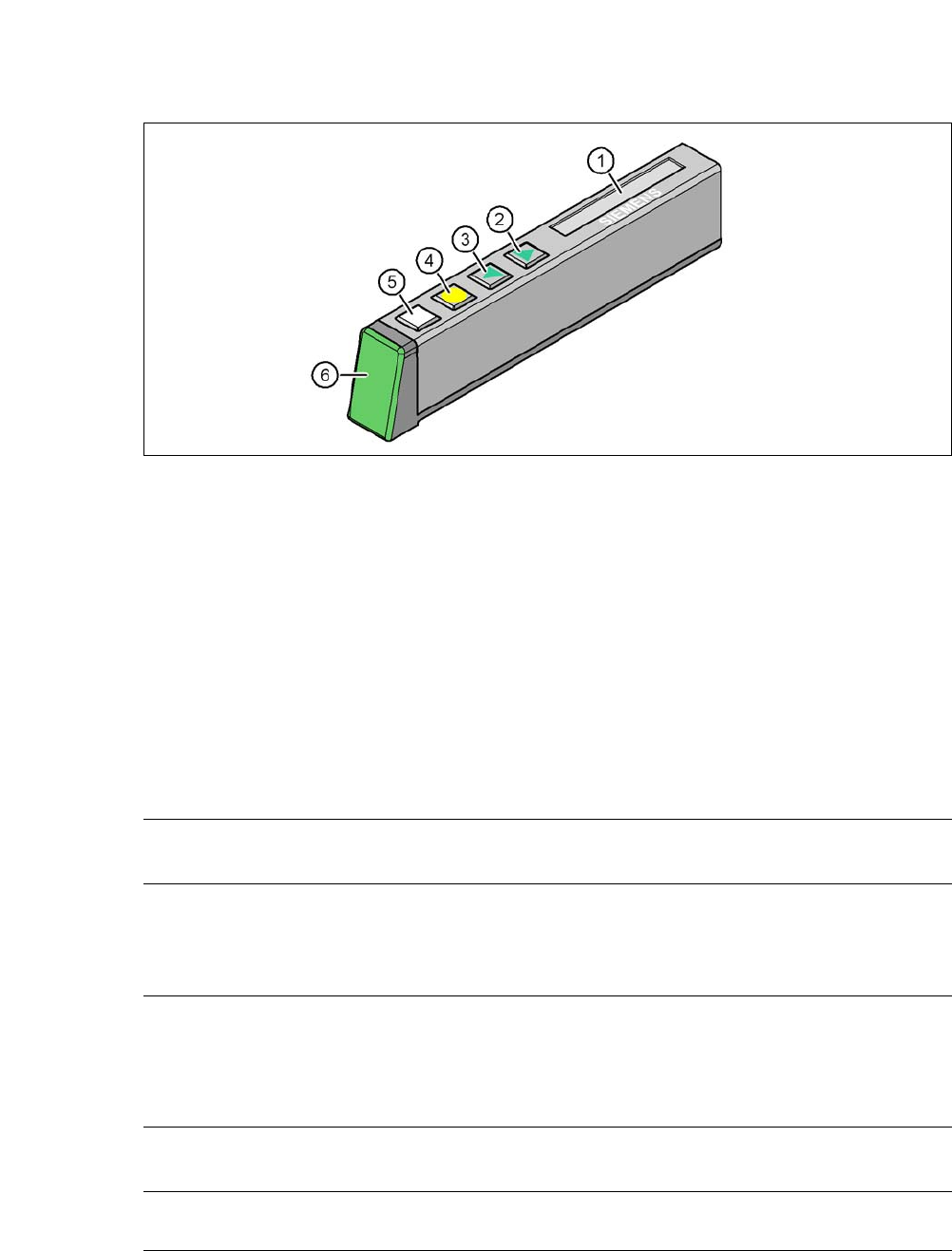
The X feeder modules have a multicolor status display (item 6) for signaling the operating statuses
and an LCD display (item 1) to display the texts.
– If the status display lights up green, the feeder module is on standby and is contained in
the current setup. If the feeder module is not contained in the current setup, the status
display remains off.
– If the status display lights up orange, it is signaling a warning. The text of the warning
appears on the LCD display.
– If the status display lights up red, a malfunction has occurred. The error message is out-
put on the LCD display.
5 Tasks on the Machine User Manual SIPLACE CA
5.7 LCD and Status Display at the X-Feeder Module Edition 08/2011 EN
360
5
Fig. 5.7 - 1 Buttons, LCD and status displays on the X feeder module
The following tables show the wording of the LCD display, the color and the mode of the status
display, the description of the errors and measures for troubleshooting.
5.7.1 Warnings
5
5
5.7.2 Error Messages and Troubleshooting
5
(1) LCD display (2) FORWARD button
(3) BACK button (4) FOIL button
(5) SET button (6) Status display, multicolor
Text on the
LCD display
Status
display
Meaning Troubleshooting
Remove Foil
(Remove the foil)
Orange The selected function is not
permitted when the cover foil
is tensioned (foil rocker is
pressed down).
If you wish to carry out that function, remove
the foil from the pair of gear wheels and cut
it off to relieve the pressure on the foil rocker.
Text on the
LCD display
Status
display
Meaning Troubleshooting
none Red,
flashing
Feeder module software not
jumping to the application
Reload the application software
Load feeder module software

User Manual SIPLACE CA 5 Tasks on the Machine
Edition 08/2011 EN 5.7 LCD and Status Display at the X-Feeder Module
361
Handle --->>
(Handle --->>)
Red Feeder module was sig-
naled, but removal handle is
not yet pushed in
Push in the removal handle
Low Voltage
(Low voltage)
Orange 24V supply voltage did not
rise above the switch-on
threshold after switching on
Check the power supply
Low Voltage
(Low voltage)
Red 24V supply voltage rose
above the switch-on thresh-
old after switching on and
was then interrupted
Check the power supply
Feed Time-out
TransTimeout
(Transfer time-out
error during tape
transfer cycle)
Red Tape feeder cycle did not
end correctly within the spec-
ified time (time-out for the
"Feed" function)
Is the tape reel jammed in the container?
Is there a component jammed in the pickup
area between component tape and compo-
nent window?
Once the obstacle has been eliminated, use
the arrow keys to restart the conveyor. The
feeder module will move the defective con-
veyor to the end, and then returned to its
position
Foil Torn
(foil torn)
Red Foil was not tensioned within
the specified time
The foil is probably torn. Insert new foil and
tension
Foil PeelErr
(Error while peel-
ing off the foil)
Red Foil was not peeled off even
though the tape is moved
The cover foil is probably jammed beneath
the pickup window and cannot be peeled off
correctly
Foil Jam
(foil jam)
Red Foil motor has locked up Leveling gears blocked by foil? => Remove
the foil
EEP-WriteErr
(Error while back-
ing up data in the
EEPROM)
Red The data back-up in the EE-
PROM was not carried out
correctly
Remove the component tape (tape can be
moved out by pressing the arrow keys or
pulled out after raising the pickup window).
Press the SET button to confirm the error.
Then press the yellow button to confirm the
reference run prompt.
EEP-ReadErr
(Error reading out
EEPROM)
Red Data was not read from the
EEPROM correctly
EEP-DataErr
(Error while back-
ing up the data in
the EEPROM)
Red The data back-up in the EE-
PROM was not carried out
fully
Text on the
LCD display
Status
display
Meaning Troubleshooting