00196044-05 - sg x und x4i fse_en.pdf - 第149页
Communication and Control Function Control and Troubleshooting for Service Work One Wire Bus S tudent Guide (FSE) SIPL ACE X Series and X4I Edition 01/2009 EN Communication and Control 149 Assignment X4I and X Series (fr…
Communication and Control
One Wire Bus Function Control and Troubleshooting for Service Work
Student Guide (FSE) SIPLACE X Series and X4I
Communication and Control Edition 01/2009 EN
148
Assignment X Series (up to SW 60x) PA1
Subsystem Hardware components Comments
NC, 1, coupler, 00 1-Wire CAT5 interface on
the I/O module
Temperature, 20, coupler, 00 1-Wire CAT5 interface on
the I/O module
NC, 4, coupler, 00 1-Wire CAT5 interface on
the I/O module
Mainpath, 0, IO_2C, 01
Mainpath, 0, E2_512B, 01
1-Wire CAT5 interface on
the I/O module
1-Wire-CAT5 board interface will be
integrated later into the I/O module
Temperature, 20, E2_32B, 01
temperature, 20, E2_512B, 61
Temperature, 20, temperature, 10
Temperature, 20, temperature, 11
Temperature, 1, IO_2C,01
Temperature sensors
Gantry 1
The two temperature sensors form a unit and
can only be replaced as a set. The gantry
recognition part can not be replaced.
Temperature, 20, E2_32B, 81
Temperature, 20, E2_512B, e1
Temperature, 20, temperature, 90
Temperature, 20, temperature, 91
Temperature, 20, IO_2C,81
Temperature sensors
gantry 4
The two temperature sensors form a unit and
can only be replaced as a set. The gantry
recognition part can not be replaced.
NC, 4, AD, 03
NC, 4, AD, 01
NC, 4, AD, 81
1 wire hub NC on location
4
Shows, that the 1 wire hub is connected.
NC, 4, E2_32B, 01
NC, 4, IO_8C, 01
NC, 4, AD, 01
Control board in NC
Gantry 4, only for
C&P20A NC
Control board of NC row 1
(only for C&P20A NC).
NC, 4, E2_32B, 81
NC, 4, IO_8C, 81
NC, 4, AD, 97
Control board in NC
Gantry 4, only for
C&P20A NC
Control board of NC row 2
(only for C&P20A NC).
NC, 1, AD, 01
NC, 1, AD, 03
NC, 1, AD, 81
1 wire hub NC on location
1
Shows, that the 1 wire hub is connected.
NC, 1, E2_32B, 01
NC, 1, IO_8C, 01
NC,1 AD, 15
Control board in NC
Gantry 1, only for
C&P20A NC
Control board of NC row 1
(only for C&P20A NC).
NC, 1, E2_32B, 81
NC, 1, IO_8C, 81
NC, 1, AD, 97
Control board in NC
Gantry 1, only for
C&P20A NC
Control board of NC row 2
(only for C&P20A NC).
Communication and Control
Function Control and Troubleshooting for Service Work One Wire Bus
Student Guide (FSE) SIPLACE X Series and X4I
Edition 01/2009 EN Communication and Control
149
Assignment X4I and X Series (from SW 70x) PA1
Subsystem Hardware components Comments
NC, 1, coupler, 00 1-Wire CAT5 interface on
the I/O module
Not needed, as the NC operates with CAN
nodes.
Temperature, 20, coupler, 00 1-Wire CAT5 interface on
the I/O module
NC, 4, coupler, 00 1-Wire CAT5 interface on
the I/O module
Not needed, as the NC operates with CAN
nodes.
Mainpath, 0, IO_2C, 01
Mainpath, 0, E2_512B, 01
1-Wire CAT5 interface on
the I/O module
1-Wire-CAT5 board interface will be
integrated later into the I/O module version
03
Temperature, 1, IO_2C,01
Temperature, 20, IO_2C,81
1-Wire CAT5 interface on
the I/O module
Temperature, 20, E2_32B, 01
temperature, 20, E2_512B, 61
Temperature, 20, temperature, 10
Temperature, 20, temperature, 11
Temperature, 1, IO_2C,01
Temperature sensors
Gantry 4
The two temperature sensors form a unit and
can only be replaced as a set. The gantry
recognition part can not be replaced.
Temperature, 20, E2_32B, 81
Temperature, 20, E2_512B, e1
Temperature, 20, temperature, 90
Temperature, 20, temperature, 91
Temperature, 20, IO_2C,81
Temperature sensors
Gantry 1
The two temperature sensors form a unit and
can only be replaced as a set. The gantry
recognition part can not be replaced.
Communication and Control
One Wire Bus Function Control and Troubleshooting for Service Work
Student Guide (FSE) SIPLACE X Series and X4I
Communication and Control Edition 01/2009 EN
150
4.5.2.2 Function Control with Caccia
Example - nozzle changer (NC)
In addition to the station software, there are also two other means for checking the function of the NC.
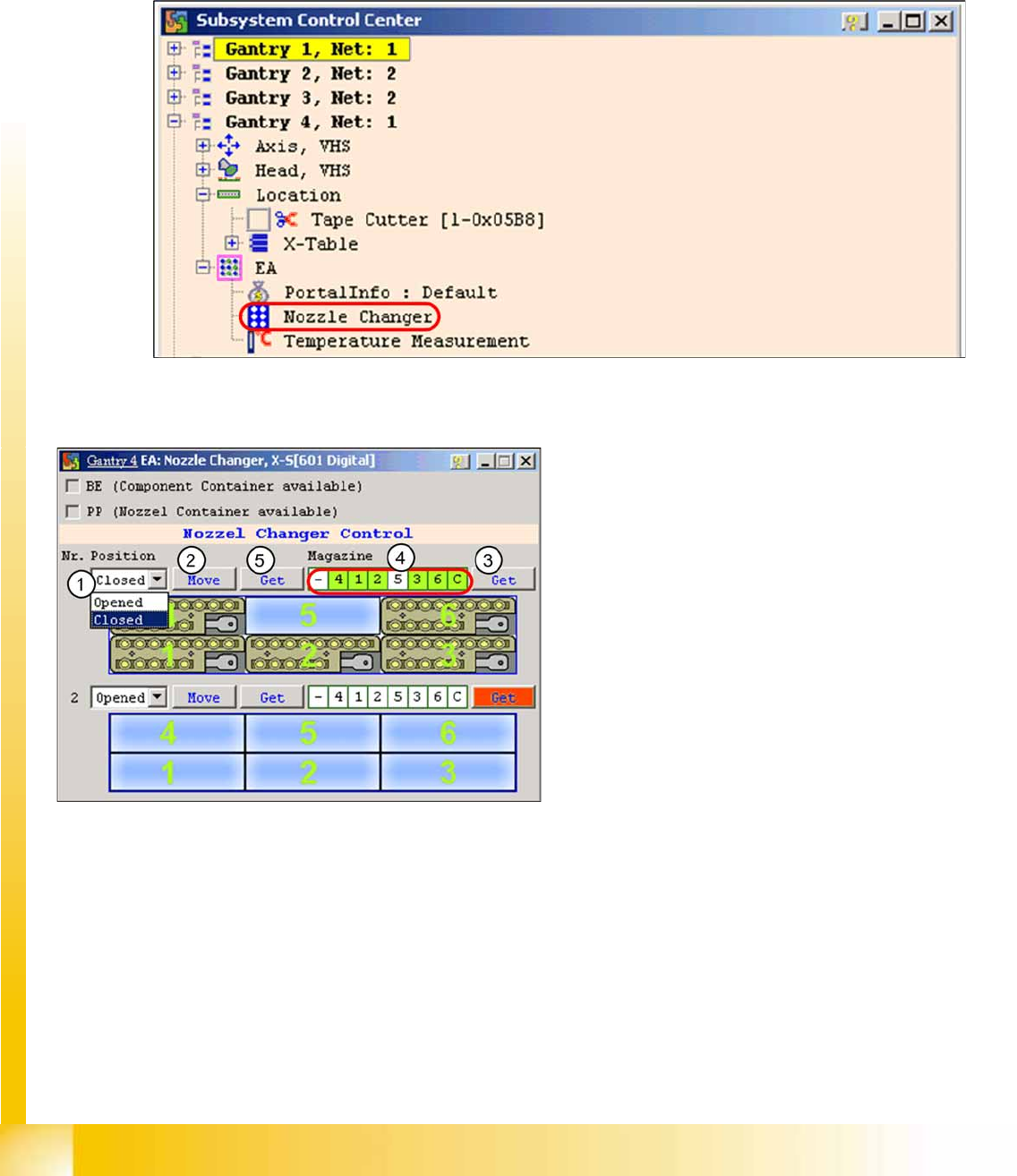
NC menu
X Open the
IO
folder for the relevant location in the
Subsystem control center
.
X Double-click on
Nozzle Changer
4-51: Subsystem control center (nozzle changer)
X the following menu will appear:
4-52: I/O nozzle changer
Legend
1. Selection window, open/close NC row 1
2. Performs the selected function
3. Status query magazine (micro switch under
the magazine)
4. Status display magazine
5. Status display NC opened / closed