00196044-05 - sg x und x4i fse_en.pdf - 第375页
Twin Head Manual Lowering of Z Axis Settings S tudent Guide (FSE) SIPL ACE X Series and X4I Edition 01/2009 EN T win Head 375 Since both segments of the Twin head are fitted at an angle of 180°, there are two different m…

Twin Head
Settings Calibrating the Twin Head
Student Guide (FSE) SIPLACE X Series and X4I
Twin Head Edition 01/2009 EN
374
9.4.7 Calibrating the Twin Head
During initial setup or after replacement of a Twin module the Twin Head must be calibrated. This menu
measures the offset between the Twin segment and the PCB camera center.
X Put the nozzles 517 by hand on the segments of the P&P modules.
X Make sure that the first nozzle from the garages are empty and depend on this the filling level from
the nozzle changer are edited, This is necessary for calibration of the pickup height.
X Enter the nozzle "517" for both TWIN modules as active nozzle on the TWIN Head:
SITEST:
X Select
Twin Head
X Select the nozzle changer head function.
X Select the appropriate "segment" from the list.
X Select
Edit
==>
517
and
Accept
.
X Enable
Select Segment
.
X Select
Confirm Exchange
.
X In the SITEST main menu, select
All Heads and Cameras
X Only select the checkbox
Twin Head
of the applicable placement area.
X Select
Start
.
9.4.8 Mechanical Adjustment of the Z Axis Incremental Encoder
9.4.9 Vision DC/DC Converter
The function of the Vision DC/DC converter is to provide the 42V voltage supply for the stationary
cameras.
The 42V are use for the illumination of the stationary cameras.
When replacing the Vision DC/DC converter, observe the following settings, which depend on your
installation location (main/subdistributor).
9.4.10 Manual Lowering of Z Axis
The Twin head is designed for a placement force of 0.5 to 15 N (up to 30 N for the high force Twin head)
. The rotary axis needs to be very smooth-running, especially for low placement forces. Therefore, the
rotary axis is not constructed for traction forces.
NOTE:
The following calibration steps are performed automatically: - MA zero point, PCB camera,
calibration tool position, head height, TH calibration offset module 1 and 2, IC camera, (option
FC camera), nozzle changer.
NOTE:
The incremental encoder on the Z axis must be adjusted to a distance of 0.4 mm to the
incremental scale. Please adjust the incremental encoder parallel to the incremental scale.
After fitting, check the Z axis track signals (see Section Component Handling).
Main distributor Subdistributor
Bypass 1 (wire jumper) 10 - 13 6 - 13
Bypass 2 (wire jumper) 11 - 12 4 - 12
Twin Head
Manual Lowering of Z Axis Settings
Student Guide (FSE) SIPLACE X Series and X4I
Edition 01/2009 EN Twin Head
375
Since both segments of the Twin head are fitted at an angle of 180°, there are two different methods for
moving the Z axis downwards.
CAUTION:
When manually lowering the Z axis, the Twin head module can be easily damaged!
X Manual lowering may only be performed by trained personnel!
ATTENTION:
Before performing manual lowering of the Z axis, make sure the Z axis has been released at the
relevant axis controller board.
X When releasing the Z axis, the Z axis return cylinder moves upwards.
X If the axis is not released, the return cylinder will automatically move upwards when the Z axis
is manually lowered, which could cause injuries and damage to the placement head.
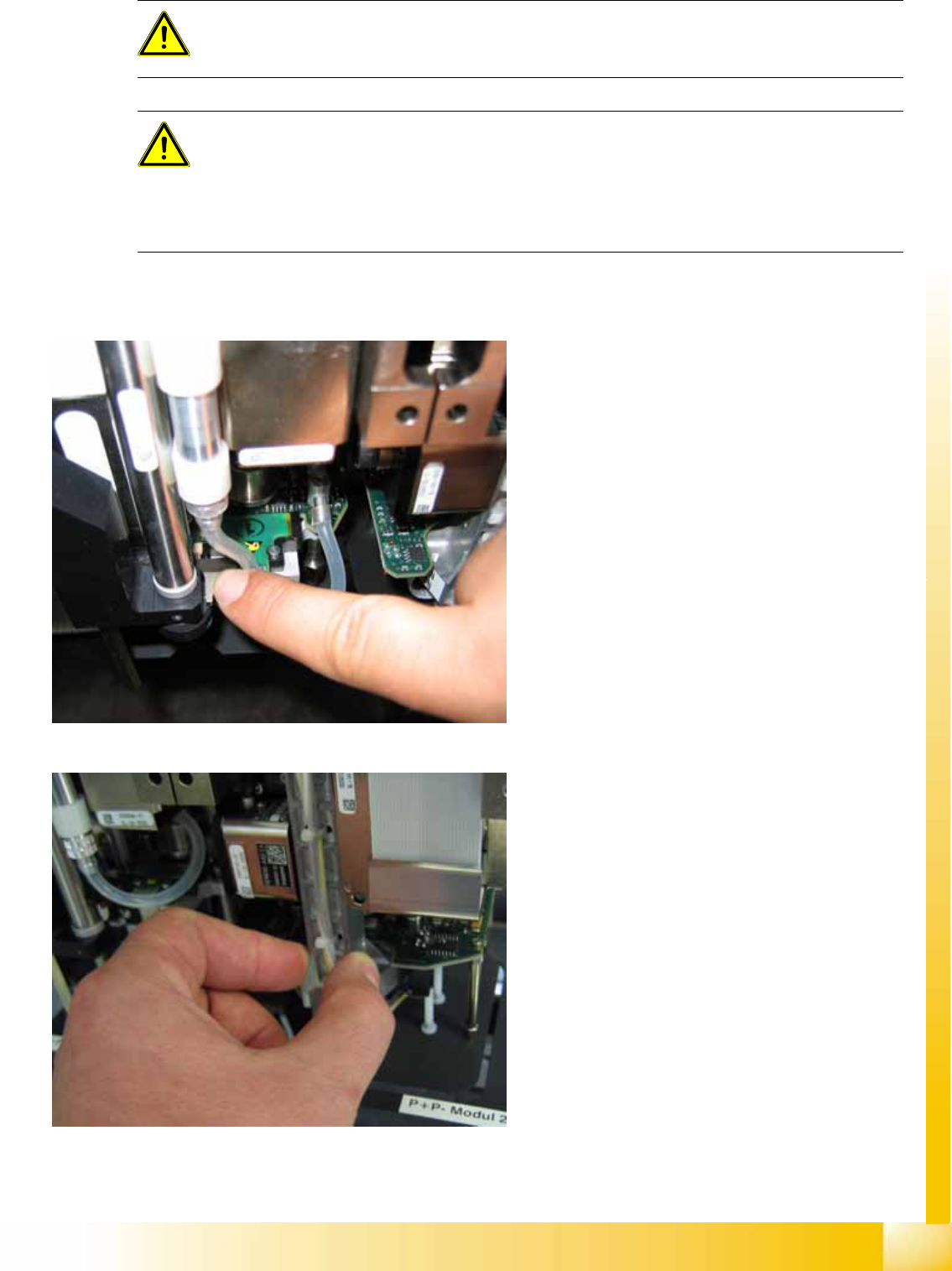
Lowering the Z Axis at P&P Module 1
To safely press the Z axis downwards, apply
manual pressure to the marked part of the return
unit driver.
Lowering the Z Axis at P&P Module 2
The Z axis can be moved downwards at segment
2 by taking hold of the carrier arm from both sides
and then pushing this down.
Twin Head
Nozzle changer Position and assembly the nozzle changer
Student Guide (FSE) SIPLACE X Series and X4I
Twin Head Edition 01/2009 EN
376
9.5 Nozzle changer
9.5.1 Position and assembly the nozzle changer
9.5.1.1 Position
9.5.1.2 Nozzle Changer Position at Location with an MTC
SW 603 allows you to install an MTC in a placement area with 2 gantries. However, you need a special
adapter for the Twin head NC, if using this configuration.
9.5.1.3 Fitting the Nozzle Changer Magazine
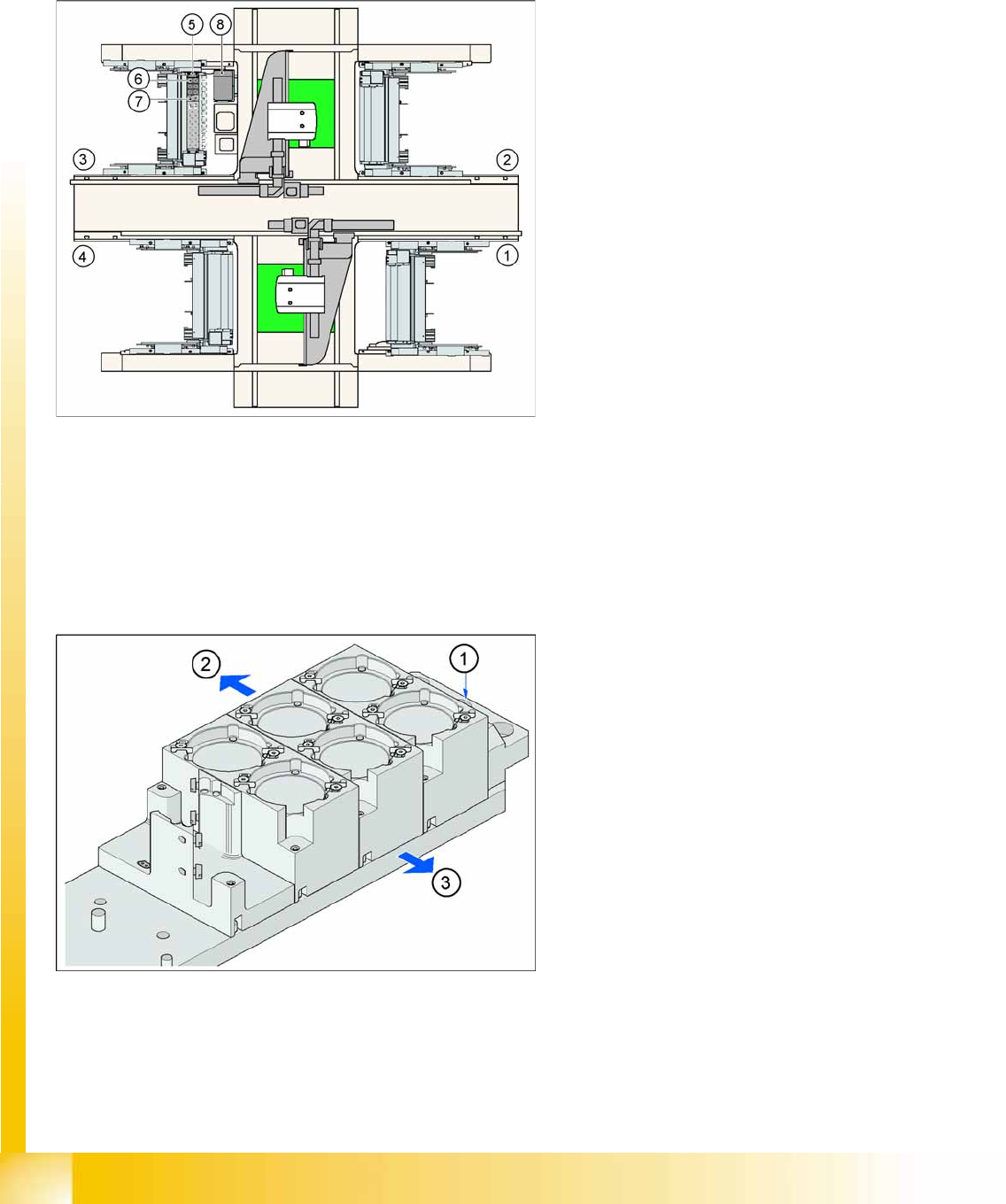
9-18: Position of "standard nozzle changer" – sector 3 shown here
Legend
1. Feeder area 1
2. Feeder area 2
3. Feeder area 3
4. Feeder area 4
5. Nozzle changer no. garage 1
6. Standard magazine
7. Magazine for special nozzles or grippers
8. Component reject bin
9-19: Fitting the magazine (X/D3 machine)
The nozzle changer together with the empty tape
duct is fixed on the component docking unit. The
magazines are seated on a common support.
They are centered with two parallel pins and fixed
in place with two countersunk screws.
Legend
1. Fiducial for optical X/Y position recognition of
the magazine carrier.
2. Arrow pointing to changeover table
3. Arrow pointing toward the PCB conveyor
Align the nozzle changer so that the marking hole
(item 1) is on the left, as viewed by the operator (at
the changeover table side).