00196044-05 - sg x und x4i fse_en.pdf - 第590页
MTC2 MTC2 Calibration and Settings Adjustments feed axes S tudent Guide (FSE) SI PL ACE X Series and X4I MTC2 Edition 01/2009 EN 594 Checking and setting the handle se nsors Checking and setting the WT C safety query 14-…
MTC2
Adjustments feed axes MTC2 Calibration and Settings
Student Guide (FSE) SIPLACE X Series and X4I
Edition 01/2009 EN MTC2
593
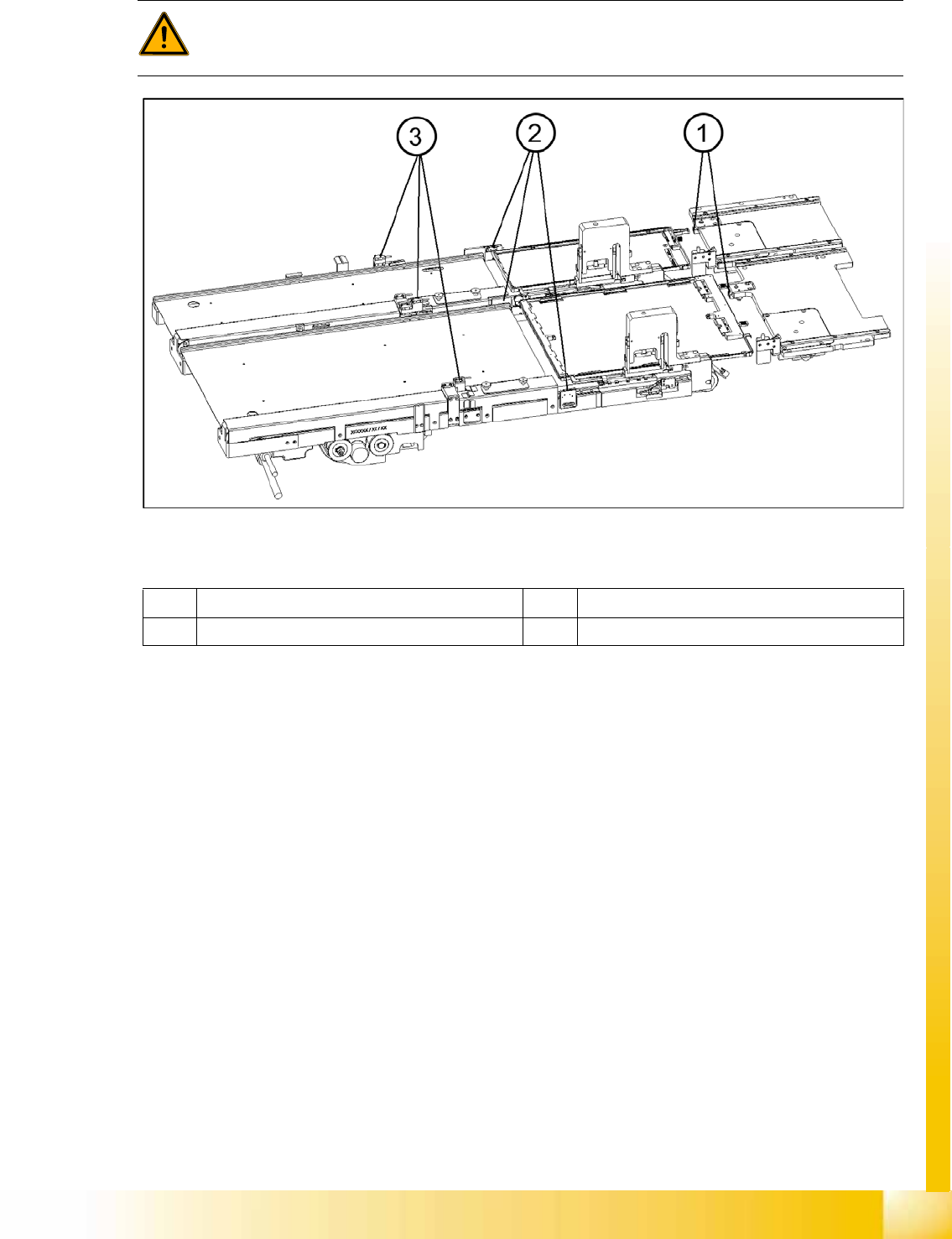
14.3.4.3 Light barriers
14-55: Light barriers on the feed axes
Legend
Tools and Equipment
Adjustment gauge, crash light barriers (03021679-01)
1 set of Allen keys
Preparations
X Move the feed axis into the zero position --> „Check the zero point“.
WARNING:
You may only check and calibrate the light barriers of the feed axis with the correct zero
positions, transfer positions and removal positions of the lifting and feed axes.
1 Handle sensor 3 Crash light barriers
2 WTC safety query
MTC2
MTC2 Calibration and Settings Adjustments feed axes
Student Guide (FSE) SIPLACE X Series and X4I
MTC2 Edition 01/2009 EN
594
Checking and setting the handle sensors
Checking and setting the WTC safety query
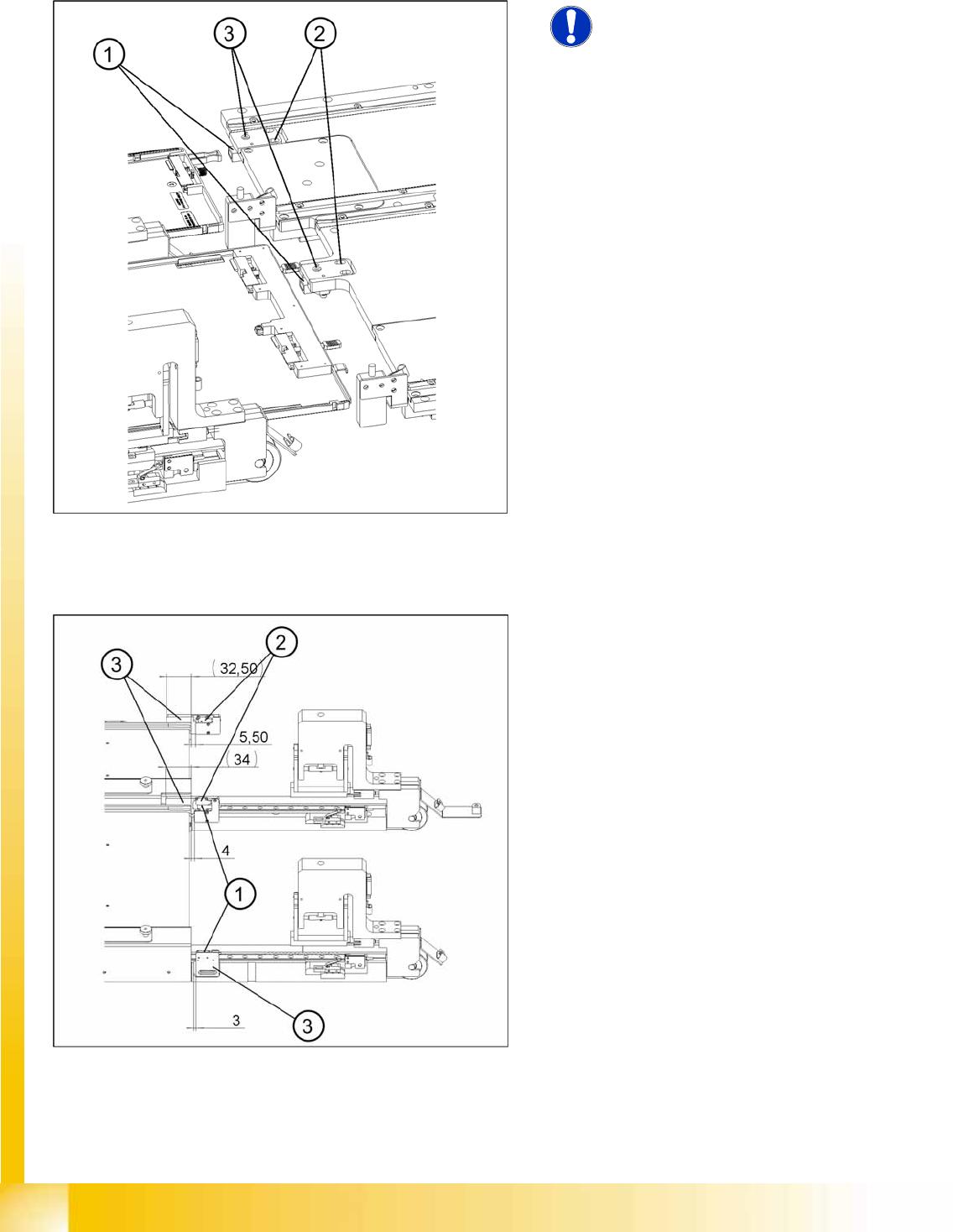
14-56: Checking and setting the handle sensors
NOTE:
The handle sensors each comprise a
reflecting light barrier which can detect
the handle of the WTC or the side of the
handle of the WTC XL. An LED
indicates the switching status of the
sensor.
Legend
1. Reflecting light barriers of the handle sensors
2. Mounting plates with clamping screws
3. LEDs
X Unscrew the clamping screws of the mounting
plate.
X Move the mounting plate in the direction of the
WTC until the reflecting light barrier responds
(the LED will change its status). Fix the plate in
place there.
X Ensure that the status of the LED remains the
same when you move the locked WTC. If
necessary, move the mounting plate a little
further in the direction of the WTC.
X Firmly tighten the clamping screws.
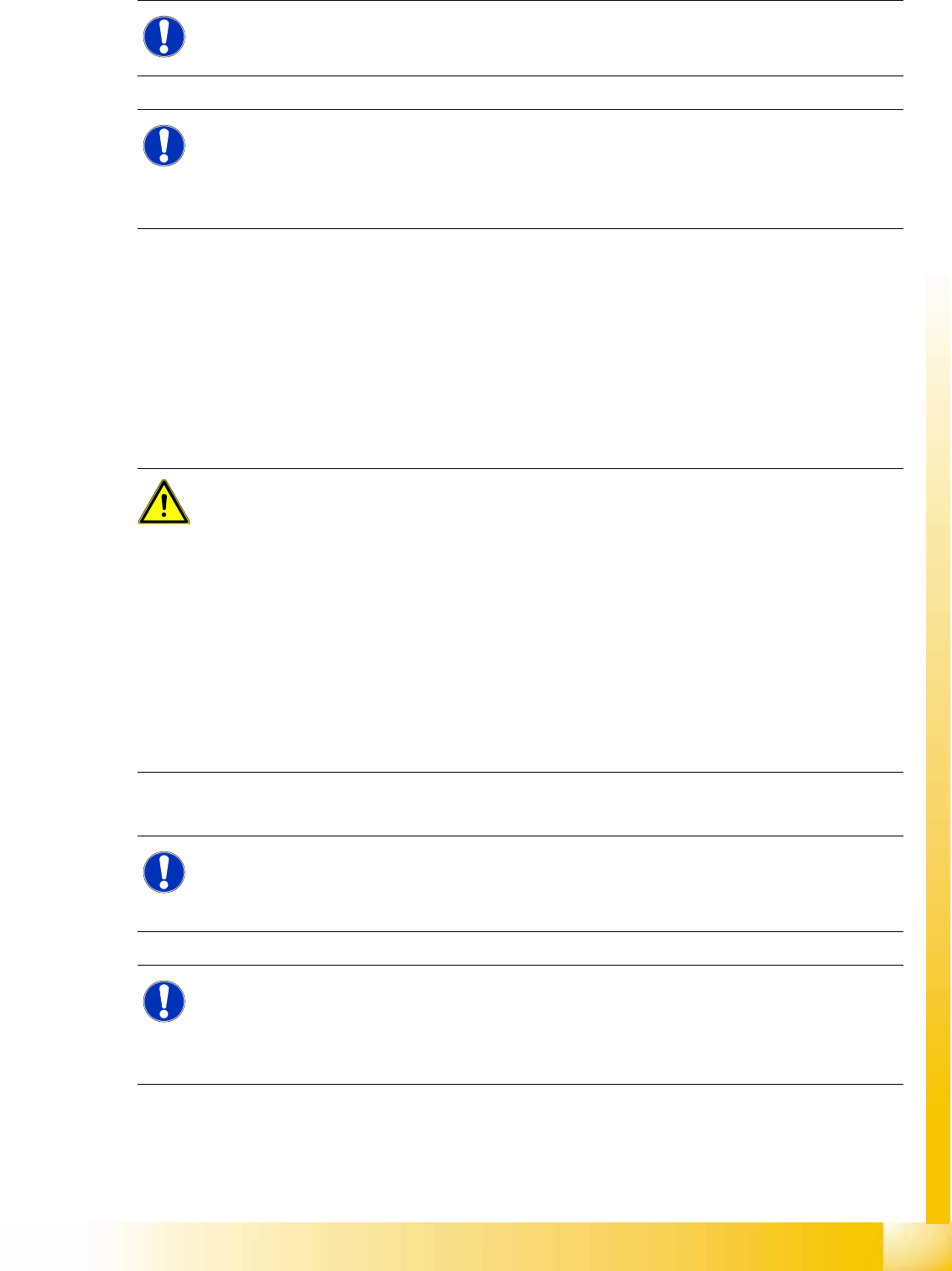
14-57: Checking and setting the WTC safety queries
Legend
1. Light barrier for the WTC safety query for
tower 1
2. Light barrier for the WTC safety query for
tower 2
3. Light barrier holder with clamping screws
MTC2
Adjustments feed axes MTC2 Calibration and Settings
Student Guide (FSE) SIPLACE X Series and X4I
Edition 01/2009 EN MTC2
595
X Unscrew the clamping screws on the middle holder and move it by the following fixed adjustment
amounts (see ):
Tower 1, left side: 3 mm
Tower 1, right side = tower 2, left side = 4 mm
Tower 2, right side: 5.5 mm
X Ensure that the status of the LEDs remains the same when you move the locked WTCs. If necessary,
move the holders a little further away from the front edge of the WTCs.
X Firmly tighten all clamping screws and varnish them when they have been set.
Checking and Setting the Crash Light Barriers
X Place the adjustment gauge for the crash light barriers along of a empty WPC onto the rail of the
feed axis for tower 1.
NOTE:
The WTC safety queries each comprise a light barrier which is interrupted by the front edge of
the WTC or the WTC XL. Two LEDs indicate the switching status of the sensor.
NOTE:
Make the settings for the feed axis of tower 1 first and then the feed axis of tower 2.
The light barrier holder in the middle accepts the light barriers for both axes but cannot be set
separately. When making settings, both the holder for the sender and the holder for the receiver
of the light barrier pairs must be moved.
ATTENTION:
The following must be observed for a functional test on the light barrier setting:
- Light barriers must not respond when the lifting axes are moved. When a preliminary setting
has been made, the lifting axis must therefore be moved in 0.1 mm steps over a distance
corresponding to the height of a WTC next to the light barrier to test the setting.
- If the light barrier responds, the emergency stop function is triggered. The emergency stop
status can only be reset, however, when the receiver receives a signal from the transmitter
again.
Loosen the clamping screws on the light barrier holder (transmitter and receiver). Move them
both in the direction of the feed track (away from the tower) until the receiver’s status indicator
switches from red to green. When moving the lifting axis, ensure that the front edge of the WTC
is positioned within the capture area (chamfer) of the adjustment gauge. When moving the lifting
axis, ensure that the front edge of the WTC is positioned within the capture area (chamfer) of
the adjustment gauge Checking and setting the crash light barriers.
NOTE:
The crash light barriers each comprise a light barrier which is activated by a waffle pack tray of
a specific height and is interrupted by a protruding component. Two LEDs indicate the switching
status of the sensor.
NOTE:
Make the settings for the feed axis of tower 1 first and then the feed axis of tower 2.
The light barrier holder in the middle accepts the light barriers for both axes but can be set
separately (it comprises a base section and a movable section). When making settings, both the
holder for the sender and the holder for the receiver of the light barrier pairs must be moved.