00196044-05 - sg x und x4i fse_en.pdf - 第427页
Component Handling Operation X Feeder S tudent Guide (FSE) SIPL ACE X Series and X4I Edition 01/2009 EN Component Handling 427 10.2.7.15 Feeder Settings at the S tation 10-27: View of feeder settings The line GUI can be …
Component Handling
X Feeder Operation
Student Guide (FSE) SIPLACE X Series and X4I
Component Handling Edition 01/2009 EN
426
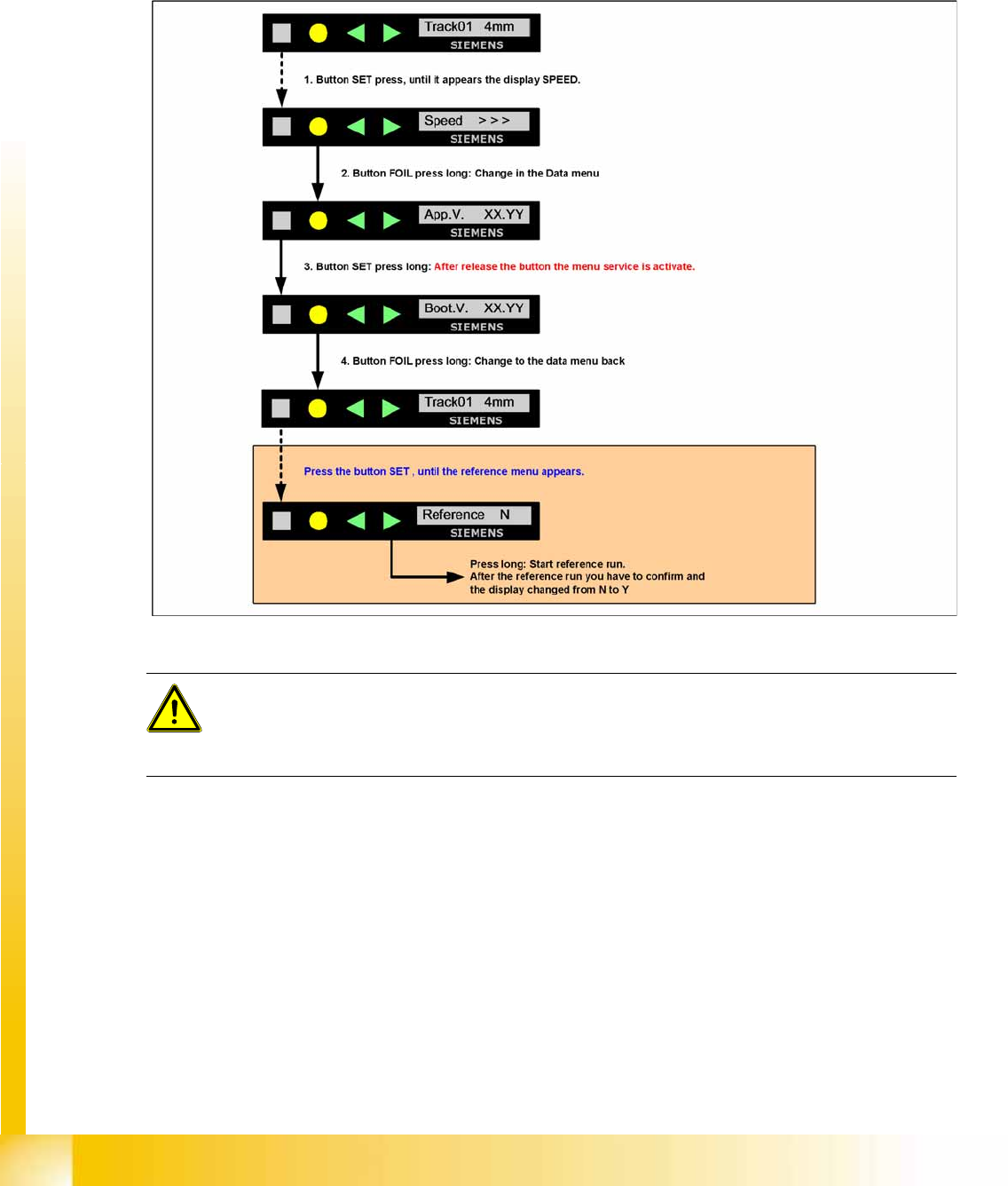
10.2.7.14 Activation and Function in the Service Technician Menu
The menu setting
Service technician
is only temporarily active. If a minute has passed since the
last time a button was pressed, the menu will automatically return to
Standard
and the menu item
Reference
will be hidden again. You then need to reset the setting
Service technician
manually.
The
Service technician
menu includes the item
Reference
as an additional entry. Here you can
start a reference run for the tape drive, if required.
10-26: Service menu for reference run
ATTENTION:
During the reference run with a tape you have to open the pick up window and no foil in the foil
removal unit and you lost components.
X Recommendation: Carry out the reference run with out a tape.
Component Handling
Operation X Feeder
Student Guide (FSE) SIPLACE X Series and X4I
Edition 01/2009 EN Component Handling
427
10.2.7.15 Feeder Settings at the Station
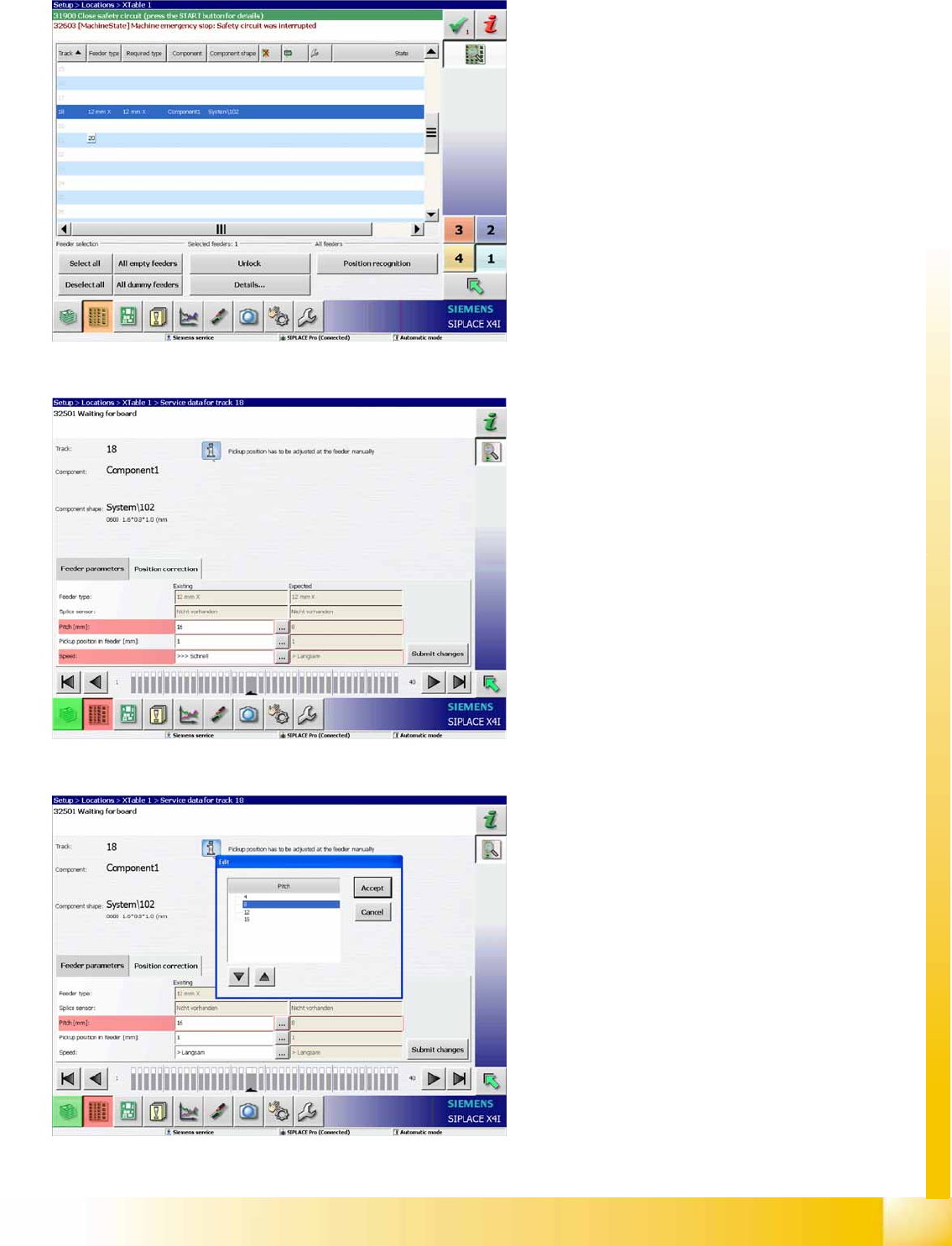
10-27: View of feeder settings
The line GUI can be configured in the SIPLACE
Pro programming system, so that correct feeder
data are sent to the machine. For reliable
production, we recommend regularly updating the
feeder data for the components, to avoid incorrect
operation of the feeders.
The adjacent diagram shows the correct
transmission of feeder settings from SIPLACE
Pro.
If a spanner appears in the feeder status field, this
means that manual settings are needed.
10-28: View of feeder settings
If the feeder data transfer is disabled in SIPLACE
Pro and if the data from the programming system
and the feeder do not match, a warning will be
issued or the fields will be marked red (see
adjacent diagram).
10-29: View of feeder settings
The data can now be manually changed using the
buttons in the relevant line.
Component Handling
X Feeder Error Messages on X Feeder
Student Guide (FSE) SIPLACE X Series and X4I
Component Handling Edition 01/2009 EN
428
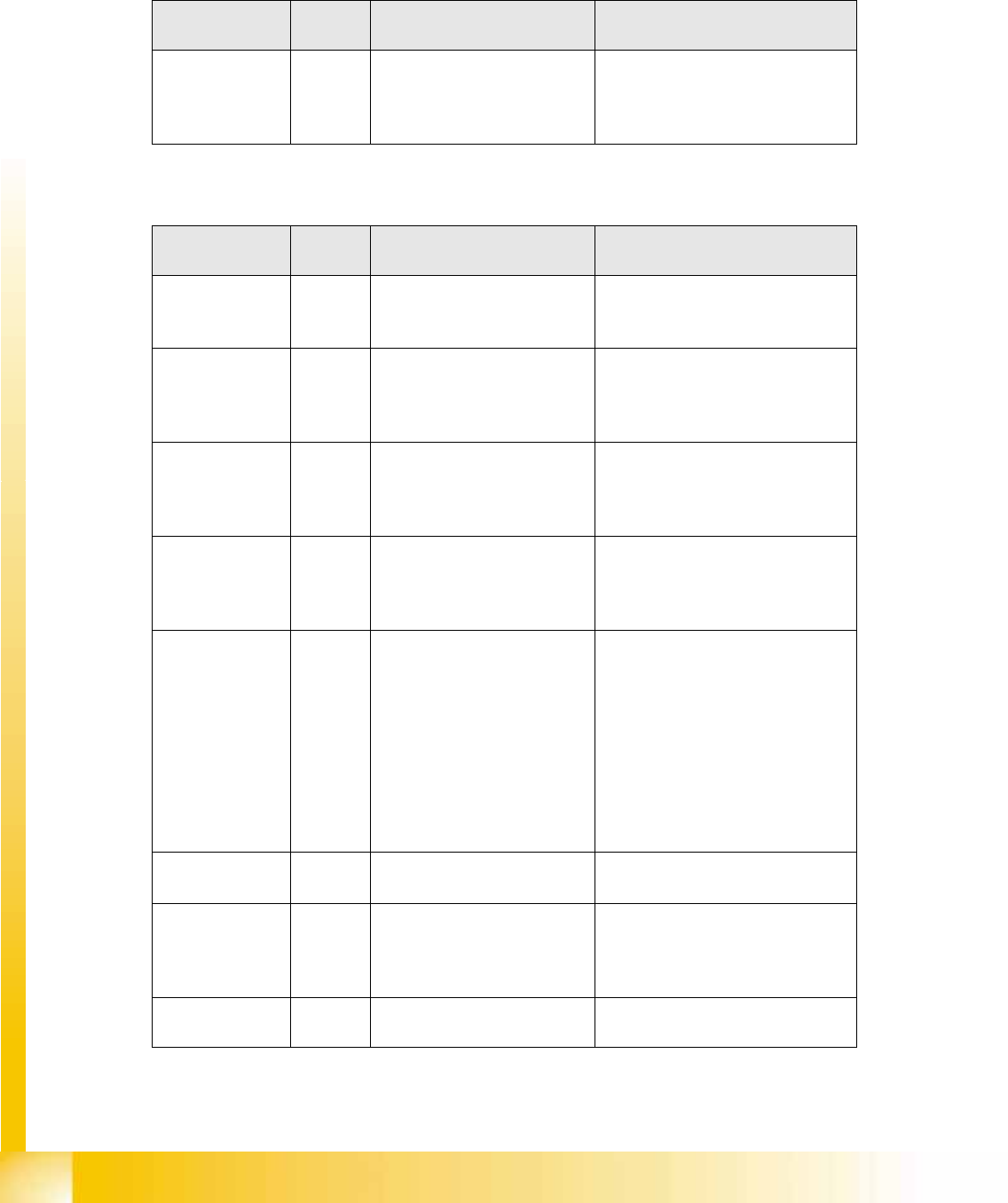
10.2.8 Error Messages on X Feeder
When the feeder is ready for operation, you will see a green LED. Warnings and error messages are
shown by orange or red LEDs and a text on the LCD display.
Warnings
Error messages
Display LED
display
Meaning Troubleshooting
Remove Foil
(Folie entfernen)
Orange Unable to perform the function
selected with the cover foil
stretched tight (foil rocker is
pushed down).
If the required function is to be
performed, remove the foil from the
toothed wheels and cut it to relax
the foil rocket.
Display LED
display
Meaning Troubleshooting
None Red,
flashing
Application software not
present or faulty → software
remains in boot loader.
Reload the application software.
Handle
(Griff)
Red The feeder module has been
logged in but the removal
handle has not yet been
engaged (pushed in).
Push in the handle until it engages.
Low Voltage
(Unterspannung)
Orange 24V supply voltage has not
reached the switching-on
threshold after being switched
on.
Check the voltage supply.
Low Voltage
(Unterspannung)
Red 24V supply voltage has
exceeded the switching-on
threshold and has then
collapsed.
Check the voltage supply.
Feed Timeout
TransTimeout
(Zeitfehler beim
Gurttransport-
zyklus)
Red Tape transport cycle was not
completed correctly in the set
time (timeout for function
"Feed").
Is the tape reel trapped in the
container?
Is the component trapped in the
pickup area, between the tape and
the component window?
Once you have solved the
blockage, reinitiate the feed-in with
the arrow buttons. The feeder
module will finish the faulty feed run
and will return to its correct position.
Foil Torn
(Folie gerissen)
Red Foil was not tensioned within
the prescribed time.
The foil has probably been torn.
Reinsert the foil and re-tension it.
Foil PeelErr
(Fehler beim
Abziehen der
Folie)
Red Foil has not been correctly
stripped off, although the tape
is being fed in.
The cover foil has probably been
trapped under the pickup window
and therefore not stripped off
properly.
Foil Jam
(Folienstau)
Red Foil motor jammed Toothed wheels blocked by foil?