00196044-05 - sg x und x4i fse_en.pdf - 第451页
Modular Conveyor Setting the Belt Tension Conveyor Settings S tudent Guide (FSE) SIPL ACE X Series and X4I Edition 01/2009 EN Modular Conveyor 451 Legend 1 1.3.1.1 Belt T ension of PCB Conveyor (SIPLACE X, X4I) 1 Width a…
Modular Conveyor
Conveyor Settings Setting the Belt Tension
Student Guide (FSE) SIPLACE X Series and X4I
Modular Conveyor Edition 01/2009 EN
450
11.3 Conveyor Settings
11.3.1 Setting the Belt Tension
11-8: Measuring and setting the belt tension for the width adjustment
ATTENTION: Press the EMERGENCY STOP!
Before performing adjustment work you must ensure that the lifting table has been secured
against movement!
NOTE:
The belt tension is measured at the point where the distance between the two deflection pulleys
is the greatest.
11-7: Measuring and setting the tension of the conveyor toothed belt
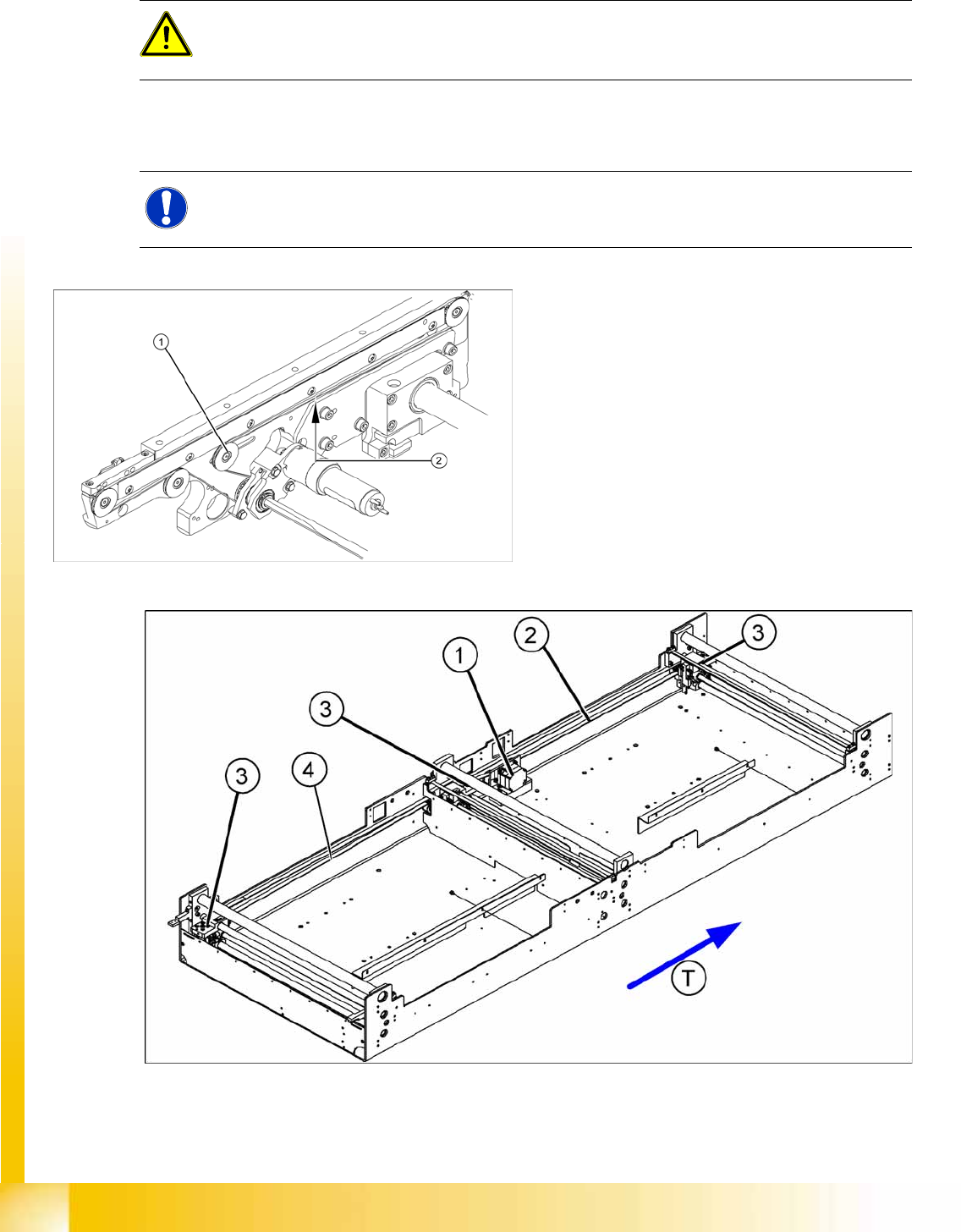
Legend
1. Deflection pulley with slot
2. Measuring point of the belt tension measuring
device (strand center )
Each conveyor section contains a deflection pulley
that can be moved. Loosen the fixing screw (1)
and move this deflection pulley in order to set the
belt tension for the associated conveyor belt (2).
The belt tension is measured at the longest point
between two idler pulleys.
Modular Conveyor
Setting the Belt Tension Conveyor Settings
Student Guide (FSE) SIPLACE X Series and X4I
Edition 01/2009 EN Modular Conveyor
451
Legend
11.3.1.1 Belt Tension of PCB Conveyor (SIPLACE X, X4I)
1 Width adjustment stepping motor 4 Toothed drive belt for adjusting the width /
measuring the belt tension
2 Toothed belt for the drive
3 Adjustment unit 1.2 and 3 T Transport direction
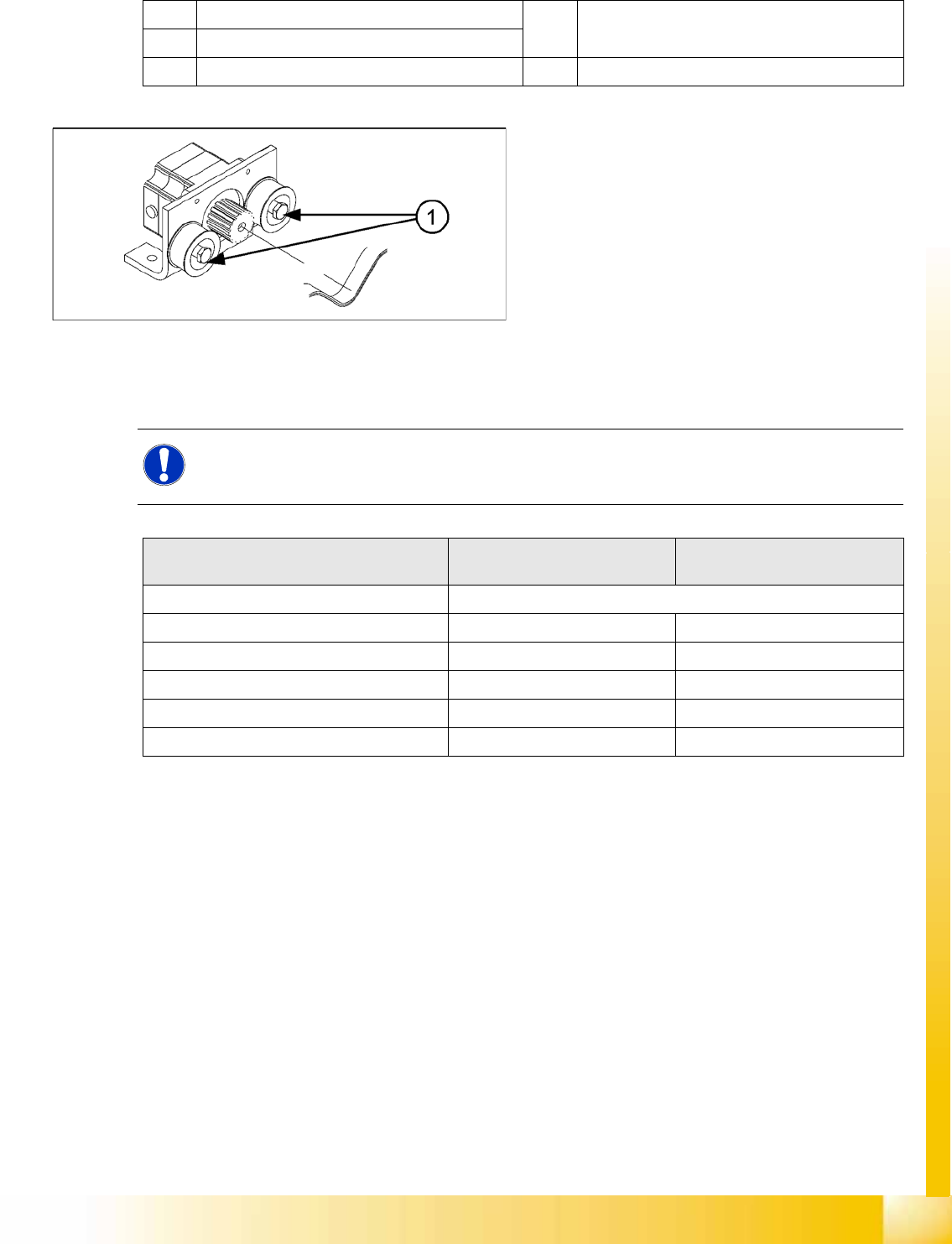
11-9: Width adjustment motor
The belt is tensioned is set by means of cams on
the idler pulleys. The idler pulleys are located on
the left and right of the motor.
Legend
1. Loosen the cam shaft on the idler pulley and
set the belt tension.
NOTE:
The modular conveyor uses different belt lengths. The different belt tensions between the
conveyor lanes are due to the different arrangement of hexagonal shafts and deflection pulleys.
Belt tension For lane 1
(single and dual conveyor)
For lane 2
(dual conveyor)
Belt tension for the width adjustment 30 Hz +/-2 Hz
Input belt 102 Hz +/- -10 Hz 144 Hz +/- -14 Hz
Placement area 1 66 Hz +/- -7 Hz 71 Hz +/- -7 Hz
Intermediate belt 94 Hz +/- -9 Hz 94 Hz +/- -9 Hz
Placement area 2 66 Hz +/- -7 Hz 71 Hz +/- -7 Hz
Output belt 102 Hz +/- -10 Hz 144 Hz +/- -14 Hz
Modular Conveyor
Conveyor Settings Setting the Fixed Conveyor Side (from SW701)
Student Guide (FSE) SIPLACE X Series and X4I
Modular Conveyor Edition 01/2009 EN
452
11.3.2 Setting the Fixed Conveyor Side (from SW701)
11.3.2.1 General Notes
Setting the fixed conveyor side
The fixed conveyor side is always set in the standard mode with right side fixed. You need to set a value
of 38.8 mm between the conveyor base and the fixed conveyor side, with the help of a gauge.
03054247-xx: Gauge for fixed conveyor side DT/ET HS60/D4
03054248-xx: Distance gauge for conveyor side DT HS-60/D4
Teach the fixed side with the software and store the value.
11-10: Setting the fixed conveyor side
Values
The measurement is performed between the side flange and the fitting flange of the mounting frame.
(See also "Example for X Series")
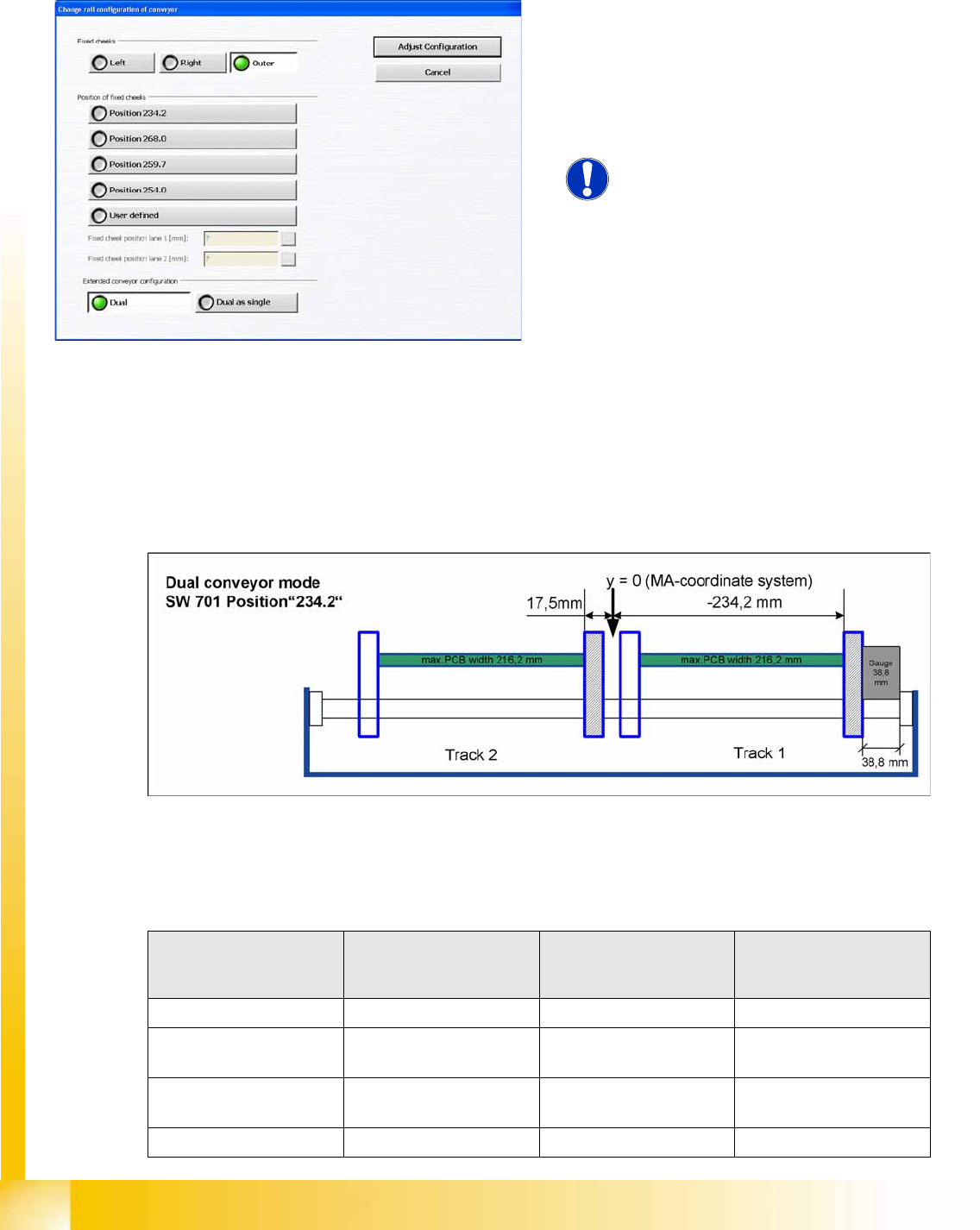
When using dual conveyors in the X4I, the fixed
conveyor side can be set as required i.e. the left or
right side, or the outer edges of each conveyor for
i-placement. The compatibility to the other
machines can be set via predefined values in the
SW (see diagram).
NOTE:
This menu is available from user level
Service (customer)
!
Machine Single conveyor
Standard width
508 (460) mm
Dual conveyor
Standard width
250 (216) mm
Quad lane
Standard width
114 mm
HF series 19 (43) mm 4.5 (38.8) mm
X series / D3
up to July 2007
19 (43) mm 4.5 (38.8) mm
X series / D3
from July 2007
16 (40) mm 4.5 (38.8) mm 2 mm
X4I 16 (40) mm 4.5 (38.8) mm 2 mm