YAMAHA 报警资料.pdf - 第44页
Comparison Table ( English - Chinese ) VGOS V2.46STD R1.000 44 / 237 Copyright (C) 2009 Y amaha Motor Co., Ltd. All Rights Reserved. Code Code Code Code Englis h Englis h Englis h Englis h Chinese Chinese Chinese Chinese…
Comparison Table ( English - Chinese )
VGOS V2.46STD R1.000 43 / 237 Copyright (C) 2009 Yamaha Motor Co.,Ltd. All Rights Reserved.
Code
CodeCode
Code
English
EnglishEnglish
English
Chinese
ChineseChinese
Chinese
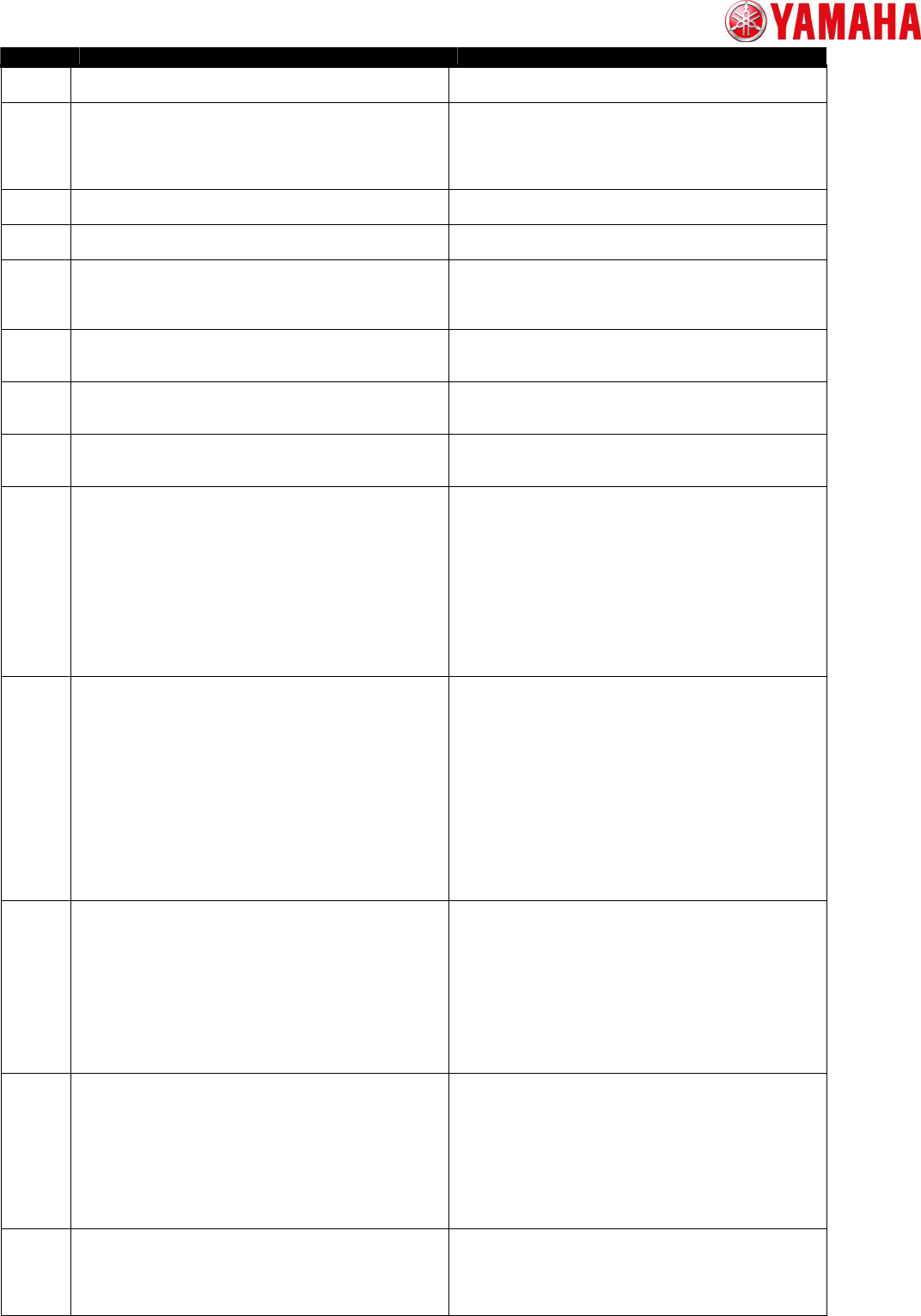
Ea00914 CYCLE STOP button was executed.
因[装-停机]指令,机器停止了运行。
Ea00915 DEFINED PRODUCTION AMOUNT OF BOARDS IS REACHED.
To continue the production, set the
[Board/Schedule] parameter to 0. When switching
the Board data, make sure that there is no Board
on the buffer conveyor.
生枚数已达到了定生枚数。
如基板的生,将生枚数改 0。
如切生基板,确冲送装置上没有基板存在。
Ea00916 CYCLE STOP button was executed.
因基板装的完成,机器停止了运行。
Ea00917 GROUP CYCLE STOP button was executed.
因吸料的装已完成,机器停止了运行。
Ea00918 ORIGIN ERROR
Search origin failed,
because the result is too much different from
a dual-offset parameter.
返回原点
因所指定的双重位移与数(量果)
的差在置的范外,所以返回原点失了。
Ea00919 INTERLOCK ERROR
The Y-axis is interfering with the wafer camera LCY-axis.
Please move the Y-asis to front side.
主机 Y 与晶片相机 LCY 相干。
将主机 Y 向机器正面一移,避干。
Ea00928 CONFORM DATUM BALL AUTO SET
Datum ball has already been set.
Execute the automatic setting of datum ball?.
基准球重新置的确
基准球信息已置。
是否需要重新置?
Ea00929 DATUM BALL AUTO SET ERROR
The automatic setting of datum ball failed.
Please set it by manual.
基准球自置
基准球的自置失了。
用手方式重新行置。
Ea00930 Nozzle dirt detection error
Although multi-camera recognition was successful,
side view camera recognition was failed.
Since the nozzle may be dirty, please check a nozzle.
If nozzle is dirty please perform nozzle cleaning immediately,
because it cannot keep good mounting condition.
MountData PartsData
Name Comment
Feeder Pos
Pallet Pos
Table/Head
吸嘴垢出
然多相机成功了,但面相机没有出元件。
吸嘴可能有垢,吸嘴。
吸嘴有垢,可能会造成不良装,立刻清吸嘴。
装数据 号
元件数据 号 名称
注
送料器安装位置 号
料架抽出位置 号
工作台/Head
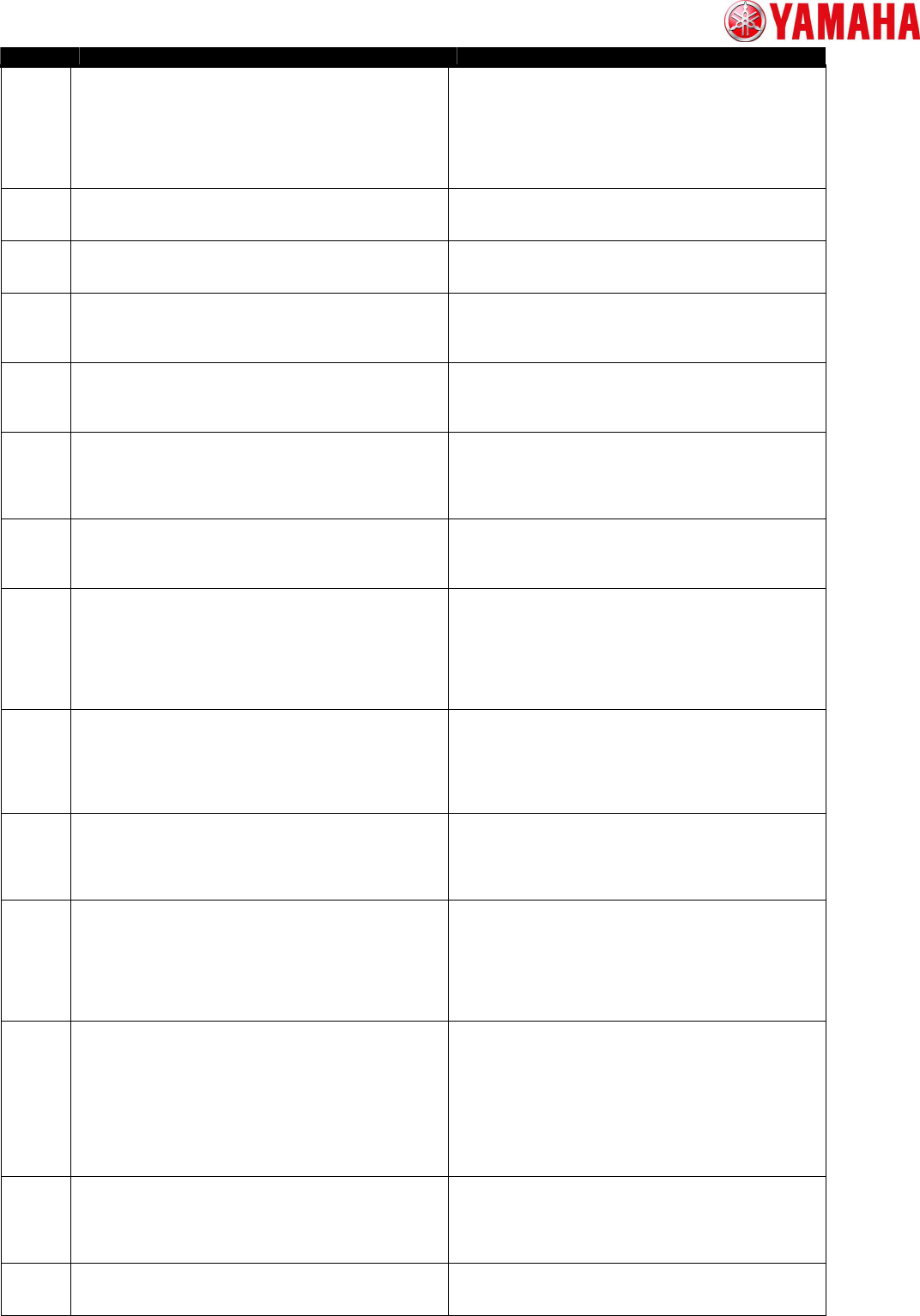
Ea00931 Part standup detection error
Side view camera found part was picked up with standing up.
Please check in following order.
1. Check the pick up position by manual feeding the feeder.
2. Check the nozzle tip was broken or stuffed nozzle hole.
3. Check the pick up position in parts information.
MountData PartsData
Name Comment
Feeder Pos
Pallet Pos
Table/Head
元件立出
面相机中出了元件立异常。
可能由多原因造成,按下列序行确。
1. 用手送料器,确元件是否被送至正确的位置。
2. 目吸嘴前端,确是否堵塞或缺。
3. 确元件信息的吸附位置坐(X,Y)。
4. 确元件信息的吸料高度。
装数据 号
元件数据 号 名称
注
送料器安装位置 号
料架抽出位置 号
工作台/Head
Ea00932 Part thickness error
The part thickness recognized with the side view camera is
out of tolerance.
Please reconfirm Thickness Tolerance in component information.
MountData PartsData
Name Comment
Feeder Pos
Pallet Pos
Table/Head
元件厚度不足
面相机所的元件厚度尺寸在指定公差范外。
在元件信息的面相机中重新确公差。
装数据 号
元件数据 号 名称
注
送料器安装位置 号
料架抽出位置 号
工作台/Head
Ea00933 Side view camera recognition error
Although multi-camera recognition was successful,
side view camera recognition was failed.
MountData PartsDat
Name Comment
Feeder Pos
Pallet Pos
Table/Head
面相机元件
然多相机成功了,但面相机未能出元件。
装数据 号
元件数据 号 名称
注
送料器安装位置 号
料架抽出位置 号
工作台/Head
Ea00934 Multi-camera recognition error
Although side view camera recognition was successful,
multi-camera recognition was failed.
Please check in following order.
1.Check the part size XY.
多相机元件
然面相机成功了,但多相机失了。
确以下目。
1.元件 XY 尺寸。
2.照明和界限。
Comparison Table ( English - Chinese )
VGOS V2.46STD R1.000 44 / 237 Copyright (C) 2009 Yamaha Motor Co.,Ltd. All Rights Reserved.
Code
CodeCode
Code
English
EnglishEnglish
English
Chinese
ChineseChinese
Chinese
2.Check the light level or threshold.
3.Check the position of part picked up.
MountData PartsData
Name Comment
Feeder Pos Pallet Pos
Table/Head
3.元件吸附姿。
装数据 号
元件数据 号 名称
注
送料器安装位置 号
料架抽出位置 号
工作台/Head
Ea00935 Side view camera Nozzle basic information transmitting error
When transmitting the nozzle basic information on a side view
camera to Vision, it happen error.
面相机 吸嘴基本信息送
向 Vision 送面相机的吸嘴基本信息,生了某异常。
Ea00936 Side view camera Nozzle detail information transmitting error
When transmitting the nozzle detail information on a side view
camera to Vision, it happen error..
面相机 吸嘴信息送
向 Vision 送面相机的吸嘴信息,生了某异常。
Ea00937 Side view camera setting error
Although the side view camera is set "None" in Installation
Setting, the side view camera is set in Camera Specification.
Please check the machine data.
面相机置
工厂置中置没有面相机,
但相机格中却置了面相机。
Ea00938 Side view camera setting error
Although the side view camera is set "Exist" in Installation
Setting, the side view camera is not set in Camera Specification.
Please check the machine data.
面相机置
工厂置中置有面相机,
但相机格中却没有置面相机。
Ea00939 Side view camera, Nozzle error
It is the nozzle which cannot be used by side view camera recognition.
Please check follows item in machine data.
[Side View Camera Spec]-[Nozzle Basic Setting]-[Side View Camera]
PartsData
面相机 吸嘴
面相机所不能使用的吸嘴。
确机器置中[吸嘴基本置]-[面相机]
的使用状况。
元件数据 号
Ea00940 Side view camera, Part size error
The part size is out of Side view camera size.
Please check part size or Side view camera "Max XY" in machine data.
PartsData
面相机 元件尺寸
行面相机的元件的外形尺寸在范外。
元件数据 号
Ea00941 Side view camera, Part thickness error
The part thickness is out of value which allowed for Normal mode.
The part thickness which allowed for Normal mode is set in follows.
Machine Setting - [Side View Camera Spec]-[General Setting]-
[The minimum part thickness]
Please change Side View Camera to [Detail mode] in Part Information.
PartsData
面相机 元件厚度
元件厚度小于易模式可定的限度。
用易模式可定的元件厚度的置如下。
机器置 - [面相机格]-[全面置]-
[可以易定的最低元件厚度]
将面相机的元件信息置 [有 ]。
元件数据 号
Ea00942 Side view camera, Nozzle recognition error
It cannot recognize part thickness correctly because it failed
nozzle recognition.
Please check correct nozzle is put on head.
If nozzle is correct please try [Measure Nozzles].
面相机 吸嘴形状
因不能正确吸嘴形状,所以不能定元件厚度。
确元件信息中所置的吸嘴是否已正确安装。
如吸嘴安装正确,俘吸嘴形状。
Ea00943 Side view camera, Part thickness range error
Side view [Part Thickness] in Part Information must be
between 0 to [Body Size Z].
Please check [Part Thickness] and [Body Size Z].
PartsData
面相机 元件厚度公差范
元件信息中的面相机的元件厚度公差已置
0 或超出外形尺寸元件厚度的。
确[元件厚度公差]、[外形尺寸元件厚度]。
元件数据 号
Ea00944 SIDE VIEW CAMERA BRING BACK ERROR (AFTER MOUNT)
Side view camera detects bring back parts after mounting.
It may fail to mount parts because of bring back.
Please press [ERROR CLEAR] button, and check the mount position on the board.
TABLE
HEAD
MOUNT
面相机 装后回元件
面相机出,装元件生了回元件的。
因吸嘴上吸附有元件,可能致装失。
点[清除]按,确装位置。
工作台号 号
Head 号 号
装数据
Ea00945 SIDE VIEW CAMERA BRING BACK ERROR (AFTER DUMP)
Side view camera detects bring back parts after dumping.
It may fail to dump parts because of bring back.
Please keep this dialogue displayed and remove parts after EMG stop..
After press [ERROR CLEAR] button, the machine will retry to check bring back
parts.
TABLE
HEAD
MOUNT
面相机 弃后回元件
面相机出,弃元件生了回元件的。
吸嘴可能吸附着元件。
在画面示的状下,按急停机按,然后取出元件。
如按[清除]按,将再次行弃后回元件的。
工作台号
Head 号
装数据
Ea00946 SIDE VIEW CAMERA RETRY SETTING ERROR
The retry setting of the bring back parts is not selected.
Please set the retry setting of all the bring back parts.
[YES] Return to the dialogue to set the retry setting.
[NO] Close dialogue with unselected parts [RETRY].
面相机 重新行作未置
回元件中存在没有确定重新行作的元件。
所有回元件置重新行作。
[是] 置重新行作,返回原来的画面。
[否] 将未置的元件置[有重新行],并画面。
Ea00947 STOP AUTO RUNNING WITH CYCLE STOP
The machine detect bring back parts during Auto Running.
But it selected [NOT RETRY] in the dialogue and the machine stop by Cycle Stop.
因[装后停止]命令而停止了运行。
装出了回元件,但由于了[不重新行],
所以[装后停止]了。
Comparison Table ( English - Chinese )
VGOS V2.46STD R1.000 45 / 237 Copyright (C) 2009 Yamaha Motor Co.,Ltd. All Rights Reserved.
Code
CodeCode
Code
English
EnglishEnglish
English
Chinese
ChineseChinese
Chinese
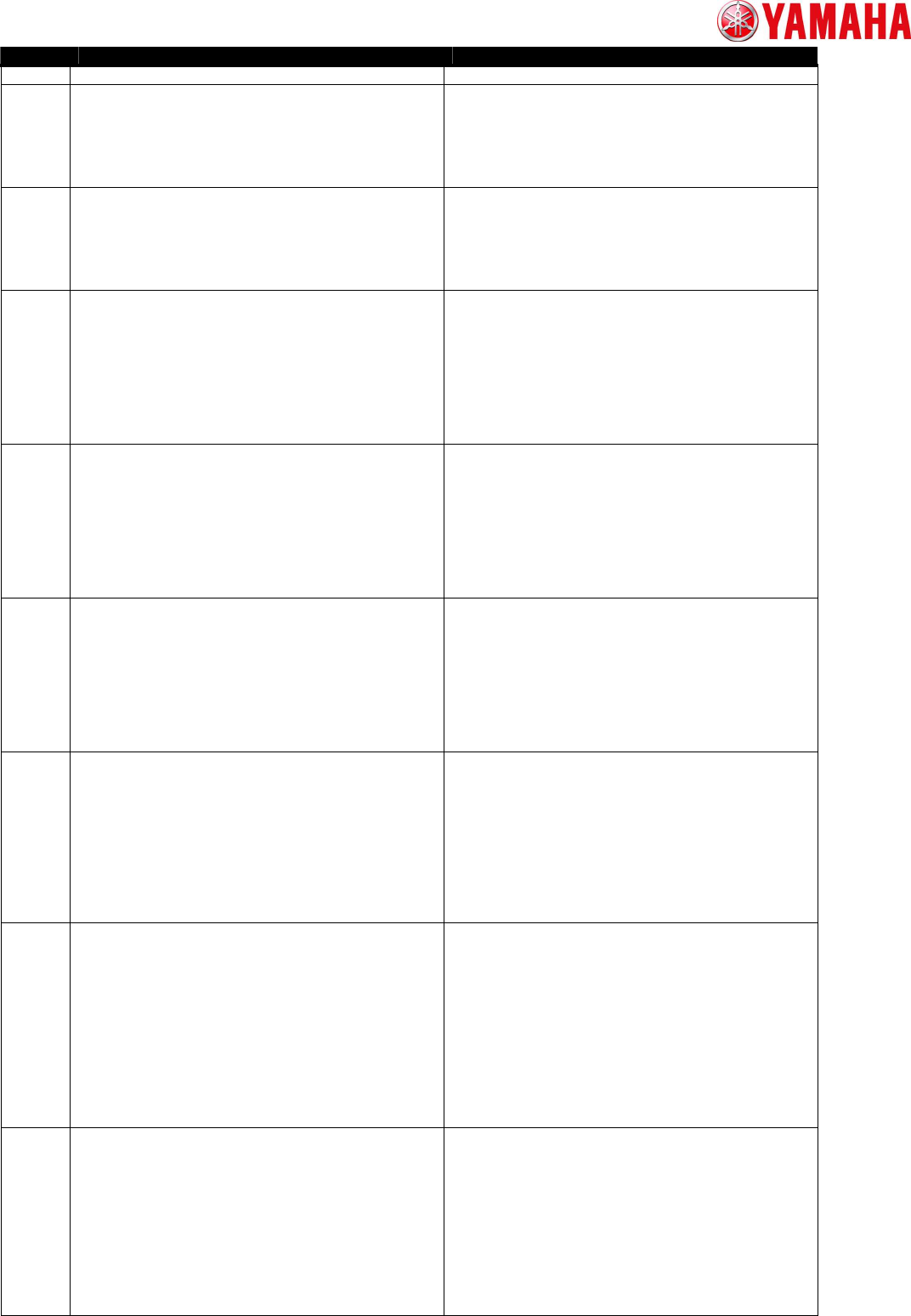
Please press [ERROR CLEAR] button. 点[清除]按。
Ea00948 SIDE VIEW CAMERA BRING BACK RETRY CHECK
Bring back parts error happened on this board.
But it selected skip mounting this parts.
May I continue Auto Running?
[YES] Running start and the board is transported.
[NO] Reset and check the board condition.
完成装的基板确
基板因装状不定生了,
但元件的装已置跳。
运行?
[是] 始运行,入基板。
[否] 行位,确基板。
Ea00949 MOUNTING CONDTION CHECK IS CANCELED
Mounting condition check is canceled.
Setting about retry of error component is disabled.
Press [OK] button and start running then the machine will continue Auto Running.
取消弃元件
在弃元件的途中,操作人出了中止作的指令。
取消弃元件。
在画面点[OK]并按[START]按,取消元件的
装状,并始装。
Ea00950 SIDEVIEW TIMEOUT ERROR
The Application error occurred by sideview action.
datail number
Please stop this action, and retry.
If this error occurred many times, please execute the following.
Trouble of application
- extecute of Parts Adjust - Test.
- none is set to Machine Setting - Side view camera,
and reload board data.
面相机超
在面相机理中生了用件。
datail number
中止理,重新行。
如果反示画面,按照下列指示操作。
·行元件整 - 。
·将机器置 - 工厂置 - 面相机置「没有」。
置完后,重新入基板程序。
Ea00951 SIDE VIEW CAMERA PARTS REVERSE OVER ERROR
Parts are reversing.
Please check the parts and the sequence unit.
MountData
PartsData
Name
Feeder Pos
Pallet Pos
Table/Head
面相机 元件翻
元件正反面反了。
确元件以及元件供装置的状。
装数据 号
元件数据 号
名称
送料器安装位置 号
料架抽出位置 号
工作台/Head 号
Ea00952 SIDE VIEW CAMERA PARTS SIZE ERROR
The shape sizes of parts are outside ranges.
Please check the parts and the component information.
MountData
PartsData
Name
Feeder Pos
Pallet Pos
Table/Head
面相机 元件尺寸
面相机的元件形状尺寸在范外。
确元件以及基板程序的元件信息。
装数据 号
元件数据 号
名称
送料器安装位置 号
料架抽出位置 号
工作台/Head 号
Ea00970 BOARD FILE READ ERROR
It failed in reading the board data.
Cause:
The mount information data is broken.
There is a possibility that the mount data file has been damaged.
Measures:
If you have a backup data, delete the broken data, copy from the backup,
and reload the data.
If you don't, delete the broken data and create new data.
基板程序入
基板程序的入失。
原因:
基板程序的装信息文件的数据异常。
文件有可能破。
策:
如果有基板程序的份,除异常的基板、
将份的制,然后重新入。
如果没有基板程序的份,除异常的基板后,
在新建。
Ea00971 BOARD FILE READ ERROR
It failed in reading the board data.
Cause:
The parts information data and parts data base is broken.
There is a possibility that the mount data file has been damaged.
Measures:
If you have a backup data, delete the broken data, copy from the backup,
and reload the data.
If you don't, delete the broken data and create new data.
If it failed in reading the database, restore the database file from
database backup or system backup.
基板程序入
基板程序入失。
原因:
基板程序的元件信息文件或元件数据的数据异常。
文件有可能破。
策:
如果有基板程序的份,除异常的基板、
将份的制,然后重新入。
如果没有基板程序的份,除异常的基板后,
在新建。
如果入数据失,使用数据的原程序份,
原数据。
Ea00972 BOARD FILE READ ERROR
It failed in reading the board data.
Cause:
The mark information data and mark data base is broken.
There is a possibility that the mount data file has been damaged.
Measures:
If you have a backup data, delete the broken data, copy from the backup,
and reload the data.
If you don't, delete the broken data and create new data.
If it failed in reading the database, restore the database file from
database backup or system backup.
基板程序入__
基板程序入失
原因:
基板程序的信息文件或数据的数据异常。
文件有可能破。
策:
如果有基板程序的份,除异常的基板、
将份的制,然后重新入。
如果没有基板程序的份,除异常的基板后,
在新建。
如果入数据失,用数据的原程序份,