GLM250 VF激光测距仪数据表.pdf - 第21页
English | 21 Bosch Power Tools 1 609 92A 1YW | (8.7 .16) the same location for all indi vidual measurements within a measuring sequence (exception: trap ezium measurements). The laser beam remains switch ed on between th…
20 | English
1 609 92A 1YW | (8.7.16) Bosch Power Tools
For several subsequent length measurements, the last meas-
ured results are displayed in the measured-value lines a.
Continuous Measurement (Tracking)
For continuous measurements, the measuring tool can be
moved relative to the target, whereby the measuring value is
updated approx. every 0.5 seconds. In this manner, as an ex-
ample, you can move a certain distance away from a wall,
while the actual distance can always be read.
For continuous measurements, firstly select the length meas-
uring mode and then press the measuring button 7 until the
“indicator for continuous measurement” appears on the
display. The laser is switched on and the measurement starts
immediately.
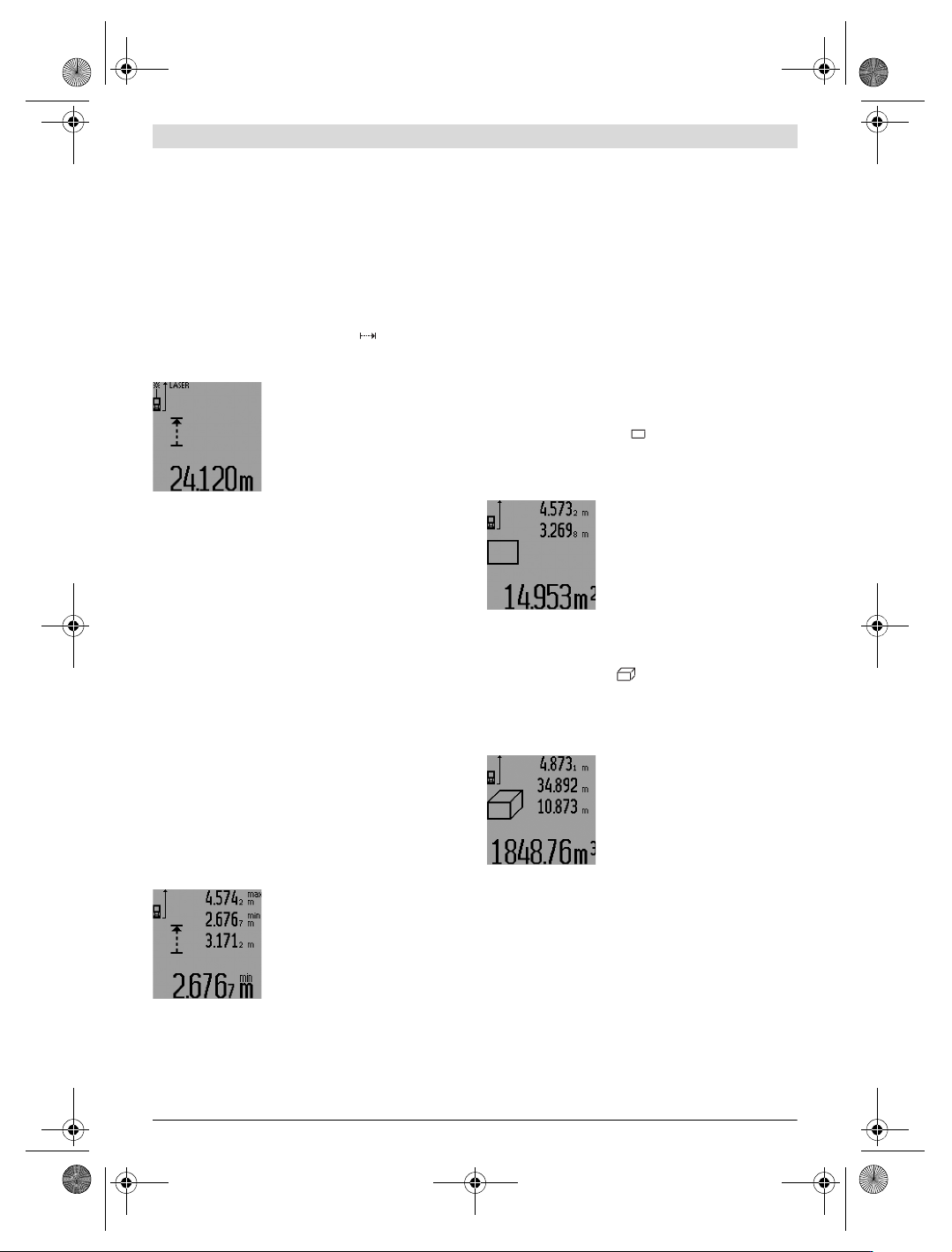
The current measured value is dis-
played in the result line c.
Briefly pressing the measuring button
7 ends the continuous measurement.
The last measured value is displayed
in the result line c. Pressing the meas-
uring button 7 for several seconds re-
starts a continuous measuring run.
Continuous measurement automatically switches off after
5 min. The last measured value remains indicated in the result
line c.
Minimum/Maximum Measurement (see figure F–G)
The minimum measurement is used to determine the shortest
distance from a fixed reference point. It is used, as an exam-
ple, for determining plumb lines or horizontal partitions.
The maximum measurement is used to determine the greatest
distance from a fixed reference point. It is used, as an exam-
ple, for determining diagonals.
For simple minimum/maximum measurement, firstly select
“length measurement mode” and then press button 13. “min”
is displayed in result line c for minimum measurement. For
maximum measurements, press button 13 again, so that
“max” is displayed in the result line. Then press the measur-
ing button 7. The laser is switched on and the measurement
starts.
Move the laser back and forth over the requested target (e.g.,
the room corner for determining the diagonal) in such a man-
ner that the reference point of the measurement (e.g., the tip
of the positioning pin 18) always remains at the same loca-
tion.
Depending on the set mode, the mini-
mum or maximum value is displayed
in the result line c. It is always over-
written, when the current length
measurement value is less than the
present minimal or larger than the
present maximal value. The maximal
(“max”), the minimal (“min”) and
the current measuring value are displayed in the measured-
value lines a.
To end the minimum/maximum measurement, briefly press
the measuring button 7. Pressing the measuring button again
starts a new measurement.
The minimum/maximum measurement can also be used for
length measurements within other measuring modes (e.g. ar-
ea/surface measurement). For this, press button 13 once for
minimal measurement and twice for maximal measurement
each time when determining individual measured values.
Then press the measuring button 7 to switch the laser beam
on. Move the measuring tool in such a manner that the desired
minimum or maximum value is measured, and press the
measuring button 7 to take over the minimum or maximum
value into the current calculation.
For time-delayed length measurements and when in mark-out
mode, minimum/maximum measurements are not possible.
The minimum/maximum measurement automatically switch-
es off after 5 min.
Area Measurement
For area/surface measurements, press button 4 until the indi-
cator for area measurement appears on the display.
Afterwards, measure the length and the width, one after an-
other, in the same manner as a length measurement. The laser
beam remains switched on between both measurements.
Upon completion of the second meas-
urement, the surface is automatically
calculated and displayed in the result
line c. The individual measured values
are displayed in the measured-value
lines a.
Volume Measurement
For volume measurements, press button 4 until the indicator
for volume measurement appears on the display.
Afterwards, measure the length, width and the height, one af-
ter another, in the same manner as for a length measurement.
The laser beam remains switched on between all three meas-
urements.
Upon completion of the third meas-
urement, the volume is automatically
calculated and displayed in the result
line c. The individual measured values
are displayed in the measured-value
lines a.
Values above 999999 m
3
cannot be indicated; “ERROR” and
“––––” appear on the display. Divide the volume to be
measured into individual measurements; their values can
then be calculated separately and then summarized.
Indirect Length Measurement (see figures H–K)
The indirect length measurement is used to measure distanc-
es that cannot be measured directly because an obstacle
would obstruct the laser beam or no target surface is available
as a reflector. Correct results are achieved only when the right
angles required for the respective measurement are exactly
adhered to (Pythagorean Theorem).
Pay attention that the reference point of the measurement
(e.g. the rear edge of the measuring tool) remains exactly at
OBJ_BUCH-947-007.book Page 20 Friday, July 8, 2016 10:44 AM
English | 21
Bosch Power Tools 1 609 92A 1YW | (8.7.16)
the same location for all individual measurements within a
measuring sequence (exception: trapezium measurements).
The laser beam remains switched on between the individual
measurements.
For indirect length measurements, four measuring modes are
available. Each measuring mode can be used for determining
different distances. To select the measuring mode, press the
function-mode button 3 until the symbol of the desired meas-
uring mode is indicated on the display.
a) Simple Pythagoras Measurement (see figure H)
Press the function-mode button 3 until the indication for sim-
ple Pythagoras measurement appears on the display.
Measure distances “1” and “2” in this sequence with a length
measurement. Pay attention that a right angle exists between
distance “1” and the sought distance “E”.
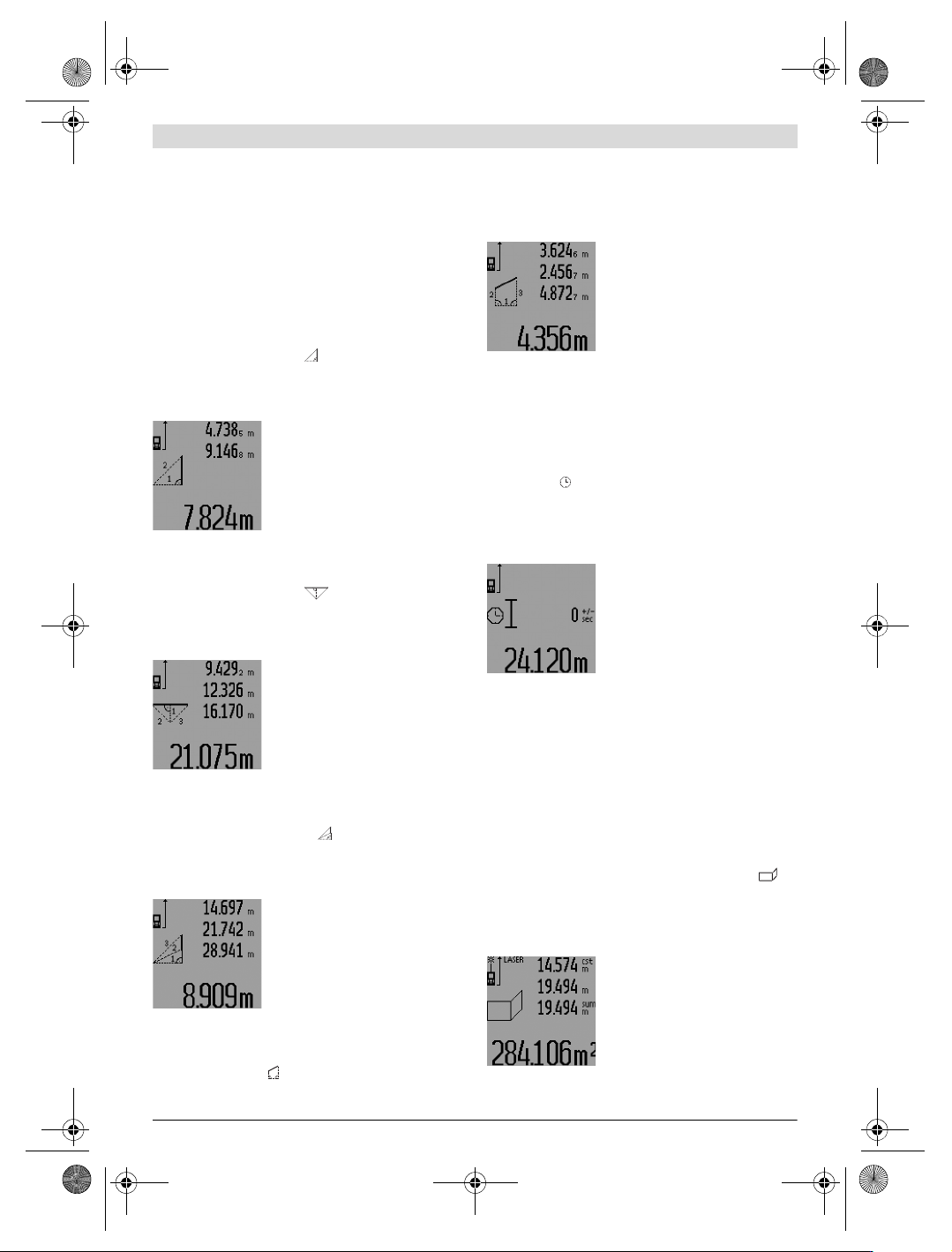
Upon completion of the last measure-
ment, the result for the sought dis-
tance “E” is displayed in the result
line c. The individual measured values
are displayed in the measured-value
lines a.
b) Double Pythagoras Measurement (see figure I)
Press the function-mode button 3 until the indication for dou-
ble Pythagoras measurement appears on the display.
Measure distances “1”, “2” and “3” in this sequence with a
length measurement. Pay attention that a right angle exists
between distance “1” and the sought distance “E”.
Upon completion of the last measure-
ment, the result for the sought dis-
tance “E” is displayed in the result
line c. The individual measured values
are displayed in the measured-value
lines a.
c) Combined Pythagoras Measurement (see figure J)
Press the function-mode button 3 until the indication for com-
bined Pythagoras measurement appears on the display.
Measure distances “1”, “2” and “3” in this sequence with a
length measurement. Pay attention that a right angle exists
between distance “1” and the sought distance “E”.
Upon completion of the last measure-
ment, the result for the sought dis-
tance “E” is displayed in the result
line c. The individual measured values
are displayed in the measured-value
lines a.
d) Trapezium Measurement (see figure K)
Press the function-mode button
3 until the indication for tra-
pezium measurement appears on the display.
Measure distances “1”, “2” and “3” in this sequence with a
length measurement. Pay attention that the measurement of
distance “3” starts exactly at the end point of distance “1”
and that a right angle exists between distances “1” and “2” as
well as between “1” and “3”.
Upon completion of the last measure-
ment, the result for the sought dis-
tance “E” is displayed in the result
line c. The individual measured values
are displayed in the measured-value
lines a.
Time-delayed Length Measurement
Time-delayed length measurement is helpful e.g. when meas-
uring at hard to reach locations or when movements of the
measuring tool during measuring are to be prevented.
For a time-delayed length measurement, press function-
mode button 3 until the indicator for time-delayed length
measurement appears on the display.
The time period from the actuation until the measurement
takes place is displayed in the measured-value line a. The time
period can be adjusted between 1 s and 60 s by pressing the
plus button 6 or the minus button 12.
Then press the measuring button 7 to
switch the laser beam on and aim at
the target point. Press the measuring
button 7 again to actuate the meas-
urement. The measurement takes
place after the set time period. The
measured value is displayed in the re-
sult line c.
The addition and subtraction of measuring results as well as
minimum/maximum measurements are not possible for time-
delayed length measurements.
Wall Surface Measurement (see figure L)
The wall surface measurement is used to determine the sum
of several individual surfaces with a common height.
In the example shown, the total surface of several walls that
have the same room height A, but different lengths B, are to
be determined.
For wall surface measurements, press the function-mode but-
ton 3 until the indicator for wall surface measurement ap-
pears on the display.
Measure the room height A as for a length measurement. The
measured value (“cst”) is displayed in the top measured-val-
ue line a. The laser remains switched on.
Afterwards, measure length B
1
of the
first wall. The surface is automatically
calculated and displayed in the result
line c. The length measurement value
is displayed in the centre measured-
value line a. The laser remains
switched on.
1
2
1
32
1
3
2
1
3
2
OBJ_BUCH-947-007.book Page 21 Friday, July 8, 2016 10:44 AM
22 | English
1 609 92A 1YW | (8.7.16) Bosch Power Tools
Now, measure length B
2
of the sec-
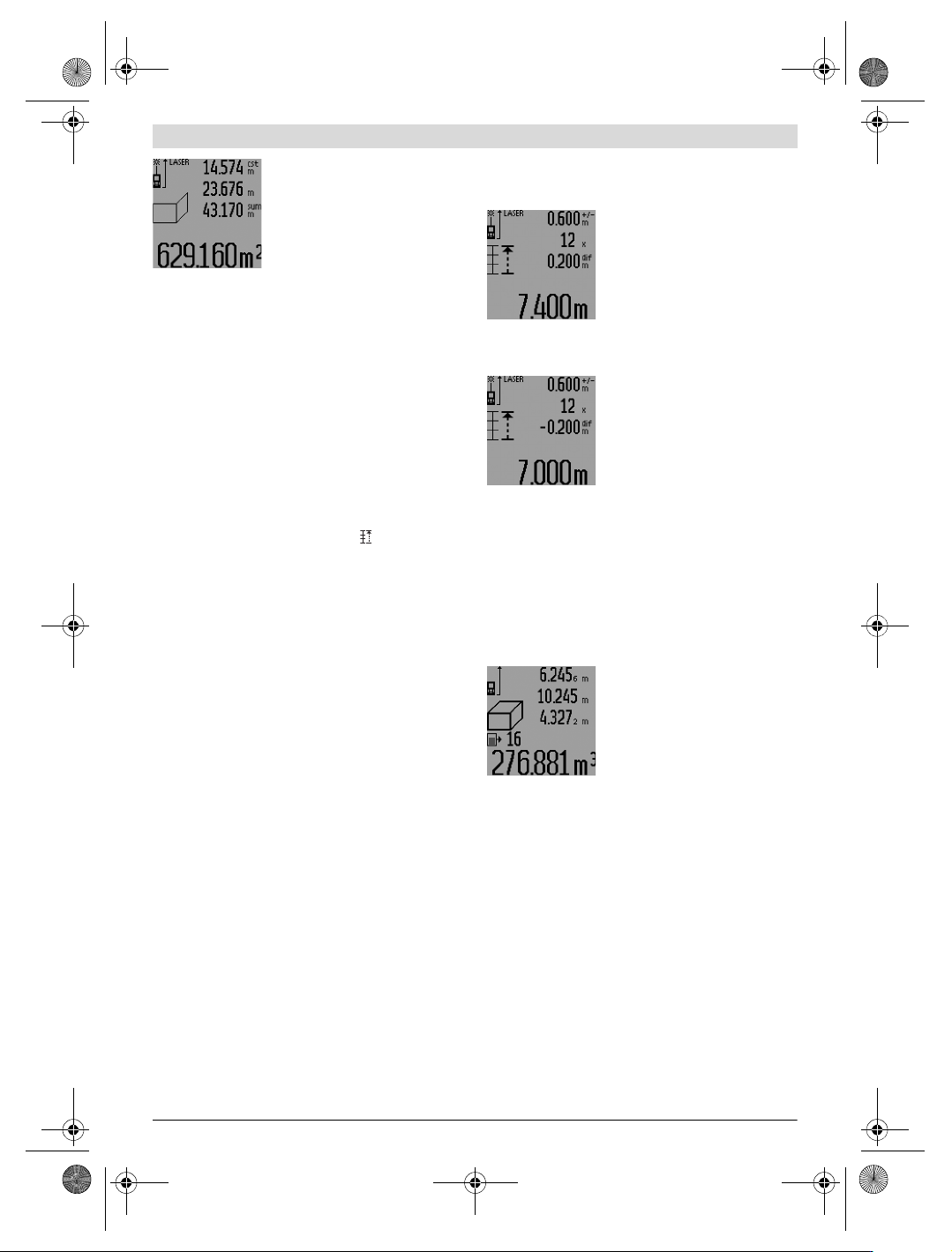
ond wall. The individually measured
value displayed in the centre meas-
ured-value line a is added to the
length B
1
. The sum of both lengths
(“sum”, displayed in the bottom
measured-value line a) is multiplied
with the stored height A. The total
surface value is displayed in the result line c.
In this manner, you can measure any number of further
lengths B
X
, which are automatically added and multiplied with
height A.
The condition for a correct area/surface calculation is that the
first measured length (in the example the room height A) is
identical for all partial surfaces.
For a new wall surface measurement with new room height A,
press button 16 three times.
Mark-out Mode (see figure M)
Mark-out mode is used for marking off a fixed length (mark-
out value), which can either be measured or entered. It is
helpful for, e.g., marking partition spaces for drywalls.
To activate the mark-out mode, press the function-mode but-
ton 3 until the mark-out mode indication appears on the
display.
The mark-out value can be adjusted as follows:
– To enter a known value, press the plus button 6 or the mi-
nus button 12 until the desired value is displayed in the up-
per measured-value line a. When pressing and holding the
plus button 6 or minus button 12, the values will continu-
ously skip through. The laser is not activated yet.
– For measuring the mark-out value, briefly press the meas-
uring button 7 once for sighting and once more for measur-
ing. Afterwards, the laser beam remains switched on.
– The measured or entered mark-out value can be corrected
by pressing the plus button 6 or the minus button 12.
After determining the mark-out value, press and hold the
measuring button 7 to begin the measurement.
Now, move the measuring tool in the desired direction for
marking out. The current measuring value of the complete
measured distance is continuously displayed in the result line
c. The selected mark-out value continues to be displayed in
the upper measured-value line a.
The factor (“x”) how often the mark-out value is contained in
the total measuring distance is displayed in the centre meas-
ured-value line, and the difference (“dif”) between an inte-
gral multiple of the mark-out value and the total distance is
displayed in the bottom measured-value line a.
When the total measuring distance is somewhat less than an
integral multiple, then a negative difference and the next high-
er multiple of the mark-out value are displayed.
Move the measuring tool until the desired multiple of the
mark-out value is displayed in the centre measured-value line
a and the difference in the bottom measured-value line is a
“0.0 m”. Then mark off the reference point of the measure-
ment.
Examples:
a) Positive difference:
7.4m=(12x0.6m)+0.2m
The mark-out value 0.6 m is con-
tained 12x in a total distance of
7.4 m. Additionally, the total distance
contains a rest of 0.2 m. Reduce the
distance between the measuring tool
and the starting point by 0.2 m differ-
ence, and then mark off the length.
b) Negative difference:
7.0 m = (12 x 0.6 m) – 0.2 m
For a total distance of 7.0 m, 0.2 m
are missing for the mark-out value
0.6 m to be contained 12x. Increase
the distance between the measuring
tool and the starting point by 0.2 m
difference, and then mark off the
length.
Briefly pressing measuring button 7 ends the mark-out mode.
Pressing and holding the measuring button 7 restarts the
mark-out mode anew (with the same mark-out value).
The mark-out mode automatically switches off after 5 min.
For prior exiting of the function, press one of the measuring-
mode buttons.
List of the last Measuring Values
The measuring tool stores the last 30 measuring values and
their calculations, and displays them in reverse order (last
measured value first).
To recall the stored measurements,
press button 15. The result of the last
measurement is indicated on the dis-
play, along with the indicator for the
measured-value list d as well as a
counter for the numbering of the dis-
played measurements.
When no further measurements are stored after pressing but-
ton 15 again, the measuring tool switches back to the last
measuring function. To exit the measured-value list, press
one of the measuring-mode buttons.
To delete the currently displayed measured-value list entry,
briefly press button 16. To delete the complete measured-
value list, press and hold the button for the measured-value
list 15 and at the same time briefly press button 16.
Deleting Measured Values
Briefly pressing button 16 deletes the last individual measur-
ing value determined in all measuring functions. Briefly press-
ing the button repeatedly deletes the individual measured val-
ues in reverse order.
In wall surface measurement mode, briefly pressing button
16 the first time deletes the last individually measured value;
pressing the button a second time deletes all lengths B
X
, and
pressing the button a third time deletes all room heights A.
OBJ_BUCH-947-007.book Page 22 Friday, July 8, 2016 10:44 AM