JX-350_EPU使用说明书.pdf - 第108页
EPU Instruction M anual C hapter 4 Creating a Production Progr am 4- 60 4) T ray thickness Enter the height " T" f rom t he bottom s ide of a tr ay to the top side including the component body . If the thicknes…
EPU Instruction Manual Chapter 4 Creating a Production Program
4-59
(3) Tray input method
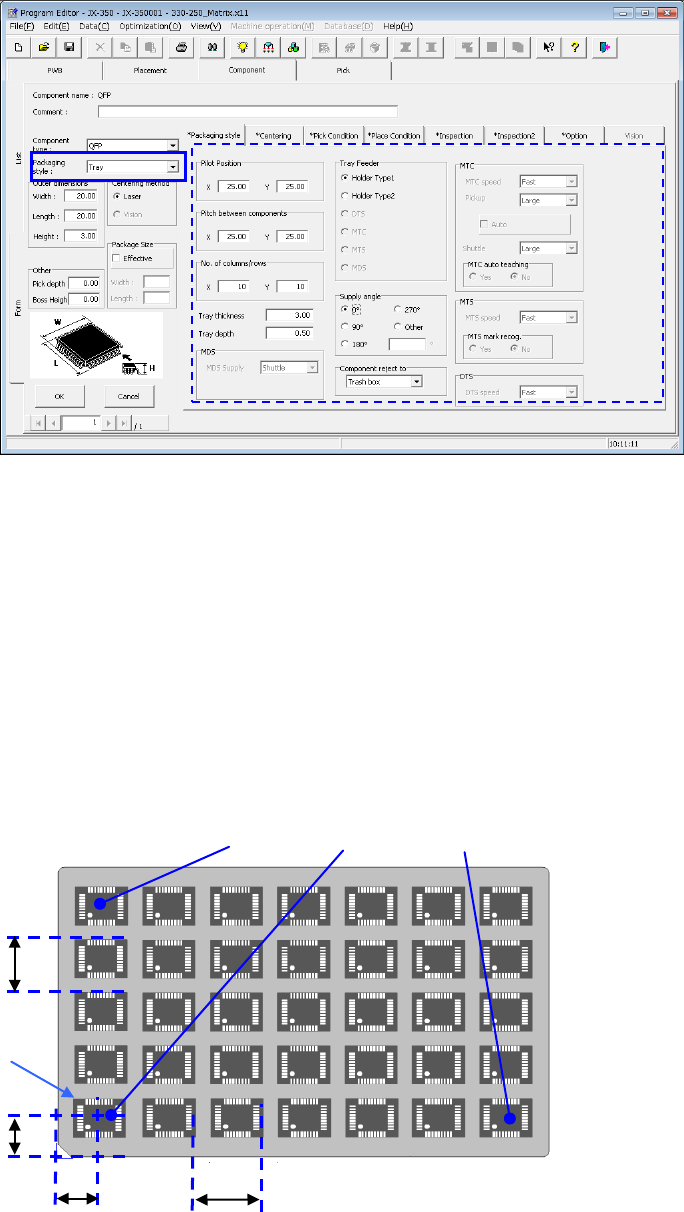
1) Pilot Position
Enter the distance from the tray outside to the center position (X, Y) of the first
tray component.
2) Pitch between components
Enter the pitch between components (Pitch X, Pitch Y).
3) No. of columns/rows
Enter the number of components (Xn, Yn) in the lateral direction and the
longitudinal direction.
After the pickup data supply position is determined, the coordinates of 3 positions
of the tray are displayed in the pickup data. (X
1
, Y
1
to X
3
, Y
3
)
First component position X
First component
position Y
First
component
Pitch X
Pitch Y
(
X
2
,Y
2
)
(
X
1
Y
1
)
(
X
3
Y
3
)
EPU Instruction Manual Chapter 4 Creating a Production Program
4-60
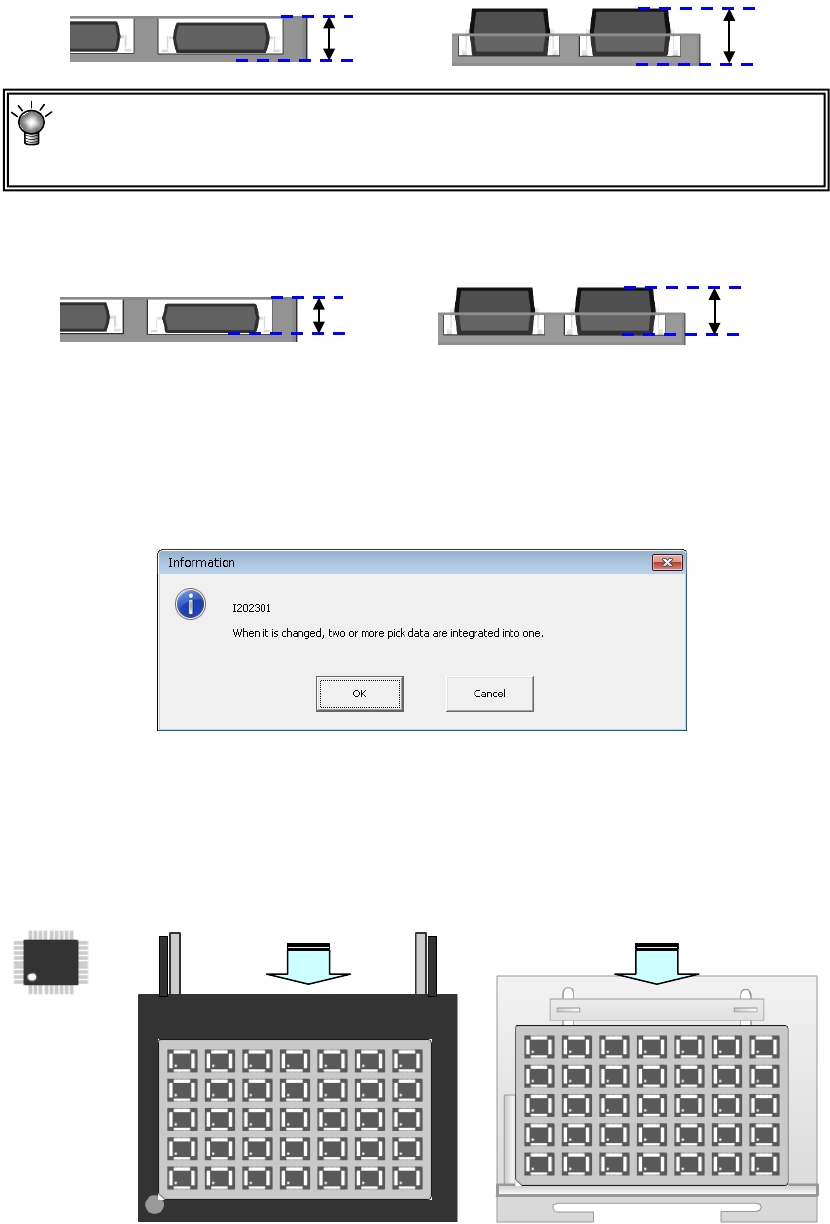
4) Tray thickness
Enter the height "T" from the bottom side of a tray to the top side including the
component body.
If the thickness of a tray of an MTS exceeds 9 mm, any tray base cannot be set one level
higher.
The maximum tray thickness “T” is 23 mm.
5) Tray depth
Enter the depth of the tray.
6) Tray feeder
Select a tray feeder from between “Holder” and “MTS.” (DTS, MTC, and MDS
cannot be set.)
If you change the setting of a tray feeder of a component for which two or more
records of pick data have been entered, the following message appears on the
screen.
7) Supply angle
Enter the direction of the component package on the tray in comparison with the
reference posture 0º (placement angle 0º).
For details, see "(1) Tape input method * JUKI component feed angle definition."
When you select “Other,” enter the angle in the edit field. (0º to 359.9875º)
8) Component reject to
Set the component discarding method for a case where centering results in a
recognition error or lead floating inspection results in an error. For details, see
"(1) Tape input method, Component discarding."
Tray depth
Tray depth
Tray
thickness “T”
Tray
thickness “T”
Angle definition 0°
供給角度 180°
供給角度 0°
Feed angle 0°
Feed angle 180°
Supply from the rear bank
Supply to the MTS
EPU Instruction Manual Chapter 4 Creating a Production Program
4-61
9) MTC
* JX-350 is not applicable to the MTC.
10) MTS
• MTS speed Specify the tray pull-out speed. This prevents lightweight
components from jumping.
• MTS mark recognition ...
When the MTC is used, and the pick reference position mark recognition
is set to "Do," the pick reference position mark is recognized when the
tray where the set components are placed is pulled out, and the
execution coordinates such as the pick and the component return is
corrected.
It takes the recognition time though the pick accuracy improves when
"Do" is selected.
11) DTS
* JX-350 is not applicable to the DTS.
12) MDS
* JX-350 is not applicable to the MDS.