JX-350_EPU使用说明书.pdf - 第4页
4.2 Optimi zation .............................................................................................................. 4- 93 4.2.1 Conditions setting for optimization ...........................................…

Table of Contents
Chapter 1 Introduction 1-1
1.1 About the EPU ............................................................................................................ 1-1
1.2 System Configuration.................................................................................................. 1-1
1.3 Operating Specifications ............................................................................................. 1-2
1.3.1 Specifications of a personal computer and support unit ......................................... 1-2
1.4 Standard accessories list ............................................................................................ 1-2
Chapter 2 Installation 2-1
2.1 Before install ............................................................................................................... 2-1
2.2 Installing the Software ................................................................................................. 2-7
2.2.1 Starting up the installer .......................................................................................... 2-7
2.3 Before starting the EPU ............................................................................................ 2-12
2.3.1 Attaching an EPU protect module ........................................................................ 2-12
2.3.2 Making other settings (Windows Vista / Windows 7 / Windows10 only) ............... 2-13
2.3.3 Starting Up the EPU Launcher ............................................................................. 2-19
Chapter 3 EPU Setup 3-1
3.1 Overview..................................................................................................................... 3-1
3.2 Start Up....................................................................................................................... 3-1
3.3 Password .................................................................................................................... 3-3
3.3.1 Setting the Password ............................................................................................. 3-3
3.3.2 Entering the password ........................................................................................... 3-4
3.3.3 Changing the password ......................................................................................... 3-4
3.4 Start-Up Screen .......................................................................................................... 3-6
3.4.1 Main window .......................................................................................................... 3-6
3.5 Menu Command List ................................................................................................... 3-7
3.5.1 Menu commands ................................................................................................... 3-7
3.5.2 Toolbar................................................................................................................... 3-7
3.5.3 Guidance ............................................................................................................... 3-7
3.6 EPU Profile ................................................................................................................. 3-8
3.6.1 Specifying a production program folder .................................................................. 3-9
3.6.2 Specifying a database.......................................................................................... 3-10
3.6.3 Setting the unit type ............................................................................................. 3-11
3.7 Setting a Station Profile ............................................................................................. 3-12
3.7.1 Basic settings ...................................................................................................... 3-12
3.7.2 Explanation of buttons ......................................................................................... 3-19
3.8 File............................................................................................................................ 3-21
3.8.1 Save .................................................................................................................... 3-21
3.8.2 Print ..................................................................................................................... 3-21
3.8.3 Exit ...................................................................................................................... 3-22
3.9 Help .......................................................................................................................... 3-22
3.9.1 Help ..................................................................................................................... 3-22
3.9.2 Version information .............................................................................................. 3-22
Chapter 4 Creating a Production Program 4-1
4.1 Creating a Production Program ................................................................................... 4-1
4.1.1 Procedure for creating a production program ......................................................... 4-3
4.1.2 PWB data .............................................................................................................. 4-4
4.1.3 Placement data .................................................................................................... 4-37
4.1.4 Component data .................................................................................................. 4-48
4.1.5 Pick data .............................................................................................................. 4-84
4.1.6 Checking the status of data completion ............................................................... 4-91
4.1.7 Line coherence check .......................................................................................... 4-92

4.2 Optimization .............................................................................................................. 4-93
4.2.1 Conditions setting for optimization ....................................................................... 4-93
4.2.2 Executing the Optimization function ................................................................... 4-106
4.3 Other Functions ...................................................................................................... 4-115
4.3.1 Editing ............................................................................................................... 4-115
4.3.2 Environment setting ........................................................................................... 4-133
4.4 Production Management Information (Window) ...................................................... 4-136
4.4.1 Production management information ................................................................. 4-136
4.4.2 Parts no. setup .................................................................................................. 4-145
4.5 Print ........................................................................................................................ 4-148
4.6 Help ........................................................................................................................ 4-149
4.6.1 Help ................................................................................................................... 4-149
4.6.2 Version information ............................................................................................ 4-149
4.7 Exit ......................................................................................................................... 4-150
Chapter 5 Database 5-1
5.1 Component Database ................................................................................................. 5-1
5.1.1 How to Use a Database ......................................................................................... 5-1
5.1.2 Register ................................................................................................................. 5-4
5.1.3 Call List ................................................................................................................. 5-6
5.1.4 ReSearch ............................................................................................................ 5-10
Chapter 6 Supplementary Information for Creating a Production Program 6-1
6.1 Examples of component dimensions ........................................................................... 6-1
6.2 File type of Production Programs ................................................................................ 6-9
6.2.1 Read enable file type table .................................................................................... 6-9
6.2.2 Save enable file type table ................................................................................... 6-11
Appendix
Glossary ............................................................................................................................. A-1
EPU Instruction Manual Chapter 1 Introduction
1-1
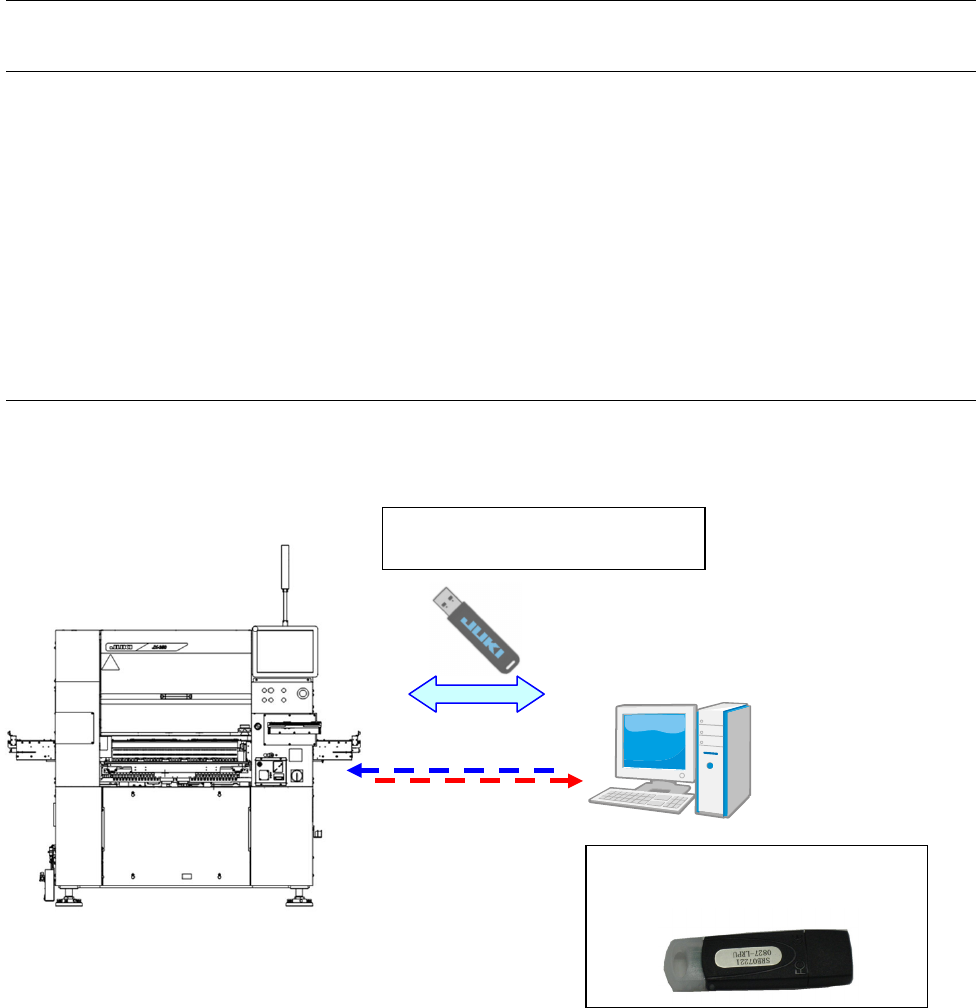
A dedicated "Protect module" is
needed to start EPU.
Chapter 1 Introduction
1.1 About the EPU
“EPU” is an abbreviation of “External Programming Unit,” and is a device for creating a
production program of JX-350 mounter on a personal computer (offline).
The EPU is exclusively designed for model of JX-350.
This Instruction Manual describes EPU for JX-350 of mounter.
Unless otherwise specified, the descriptions of this manual is applied to all types of EPUs.
1.2 System Configuration
Network and data transfer in
USB flash memory
PC for EPU
* Sharing with
component data is
also possible.