JX-350_EPU使用说明书.pdf - 第183页
EPU Instruction M anual C hapter 4 Creating a Production Progr am 4- 135 ● W hen using a serv er Component database. Select "Serv er Component part DB". In this cas e, the reference database w ill automatical l…
EPU Instruction Manual Chapter 4 Creating a Production Program
4-134
2) Prompt to optimize on exit
Select whether to display the message for optimization when you quit the Program
Editor.
• Yes: The system displays the inquiry dialog box that asks you whether to
execute the Optimization function if you try to quit the program although
you have not executed the optimization function.
• No: The system does not display the inquiry dialog box.
3) Notify when data entered into DB
Select whether to notify you that the system finishes registering data in the
database.
• Yes: The system notifies you that it registered component data into the
database when it did.
• No: The system does not notify you.
4) If no placements delete comp. record
Select whether to delete component data on a component used at the placement
position when the corresponding placement data is deleted.
• Yes: The system deletes component data when all the corresponding
components have been placed at the placement positions.
• No: The system does not delete component data.
You can delete component data that has no placement positions on
the “Component” data “List” screen.
• Notification: The system displays the “Question” message that asks you
whether to delete the corresponding component data.
(3) Database file:
Select a type of a database file you are to use. Note that you cannot select a
database that cannot be used.
A database is a file in which component data is registered. (For more details, see
Chapter 5 "Database.")
You can use only one database with the Editor.
You can create two or more databases and operate them, but You have to specify the
database file to use according to the program.
• When you use the component database of the mounter main unit
<How to set>
① Select the <Machine Component DB> button.
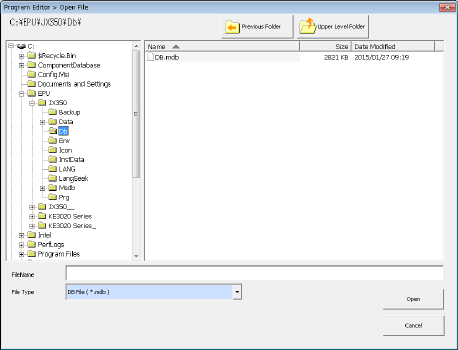
② Press the <Browse> button, and select a database file on the “Open File” dialog box.
EPU Instruction Manual Chapter 4 Creating a Production Program
4-135
●When using a server Component database.
Select "Server Component part DB".
In this case, the reference database will automatically refer to the database in the
server of the production support system.
The IP address and port number of the production support system server are
displayed on the screen
※
For more information Chapter 5 database for the database in the mounter side,
set in the production support system side, please refer to in the instruction manual
of the production support system.
(4) Default Nozzle Selection
Specify the nozzle you use among the “No. 500 nozzles” and the “No. 502/503
nozzles.” This selection changes the nozzle number the system automatically selects
on the “Component” data screen.
Example: When you select the radio button “Use 500 nozzle as default”
When you enter “2 mm × 1.2 mm” as the component dimensions on the “Component”
data screen, the system automatically selects a “No. 500 nozzle.”
(5) Setting “Pick Position Check”
When you are to check the component pick-up position, enter the value for judging if a
pick-up position is shifted from the regulated position.
See the description of the pick position detection under Section 4.1.4.2.6 “Inspection”
for the threshold value and the judgment value (“Tolerance”) for detecting a pick-up
position error.
(6) Default Feeder
If an 8-mm electric feeder is specified in the Pick data, select the initial feeder type, “E
8mm S” (single lane) or “E 8mm D” (double lane). “E 8mm S” is selected by default.
EPU Instruction Manual Chapter 4 Creating a Production Program
4-136
4.4 Production Management Information (Window)
When you select “PWB production” as the production mode, the production management
information is saved. This section describes the production management information
saved during production.
4.4.1 Production management information
(1) Conditions under which the production management information is collected
① When “PWB production” is selected as the production mode, and components are
placed on all component placement positions of a board
② Once the information is collected, new information collected during the next
production is added to the previous production management information.
If you want to collect new data only, clear the information already stored.
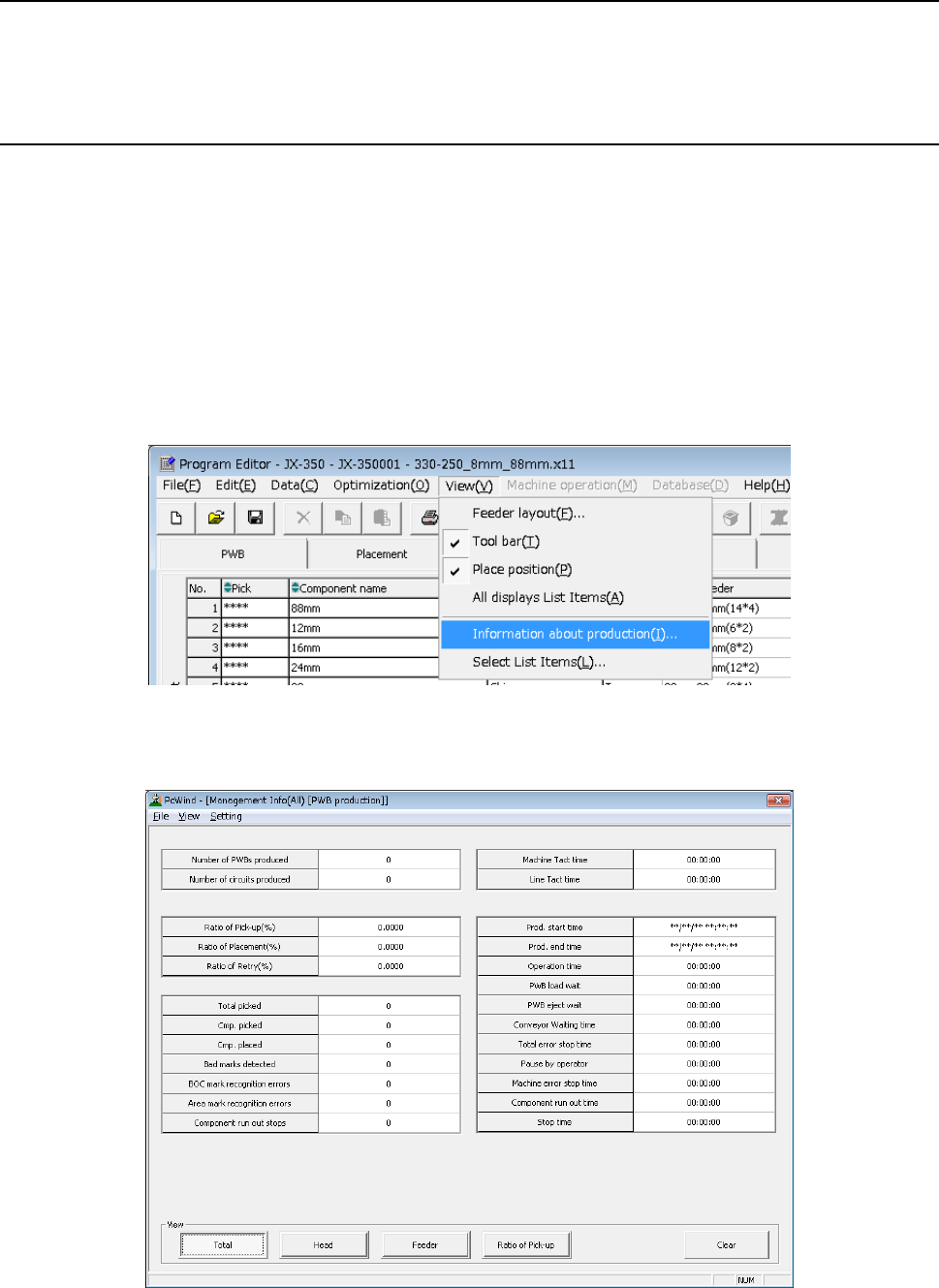
(2) Production management information screen
Click the [View] command from the menu bar, and select the “Information about
production” to be displayed on the screen.
(3) Contents
1) Production management information (All)