JX-350_EPU使用说明书.pdf - 第162页
EPU Instruction M anual C hapter 4 Creating a Production Progr am 4- 114 (3) Ref erence mode and init ializ ation If ther e is a difference in electr ic - powered system and mechanism bet ween the supply bank of the plac…
EPU Instruction Manual Chapter 4 Creating a Production Program
4-113
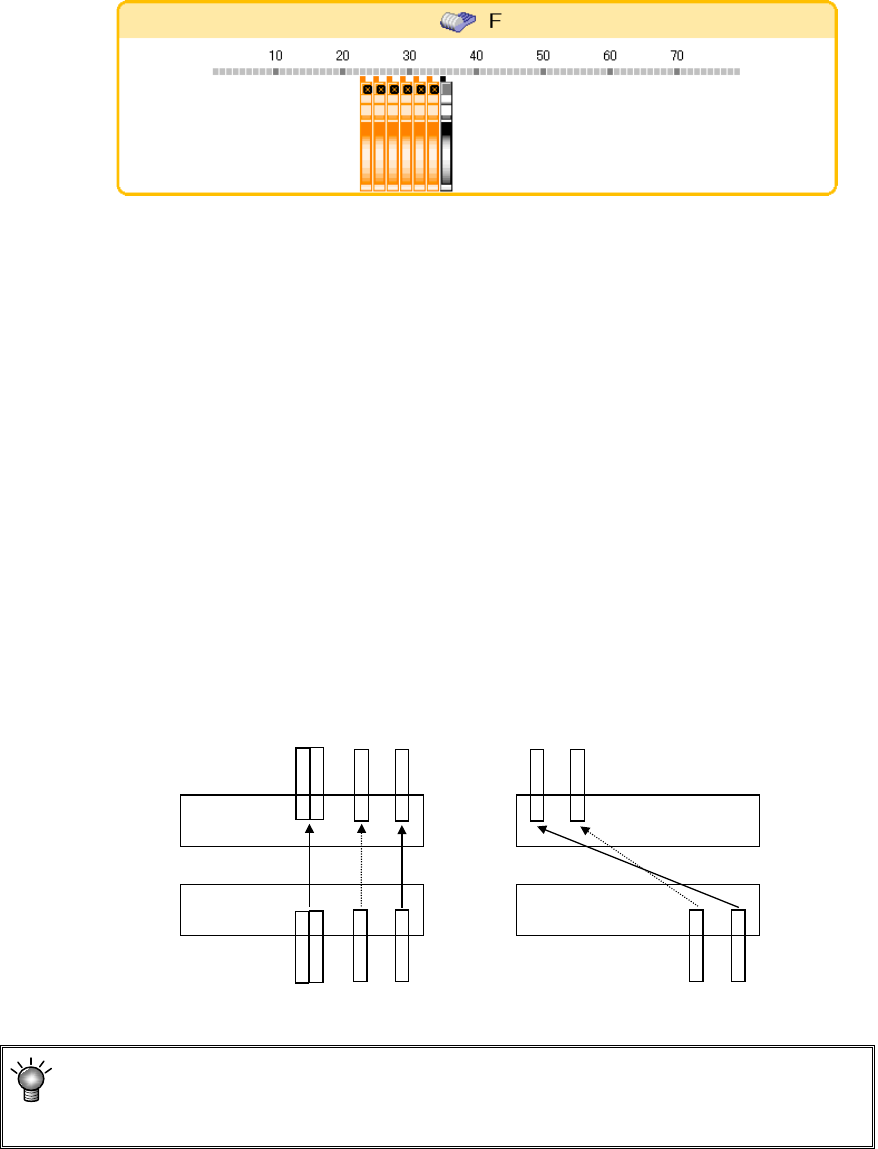
6) Display head image
When you check off the [Head image] button of the operating button, a head
image is displayed according to the mouse cursor. In the head image display
mode, the space between heads is displayed as an image. Bring the mouse
cursor to the bank image. Then, the head image displays the feeders having a
possibility of simultaneous pick-up in orange. If the feeders are arranged
according to the head space, simultaneous pick-up can be performed as
specified.
7) Movement/copy by axial symmetry or dot symmetry
Drag the feeder. In the reverse video status, press the [Axial symmetry] or [Dot
symmetry] to move the feeder.
In the status where the [Copy] button is checked off, copying is performed.
When you select the feeder on the front side, it is moved or copied to the rear
side. When you select the feeder on the rear side, it is moved or copied to the
front side. (Copy components cannot be copied.)
If components are already assigned to the copy destination, copying is not
performed.
• Copying by axial symmetry
The feeder is moved or copied to the position opposite to the hole number of
the front/rear side.
• Copying by dot symmetry
The feeder is moved or copied to the symmetrical hole position so that
front/rear overall change may be mutually used.
①
線対称でコピーした場合
F-79
F-75
R-79
R-75
点対称でコピーした場合
F-79
F-75
R
-5
R-1
F-71
F-71
①
②
②
When the rear feeder option in the “EPU setup” menu is disabled, copying by axial
symmetry and copying by dot symmetry cannot be performed.
(The buttons cannot be selected.)
When a feeder is copied to the
position symmetrical to a point
When a feeder is copied to the
position symmetrical to a line
EPU Instruction Manual Chapter 4 Creating a Production Program
4-114
(3) Reference mode and initialization
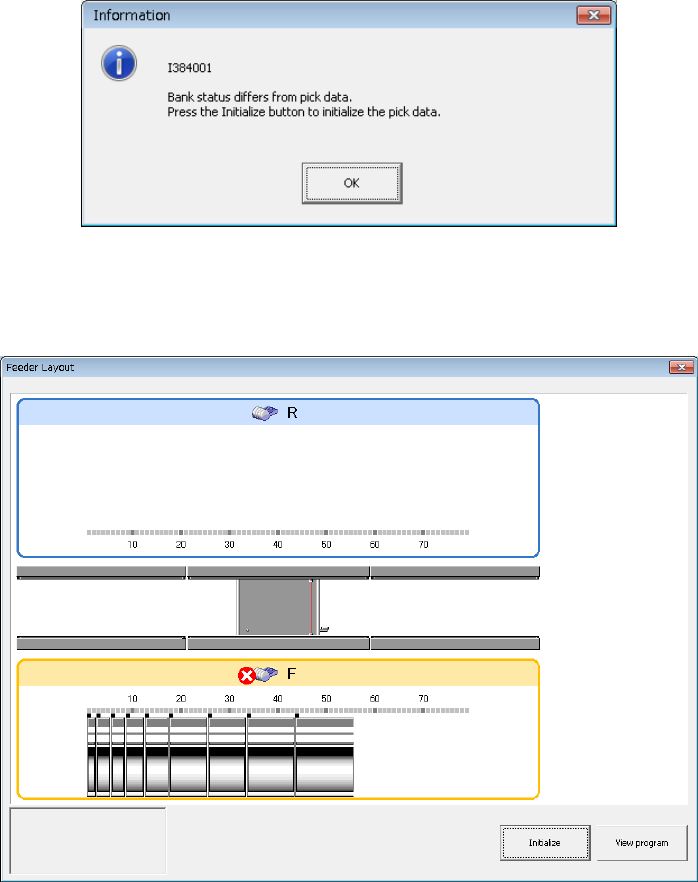
If there is a difference in electric-powered system and mechanism between the supply
bank of the placer proper and the production program feeder type when the
production program is read and program editing is executed, a feeder layout appears
after a message is displayed.
Check the bank connection and the feeder type of pick data in the reference mode.
To change the program, initialize the pick data.
1) [View Program] button
editing is started in the reference mode and the contents of the program can be
checked.
At this time, program change and teaching operations are disabled.
2) [Initialize] button
The pickup data of a feeder in a different status is initialized and changed into
one initialization data of "Auto selection."
As a result, the number of component supply becomes one.
EPU Instruction Manual Chapter 4 Creating a Production Program
4-115
4.3 Other Functions
4.3.1 Editing
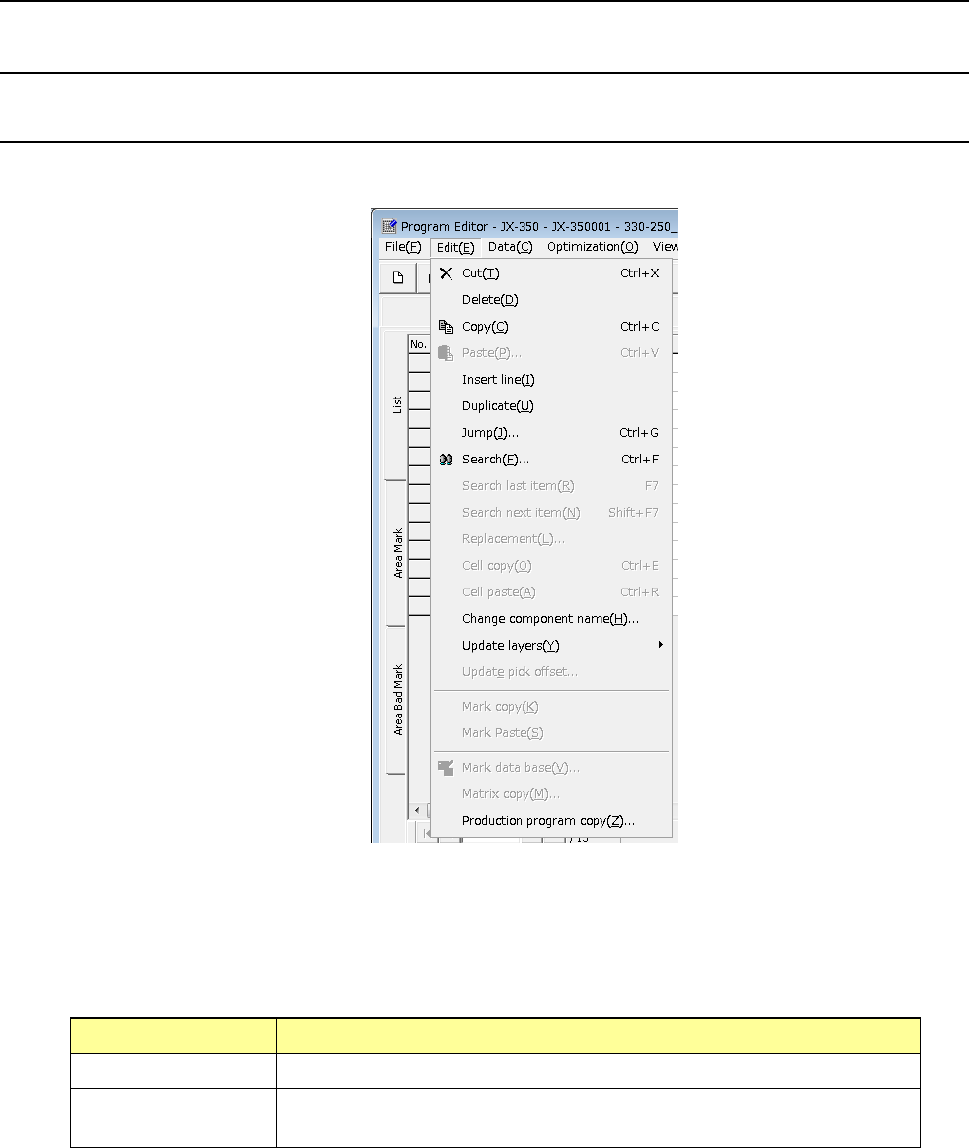
4.3.1.1 “Edit” menu
This is the function that helps you create a program.
* Selecting the range of data
To cut or copy data, select the range of data to be copied or cut in advance. This
range can be specified on a line-by-line basis.
How to select the range of data
Mouse (trackball) When you drag a mouse, the lines to be selected are highlighted.
Keyboard When you press the “↓” key or the “↑” key while holding down the “SHIFT”
key, the lines to be selected are highlighted.