JX-350_EPU使用说明书.pdf - 第135页
EPU Instruction M anual C hapter 4 Creating a Production Progr am 4- 87 4.1.5.2 Setting i tems ( 1) Angle S pecif y the component pick ing ang le. T he angle set in the " Component" data screen is set her e as …
EPU Instruction Manual Chapter 4 Creating a Production Program
4-86
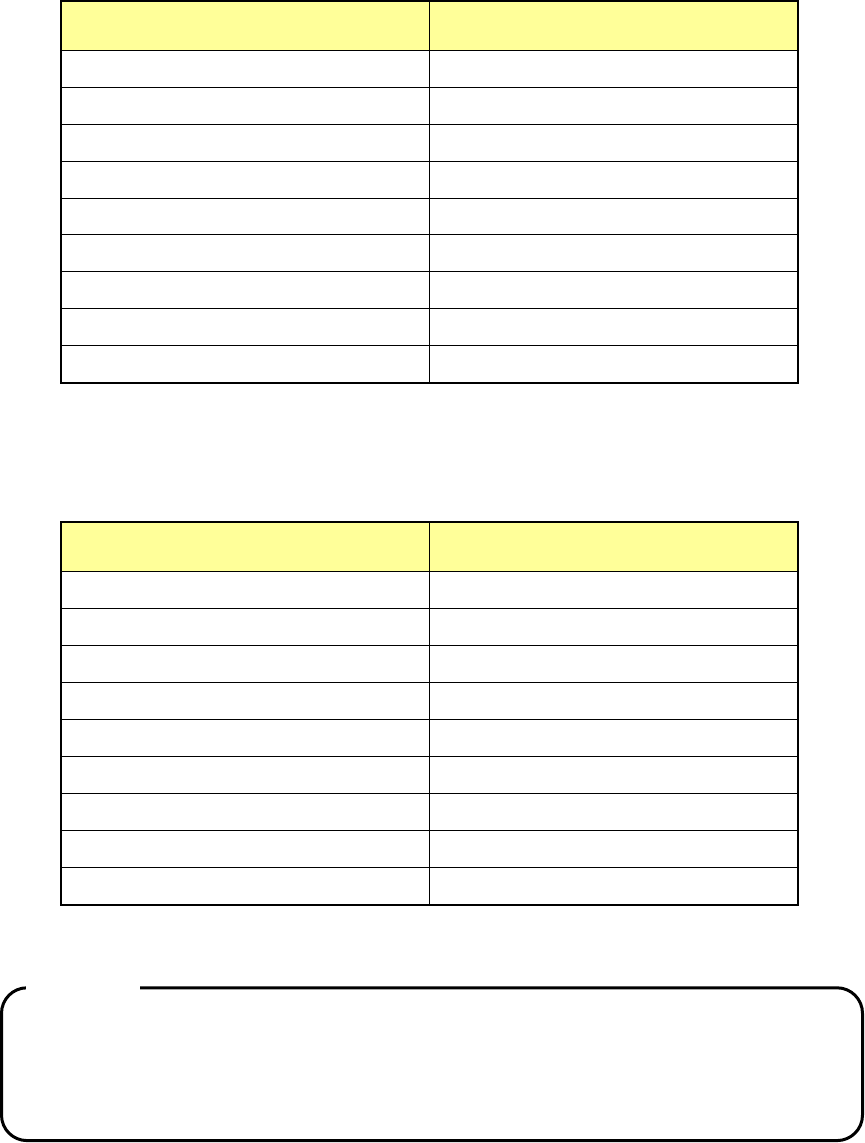
The range of occupied mounting holes of the feeder bank varies depending on the width
of the tape feeder.
Tape feeder/bulk feeder type
Number of the occupied feeder
mounting holes
8mm
2
12mm
3
16mm
3
24mm
4
32mm
5
44mm
8
56mm
8
72mm
10
Bulk feeder
2
Therefore, up to 40 8-mm tape feeders can be installed on one feeder bank, while up to
16 32-mm tape feeders can be installed on one feeder bank.
* An 88-mm tape feeder is provided in response to your customization order only.
Electric feeder type
Number of occupied feeder mounting
rails
8-mm single (8mm S)
1
8-mm double (8mm D)
1
12mm
1
16mm
2
24mm
2
32mm
3
44mm
3
56mm
4
72mm
5
Therefore, up to 40 8-mm single electric feeders can be installed on one feeder bank.
Caution:
Any component whose size is equal to that of a 0402 component cannot be
used with an electric double tape feeder.
If you specify
“8 mm” in the “Feed Pitch” field of the “Component” data screen,
you cannot specify an electric double tape feeder.
EPU Instruction Manual Chapter 4 Creating a Production Program
4-87
4.1.5.2 Setting items
(1) Angle
Specify the component picking angle. The angle set in the "Component" data
screen is set here as the initial value.
To change the value, enter the desired value from the keyboard.
Even though you enter a value into this “Angle” field on the “Pick” data screen, the
corresponding angle is not changed on the “Component” data screen or database.
(2) Side
Specify on which side to set the feeder, on the front side or on the rear side.
“Rear” can be specified when the “Rear feeder” option is available.
“AUTO” is selected in this field as the initial value.
When “AUTO” is selected, the optimization function determines the side, front or rear.
• AUTO: The optimization function determines the side, front or rear.
• Front: The front side supplies components.
• Rear: The rear side supplies components.
When you select a bank without selecting “Auto,” the menu items “Angle,” “Position,”
“Feeder type,” “Lane” (for stick feeders and electric double tape feeders only), “Pick
position” and “Status” become available.
* When you select two or more Pick data records, you can change them at a time.
However, in this case, you can select “Auto” only.
* Regarding the tray holder and MTS, only "Rear" can be selected.
(3) Position
Enter the position for mounting a feeder unit.
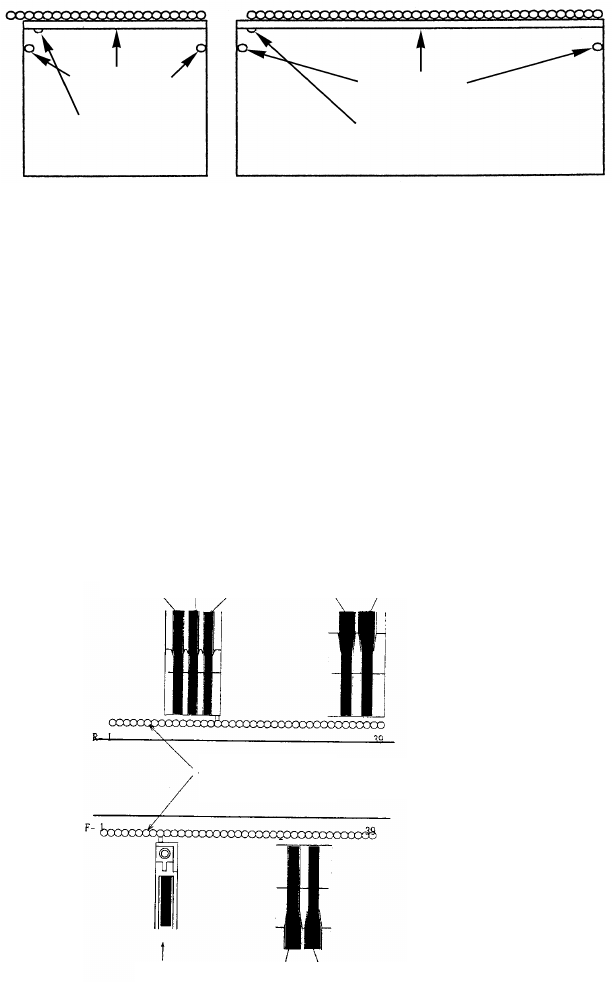
• For a tape feeder/stick feeder/bulk feeder: these types of feeders have a fixed
pin on its tip. Enter the number of the feeder-mounting hole of the main unit into
which this pin is inserted.
• For a tray holder: Specify the feeder-mounting hole number indicated with the
mounting marker.
• For an MTS: Specify the level on which a tray is stored.
Position when you execute the [Duplicate] command for a line of an MTS
component on the “Pick” data screen:
When you execute the [Duplicate] command for a line of an MTS component, the
system displays the dialog box that asks you which is to be duplicated, a line of a
tray component or that of a tray holder.
When you select to duplicate a line of a tray component, the number set in the
[Position] field of the original line is copied into that of a new line. However, the
“Pick position” fields become blank. Enter each coordinate into the “X1”, “Y1”
and “Z” fields respectively.
When you select to duplicate a line of a tray holder component, the [Position]
(number of levels) field becomes blank. Enter the number of levels.
You cannot specify another type of feeder on the position whose number was
already specified for one type of feeder.
Example: If you specify “10” in this field for a 12-mm tape feeder, you cannot
specify another type of feeder at the positions from 10 to 12.
EPU Instruction Manual Chapter 4 Creating a Production Program
4-88
(4) Feeder type (You have to specify this menu item for a stick feeder, a tray or an
8-mm electric tape feeder.)
Select a type of a stick feeder, a tray or an 8-mm electric tape feeder.
However, the type set in the Component data is displayed here. To change it,
specify the desired type on the “Component” data screen.
For the a mechanical type, "M" is attached at the beginning of the name.
For an electric type, "E" is indicated at the beginning of the name.
• Tray holder
Tray holders are classified into "Type 1 (full specification)" and "Type 2 (half
specification)."
* For installing a tray holder, insert it so that the mounting marker can be localted at
the feeder mounting hole.
• For an 8-mm electric tape feeder:
When you select “8 mm paper” or “8 mm emboss” as an electric feeder on the
“Component” data screen, you can select “E 8mmS” (single lane) or “E 8mmD”
(double lane) in the “Feeder Type” field of the “Pick” data screen.
(5) Lane
Select a lane number for a stick feeder or an electric double tape feeder.
Lane numbers are seguentially assigned from the left with viewed from the front of the
machine regardless of which side a component is supplied from.
Lane
3 Lane 2 Lane 1 Lane 2 Lane 1
Lane 1 Lane 1 Lane 2
Feeder
mounting hole
Transport path
Butt
Butt
Mounting marker
type 2
Mounting marker
type 1