JX-350_EPU使用说明书.pdf - 第122页
EPU Instruction M anual C hapter 4 Creating a Production Progr am 4- 74 4.1.4.2. 5 Place Conditi on The placement c onditions consist of setting items relat ed to placement and def ault values are applied. According ly ,…

EPU Instruction Manual Chapter 4 Creating a Production Program
4-73
(7) Auto correct pick:
This setting causes the system to automatically correct the component pick-up
position error as the result of laser recognition. Note that this check is only for
components that are centered with laser and supplied from tape.
The corrected position is entered to the coordinates field of the component pick-up
position on the “Pick” data screen.
The system corrects the component pick-up position without causing the
simultaneous pick-up to be disordered by correcting the pitch in Y direction when an
electric feeder is used.
When you select a component pick-up position correction for a mechanical
feeder, the system may not be able to pick up a component simultaneously on
the way because the component pick-up coordinates change during PWB
production.
(8) Auto teaching:
This is the function for automatically measuring the center of a component when the
system tracks the component pick-up position.
You cannot select the “Yes” radio button for components other than chips 0603 to
3216 whose packaging style is a paper tape (8-mm pitch).
When you select “Yes,” the system automatically teaches the center of a component
when it tracks the pick-up position.
EPU Instruction Manual Chapter 4 Creating a Production Program
4-74
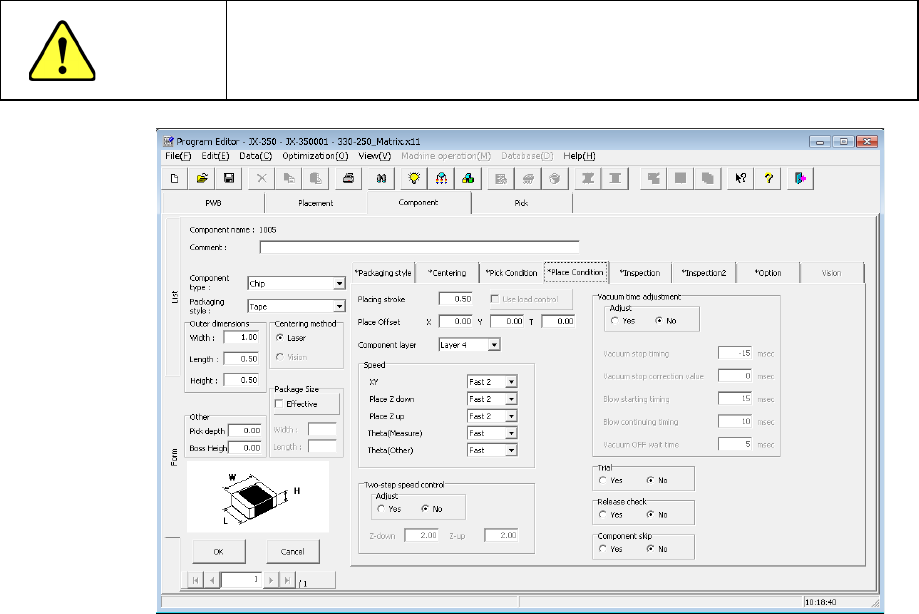
4.1.4.2.5 Place Condition
The placement conditions consist of setting items related to placement and default values
are applied. Accordingly, they do not need to be changed. If placement cannot be
performed normally in the default value status, change the settings.
CAUTION
If you change any of the basic settings after changing any value on the
“Place Condition” tab, some values are reset to their defaults on the
“Place Condition” tab.
(1) Placing stroke
Specify the distance for pushing a component to be placed from the top surface of a
board.
When you specify “0” in this field, a component may not reach a board due to the
flatness of the board and it may not be placed at the specified placement position
(that is, a placement error occurs), or a component may slide over the cream solder
when it is placed.
In such a case, increase the value set in this field so that a component can reach the
board (that is, enter a positive value).
The initial value is “0.5 mm” (0.2 mm for a 0603 chip component).
"The load is controlled" button becomes effective for the use of the nozzle with which
a simple load can be controlled after 601.
* Not used in JX-350.
EPU Instruction Manual Chapter 4 Creating a Production Program
4-75
(2) Place Offset XYӨ
When the system centers a component with laser, it holds the center of the
component based on the outline of the component observed with laser.
In CAD data or similar type of data, the center of the component-mounted pattern
(called “pad”) is regarded as the coordinates of the component placement position.
This difference may cause leads of a component to be shifted from the pad of a
PWB.
Therefore, when you enter this difference in this “Place Offset,” the system can place
a component at the correct position.
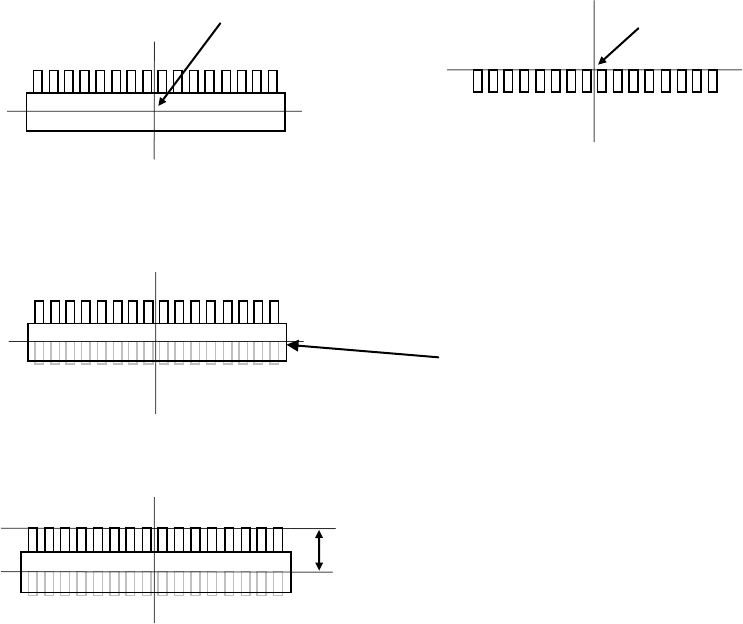
Example 1: One-direction lead connector
* Placement angle is 0°.
If the placement offset is not entered, components will be placed as shown below.
In the condition shown in the figure above (placement angle of 0º and placement
offset of 0), the system measures the distance from the coordinates of the component
placement position as the start point to the relative position of the component
placement position coordinates, and enters this distance into the “Place Offset” field.
To place two or more components of the same name, enter the placement offset in
this manner, and the placement position will be automatically changed and the
component will be placed on the correct position even if each placement angle is
other than 0°.
Placement offset -Y (X is 0)
Center position of a component
centered with laser
Placement coordinate
position
Top view of a component
Pad on a PWB
Pad on a PWB