JX-350_EPU使用说明书.pdf - 第130页
EPU Instruction M anual C hapter 4 Creating a Production Progr am 4- 82 (2) M easure PWB Surface Height This setting item allows the system to measur e the height of the boar d surf ace at the component placement positio…
EPU Instruction Manual Chapter 4 Creating a Production Program
4-81
(4) Component verification
* JX-350 is not applicable to the component verification.
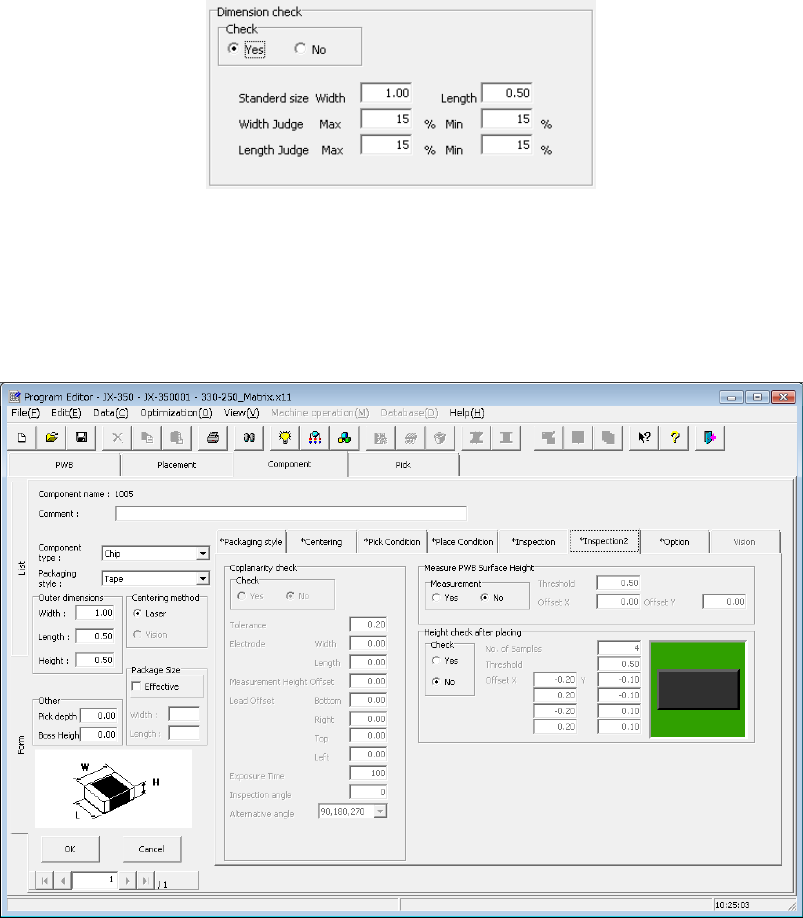
(5) Dimension check
Specify whether to check a dimension of a component, and enter the standard size
and the size used for judgment if the system checks.
If you check the “Yes” radio button in the “Check” field, the system checks the width
and length of a component when centered, and an error occurs if these dimensions
exceeds the upper/lower limits and the system judges that the component is
irregularly-shaped.
Use this check function mainly to check that a component of the specified size is not
set.
The system performs this check when it centers a component during production.
The component to be judged is laser centering component.
4.1.4.2.7 Inspection 2
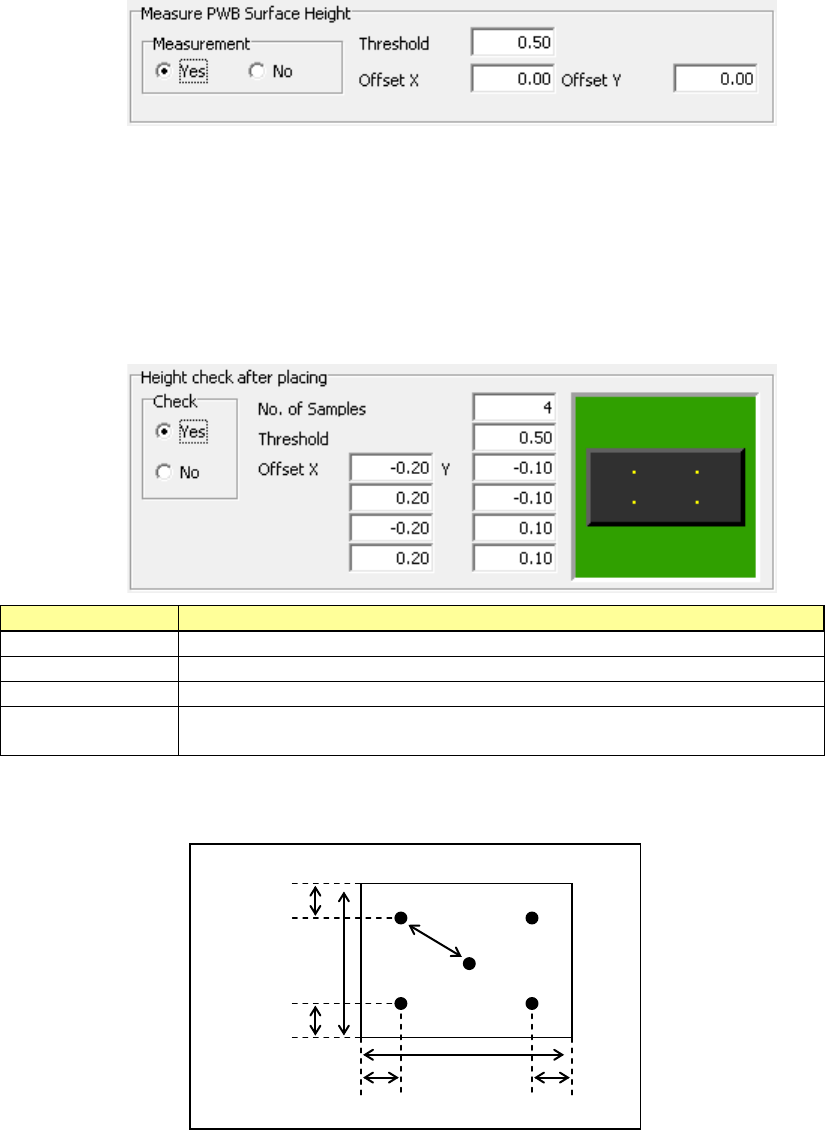
On this tab, you can make settings of the coplanarity check data (“Coplanarity check”),
those of measurement of the board surface height on which a component is placed
(“Measure PWB Surface Height”) and those of measurement of the component height
after it is placed on a board (“Check Component Height after place”).
(1) Coplanarity inspection data
* JX-350 is not applicable to the coplanarity inspection data.
EPU Instruction Manual Chapter 4 Creating a Production Program
4-82
(2) Measure PWB Surface Height
This setting item allows the system to measure the height of the board surface at the
component placement position to correct the Z-coordinate of the component
placement position.
The center (one point) of the component placement position is to be measured.
According to the measurement result, enter the threshold value for determining
whether the board warps or not in the “Threshold” field.
When the measurement result is within the range of – “Threshold value” to “Threshold
value,” the system determines that a component can be placed on the board.
To measure a position other than the component placement position, enter the “Offset
X” and “Offset Y” fields.
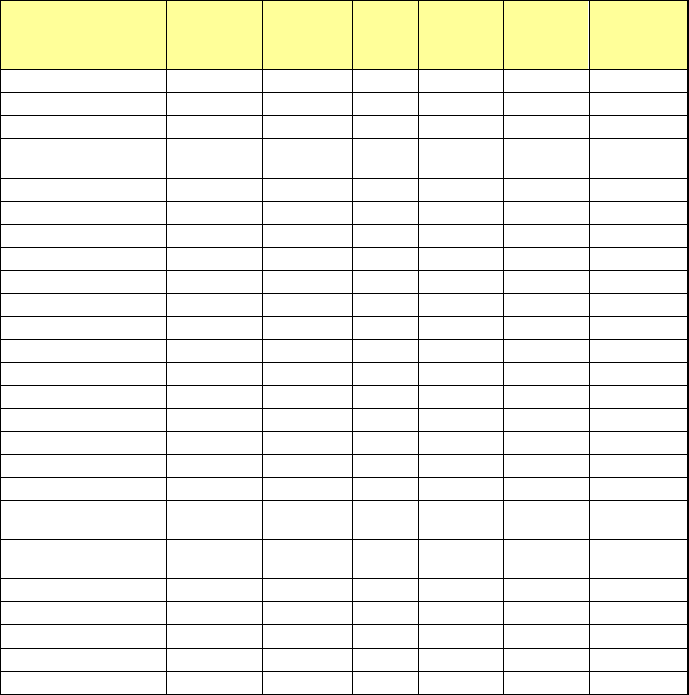
(3) Check Component Height after place
This setting item allows the system to measure the heights of four corners of a
component such as one having a boss after it is placed on a board, and check to see
if the placed component is tilted or not.
When the measurement result is within the range of – “Threshold value” to “Threshold
value,” the system determines that the component has been placed on the board
normally.
If it exceeds this range, the current production stops temporarily.
Setting item
Description
Check
Specify whether to check or not by selecting the corresponding radio button.
No. of Samples
Specify how many positions to be checked within the range of 2 to 4.
Threshold
Specify a value for determining whether a placed component is tilted or not.
Offset X, Y
Specify where to check by entering the offset from the component placement
position. From the top, specify the measurement positions 1, 2, 3 and 4.
The relation between the measurement offset positions and the check positions is
shown in the figure below.
Offset value
30% of the
vertical length
Measuring
position 1
Measuring
position 3
Measuring
position 2
Measuring
position 4
30% of the
horizontal length
30% of the
vertical length
30% of the
horizontal length
EPU Instruction Manual Chapter 4 Creating a Production Program
4-83
* Regarding the data of the “Inspection” and “Inspection 2” tabs, the entry may be
restricted depending on setting such as the component type.
Component type Tombstone
Dimension
check
SOT
Angle
Pick
Position
Detection
Measure
PWB
Surface
Height
Check
Component
Height after
place
Square chip
○
○
×
○
○
○
Square chip (LED)
○
○
×
○
○
○
MELF
○
○
×
○
○
○
Aluminum electrolytic
capacitor
○ ○ × ○ ○ ○
SOT
○
○
○
○
○
○
Trimmer
○
○
×
○
○
○
Network resistor
○
○
×
○
○
○
SOP
○
○
×
○
○
○
HSOP
○
○
×
○
○
○
SOJ
○
○
×
○
○
○
QFP
○
○
×
○
○
○
GaAsFET
○
○
×
○
○
○
PLCC (QFJ)
○
○
×
○
○
○
PQFP (BQFP)
○
○
×
○
○
○
TSOP
○
○
×
○
○
○
TSOP2
○
○
×
○
○
○
BGA
○
○
×
○
○
○
QFN
○
○
×
○
○
○
Unidirectional lead
connector
○ ○ × ○ ○ ○
Bidirectional lead
connector
○ ○ × ○ ○ ○
Z-lead connector
○
○
×
○
○
○
J-lead socket
○
○
×
○
○
○
Gull-wing socket
○
○
×
○
○
○
Socket with bumper
○
○
×
○
○
○
Other components
○
○
×
○
○
○
4.1.4.2.8 Option
* JX-350 is not applicable to the opyion.
4.1.4.2.9 Vision data
* JX-350 is not applicable to the version data.