JX-350_EPU使用说明书.pdf - 第70页
EPU Instruction M anual C hapter 4 Creating a Production Progr am 4- 22 13) PWB height, PWB thickness, and B ack height Enter thes e fields in t he same manner as t hose f or a s ingle - plane PW B. Example: Dat a entry …
EPU Instruction Manual Chapter 4 Creating a Production Program
4-21
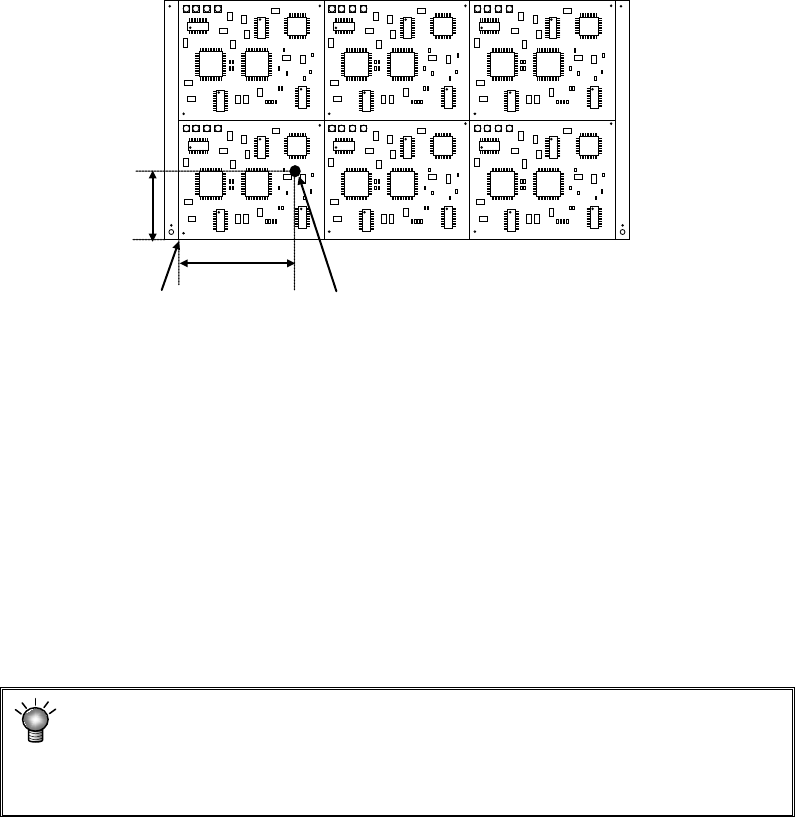
12) Bad mark position
Select the “Not Used” radio button or the “Used” radio button depending on
whether a bad mark is used or not.
When you select the “Not Used” radio button, “***” appears in the “X” field and the
“Y” field respectively.
When you select the “Used” radio button,
Enter the distance from the circuit origin (circuit reference position) to the center
of a bad mark on the reference circuit.
* In the above case, enter X = a and Y = b.
<Usage of a bad mark and operation flow>
i) Enter the bad mark coordinates into the PWB data.
ii) Before feeding a PWB, affix a bad mark on the spot specified with the bad
mark coordinates of a defective circuit.
iii) When the OCC or the bad mark sensor reads a bad mark on circuits before
starting production, the system skips the circuit on which the bad sensor
detects a bad mark without placing it on a board.
iv) Before the start of production, the OCC or bad mark sensor reads a bad mark
of each circuit. When a bad mark is recognized, components are not placed
on the corresponding circuit.
The requirements for a bad mark are: the mark must be distinct in the
color from a PWB, and its diameter must be 2.5 mm or greater. If a bad
mark is used, the production time will be longer by the mark recognition
time.
* For the extended bad mark, see "4.1.2.5 "Ex. bad mark" screen."
* If the bad mark is set out of the circuit, use an extension bad mark.
a
Circuit origin
Bad mark coordinates
b
EPU Instruction Manual Chapter 4 Creating a Production Program
4-22
13) PWB height, PWB thickness, and Back height
Enter these fields in the same manner as those for a single-plane PWB.
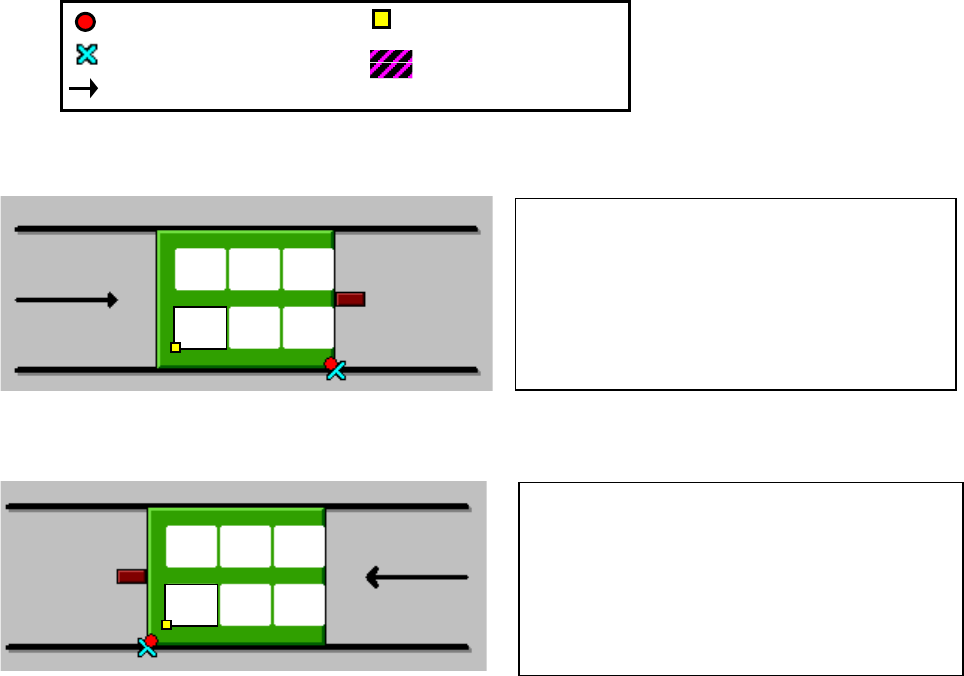
Example: Data entry for a multi-plane matrix PWB
The following examples indicate a PWB whose reference circuit is at the left bottom
corner, and whose circuit origin is at the left bottom corner of a circuit.]
① For front reference and PWB transport direction of L → R: (when “Shape reference” is
selected as the “Positioning method” on the “Basic setting” screen)
② For front reference and PWB transport direction of R → L: (when “Shape reference” is
selected as the “Positioning method” on the “Basic setting” screen)
PWB dimensions X=200 Y=120
PWB layout offset X=5 Y=−5
Circuit dimension X=50 Y=30
Ckt. Layout offset X=0 Y=0
First circuit position X=−170 Y=15
Circuit divide No X=3 Y=2
Circuit pitch X=60 Y=50
PWB dimensions X=200 Y=120
PWB layout offset X=−5 Y=−5
Circuit dimension X=50 Y=30
Ckt. Layout offset X=0 Y=0
First circuit position X=20 Y=15
Circuit divide No X=3 Y=2
Circuit pitch X=60 Y=50
:PWB position reference
:
Transport direction
:Circuit origin
:Reference circuit
:Layout end
EPU Instruction Manual Chapter 4 Creating a Production Program
4-23
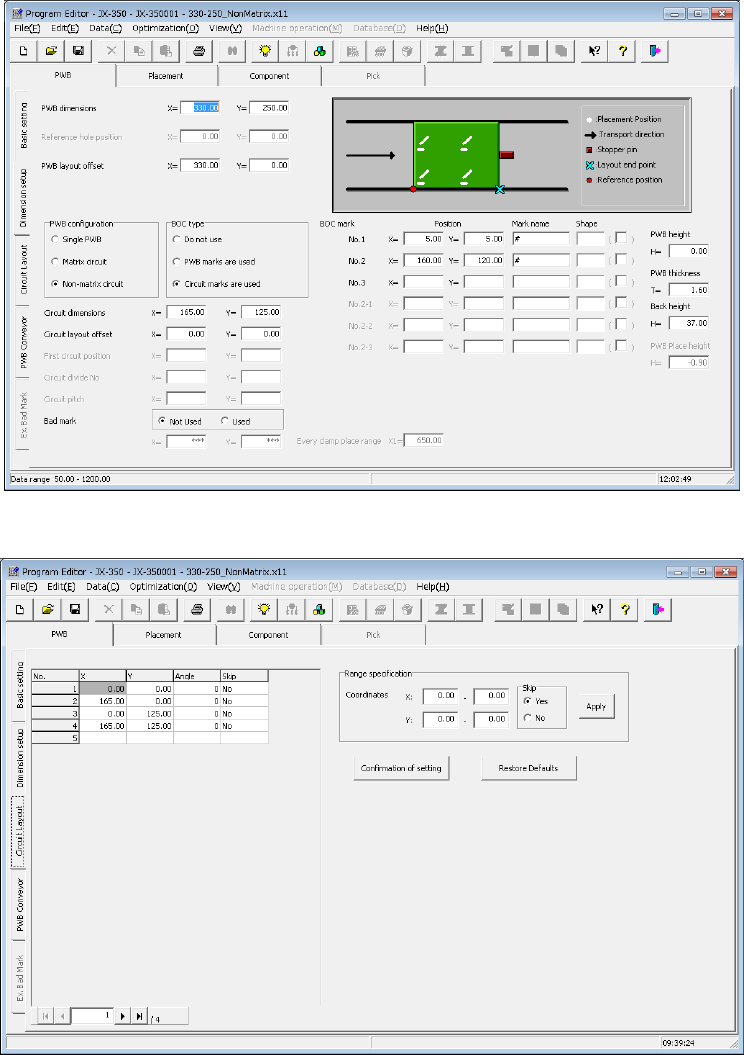
(2) Multi-plane non-matrix PWB
(set as “Non-matrix circuit” on the “Basic setting” screen)
The angle of each circuit is different from each other and the distance (pitch) between
circuits is not equal on this type of PWB (see the example on the next page).
The system places each circuit on a PWB one by one according to the specified X
and Y angles with regarding the PWB origin as the reference position. Therefore,
the system can handle the different pitch or the different circuit angle from other ones.
If you specify the same circuit pitch and angle, you can create PWB data for a
multi-plane matrix PWB also.
- Length setting screen
- Circuit layout screen