JX-350_EPU使用说明书.pdf - 第224页
Glossary A − 3 • Centering Centering is a system that detects t he position, angle, and picking pos ition of t he component bef ore placing t he picked up component on the PW B, and correc ts the position slippage, and a…
Glossary
A−2
•
ATC
An abbreviation for Auto Tool Changer
In JX-350 unit, nozzles that are suited to the component size are mounted on the head
in order to conduct component picking and placement. This is the storage place for
these nozzles.
•
Bad mark reader
A bad mark reader is: on a gang processing PWB, a mark (bad mark) is affixed to a
specific part of the circuit that the user does not want to execute placement, the
coordinates of the bad mark are entered into Bad mark position of PWB data, and during
production, the bad mark reader moves to the coordinate position entered by the PWB
data, and the LED sensor checks the presence of bad mark, and as a result, the
component will not be placed for a circuit that has a bad mark.
PWBs available for this system are gang processing PWBs. PWBs of single PWB
processing are not applicable. Use a bad mark with the diameter of 2.5 mm φ or larger,
and the color must be distinct in its light and shade.
Use of a white bad mark is preferable for a PWB of which color is relatively strong, such
as Glass Epoxy PWB while use of a blackish bad mark for a PWB of which color is light
such as ceramic PWB. A bad mark reader is also an option on shipping at factory.
•
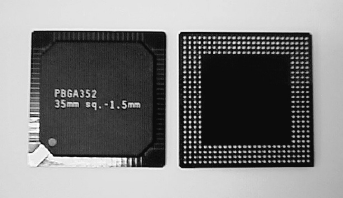
BGA, and FBGA
An abbreviation for Ball Grid Array, and Fine pitch BGA.
Solder bumps (balls) are arrayed in a grid pattern on the component placement surface.
This arrangement has a feature of having resistance against deformation and easiness
of handling.
Since they were recently employed in
Intel's peripheral circuits for personal
computer, they are adopted in the field of
personal computer in a significant
upsurge.
•
BOC alignment
This function recognizes the BOC mark
and calculates the correction rate by means of BOC mark.
When to use BOC mark for placement, BOC Alignment must be acquired. Otherwise,
placement position will be slipped when teaching of placement position is conducted.
•
BOC mark
An abbreviation for Board Offset Correction mark.
A mark or marks provided on PWB to correct slippage between the periphery used in
PWB positioning or machine processing part such as positioning pin hole and the pad
(land).
In JX-350 unit, two or three points of marks may be specified. Use of two points can
correct rotation and expansion/contraction. If three points are used, X and Y distortion
can be corrected in addition to the above.

Glossary
A−3
•
Centering
Centering is a system that detects the position, angle, and picking position of the
component before placing the picked up component on the PWB, and corrects the
position slippage, and angle slippage of the component that are obtained from the above
actions in order to place the component on the PWB.
We have two types of centering. One is called "laser centering" and this system can be
used commonly in the FX-series mounters, KE-series mounters and the JX-series
mounters.
This system uses a dedicated laser unit to irradiate a laser beam to the component, and
executes centering while rotating the component, and thus it can determine the picking
slippage, angle slippage of the component in relation to the center position, and
correction will be made over those value of slippage.
It is also called Touchless centering because it does not touch the component except for
that picking.
The other system is Image centering, which is also called vision centering or VCS
centering. This centering system allows the mounter to inspect and place on a board a
component whose lead pitch is less than 0.65 mm (such a component cannot be
centered with laser) by using the dedicated camera.
(However, not supported in JX-350.)
The camera used in this operation is called a VCS camera. It is used mainly in
centering of QFP, PLCC, connector, BGA etc. and pitch, lead bend, lead length, ball
deformation inspection etc., for which laser is not effective, can be seen.
Further, use of the high-resolution VCS camera (0.3 mm VCS) can perform centering
placement of those components with smaller lead pitch (lead pitch of 0.3 to 0.4 mm).
This centering is similar to laser centering in the light of placement through correction of
slippage from the center position, angle of the component.
•
Component data
Based on the Component name entered by the previous placement data, entry of
information of that component is made on the component data. In addition to the above,
setting of packaging style of the component, the speed of X, Y, Z, and θ when placing
the component, various checks, and inspection functions are made here.
•
Component shape (“Comp Shape”)
The “Comp Shape” sets a shape of a component for the system to recognize it roughly
when it centers the component with laser.
There are eight component shape types to be recognized with laser: “No Definition,”
“Corner Square,” “Corner Cut”, “PLCC”, “Cylinder”, “Flexible”, “Flexible 2” and “Flexible
3.” The machine decides which type is to be set by checking the “Comp Shape” setting
you made on the Component data screen.
“Corner cut” is mainly used for a rectangular component such as a chip. “Corner Cut” is
used for a component whose corner to be recognized lacks some area whose cross
section is 0.25 mm or more as shown in the figure below.
“PLCC” is used exclusively for a special PLCC component whose recognized cross
section is unique. “Cylinder” is used for cylinder components without corner. “Flexible”
is used for polygonal components or other components that the laser recognition error
(shape recognition error) occurs through “Corner square”, “Corner cut”, or “PLCC”.
0.25mm or more
Glossary
A−4
“Flexible 2” is valid for components with multiple symmetry axes. “Flexible 3” is used
for irregular shape components. “No Definition” indicates that the system places the
component on a board based on the angle given according to the mechanical accuracy
of the machine without recognizing it with laser.
•
Coordinate
Coordinates express the relation of X and Y to the origin, and for the mounter, the
left-hand direction viewed from the origin is −X, and the right-hand direction is +X, and
the upward (rear) direction viewed from the origin is +Y, and the downward (front)
direction is −Y, both on control and on data.
"On control" means that how the machine moves when we move the machine. For
teaching by OCC, for example, the 8-direction arrow buttons +X+Y on the teaching
screen are used to move the OCC to the upper right edge after putting the OCC at the
lower left edge of PWB in the PWB set status. The relation of +Y−Y is reversed for those
machines in which the Y-axis of PWB moves, such as KD-775 (dispenser).
"On data", it depends on the position at which the PWB origin (circuit origin) during
program preparation is to be placed.
For example, if we place the PWB origin (circuit origin) at the left bottom of the PWB
edge, the development of the BOC mark, placement position will be positive
development both for X, Y. On the contrary, if we place the origin at the right top of the
PWB, all X, Y will be negative development on data.
•
Current memory
Current memory is the memory that is available at present. In a mounter, two or more
files cannot be opened simultaneously, and it has only one current memory.
•
Data compatibility
Data compatibility means that a production program prepared by Machine A, for example,
can be read by Machine B. Between KE series and KD series, Upward compatibility is
effective.
“Upper compatibility” means that the program created by KE-750/760 can be read by
JX-350.
Conversely, the data created by JX-350 can sometimes be read by KE-750/760 (lower
compatibility). (Depending on the main unit version of each machine)
•
Directory
A directory indicates the address in which a file is stored, and directories are divided into
two.
First, [A] and [D] that is placed at the top of directory is called a root directory.
A root directory indicates the very root or the source, and if a root directory is [A], for
example, you can recognize it to be the FDD, and if it is [C], you can recognize it to be
the HDD.
In JX-350, the directories such as [Data] and [Prg] are provided in advance. To put it
shortly, a directory indicates the “address” of a file, and if we open [Read file] etc., for
example, we will see [D:¥ PRG] etc. in the directory list. Seeing this, we will understand
that it is on the hard disk because the root directory is D. Next, when we see :¥PRG,
we can see what files are stored in this dwelling place, or this directory. A number of
branches are found in the same hard disk, like this, allowing easy file management and
distinction by applications. In addition, the users can create new directories by
themselves.