JX-350_EPU使用说明书.pdf - 第173页
EPU Instruction M anual C hapter 4 Creating a Production Progr am 4- 125 ( 10) Cel copy This comm and register s data of t he selected cell (f ield) in the memor y . This comm and is effective f or the cells “ X, ” “ Y, …
EPU Instruction Manual Chapter 4 Creating a Production Program
4-124
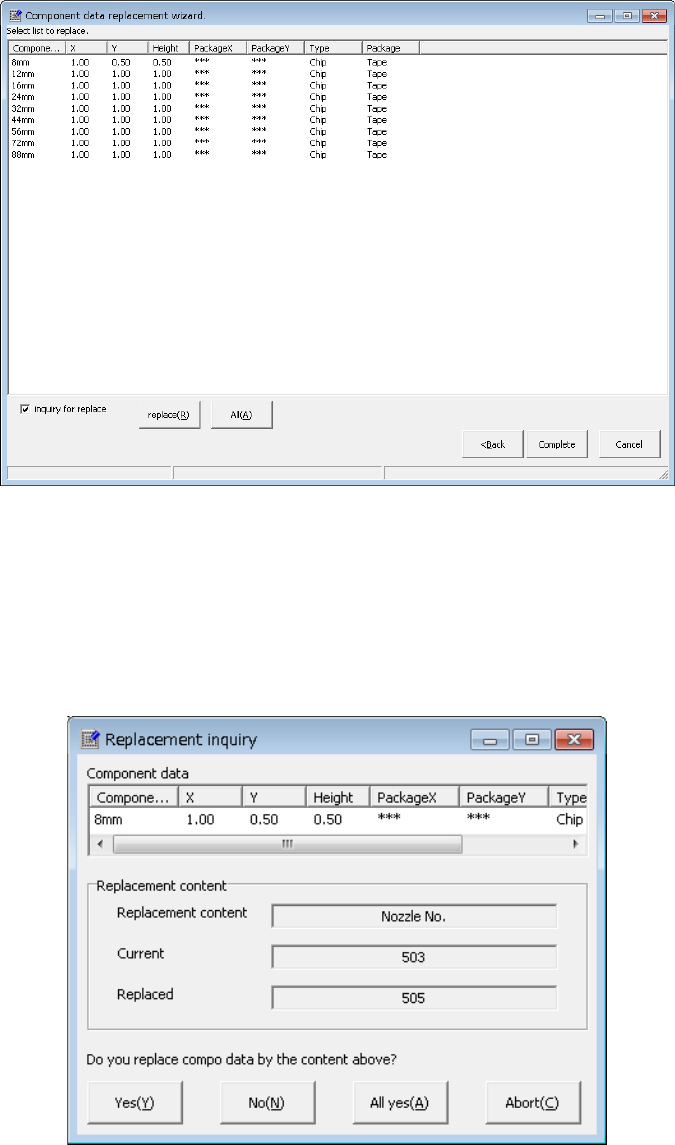
3) List of the selected components
The entered data appears on the screen as shown below.
• <replace>: The system replaces data of the records you selected
one by one.
• <All>: The system replaces all data.
• “inquiry for replace”: When you check this check box, the system displays
the “Replacement inquiry” dialog box every time the
system replace one record of data.
EPU Instruction Manual Chapter 4 Creating a Production Program
4-125
(10) Cel copy
This command registers data of the selected cell (field) in the memory.
This command is effective for the cells “X,” “Y, ” “Angle” and “Component name.”
To paste the registered data into another data, execute the [Cel Paste] command
described below.
(11) Cel Paste
This command overwrites the corresponding item on a line on which the cursor is
located with data registered in the memory with the [Cel copy] command.
You can paste data from the “X,” “Y” or “Angle” cells (fields) in the same type of cell
only.
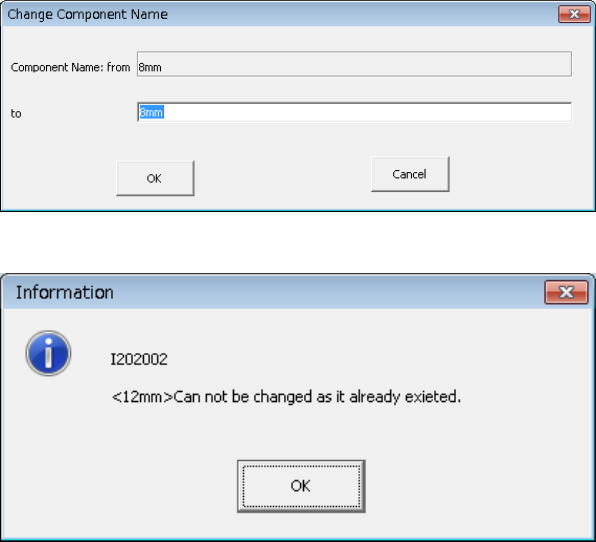
(12) Change component name
This command changes a component name.
When you select this command, the following dialog box appears on the screen.
Enter a new name to the “to” field, and click the <OK> button.
If the changed component name is duplicate with another component name, the
following message is displayed.
(13) Update layers
The layer of "Component data" is incorporated into "Placement data." The
following incorporating methods are available.
All components: The layer of all component data is incorporated into the
incorporating data.
Each component: The layer of the corresponding component data is
incorporated into the placement data.
EPU Instruction Manual Chapter 4 Creating a Production Program
4-126
(14) Update Pick Offset
The component pick-up coordinates set on the “Pick” data screen are reflected in the
“Picking offset XYZ” field on the “Component” data screen.
When you select one data record on the “Pick” data edit screen after teaching, and
the [Update Pick Offset] command on the “Edit” menu, the difference between the
default pick-up value of the selected “Pick data” and the taught result can be
reflected in the “Picking offset” of the “Component data.”
(15) Mark copy
* Not used in JX-350.
(16) Mark Paste
* Not used in JX-350.
(17) Mark database
* Not used in JX-350.
(18) Matrix Copy
This command copies data in the range selected with the [Cut] or [Copy] command to
the specified position.
* This command cannot be selected when you use the sort function.
1) Placement data
This command inserts data in the range selected with the [Cut] or [Copy] command
before the cursor position.
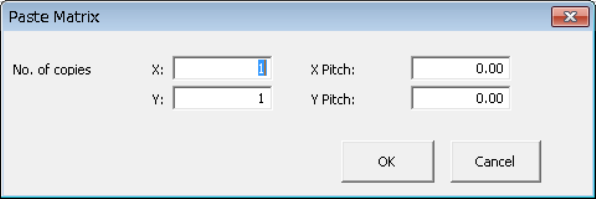
When you specify the “X” and “Y” fields of “No. of copies,” and “X Pitch” and “Y
Pitch” fields, the system allows you to copy the data in a matrix with adding or
subtracting the entered value to/from the component placement position in the X
direction and that in the Y direction.
After you execute the [Matrix Copy] command, all of the component IDs are
changed to “#.”
① No. of copies, X: Specify the number of times the system will copy data in the
X direction.
② No. of copies, Y: Specify the number of times the system will copy data in the
Y direction.
③ X Pitch: Specify the amount to increment or decrement the
component placement or pick-up position in the X direction.
④ Y Pitch: Specify the amount to increment or decrement the
component placement or pick-up position in the Y direction.
⑤ OK: This button pastes the data.
⑥ Cancel: This button cancels the paste operation.