JX-350_EPU使用说明书.pdf - 第81页
EPU Instruction M anual C hapter 4 Creating a Production Progr am 4- 33 ( 3) Del ay Unit Select the unit f or the delay time of the conveyor sensor , “ Tim e” (ms: 1/1000 second) or “Leng th” (mm). ♦ Ti m e : Select this…
EPU Instruction Manual Chapter 4 Creating a Production Program
4-32
4.1.2.4 PWB Conveyor
This tab allows you to make the detailed settings of the conveyor and the support table.
The “PWB Conveyor” screen consists of the “PWB conveyor” tab and the “Support table”
tab.
4.1.2.4.1 “PWB conveyor” tab
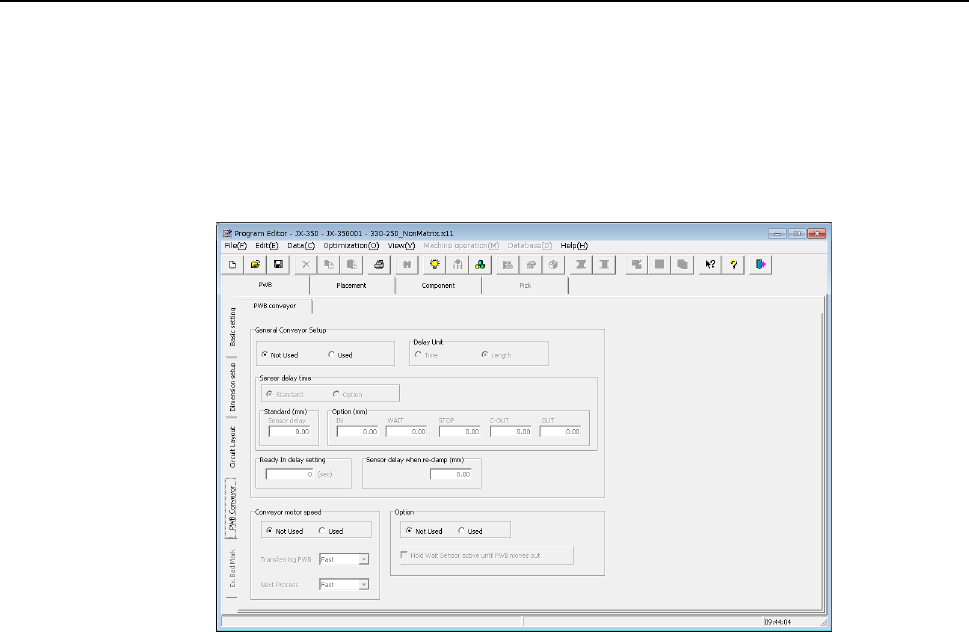
When you select the “PWB Conveyor” tab located at the lower left corner of each “PWB”
data screen, the following screen appears.
The “PWB conveyor” tab consists of the “General Conveyor Setup” group, the “Conveyor
motor speed” group and the “Option” group.
Each menu item displayed in the “General Conveyor Setup” group is explained below.
(1) Not Used/Used
Select whether to use the data set in the “General Conveyor Setup” group or not.
♦ Not Used: Select this radio button when you do not use the data in the “General
Conveyor Setup” group. The system operates according to the
settings of the main unit.
♦ Used: Select this radio button when you use the data in the “General
Conveyor Setup” group.
(2) Sensor delay time
Select whether to set the delay time of each sensor to the same value or not.
♦ Standard: Select this radio button to set the delay time of each sensor to the
same value.
♦ Option: Select this radio button to set the delay time of each sensor
respectively.
When you select the “Standard” radio button, the value set in the “Sensor delay” field
under the title “Standard” becomes active. When you select the “Option” radio
button, the delay time set in the field for each sensor under the title “Option” becomes
active.
EPU Instruction Manual Chapter 4 Creating a Production Program
4-33
(3) Delay Unit
Select the unit for the delay time of the conveyor sensor, “Time” (ms: 1/1000
second) or “Length” (mm).
♦ Time: Select this radio button to set the unit of the delay time to 1/1000 second
(ms).
♦ Length: Select this radio button to set the unit of the delay time to mm.
(4) Standard
When you select the “Standard” radio button in the “Sensor delay time” field, set the
delay time or delay length.
The allowable range for each unit is 0 to 2,500 (ms) and 0 to 1,000 (mm).
(5) Option
When you select the “Option” radio button in the “Sensor delay time” field, set the
delay time or delay length of each of the sensors: the IN sensor, the WAIT sensor,
the IN-COUNT sensor, the JOINT sensor, the OUT-COUT sensor and the OUT
sensor.
The allowable range for each unit is 0 to 2,500 (ms) and 0 to 1,000 (mm).
(6) Ready In delay setting
When the Ready IN signal, which is the signal for receiving the ejected board to be
input from the post process, is set to ON, the system passes the board to the post
process without stopping it. However, if you set the delay time here, the system
pauses when the OUT sensor detects a board, and when the Ready IN signal is set to
ON after the specified delay time passes, the system rotates the motor again to eject
the board. This delay time is useful for passing/receiving a board between the
machines whose board transporting speeds are different from each other. Note that
this delay time starts counting when the OUT sensor is set to ON.
(7) Sensor delay when re-clamp
Set the delay time to be applied if the system re-clamps a board without removing it
(re-clamping after reversing) when it restarts the production suspended due to a
production error such as a feeder float error.
You can set the delay time for each station, the right station and the left station. The
delay time range for each unit is 0 to 500 (ms) and 0 to 200 (mm).
Each menu item displayed in the “Conveyor motor speed” group is explained below.
(8) Not Used/Used
Select whether to use the settings made in the “Conveyor motor speed” group or not.
♦ Not Used: Select this radio button if you do not use the settings made in the
“Conveyor motor speed” group. The system operates according to
the settings made with the main unit.
♦ Used: Select this radio button if you are to use the settings made in the
“Conveyor motor speed” group.
(9) Transferring PWB
Set the transport speed to carry the PWB to the center buffer.
(10) Next Process
Set the speed for transporting a board on which components are placed to eject it to
the post process.
EPU Instruction Manual Chapter 4 Creating a Production Program
4-34
Each menu item displayed in the “Option” group is explained below.
(11) Not Used/Used
Select whether to use the function for supporting a board having a notch with the
WAIT sensor or not.
♦ Not Used: Select this radio button if you do not use the function for supporting a
board having a notch with the WAIT sensor.
The system operates according to the settings made with the main
unit.
♦ Used: Select this radio button if you are to use the function for supporting a
board having a notch with the WAIT sensor.
(12) Hold Wait/IOINT Sensor active until PWB moves out
When you check this check box, the function for supporting a board having a notch
with the WAIT sensor is enabled.
When you deselect this check box, the function above is disabled.