JX-350_EPU使用说明书.pdf - 第44页
EPU Instructi on Manual Chapter 3 E PU setup 3- 18 Optio n 2 • Display the units w hich can be inst alled as an op tion. Setting item Description Remarks Component hei ght Select the componen t height. (6mm/ 12mm) Fix no…
EPU Instruction Manual Chapter 3 EPU setup
3-17
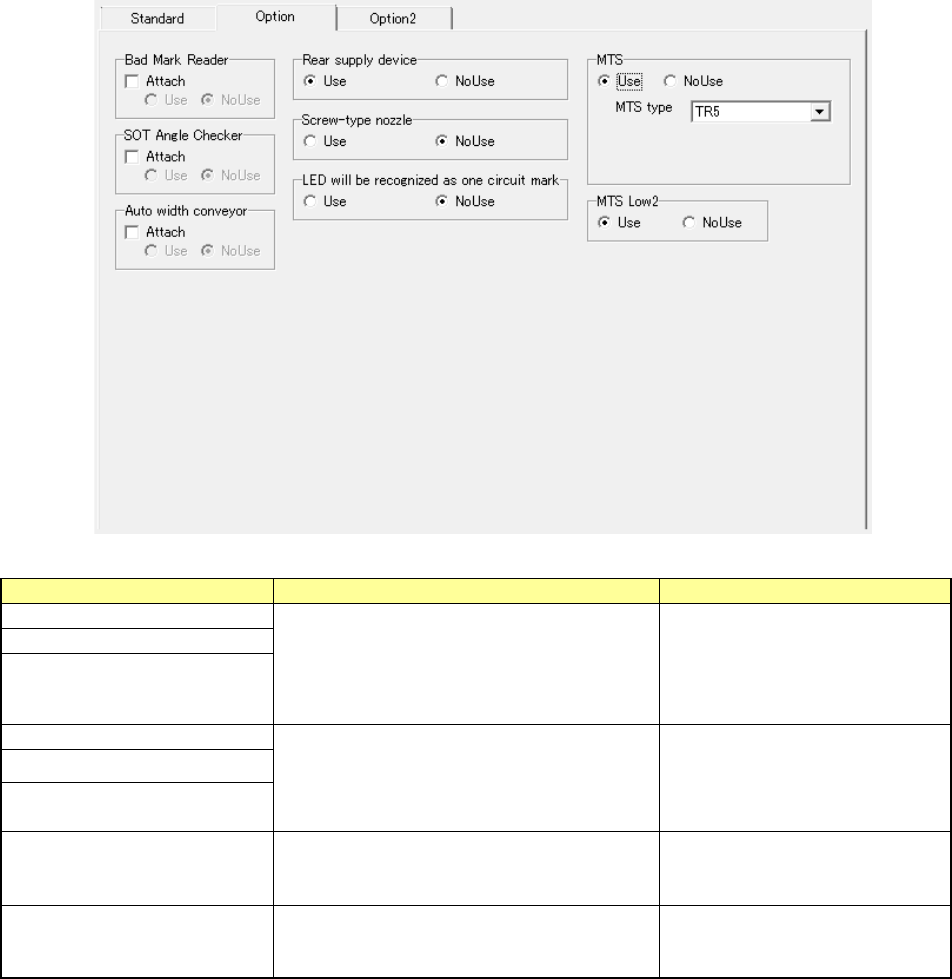
Option
• This tab displays the units which can be installed on the station as an option.
Setting item
Description
Remarks
Bad Mark Reader
Check the “Attach” check box if the unit is
attached on the system, and select either of
the radio buttons “Use” and “NoUse.”
When the “Attach” check box is
not checked, the “Use” and
“NoUse” radio buttons are
dimmed, and you cannot make
any settings.
SOT Angle Checker
Auto width conveyor
Rear supply device
Select either of the radio buttons “Use” and
“NoUse.”
“S-VCS” is displayed depending
on the model.
Screw-type nozzle
LED will be recognized as one
circuit mark
MTS (*1) (*2)
Select either of the radio buttons “Use” and
“NoUse.”Only “TR5” can be selected in the
“MTS type” field.
MTS Low2
Select either of the radio buttons “Use” and
“NoUse.”
Only when you use an “MTS,”
this setting item is displayed on
the screen.
* 1 You can change this setting item only when “Rear supply device” is set at “Use.”
* 2 When you select the “Electric” radio button for the setting item “R-Bank Type”
on the
[Standard] tab, each item is displayed in gray and you cannot set any of the items.
EPU Instruction Manual Chapter 3 EPU setup
3-18
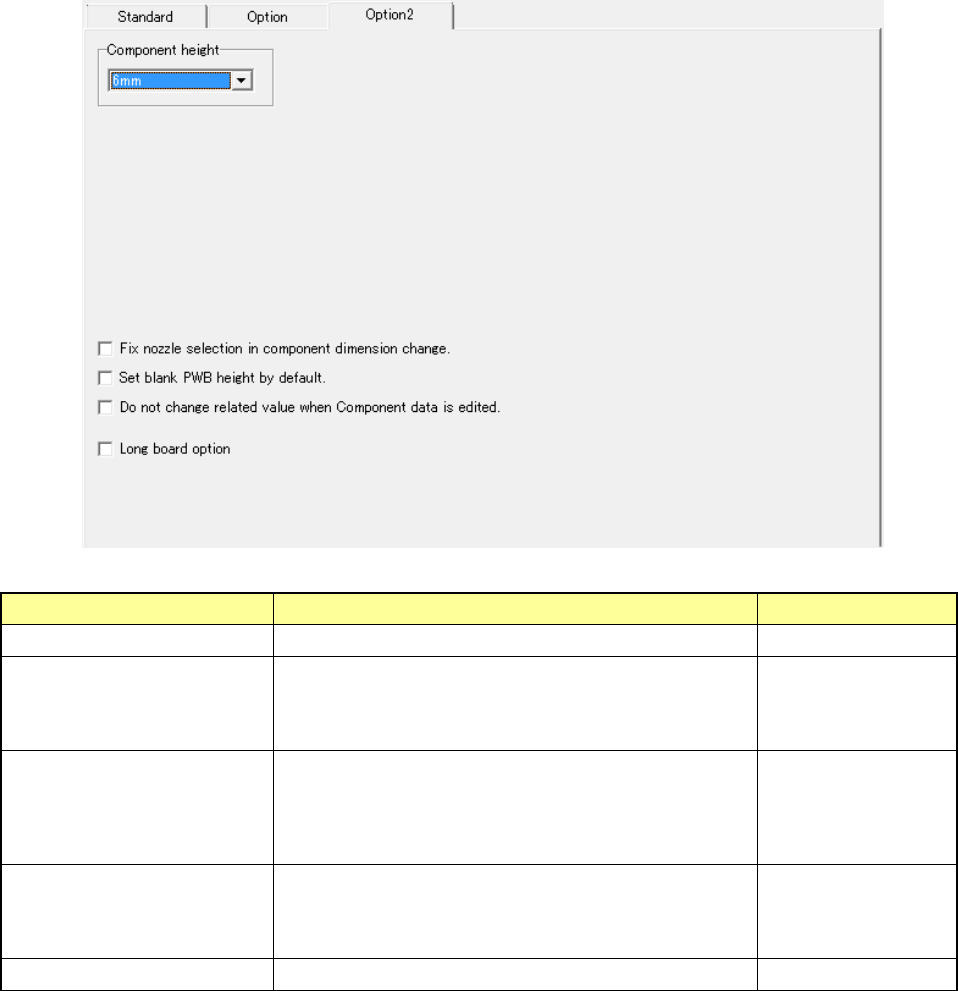
Option 2
• Display the units which can be installed as an option.
Setting item Description Remarks
Component height Select the component height. (6mm/12mm)
Fix nozzle selection in
component dimension
change.
When you check this check box, the system continues
using the nozzle already set without changing the nozzle
selection even though you change the dimensions of a
component on the “Component” data screen.
Set blank PWB height by
default.
Leave blank the “Thickness” field of a board on the
“PWB” data screen without setting the default value.
When you load a production program for a model having
no board thickness data to the system, this field
becomes blank also.
Do not change related value
when Component data is
edited.
When you check this check box, the system does not set
the standard value (initial value) to each item already set
except the edited item(s) even though you edit the
component data already set.
Long board option Select this item to use the long board option.
EPU Instruction Manual Chapter 3 EPU setup
3-19
3.7.2 Explanation of buttons
3.7.2.1 Previous Station
This button saves your change of a station profile that is being currently edited, then
displays the profile of the previous station on the screen.
◊
This button does not function if a station that is being edited is the first station.
3.7.2.2 Next Station
This button saves your change of a station profile that is being currently edited, then
displays the profile of the next station on the screen.
3.7.2.3 Nozzle
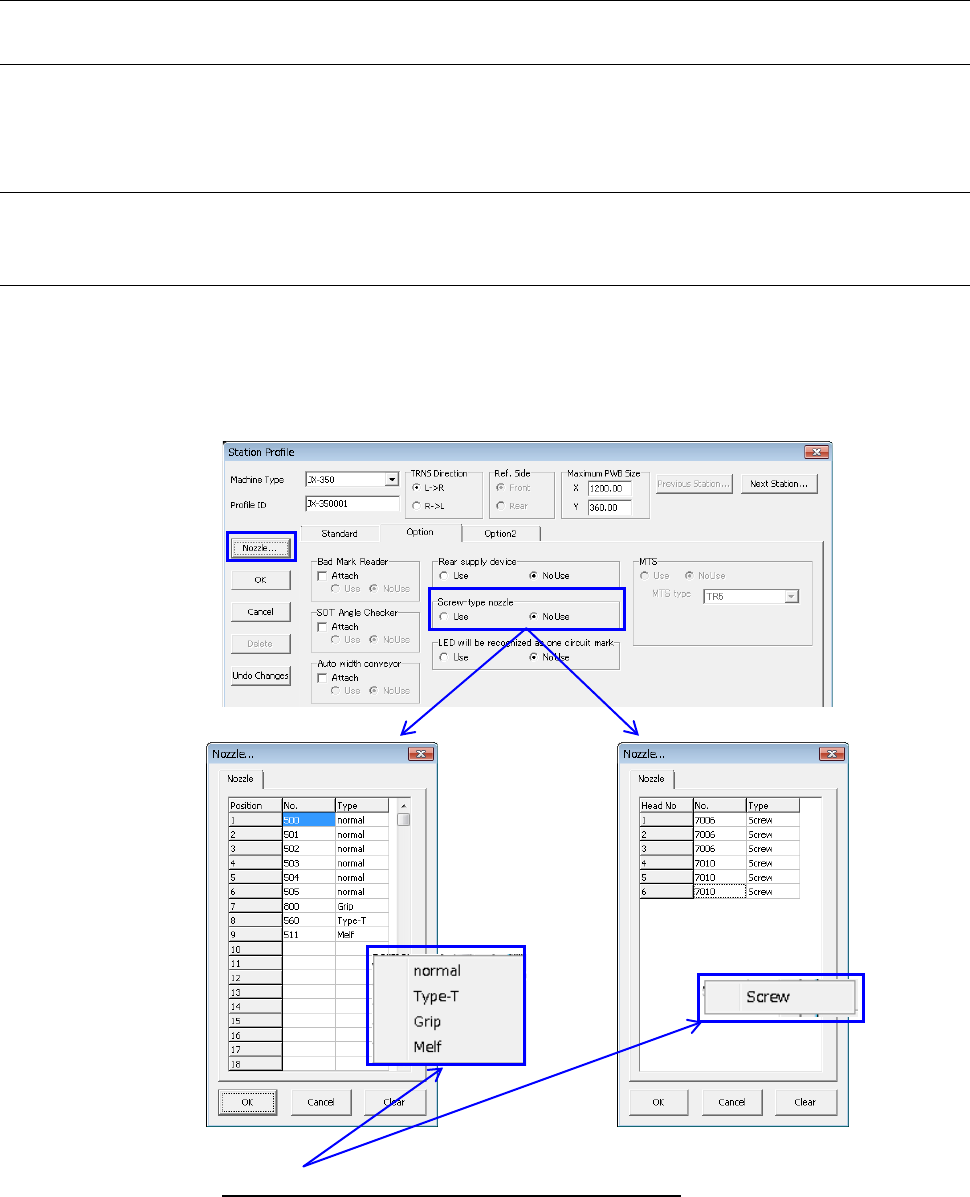
This button allows you to assign the nozzle number and nozzle type to an ATC.
The nozzles you set here are referred with the Optimization function provided by the
Program Editor.
The display and the number of settable nozzles may vary depending on “Screw-type
nozzle” setting on the [Option] tab.
No use Use
◊
When you click “Type” column with the mouse right button, the nozzle type menu
appears on the screen as shown below.
Number of settable nozzles:
Screw type nozzle No Use: 26 pcs.
Use: 6 pcs.