JX-350_EPU使用说明书.pdf - 第188页
EPU Instruction M anual C hapter 4 Creating a Production Progr am 4- 140 No. Menu item Description 1 Head Show s the head number . 2 T otal picked Shows how many times the head picked up components. (“ Cmp. picked ” + “ …
EPU Instruction Manual Chapter 4 Creating a Production Program
4-139
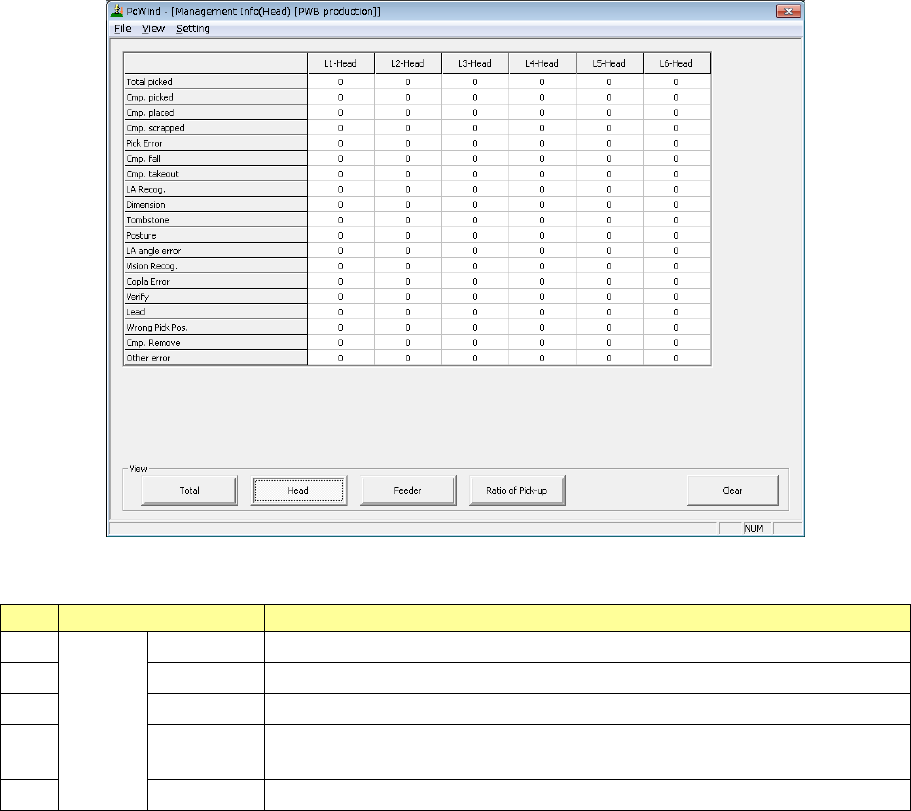
2) Management Info (Head)
The production management information per head is displayed.
“View” allows you to change the displayed management information.
No.
Menu item
Description
1
View
Total
Shows the total management information.
2 Head Shows the production management information per head.
3
Feeder
Shows the production management information per feeder.
4 Pick Sorts the component pick-up rates at each component supplied position and
shows them.
5
Clear
Clears the production management information.

EPU Instruction Manual Chapter 4 Creating a Production Program
4-140
No.
Menu item
Description
1 Head Shows the head number.
2 Total picked
Shows how many times the head picked up components.
(“Cmp. picked” + “Pick Error”)
3 Cmp. picked
Shows the number of components that were picked up with the head
successfully.
4 Cmp. placed
Shows the number of components that were placed on boards with the head
successfully.
5 Cmp. scrapped
Shows the number of components that were lost with the head.
(“Total picked” – “Cmp. placed”)
6 Pick Error Shows how many times the head failed to pick up a component.
7 Cmp. fall Shows how many picked components fell until they were placed on boards.
8 Cmp. takeout
Shows how many times the system judged that a component taken back
before starting the component pickup.
9 LA recognition
Shows how many times a laser recognition retry over error occurred at the
head.
10 Irregular dimensions
Shows how many times the system detected an irregularly shaped
component.
11 Tombstone
Shows how many times the system judged that a component picked up by the
head stood on its side.
12 Component posture Shows how many times a component posture error occurred.
13 Laser angle error Shows how many times a laser angle error occurred.
14 Vision Recog. Not used in JX-350.
15 Copla Error Not used in JX-350.
16 Verify Shows the number of times a verify error, an SOT error was judged to occur.
17 Lead Not used in JX-350.
18 Wrong Pick Pos Shows the number of times a component pick-up position error occurred.
19 Comp. Remove Shows the number of times a component was discarded.
20 Other error
Shows the number of times any other errors such as drop of a component
were judged to occur.
EPU Instruction Manual Chapter 4 Creating a Production Program
4-141
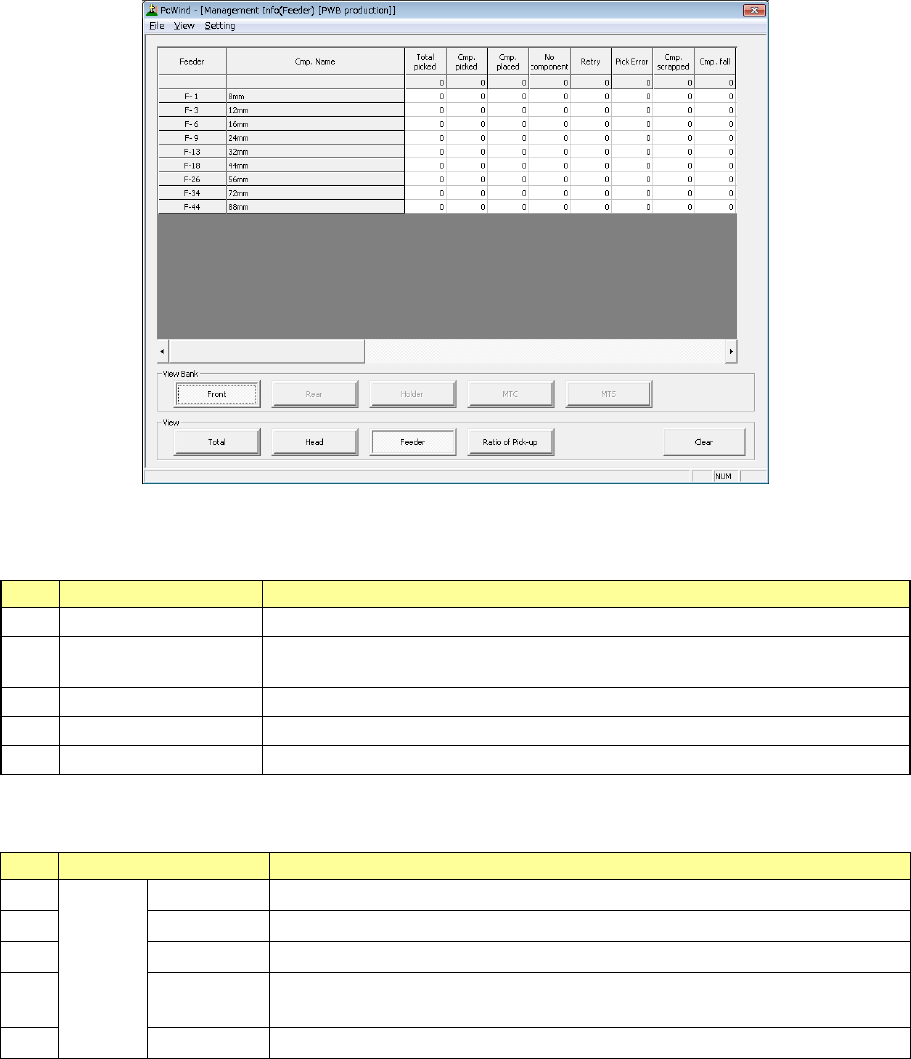
3) Management Info (Feeder)
The production management information per feeder is displayed.
When you select “Front” as the “View Bank,” the following screen appears.
“View Bank” allows you to select a bank on which a component is located to be displayed in the list
of the screen.
No.
Menu item
Description
1
Front
Shows only components set on the front bank.
2 Rear Shows only components set on the rear bank. (When the rear feeder option is
available.)
3
Holder
Not used in JX-350.
4 MTC Not used in JX-350.
5
MTS
Shows only components set on the MTS.
“View” allows you to change the displayed management information.
No.
Menu item
Description
1
View
Total
Shows the total management information.
2 Head Shows the production management information per head.
3
Feeder
Shows the production management information per feeder.
4 Pick Sorts the component pick-up rates at each component supplied position and
shows them.
5
Clear
Clears the production management information.