JX-350_EPU使用说明书.pdf - 第75页
EPU Instruction M anual C hapter 4 Creating a Production Progr am 4- 27 4.1.2.3 Circuit Layout S pecify the cir cuit position and angle, and c ircuits to b e placed on a board . Only when y ou select the “Used” radio but…
EPU Instruction Manual Chapter 4 Creating a Production Program
4-26
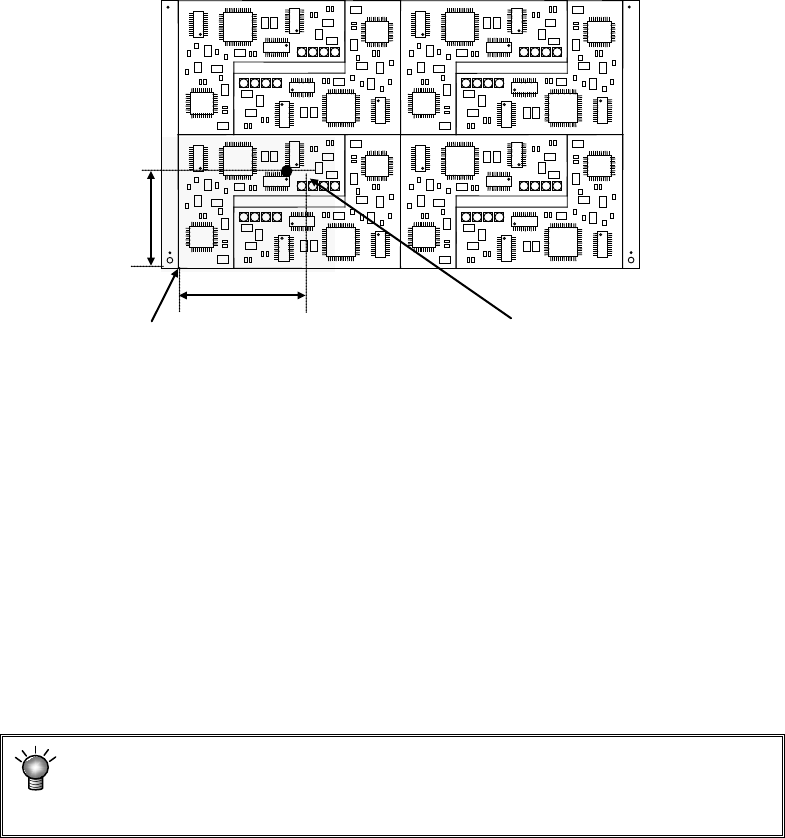
10) Bad mark position:
It is selected whether the bad mark is used or not. When you select “No-use”,
“***” is displayed. When you select “Use”, enter the length from the circuit origin
(circuit position reference) to the bad mark center position.
* In the above case, enter X = a and Y = b.
<Usage of a bad mark and the operation flow>
i) Enter coordinates of a bad mark into PWB data (that is, to the “Bad mark
position” fields.)
ii) At machine setup, adjust the bad mark reader.
iii) Before feeding a PWB, affix a bad mark at the spot specified with the bad
mark coordinates on a defective circuit.
iv) Before the start of production, the OCC or bad mark sensor reads a bad mark of
each circuit. When a bad mark is recognized, components are not placed on the
corresponding circuit.
The requirements for a bad mark: the mark must be distinct in the color
from a PWB, and its diameter must be 2.5 mm or greater. If a bad mark
is used, the production time will be longer by the mark recognition time.
* For the extended bad mark, see "4.1.2.5 "Ex. bad mark" screen."
* If the bad mark is set out of the circuit, use an extension bad mark.
11) PWB height, PWB thickness, and Back height:
Enter these fields in the same manner as those for a single-plane PWB.
a
b
Circuit origin (circuit position reference)
Coordinates of a bad mark
EPU Instruction Manual Chapter 4 Creating a Production Program
4-27
4.1.2.3 Circuit Layout
Specify the circuit position and angle, and circuits to be placed on a board. Only when you
select the “Used” radio button for the menu item “Circuit Mapping” on the “Basic setting” tab,
and the “Matrix circuit” radio button or the “Non-matrix circuit” radio button in the “PWB
configuration” column of the “Dimension setup” tab, you can select these items. When you
select the “Not Used” radio button for the menu item “Circuit Mapping” on the “Basic setting” tab,
you can select these items only if you select the “Non-matrix circuit” radio button.
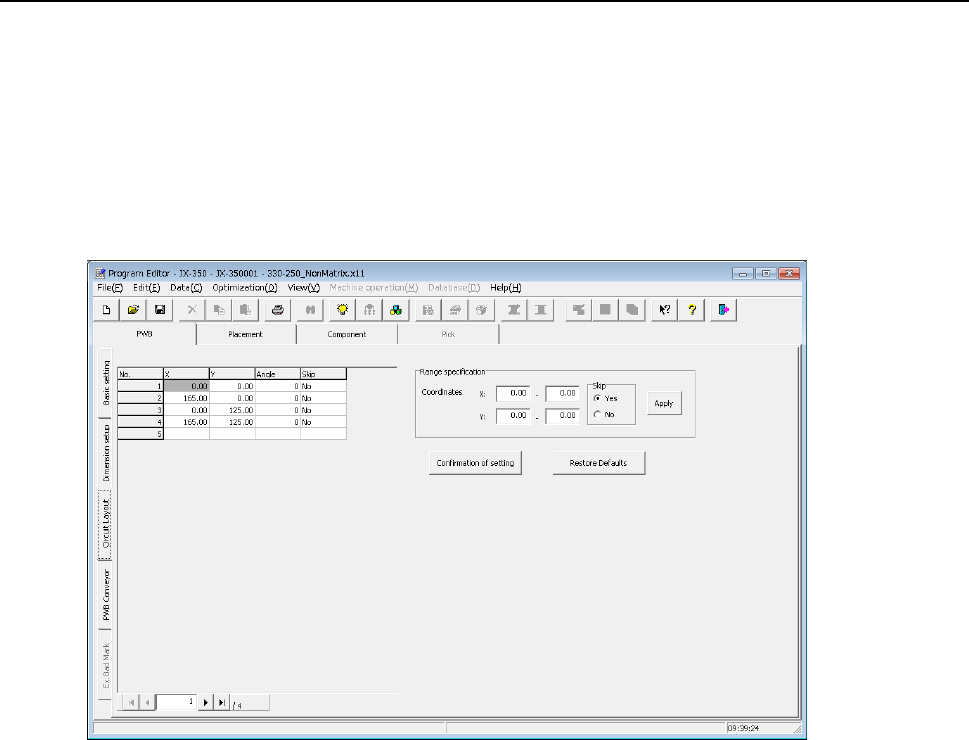
When you select the “Circuit Layout” tab located on the lower left corner of the “Dimension
setup” screen, the following screen appears.
1) Circuit position (X,Y)
In case of a matrix-circuit board, the system calculates the X and Y coordinates based
on the board settings entered on the “Dimension setup” tab to display them. In case of
a non-matrix circuit board, enter the distance from the board reference position to the
origin of each circuit and the angle.
Enter the dimensions from the board reference position to the home position of each
circuit in the “X” and “Y” fields respectively.
2) Angle
In case of a multi-circuit board, “0” is displayed in the “Angle” field. In case of a
non-matrix board, enter the assignment angle of each circuit.
In the “Angle” field, enter a value on the assumption that the angle used when you enter
values in the “Circuit dimensions” fields and the “Circuit layout offset” fields on the
“Dimension setup” screen is regarded as 0 degrees, and the anti-clock direction as “+.”
(When you use CAD data for the component placement coordinates, the angle of the
circuit that matches the CAD data is regarded as 0 degrees.)
EPU Instruction Manual Chapter 4 Creating a Production Program
4-28
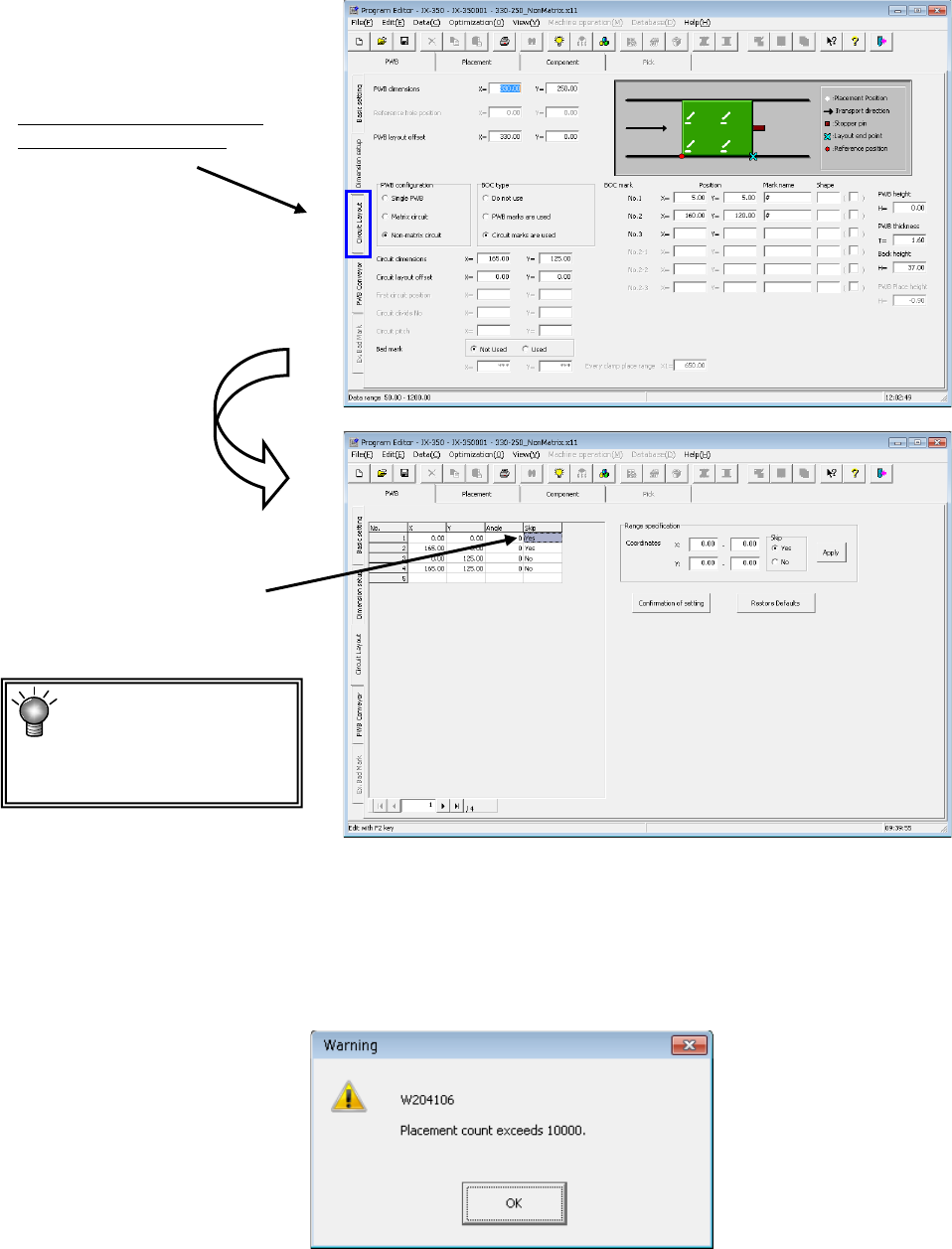
3) Skip
You can set this item only if you select the “Used” radio button for the menu item “Circuit
Mapping” on the “Basic setting” tab.
Yes: The system does not place any component on this circuit.
No: The system places a component(s) on this circuit.
“No” is set to all circuits initially.
*You cannot set “Yes” to all circuits.
You have to enter the coordinates of at least one circuit.
If you do not set any coordinates, the data is not completed.
If you move to another page of the screen without entering data completely, edition of the
record is discarded.
If the total number of component placements exceeds 10,000 even though the number of
circuits is below the limit, the following message appears on the screen.
Select this tab and the "Circuit
layout" screen will appear.
Set “Yes” to a circuit on
which any component is
not placed.
The maximum number
of circuits you can
create on a non-matrix
board is 200.