JX-350_EPU使用说明书.pdf - 第118页
EPU Instruction M anual C hapter 4 Creating a Production Progr am 4- 70 <Setting items when a gripper nozzle is used> In addition to the items des cribed above, you have to set the f ollowi ng item s for a gripper …
EPU Instruction Manual Chapter 4 Creating a Production Program
4-69
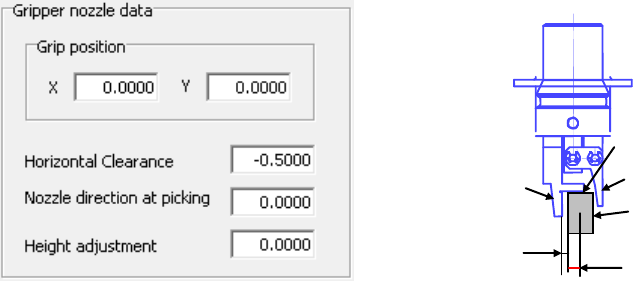
(6) Gripper nozzle data
1) Grip position:
Enter a negative value (“-a”) into the “Y” field as the offset from the center of
a component to the side against which a component is pushed (“a”). Do not
enter any value other than “0” into the “X” field.
2) Horizontal clearance:
Enter a negative value as the clearance between the side against which the
arm on the gripper nozzle fixed side is pushed and a component (“b”). Note
that the movement direction varies depending on the nozzle type and/or
nozzle direction.
Usually, set the default value that is automatically input.
3) Nozzle direction at picking:
Specify the nozzle direction when the nozzle picks up a component that is
supplied at 0 degrees. Specify one of the directions: 0, 90, 180 and 270
degrees.
4) Height adjustment:
Correction value (clearance between c and the top surface of the component)
Normally, set “- 0.5 mm” to keep a component horizontal.
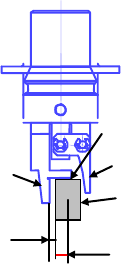
Grip position (a)
Component
C
Fixed arm
Swing arm
Horizontal
clearance (b)
EPU Instruction Manual Chapter 4 Creating a Production Program
4-70
<Setting items when a gripper nozzle is used>
In addition to the items described above, you have to set the following items for a
gripper nozzle in the different way from those for other nozzles.
① When you use a new gripper nozzle, select the [File]/[Read Nzl. data] commands
on the “Machine setup” menu to load the information on the gripper nozzle from a
floppy disk first.
② Set the nozzle onto the ATC.
Attach the gripper nozzle onto the ATC so that the fixed arm of the gripper nozzle
can be located on the rear and the swing arm can be located on the front with
viewing the ATC unit from the front.
③ Specify the component data.
a. Set the nozzle number.
The numbers for gripper nozzles are from 800 to 899.
b. Set the laser position.
Specify the distance from the tip of the fixed arm to the laser position.
Guideline for setting the “Laser position”:
- (Component height - 3.5 mm*)/2
Make fine adjustments with based on the lead position.
* Distance from the “c” shown in the figure below to the fixed arm = 3.5 mm
Example: When the component height is 5 mm (5-3.5)/2 = - 0.75 mm
④ Set the pick data.
XY is the same as the ordinary teaching method. Regarding Z, its value is
automatically calculated from the nozzle information registered by machine setup
and the component height. So, no teaching is required.
Grip position (a)
Component
C
Fixed arm
Swing arm
Horizontal
clearance
EPU Instruction Manual Chapter 4 Creating a Production Program
4-71
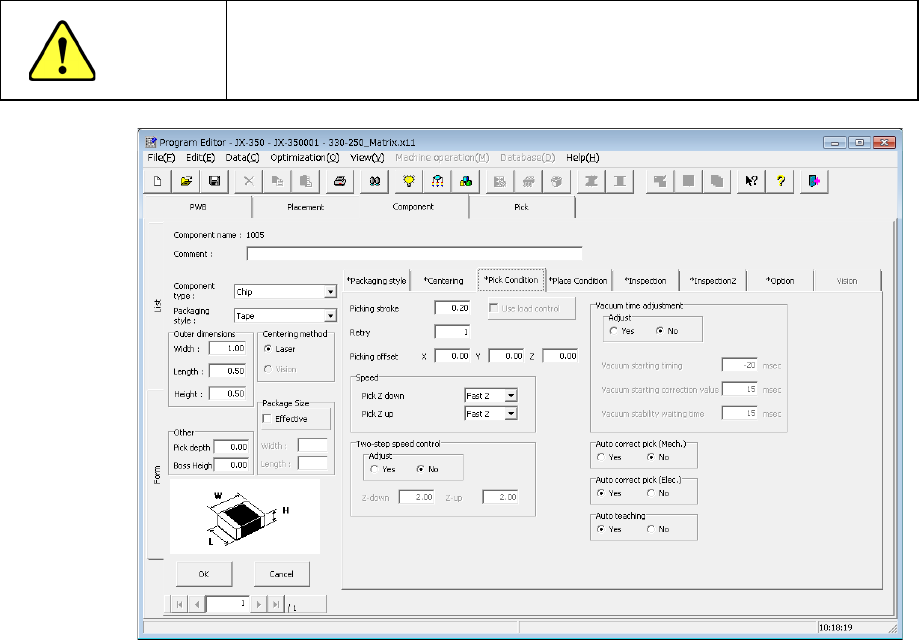
4.1.4.2.4 Pick Condition
Pick conditions are setting items for pickup and the default values are applied.
Accordingly, they do not need to be changed. If pickup cannot be performed in the
default value status, change the settings.
CAUTION
If you change any of the basic settings after changing any value on
the “Pick Condition” tab, some values are reset to their defaults on
the “Pick Condition” tab.
(1) Picking stroke:
Specify the distance for pushing a component during component pick-up.
If you set “0” here, the nozzle may not reach a component and may not pick up the
component, or a chip rise error may occur due to the variation of component heights.
In such a case, enter the larger value (that is, by entering a positive value) so that the
nozzle can reach a component.
The initial value is “0.2 mm” (0mm for a 0603 component).
"The load is controlled" button becomes effective for the use of the nozzle with which
a simple load can be controlled after 601.
* Not used in JX-350.
Note) The picking stroke is corrected when picking up components supplied from
the electric feeder (except for 0603 component).
(2) Retry:
Set the number of times the system will pick up a component again if a component
pick-up error occurs during production.
If "1" is set here, two successive picking errors will cause a "component run-out
error."
If a retry over error occurs during PWB production, the signal light flashes in yellow to
notify you of the error.