88192277-01-19 - Micron Technical Reference V9 Volume 4.pdf - 第104页
DIAGNOSTI CS RAIL SYSTEM 39.18 Technical Reference Manual Chapter Issue 4, Aug 14 RAIL SYSTEM Selecting this diagnostics modul e opens the following window: The following icons are displayed: Next/Previous moves the high…
DIAGNOSTICS
CAMERA AXES
Chapter Issue 4, Aug 14 Technical Reference Manual 39.17
Inspection
Lighting
Selecting this diagnostic function alternately switches the inspection lighting on
and off, continuously displaying the current status.
Cycle Camera
System
Selecting this diagnostic function starts a continuous cycle of driving the camera
X and Y carriages to each of the following positions in sequence, dwelling for 2
seconds at each point, locating the fiducial at each fiducial position, displaying
the returned location and repeating the cycle. The cycle is as follows:
1. Home
2. Fiducial 1
3. Fiducial 2
If the data logging is enabled the fiducial coordinates are appended to:
D:\Program Files\DEK\MachineControl\Printer\Camera.Dat file.
This continuous cycle is terminated by selecting the stop key or when the set
cycle count has been reached.
Cycle Count This diagnostic function displays the amount of cycles done and the amount of
cycles to go to complete the cycle count. The cycle count may be preset 5 -
9995 cycles (default 50) by selecting Adjust.
DIAGNOSTICS
RAIL SYSTEM
39.18 Technical Reference Manual Chapter Issue 4, Aug 14
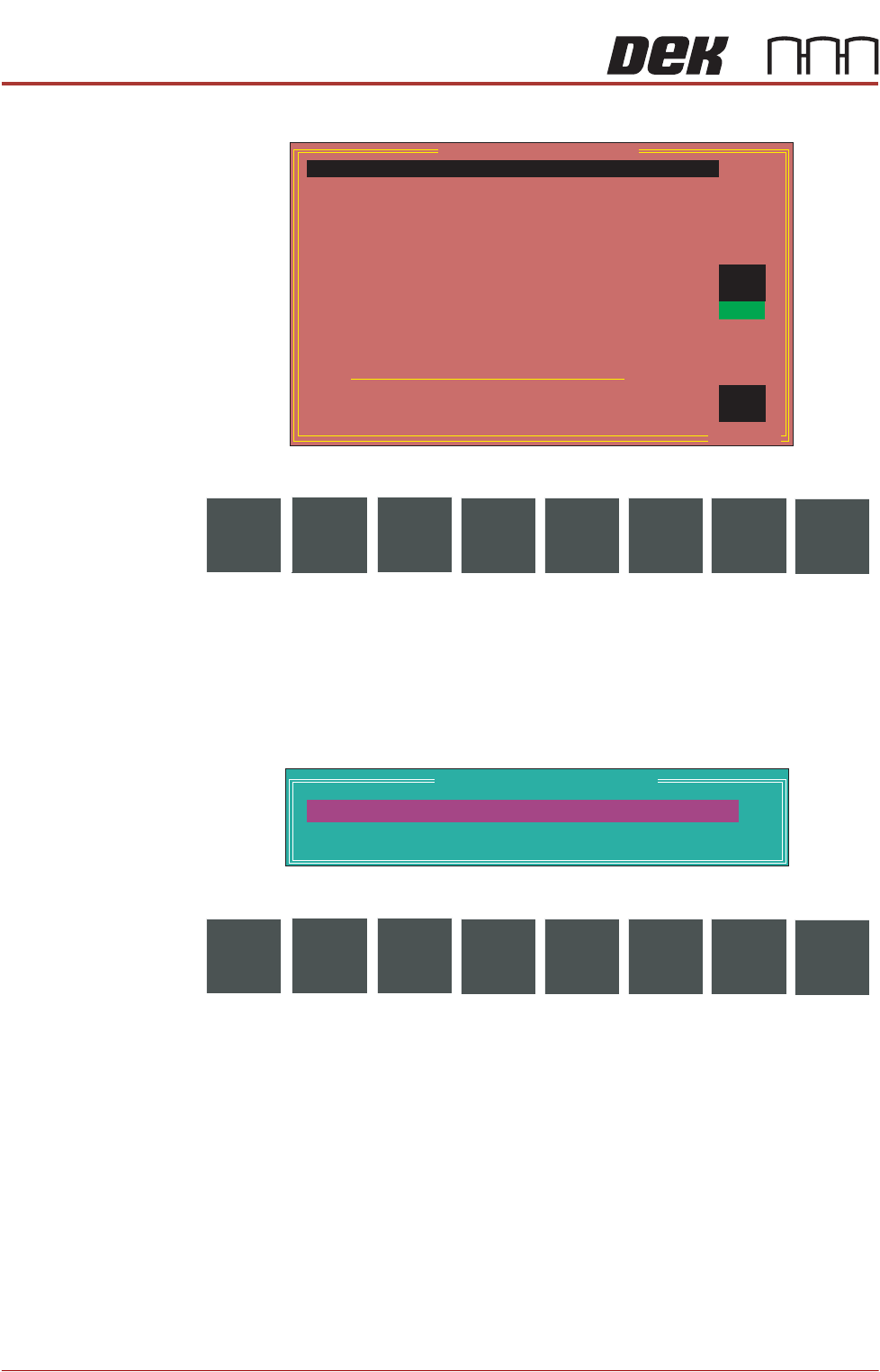
RAIL SYSTEM Selecting this diagnostics module opens the following window:
The following icons are displayed:
Next/Previous moves the highlight bar up and down the list of selectable
diagnostic functions.
Run Diagnost activates the diagnostic function, as selected by the highlight
bar.
Exit returns operation to the module diagnostics page.
Adjust opens the following window:
The following icons are displayed:
Next/Previous moves the highlight bar up and down the list of diagnostic
parameters.
Incr./Decr. changes the value of the selected diagnostic parameter.
Exit returns operation to the rail system diagnostics page.
NOTE
These parameters are used in diagnostics only and have no affect on the
product board file.
Home Rail Width Selecting this diagnostic function drives the moving rail to its home position as
determined by its home sensor.
Drive Rail to Board
Width
Selecting this diagnostic function drives the moving rail to the width set by the
board width parameter.
Board Stop In Position
Board at Stop
OFF
OFF
ON
.. more
Home Rail Width
Drive Rail To Board Width
Set Rail Board Width Calibration
Drive Rail Width Using Two Button Control
Drive Belts Using Two Button Control
Belt Speed Calibration
Toggle Board Clamp
Toggle Board Stop
Toggle Downline Board stop
Cycle Board On Belts
Cycle Board Clamp
Cycle Rails
Rail System Diagnostics
OFF
OFF
Run
Diagnost
NextAdjust
Previous
Exit
Rail System Test Parameters
BOARD WIDTH
CYCLE COUNT
250.0
50
mm
Cycles
Next Incr. Decr.
Previous
Exit
DIAGNOSTICS
RAIL SYSTEM
Chapter Issue 4, Aug 14 Technical Reference Manual 39.19
Set Rail Board
Width Calibration
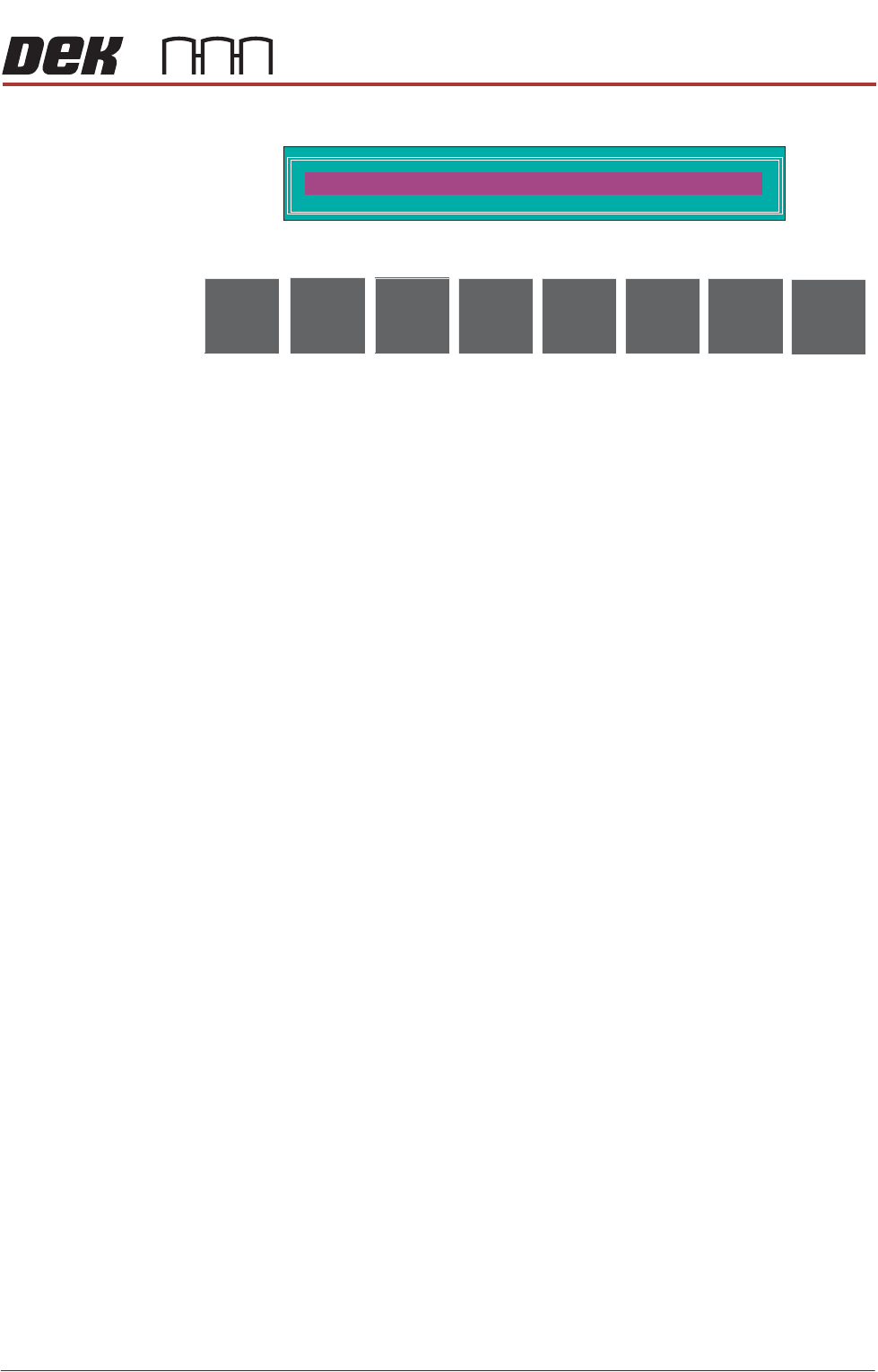
Selecting this diagnostic function opens the following window:
The following icons are displayed:
This diagnostic allows for a ±3mm offset to be applied to the width of the rails
set by the Board Width parameter.
Move drives the rails by the amount set by the rail width parameter.
Set overwrites the board width configuration figure by the value set by the rail
width offset parameter.
Incr./Decr. changes the value of the rail width offset parameter.
Cancel returns the operation to the rail system diagnostic page.
Drive Rail Width
Using Two Button
Control
Selecting this diagnostic function drives the rail width motor using the jog
buttons, stopping immediately the button is released. The message ‘Use left
jog button to move rail to maximum separation, or use right jog button to
move rail to minimum separation’ is displayed in the message prompt box.
Drive Belts Using
Two Button
Control
Selecting this diagnostic function drives the belt motors using the jog buttons,
stopping immediately the button is released. The message ‘The right Jog
button drives the belt motors to the right and the left Jog button drives the
belt motors to the left’ is displayed in the message prompt box.
Belt Speed
Calibration
Selecting this diagnostic function enables the belt speed calibration to be
carried out. For information on the belt speed calibration procedure see the
Technical Reference Manual, Rail System chapter.
Toggle Board
Clamp
Selecting this diagnostic function alternately energizes and de-energizes the
board clamp, displaying On when energized and Off when de-energized.
Toggle Board Stop Selecting this diagnostic function alternately lowers and raises the board stop
housed in the camera assembly, displaying On when lowered and Off when
raised.
Toggle Downline
Board stop
Selecting this diagnostic function alternately lowers and raises the board stop
on the downline end of the rail, displaying On when raised and Off when
lowered. Reads Not Fitted when feature is not installed.
Cycle Board on
Belts
Selecting this diagnostic function starts a continuous cycle of driving the belts
to the right, until a board reaches the right board sensor, dwelling for 2 seconds
and driving the belts to the left, until a board reaches the left board sensor,
dwelling for 2 seconds and repeating the cycle, until stop is pressed or the set
cycle count is reached.
RAILWIDTH OFFSET
0.00
mm
Move
Incr.
Set
Decr.
Cancel