88192277-01-19 - Micron Technical Reference V9 Volume 4.pdf - 第73页
STINGER CALIBRATIONS Chapter Issue 4, Nov 19 Technical Reference Manual 38.31 20. Open the printhead cover . 21. Select Step Up or Step Down to move t he nozzle into position just above the board. 22. Place the 0.05mm fe…

38.30 Technical Reference Manual Chapter Issue 4, Nov 19
STINGER
CALIBRATIONS
Contact Height Contact height sets the laser to needle height in relation to the upper surface of
the product. A relative measurement is made for all other programmed loca-
tions.
1. Select Maintenance.
2. Select Options.
3. Select Stinger Hardware.
4. Select Fitted.
5. Select Back.
6. Select Back.
7. Select Back.
8. Open the printhead cover.
9. Remove the stencil.
10. Close the printhead cover.
11. Press the System button.
12. Select Unload Screen.
13. Select Setup Product.
14. Select Options.
15. Select Stinger Dispenser.
16. Select Load Board and load a product.
17. Select Manual Calibrate to open the stinger heights calibration page.
18. The camera axis moves the stinger unit to the centre of board location by
default. However, this position can be set to any location using the Calibra-
tion Point X/Calibration Point Y parameter pair. See information on Locat-
ing the Correct Point for Height Settings.
19. Select Stinger Jog Mode and initially set the mode to Coarse (1 step =
0.5mm).
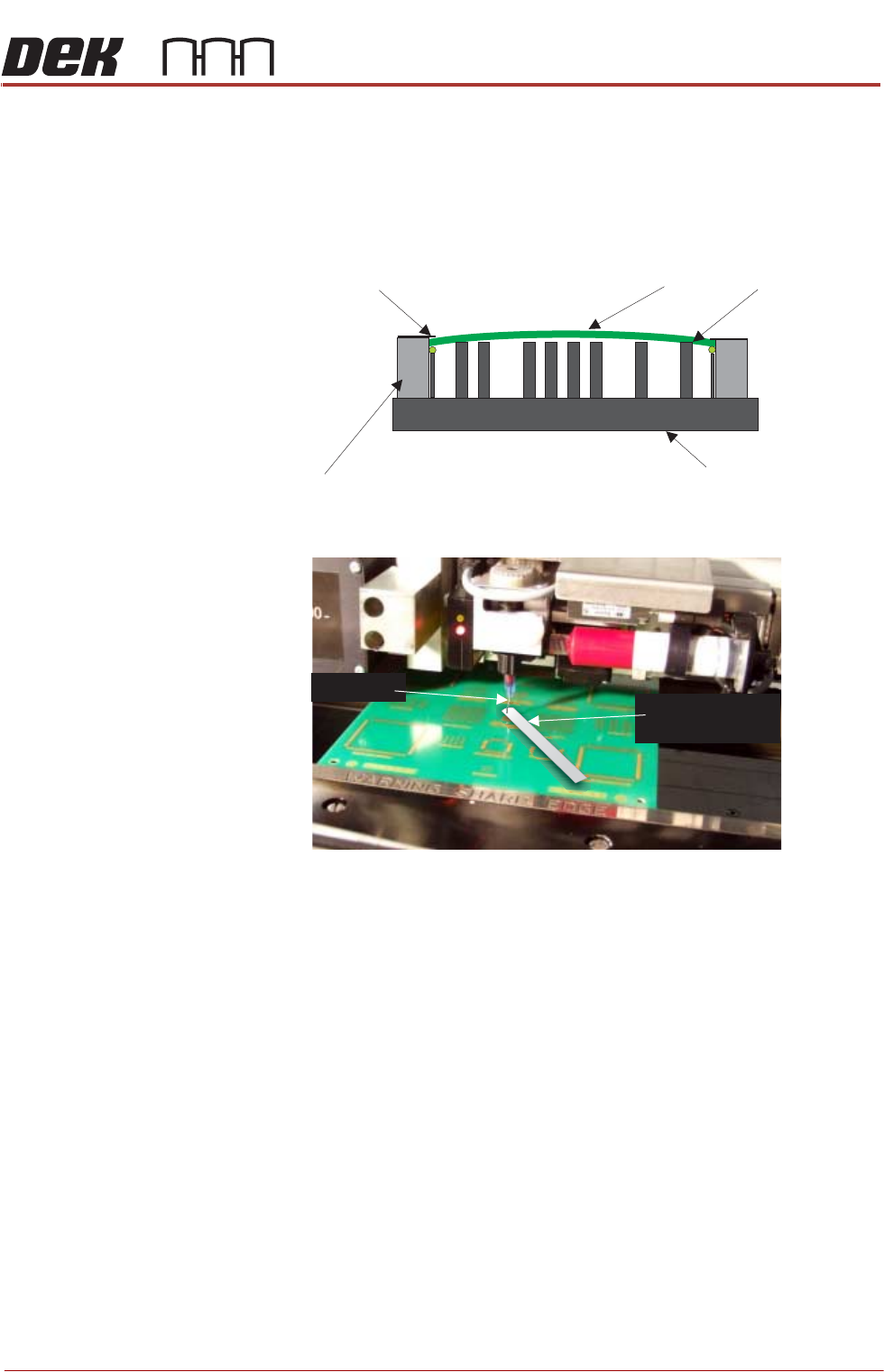
STINGER
CALIBRATIONS
Chapter Issue 4, Nov 19 Technical Reference Manual 38.31
20. Open the printhead cover.
21. Select Step Up or Step Down to move the nozzle into position just above
the board.
22. Place the 0.05mm feeler gauge on the board directly below the nozzle tip.
23. Select Stinger Jog Mode and set the mode to Fine (1 step = 0.05mm).
24. Continue jogging down until the feeler gauge has a small amount of resist-
ance to being pulled from under the nozzle tip. Do not jog down beyond
this point; any deflection of the board results in poor output and must
be avoided. The feeler gauge and the nozzle should not deflect the product
down. Any movement of the product away from the nozzle tip causes a
discrepancy in the laser reading.
25. Select Save Contact.
26. Select Back.
27. The camera axis moves the unit to the right hand edge of the board. This is
the Range Position where the unit performs a Range Check.
28. The nozzle moves down to contact height (1mm above).This completes the
Range Check.
Stinger can track the rises and falls on the product surface within the range
check limits.The user must set the idle height next.
Board Clamps may cause boards to bow slightly in the centre.
This may cause the measurement to fall outside the 0.1mm minimum
Z Axis contact position.
The feeler gauge thickness is the equivalent of one step of the Z Axis
stepper motor. It is essential that when setting this contact point no
board deflection occurs.
Rising Table
Board
Board Clamps
Rails
Tooling
Nozzle Tip
0.05mm Feeler
Gauge

38.32 Technical Reference Manual Chapter Issue 4, Nov 19
STINGER
CALIBRATIONS
Setting Idle Height Idle height is the position to which the nozzle tip is set, between dispensing
actions. The dispenser moves to its dispense site, after dispensing it is moved
to the idle position; before moving on to the next dispense location. This height
must be set so that as the nozzle is moved between locations, it is able to clear
any surface irregularities or obstructions (pads/tracks/connectors etc.)
NOTE
The following procedure is continued from the ‘Contact Height’ procedure.
29. Check that Stinger Jog Mode is set to Coarse (1 step = 0.5mm).
30. Select Step Up to move the nozzle into position above the surface of any
obstructions.
31. Select Save Idle.
32. Close the printhead cover.
33. Press the System button to restore system power.
34. Select Back.
35. Select Auto Board.
36. Select Back.
37. Select Save.
38. Select Back.
Setting the Height
Automatically
This procedure relates to units that have the automatic calibration option.
1. Select Product Changeover.
2. Select Stinger Dispenser.
3. Select Auto Calibrate.
The camera axis is driven to the calibration location and automatically jogs
down until the nozzle reaches the top surface of the product. At this point the
laser does not register a change in reading and the correct contact height is set.
Because the idle height is set in a parameter Setup Product\Options\Stinger
Dispenser, there is no need to set the idle height as this difference (between
contact height and the set value for idle height) is maintained by the laser
tracking the surface of the product during printing.
NOTE
Laser range checks are only carried out after setting contact height in manual
mode. If auto-calibration fails, performing a manual calibration resets the laser
range.
Manual Offset Setup
Procedure
This section describes the manual set up procedure that is to be employed if
the Stinger unit:
• Is being set up for the first time
• Has been replaced
• Is to be set up for a product changeover
Manual setup gives the user confidence that the unit is not going to drive directly
into the stencil, based on the software settings, when automatic height calibra-
tions are performed. It also improves the initial quality of the dispense process.