88192277-01-19 - Micron Technical Reference V9 Volume 4.pdf - 第180页
TRANSPORTATION - MAJOR RELOCATION TRANSIT BRACKET AND SCREW INS TALLATION 42.14 Technical Reference Manual Chapter Issue 5, Nov 19 7. T ighten the nylon screws (5) on to the carriage rail.
TRANSPORTATION - MAJOR RELOCATION
TRANSIT BRACKET AND SCREW INSTALLATION
Chapter Issue 5, Nov 19 Technical Reference Manual 42.13
Cover Frame
Transit Bracket
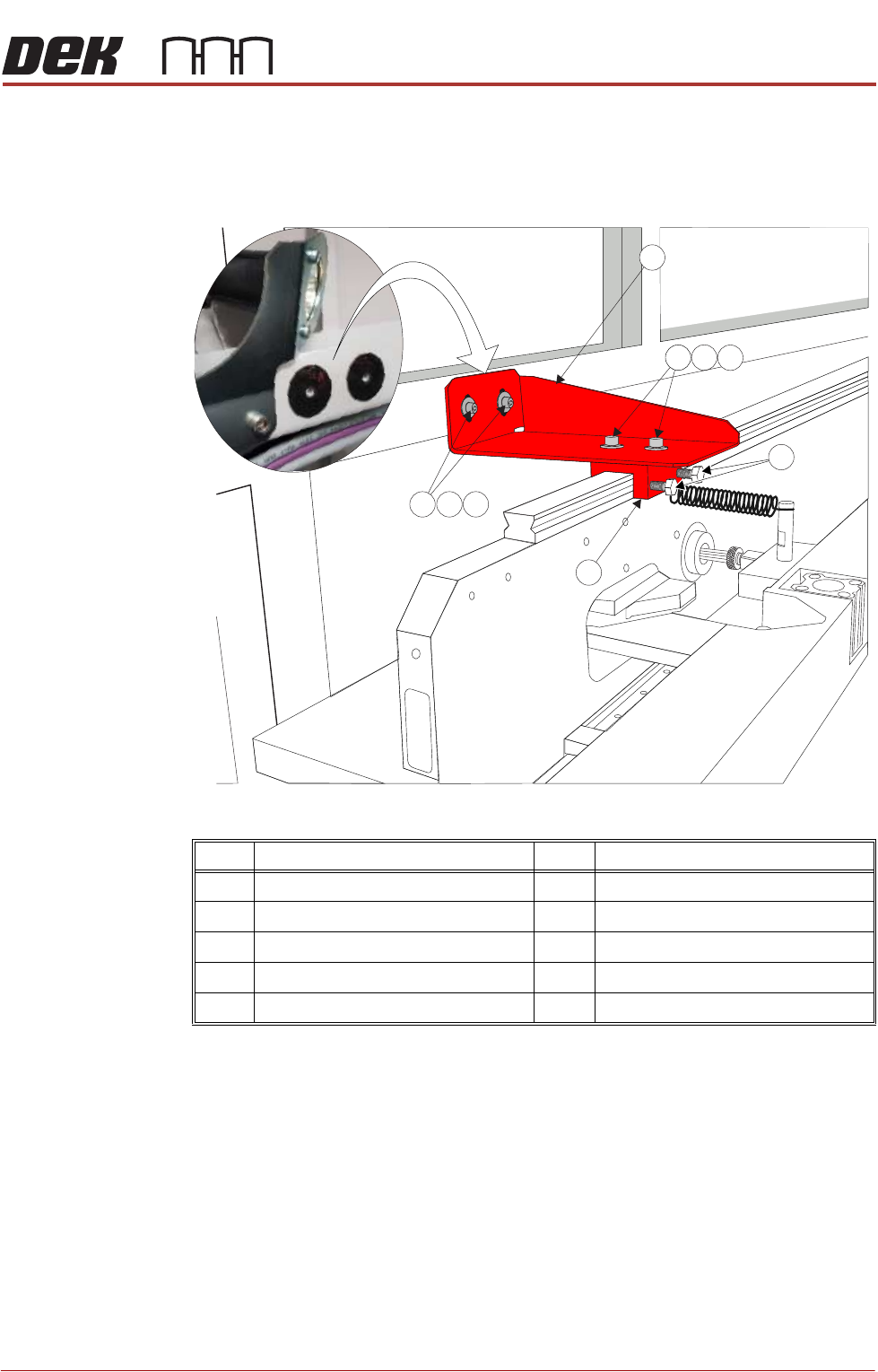
This bracket is to be fitted to printers with Anti Vibration (AV) mounts fitted to the
cover frame. It is located between the frame (adjacent to the print illumination
lights) and the carriage rail. There are neoprene washers stuck to the frame in
the position the transit bracket is to be fitted (See vignette in graphic below).
Figure 42-5 Cover Frame Transit Bracket
1. Ensure mating surfaces are clean and free of debris.
2. Place the cover frame transit bracket (1) and the block (6) (as an assembly)
over the carriage rail. The M5 screws (7) along with the crinkle washers (8)
and washers (9) should be sufficiently loose to allow adjustment.
3. Locate the M5 cap head screws (2) along with the crinkle washers (3) and
washers (4) through the bracket and into the frame and leave sufficiently
loose to allow movement.
4. Raise or lower the bracket (1) so it abuts the frame to achieve best fit and
the block is level on the carriage rail.
5. Tighten the M5 cap head screws (2).
6. Tighten the M5 cap head screws (7)
Item Description Item Description
1 Cover Frame Transit Bracket 6 Block
2 M5 Cap Head Screw2 7 M5 Cap Head Screw
3 M5 Crinkle Washer 8 M5 Crinkle Washer
4 M5 Washer 9 M5 Washer
5 M6 Nylon Screw
3
4
2
9
8
5
1
6
7

TRANSPORTATION - MAJOR RELOCATION
TRANSIT BRACKET AND SCREW INSTALLATION
42.14 Technical Reference Manual Chapter Issue 5, Nov 19
7. Tighten the nylon screws (5) on to the carriage rail.
TRANSPORTATION - MAJOR RELOCATION
DISMANTLING THE MACHINE
Chapter Issue 5, Nov 19 Technical Reference Manual 42.15
DISMANTLING THE MACHINE
To ensure the machine is not damaged during transportation, carry out the
following procedures:
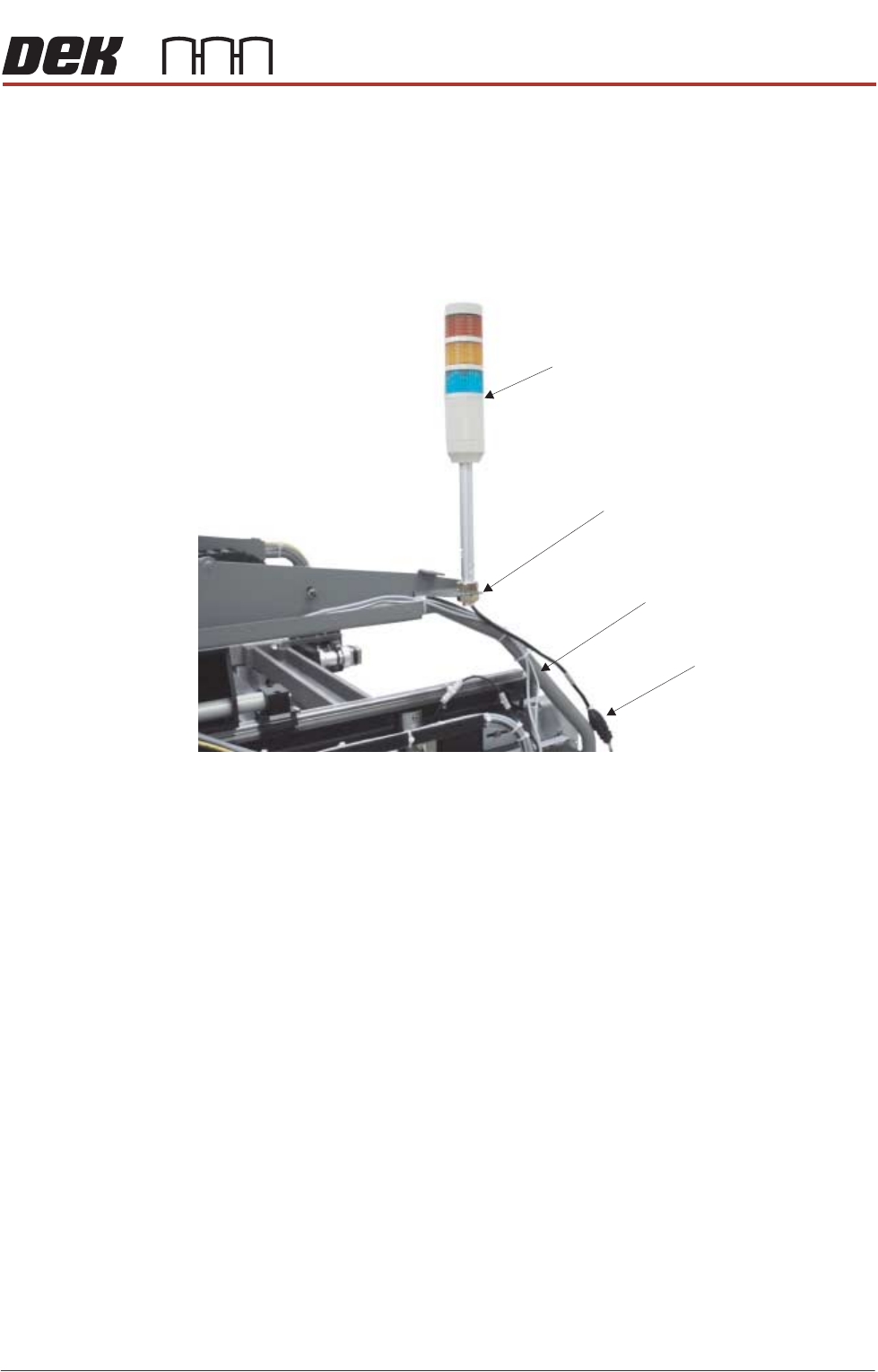
Tricolour Beacon
Type 1 Covers 1. Disconnect the tricolour beacon connection 14PL07 from 14SK07.
2. Remove the tricolour beacon from the beacon bracket by undoing one of the
nuts and sliding the beacon out of the cut-out on the beacon bracket.
3. Cable tie the loose cable to the cover frame.
View on Right Hand Side of Machine (covers removed)
Beacon Connection
Tricolour Beacon
Beacon Bracket
Cover Frame