88192277-01-19 - Micron Technical Reference V9 Volume 4.pdf - 第22页
NETWORKING CONNECTION TO A NETW ORK SERVICE 36.6 Technical Reference Manual Chapter Issue 6, Nov 19 Hardware Installation A LAN RJ45 connector is available at the external services panel, this connector provides the inte…

NETWORKING
CONNECTION TO A NETWORK SERVICE
Chapter Issue 6, Nov 19 Technical Reference Manual 36.5
CONNECTION TO A NETWORK SERVICE
Important Safety
Considerations
Whenever a printer is indirectly controlled eg, when using a network to control
its movements, there may be safety issues to consider. DEK printing printers
are fitted with several safety interlocks to protect operators and maintainers.
In addition to the above warning and before operating the machinery remotely,
ASM recommend that adequate safety systems are in place to ensure that all
personnel are clear of the moving parts in the printer and any external machin-
ery which may be in partial or full control of the networked host.
Minimum System
Requirement
The minimum system requirement for the host PC is as follows:
• IBM Compatible PC (running Windows 7 minimum)
• VDU with 800 x 600 Pixels (256 colours)
• LAN connection for GEM or Net Files
Operating
Environment
The operating system of the host computer must be capable of communicating
with a DEK printer running Windows 7 (minimum).
NOTE
Where DEK Software for Productivity Tools eg, Remote Product Changeover,
Off-Line editor etc are to be used, the installer must be logged on with Admin-
istrator level access in order for the security key device driver software to be
installed.
NETWORKING
CONNECTION TO A NETWORK SERVICE
36.6 Technical Reference Manual Chapter Issue 6, Nov 19
Hardware
Installation
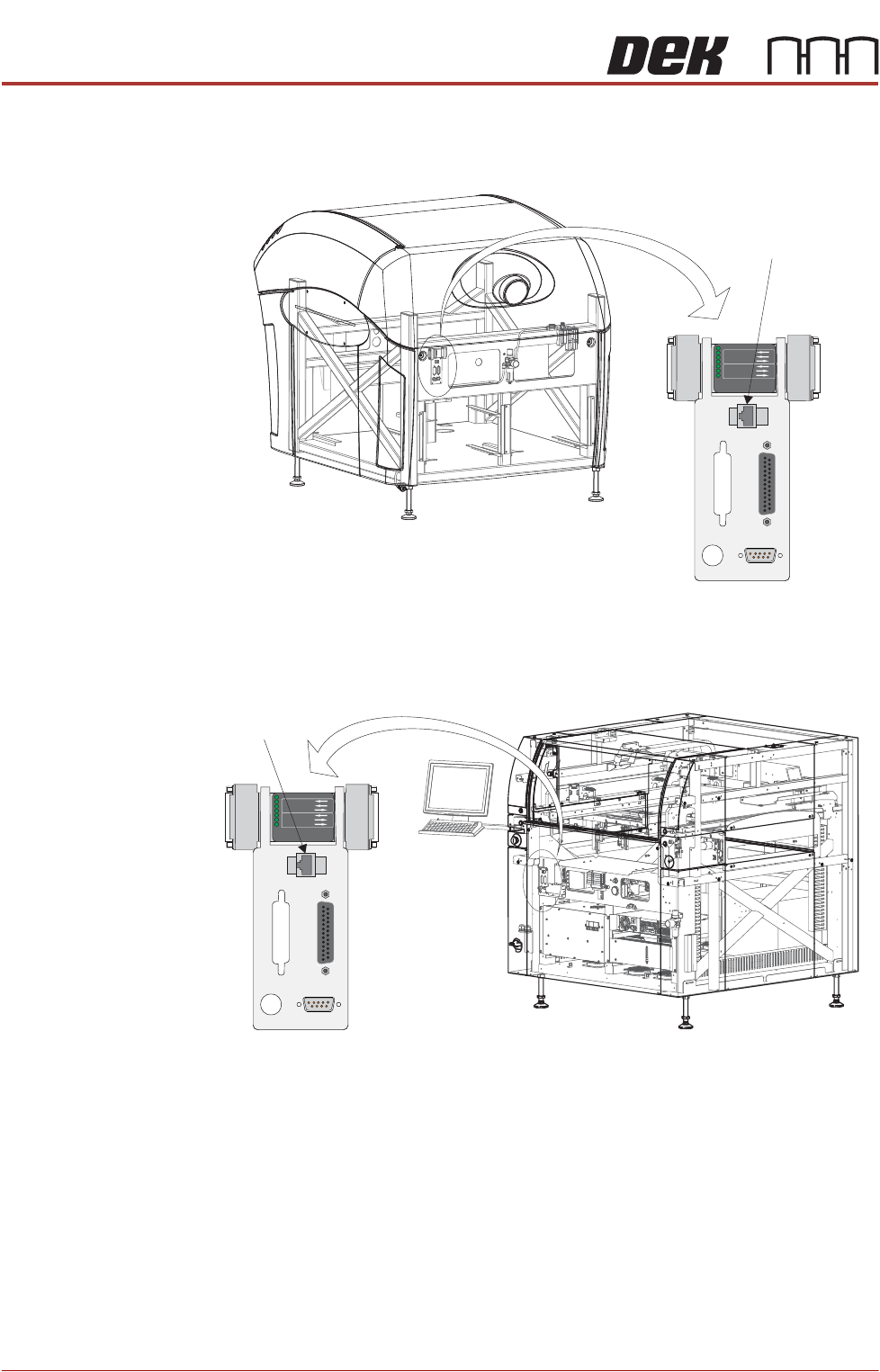
A LAN RJ45 connector is available at the external services panel, this connector
provides the interface to the customer’s network.
Figure 36-3 Type 1, 2 and 3 Covers
Figure 36-4 Type 4 Covers
POWER ON
PART No. 160740
M/C AVAILABLE
BOARD AVAILABLE
BOARD PASS
DOWNLINE
BOARD AVAILABLE
BOARD PASS
M/C AVAILABLE
UPLINE
FMI POD
View on Rear of Machine
Host Comms
LAN RJ45
POWER ON
PART No. 160740
M/C AVAILABLE
BOARD AVAILABLE
BOARD PASS
DOW
NLINE
BOARD AVAILABLE
BOARD PASS
M/C AVAILABLE
UPLINE
FMI POD
View on Front Right Quarter
Host Comms
LAN RJ45
NETWORKING
CONNECTION TO A NETWORK SERVICE
Chapter Issue 6, Nov 19 Technical Reference Manual 36.7
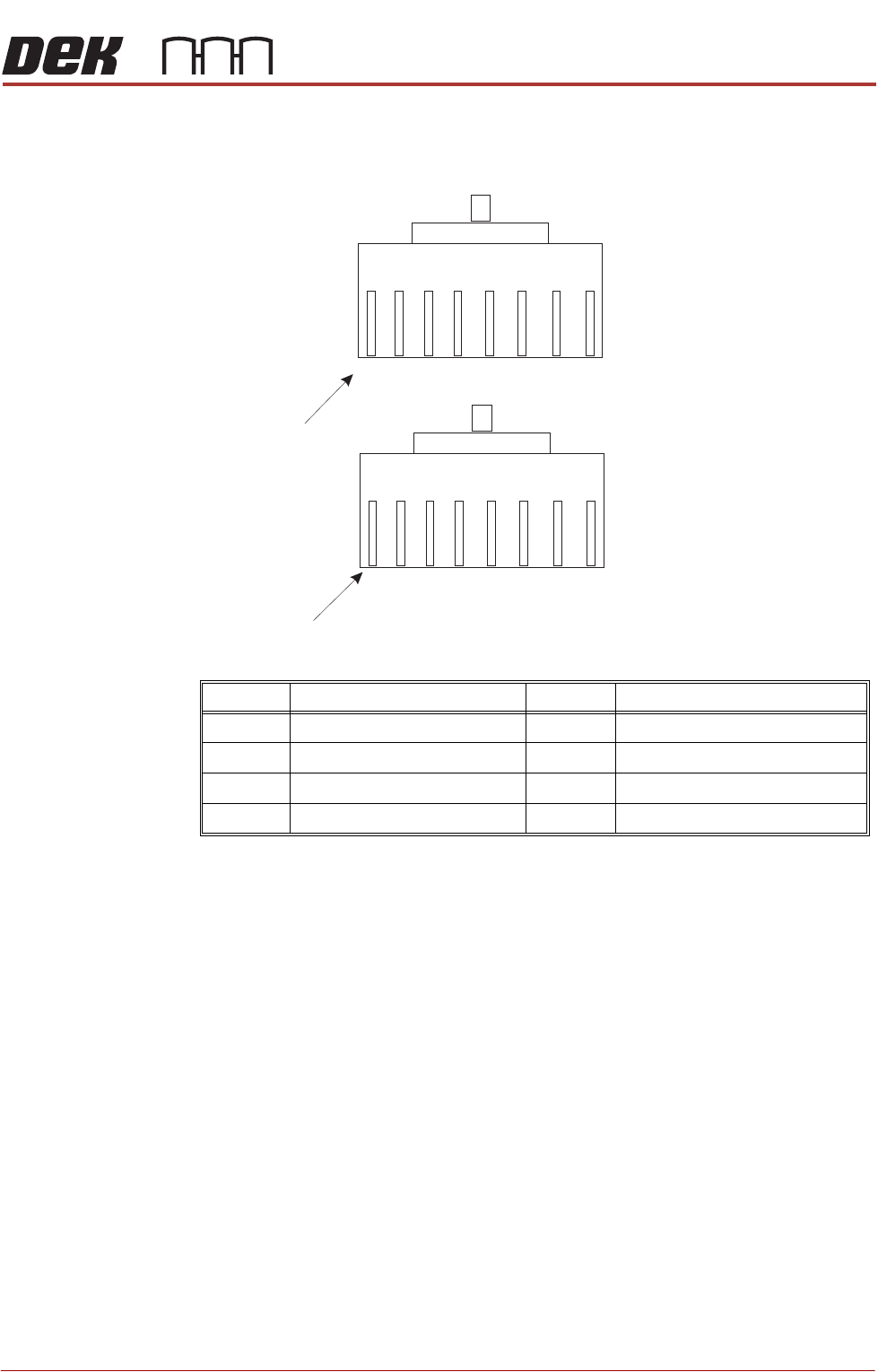
8 Way RJ45
Connector
Internally the LAN RJ45 connection is routed to 3SK02 (card slot ISA 3) of the
PC enclosure rear panel. The connections (to connector A) are shown below:
NOTE
The connection above is wired as ASM would recommend. It is possible that a
customer network connection may differ from the one shown, if a problem exists
in installation the connection at the customer network end of the cable may need
to be configured accordingly.
IP Address Configuration
To set the IP Address, use the following procedure:
1. On the Windows desktop, right mouse click the My Network Places icon
and select Properties.
2. Right mouse click Local Area Connection and select Properties.
3. Highlight Internet Protocol (TCP/IP) and select the Properties button.
4. Select the Obtain an IP address automatically radio button if the server
supports this capability. Go to Step 6.
5. Select the Use the following IP address: radio button and enter the details
supplied by the network administrator.
6. Select OK - OK and close the Networks Connections window.
Pin No. Signal Pin No. Signal
1 +ve Transmit 5 Not Used
2 -ve Transmit 6 -ve Receive
3 +ve Receive 7 Not Used
4 Not Used 8 Not Used
BN
BN
W/
BN
W/
BN
O
O
W/
O
W/
O
G
G
W/
G
W/
G
BL
BL
W/
BL
Pin 1
Connector A (pin view)
Connector B (pin view)
Connection Diagram for Reverse RJ45 Cable
Pin 1
W/
BL