88192277-01-19 - Micron Technical Reference V9 Volume 4.pdf - 第217页
TRANSPORTATION - MAJOR RELOCATION TRANSIT BRACKETS AND SCREWS REMOVAL Chapter Issue 5, Nov 19 Technical Reference Manual 42.51 7. Loosen the transit adjustment screw lo ck nut (15) on the rear chase transit bracket (12).…
TRANSPORTATION - MAJOR RELOCATION
TRANSIT BRACKETS AND SCREWS REMOVAL
42.50 Technical Reference Manual Chapter Issue 5, Nov 19
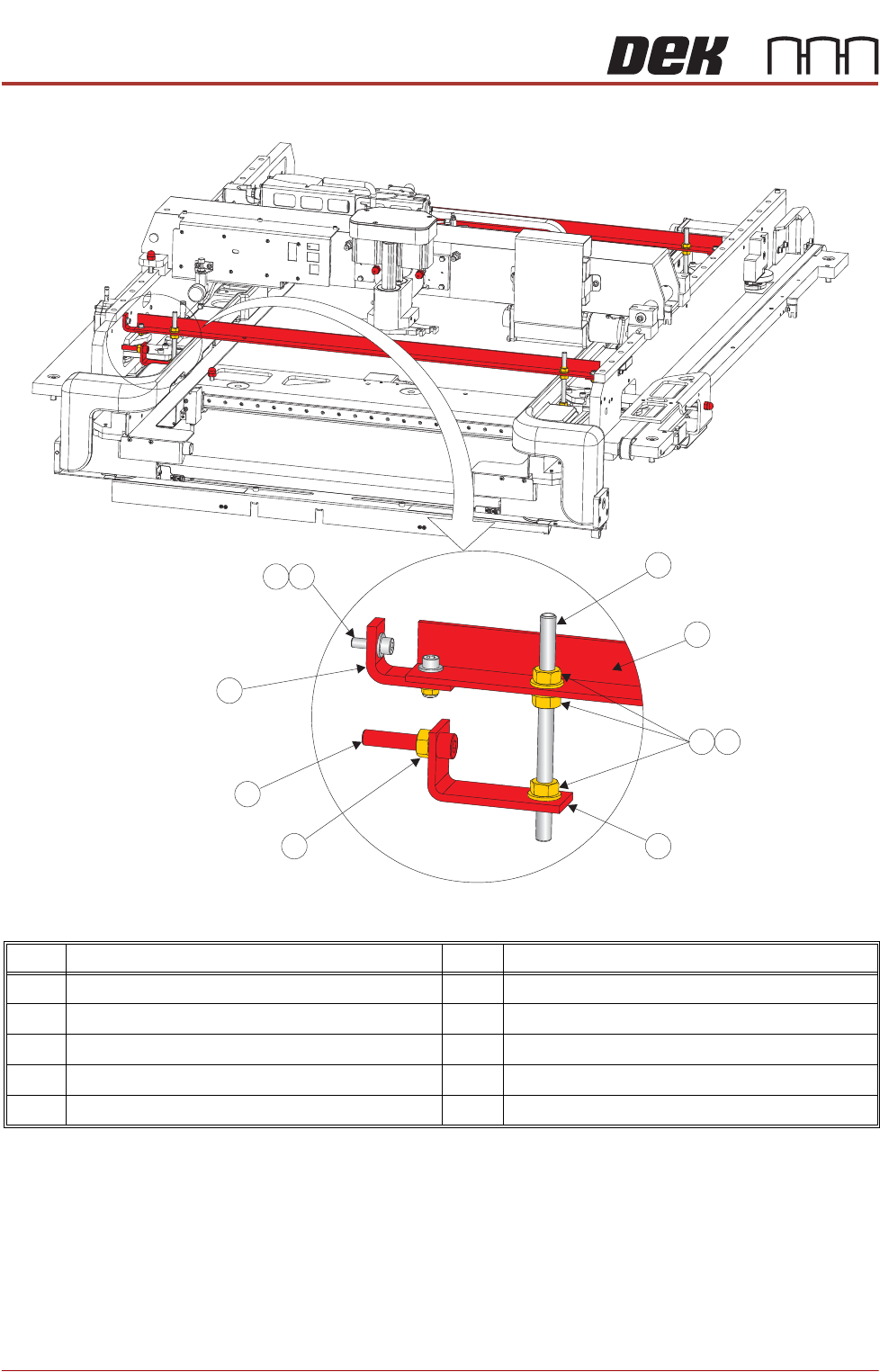
Figure 42-17 Front and Rear Transit Brackets
NOTE
Item 5, the Left Chase Bracket is fitted upside down on dual lane machines.
Item Description Item Description
1 M8 Chase Stud 6 Transit Adjustment Screw Lock Nut
2 Front/Rear Transit Bracket 7 Transit Adjustment Screw
3 M8 Nut 8 Adaptor Bracket
4 M8 Washer 9 M5 Cap Head Screw
5 Left Chase Transit Bracket 10 M5 Washer
9
1
2
3
4
5
6
7
8
10
TRANSPORTATION - MAJOR RELOCATION
TRANSIT BRACKETS AND SCREWS REMOVAL
Chapter Issue 5, Nov 19 Technical Reference Manual 42.51
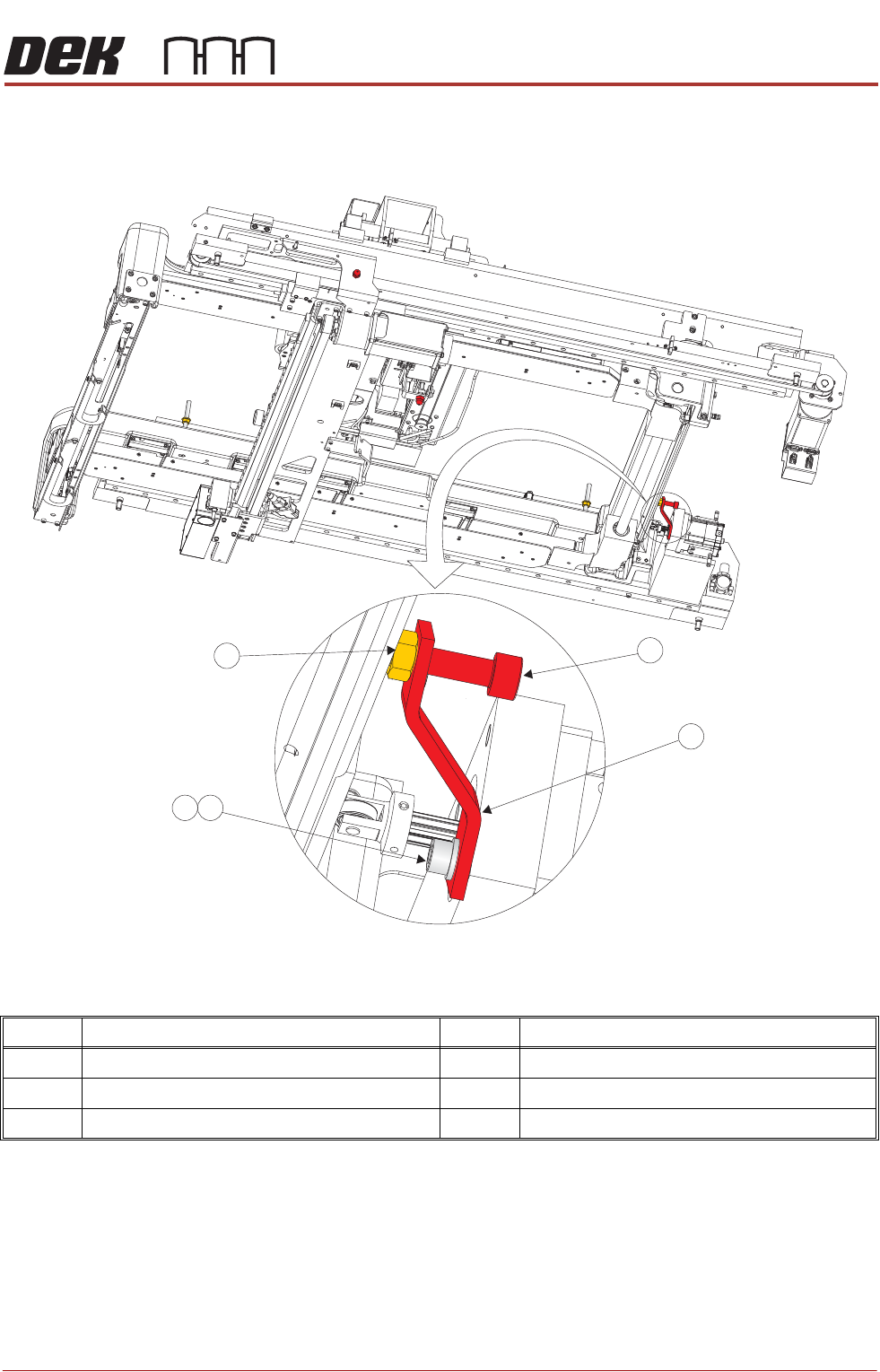
7. Loosen the transit adjustment screw lock nut (15) on the rear chase transit
bracket (12).
Figure 42-18 Rear Chase Transit Bracket
8. Using a 6mm Allen key, loosen the transit adjustment screw (7), on both the
left chase transit brackets (5), and the transit adjustment screw (11) on the
rear chase transit bracket (12), so that the chase comes into contact with
the three actuator shafts.
9. Using a 5mm Allen key, remove the rear chase transit bracket (12) by
removing the M6 cap head screw (13) and M6 washer (14).
Item Description Item Description
11 Transit Adjustment Screw 14 M6 Washer
12 Rear Chase Transit Bracket 15 Transit Adjustment Screw Lock Nut
13 M6 Cap Head Screw
View on Right Hand Underside
11
12
14
15
13
TRANSPORTATION - MAJOR RELOCATION
TRANSIT BRACKETS AND SCREWS REMOVAL
42.52 Technical Reference Manual Chapter Issue 5, Nov 19
10. Loosen the M8 nut (3) that secures the left chase transit bracket (5) to the
chase on the front and rear transit brackets.
11. Unscrew the M8 chase studs (1) from the chase and remove from the
machine.
12. Remove the two left chase transit brackets (5) from the machine.
13. Remove the two right hand chase studs (1) by loosening the two M8 nuts
(3) that secure the chase studs (1) to the chase.
NOTE
The transit screws are constructed of a red plastic dome head nut and a 45mm
steel grub screw. Although the two parts are bonded, ensure that both parts are
removed if they become separated.
Cover Frame Transit
Bracket
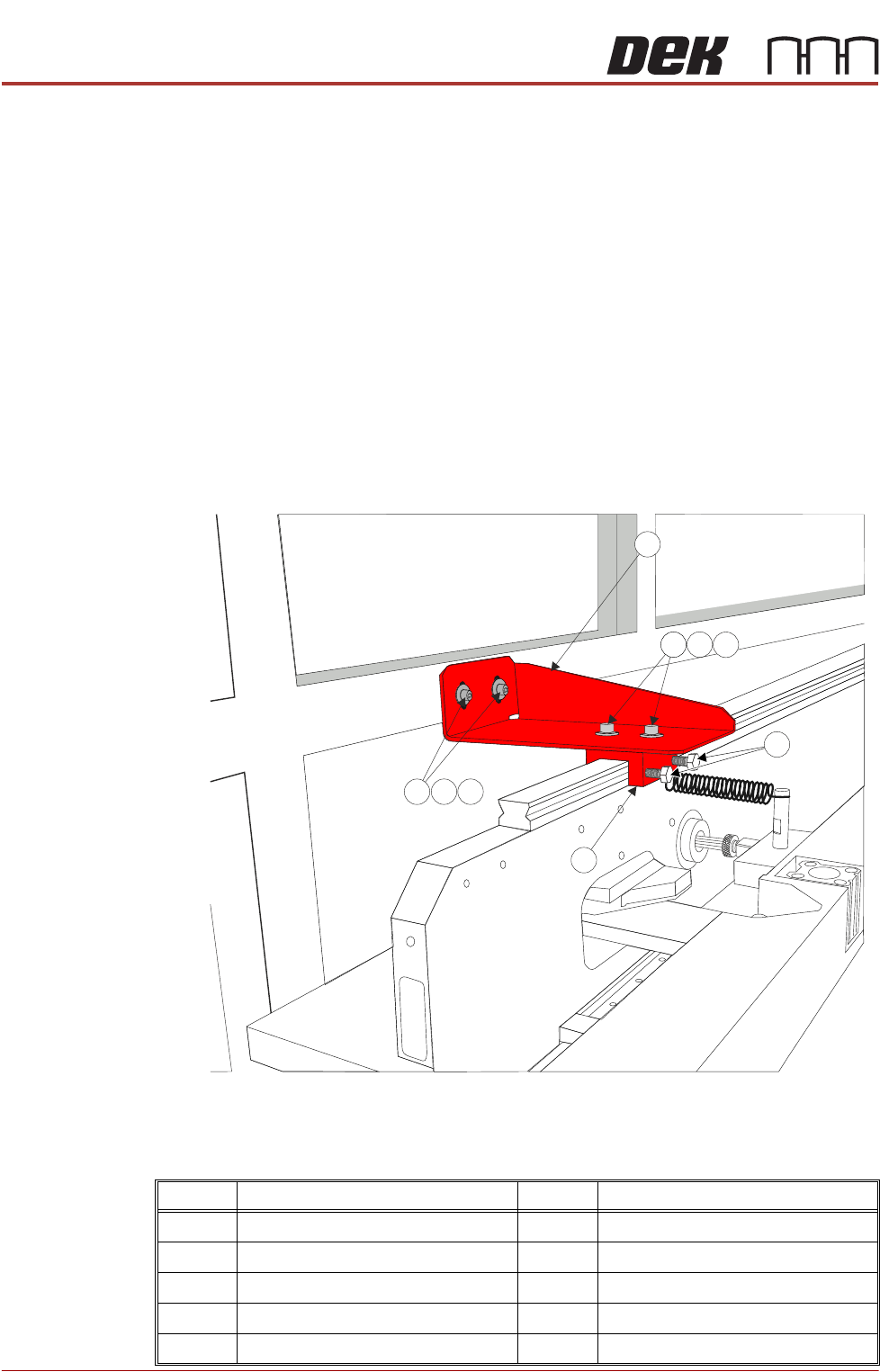
This transit bracket assembly is fitted to printers that have Anti-Vibration mounts
fitted to the covers frame.
Figure 42-19 Cover Frame Transit Bracket
Carry out the following procedure for removal:
Item Description Item Description
1 Cover Frame Transit Bracket 6 Block
2 M5 Cap Head Screw 7 M5 Cap Head Screw
3 M5 Crinkle Washer 8 M5 Crinkle Washer
4M5 Washer 9M5 Washer
5 M6 Nylon Screw