88192277-01-19 - Micron Technical Reference V9 Volume 4.pdf - 第144页
TRANSPORTATION - MINOR RELOCATION TRANSIT BRACKET INSTALLATION 41.2 Technical Reference Manual Chapter Issue 4, May 19 TRANSIT BRACKET INST ALLA TION The figure below shows the transit brackets fully assembled for part i…

TRANSPORTATION - MINOR RELOCATION
INTRODUCTION
Chapter Issue 4, May 19 Technical Reference Manual 41.1
CHAPTER 41 TRANSPORTATION - MINOR RELOCATION
INTRODUCTION The following three chapters describe the recommended procedure for moving
or storing the machine:
• Minor Relocation - Moving the machine to another area within the factory
• Major Relocation - Moving the machine to another factory or storage
• Power Up - Must be performed after Minor or Major Relocation
The following procedure is utilized to minimize the risk of damage to the
machine when:
• The machine is brought out of line for servicing or fault rectification.
• The machine is being relocated a short distance from its original position,
ie within the confines of the factory on a pallet truck or similar manually
operated machine.
For major relocation, factory to factory moves, long term storage or where
excessive noise or vibration may affect the printer, refer to Transportation -
Major Relocation.
Machine
Preparation
1. With power applied to the machine, home the stencil actuators.
2. Switch OFF and disconnect the electrical power.
3. Disconnect the pneumatic supply.
4. Remove/open the rear printhead cover as detailed in the Covers chapter.
5. On Type 1 cover machines, remove the two upper side panels as detailed
in the Covers chapter.
TRANSPORTATION - MINOR RELOCATION
TRANSIT BRACKET INSTALLATION
41.2 Technical Reference Manual Chapter Issue 4, May 19
TRANSIT BRACKET INSTALLATION
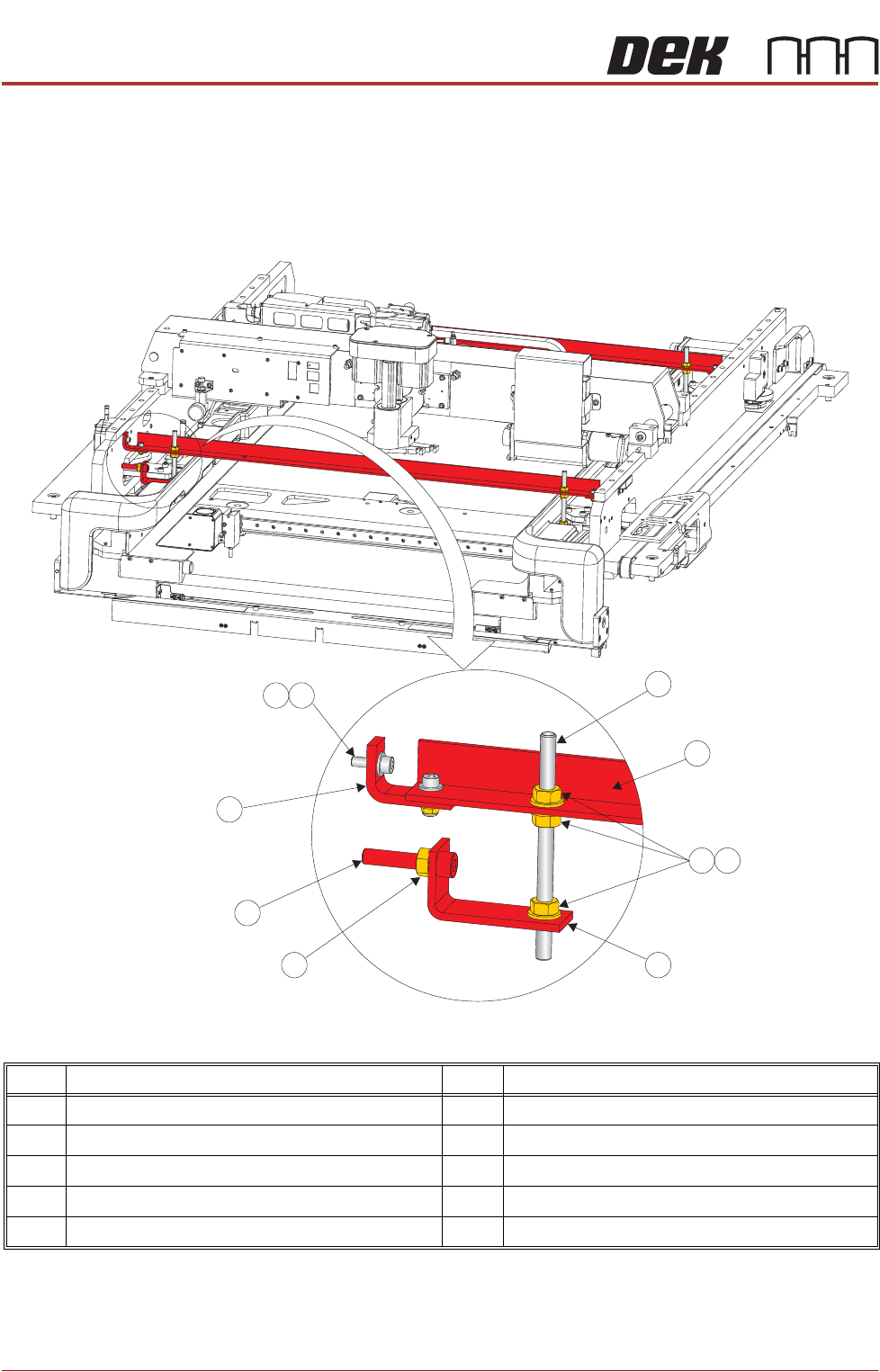
The figure below shows the transit brackets fully assembled for part identifica-
tion. Do not assemble off the machine, use the following procedure to assemble
the transit brackets on the machine.
Figure 41-1 Front and Rear Transit Brackets
NOTE
Item 5, the Left Chase Bracket is fitted upside down on dual lane machines.
Item Description Item Description
1 M8 Chase Stud 6 Transit Adjustment Screw Lock Nut
2 Front/Rear Transit Bracket 7 Transit Adjustment Screw
3 M8 Nut 8 Adaptor Bracket
4 M8 Washer 9 M5 Cap Head Screw
5 Left Chase Transit Bracket 10 M5 Washer
9
1
2
3
4
5
6
7
8
10

TRANSPORTATION - MINOR RELOCATION
TRANSIT BRACKET INSTALLATION
Chapter Issue 4, May 19 Technical Reference Manual 41.3
1. Screw two M8 chase studs (1) into the right hand side of the chase,
engaging approximately 15mm of thread and secure with M8 nuts (3) and
M8 washers (4).
2. Place a left chase transit bracket (5) over the hole on the left hand side of
the chase aligned to the front X actuator.
3. Place a left chase transit bracket (5) over the hole on the left hand side of
the chase aligned to the rear X actuator.
4. Screw two M8 chase studs (1) through the holes in the left chase transit
brackets (5) and into the holes in the chase, engaging approximately 15mm
of thread and secure with M8 nuts (3) and M8 washers (4).
5. Ensure that an M8 nut (3) is fitted to all four M8 chase studs (1) and is
approximately 50mm down from the top of the M8 chase stud (1).
6. Place an M8 washer (4) on all four M8 chase studs (1).
7. Loosely fit the rear chase transit bracket to the rear of the left hand printhead
using an M6 cap head screw (13) and M6 washer (14).