88192277-01-19 - Micron Technical Reference V9 Volume 4.pdf - 第292页
TRANSPORTATION - POWER UP HIGH THROUGHPUT CONVEYOR (HTC) 43.18 Technical Reference Manual Chapter Issue 3, Nov 19 HIGH THROUGHPUT CONVEYOR (HTC) Introduction Figure 43-4 HTC Controller Location The HTC controller (M27) e…

TRANSPORTATION - POWER UP
MACHINE POWER UP SEQUENCE
Chapter Issue 3, Nov 19 Technical Reference Manual 43.17
The ProFlow contact position sets the height of the ProFlow printhead so
that it just touches the stencil surface.
8. Using the Incr. or Decr. buttons, set the ProFlow contact position to 5.5mm.
9. Select Move to Position, the ProFlow unit is driven to the position set.
NOTE
Correct contact height is when the shim is just held between the transfer
head wipers and stencil. At this position it is not possible to slide the shim
sideways past the transfer head skis.
10. If correct contact height is achieved go to Step 14. If correct contact height
is not achieved, continue with Step 11.
11. Using the Incr. or Decr. buttons, increase or decrease the Contact Position
set height by 0.5mm (eg 5.0mm or 6.0mm).
NOTE
Normally the contact position is between 4mm and 8mm (nominally 6mm).
12. Select Move to Position, the ProFlow unit is driven to the position set.
13. Repeat Steps 11 and 12 to vary the set position until the correct contact
height is achieved.
14. Select Exit.
15. Select Exit.
16. Select Exit.
17. Select Back.
18. Open the front printhead cover and remove the shim.
19. Remove empty transfer head.
20. Close the front printhead cover.
21. Press the System button.
Minimum Maximum Increment Default
- 10mm +10mm 0.1mm 0.0mm
TRANSPORTATION - POWER UP
HIGH THROUGHPUT CONVEYOR (HTC)
43.18 Technical Reference Manual Chapter Issue 3, Nov 19
HIGH THROUGHPUT CONVEYOR (HTC)
Introduction
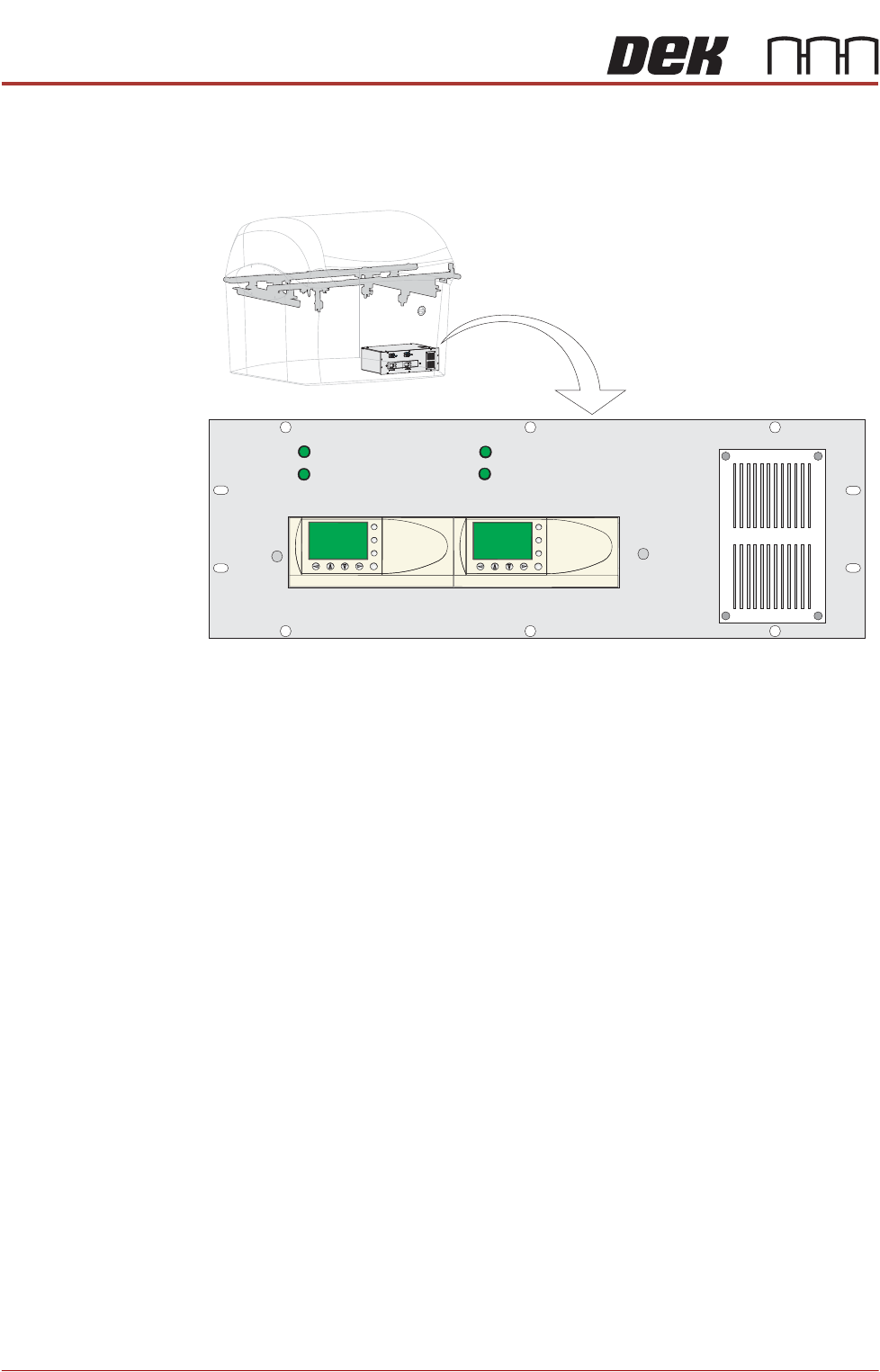
Figure 43-4 HTC Controller Location
The HTC controller (M27) enclosure is located behind the front maintenance
cover just below the mains isolator switch.
The M27 consists of a Programmable Logic Controller (PLC) for each auxiliary
conveyor. Above each PLC are the switches for selecting between 3-stage/
single stage and fast/normal mode.
On machine initialisation, each auxiliary conveyor PLC needs to detect the
machine ‘System Power’ and a ‘Downline Available’ signal before the system
starts operating. If the machine is being run in a stand-alone environment, the
‘Downline Available’ signal from the downline machine can be mimicked by
shorting pins 1 & 2 of loom Part No. 160645 to the downline machine.
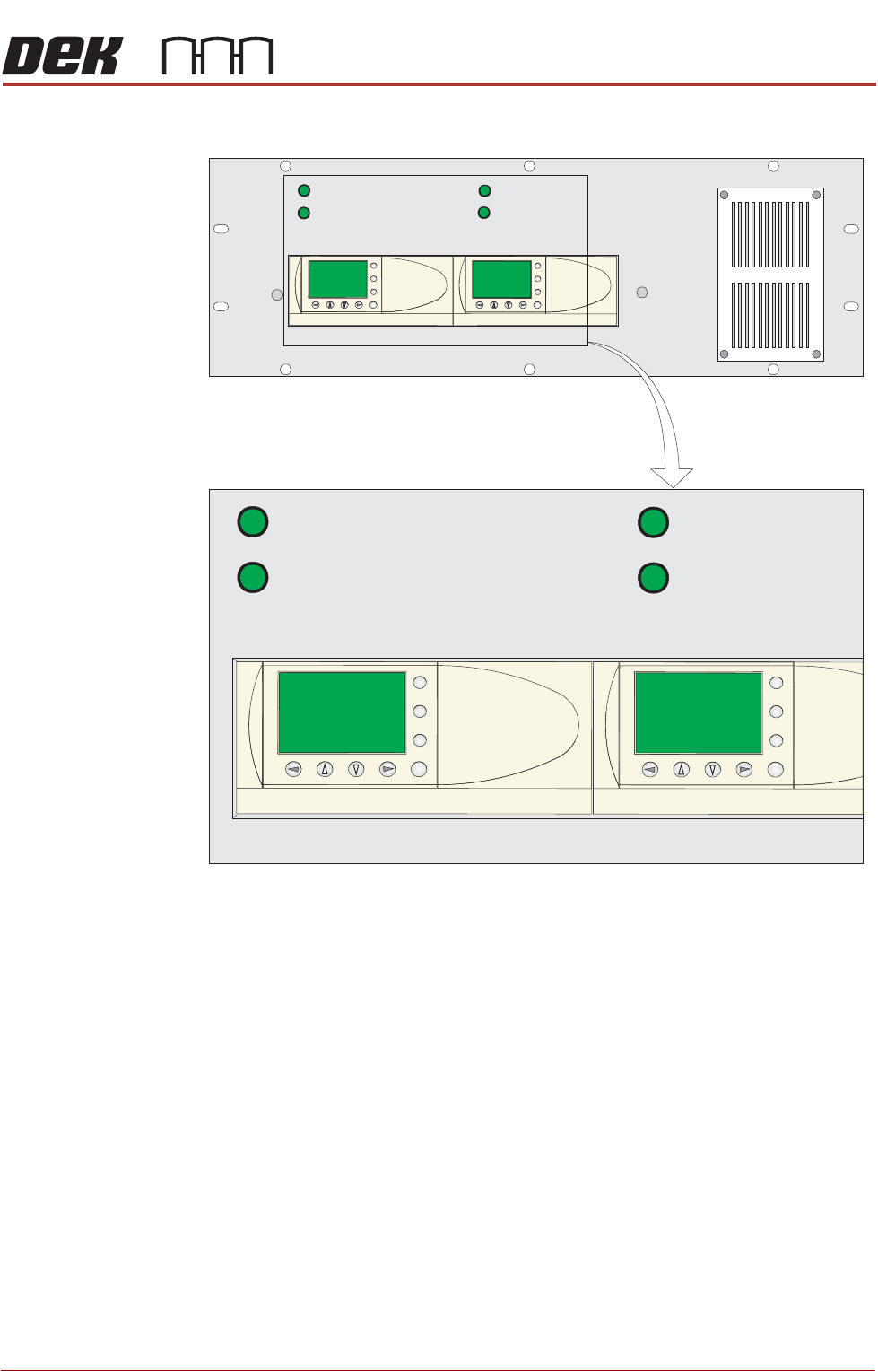
Operation The 1/3 Stage Operation and Fast Transfers Disabled buttons are LED illumi-
nated push buttons and are configured as follows:
3-Stage/Single
Stage Mode
For 3-stage mode, both 1/3 Stage Operation buttons must be OFF (LED
extinguished). The LCD screen on the PLC displays ‘3 Stage’ on the top line.
For single stage mode, both 1/3 Stage Operation buttons must be ON (LED lit).
1/3 STAGE
OPERATION
1/3 STAGE
OPERATION
FAST TRANSFERS
DISABLED
FAST TRANSFERS
DISABLED
R/H CONVEYOR L/H CONVEYOR
ESC
OK
+
-
ESC
OK
+
-
TRANSPORTATION - POWER UP
HIGH THROUGHPUT CONVEYOR (HTC)
Chapter Issue 3, Nov 19 Technical Reference Manual 43.19
The LCD screen on the PLC displays ‘1 Stage’ on the top line.
Fast/Normal Mode For a conveyor to operate in fast transfer mode, both Fast Transfer Disabled
buttons must be OFF (LED extinguished). The LCD screen on the PLC displays
‘Fst.Trans.’ on the bottom line for 5 seconds on power-up or when the button
is switched to OFF.
For a conveyor to operate in normal transfer mode, both Fast Transfer Disabled
buttons must be ON (LED lit). Normal transfer mode is not displayed on the
PLC.
Auxiliary
Conveyors
Use the following procedure to set the HTC auxiliary rails:
Height Setting To check and if required adjust the height of the auxiliary conveyor to the print
station rails carry out the following:
1. Using a Board Clamp Setting Plate Part No. 88140403-01, place the plate
on the auxiliary conveyor transport belts.
2. Place a second board clamp setting plate onto the transport belts of the print
station.
3. Ensure the plates abut and are fully supported by the transport belts.
1/3 STAGE
OPERATION
1/3 STAGE
OPERATION
FAST TRANSFERS
DISABLED
FAST TRANSFERS
DISABLED
R/H CONVEYOR L/H CONVEYOR
1/3 STAGE
OPERATION
1/3 STAGE
OPERATION
FAST TRANSFERS
DISABLED
FAST TRANSFERS
DISABLED
R/H CONVEYOR L/H CONVEYOR
ESC
OK
+
-
ESC
OK
+
-
ESC
OK
+
-
ESC
OK
+
-